
How to Iterate Over Rows in a DataFrame in Pandas
Yes you can, however you shouldn’t do it. But why it is not a good idea ?
Pandas is a powerful and widely-used Python library for data manipulation and analysis. One common task when working with data is iterating over rows in a DataFrame to perform various operations or calculations.
While Pandas provides many built-in functions for data manipulation, there are situations where you may need to loop through rows in a DataFrame. In this article, we'll explore different methods for iterating over rows in a Pandas DataFrame, and we'll emphasize best practices based on the official Pandas documentation.
About Pandas
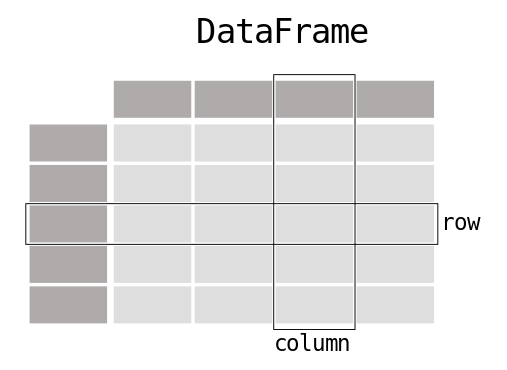
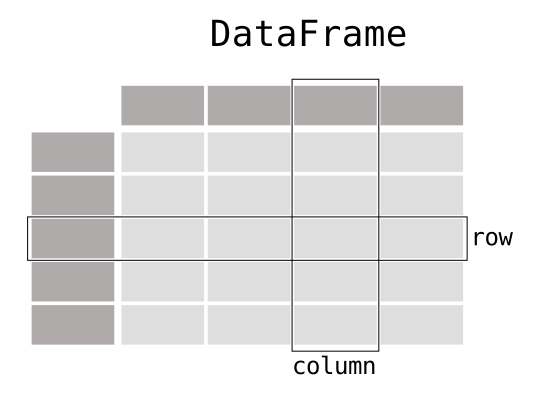
When working with tabular data, such as data stored in spreadsheets or databases, pandas is the right tool for you. pandas will help you to explore, clean, and process your data. In pandas, a data table is called a DataFrame. — Pandas documentation (source)
A DataFrame is a versatile 2-dimensional data structure capable of storing various data types, such as characters, integers, floating-point values, categorical data, and more, organized into columns. It bears resemblance to familiar structures like spreadsheets, SQL tables, or R’s data.frame. Each column in a DataFrame is a Series.
A Series is a one-dimensional labeled array-like data structure. It is a fundamental building block of Pandas and can be thought of as a column in a DataFrame. Series can, also, hold data of various types, including integers, floating-point numbers, strings, and more. Each element in a Series is associated with a label or an index, allowing for efficient and labeled data manipulation.
Here are some key characteristics of a Pandas Series:
- Homogeneous Data: Unlike Python lists, which can hold a mix of data types, a Series typically contains data of the same type. For example, you can have a Series of integers, a Series of strings, or a Series of floating-point numbers.
- Indexing: Series objects have labels or an index associated with each element. By default, the index is a sequence of integers starting from 0, but you can customize the index to be any label or combination of labels.
- Size and Shape: A Series has a size (number of elements) and a shape (number of dimensions). It is one-dimensional, so it has only one axis, unlike DataFrames, which are two-dimensional.
- Operations and Functions: Series supports various operations and functions, including arithmetic operations, aggregation functions (like sum, mean, min, max), and methods for data manipulation (e.g., sorting, filtering, and appending).
Here’s an example of creating a simple Series in Pandas:
import pandas as pd

# Creating a Series from a list
data = [10, 20, 30, 40, 50]
my_series = pd.Series(data)

# Printing the Series
print(my_series)

Out :
  0    10
  1    20
  2    30
  3    40
  4    50
  dtype: int64
The above code creates a Series containing the integers from 10 to 50 with default integer labels. In out, we can see the structure of this series, which contains its index and each value.
Series are often used to work with individual columns of a DataFrame, extract data, and perform various operations on the data efficiently.
A Dataframe is a composition of one or many Series. — Jesse Ferreira
Importing Pandas
Before we begin, ensure you have Pandas installed. You can install it using pip if you haven't already:
pip install pandas
Now, let's import Pandas and create a sample DataFrame to work with:
import pandas as pd

# Create a sample DataFrame
data = {'Name': ['Alice', 'Bob', 'Charlie', 'David'],
        'Age': [25, 30, 35, 40],
        'City': ['New York', 'Los Angeles', 'Chicago', 'Houston']}
df = pd.DataFrame(data)
But why it is not a good idea to Iterate over rows in a dataframe in Pandas ?
First and foremost, everything boils down to performance. When you engage in iteration using Pandas, a certain convention comes into play. Numerous operations take place to facilitate the traversal of rows from a DataFrame within iterator loops. This implies that the data isn’t simply plucked from the DataFrame; instead, it undergoes a process of decompression, conversion, and exposure within each iteration.
Iteration converts the rows to Series objects, which can change the dtypes and has some performance implications. — pandas documentation
This doesn’t imply that Pandas is the worst thing in the world; it simply means that it isn’t primarily designed for iterative processes. Even though you can use the ‘iter’ function, it’s generally advisable not to. Pandas offers a range of functions that allow you to manipulate data within DataFrames or Series without disrupting their structure. If your goal is to perform computations and then return to the Pandas structure, it’s better to explore techniques like Vectorization or Apply methods.
The only scenario where you might consider iteration in Pandas is when the sequence of operations is critical. However, if you have the flexibility to work with other data structures such as dictionaries, lists or tuples instead of DataFrames, it’s often a more efficient choice.
You should never modify something you are iterating over. This is not guaranteed to work in all cases. Depending on the data types, the iterator returns a copy and not a view, and writing to it will have no effect! — warning notice from pandas documentation
For example, in the following case setting the value has no effect:
In [257]: df = pd.DataFrame({"a": [1, 2, 3], "b": ["a", "b", "c"]})
In [258]: for index, row in df.iterrows():
   .....:     row["a"] = 10
   .....:
In [259]: df
Out[259]:
   a  b
0  1  a
1  2  b
2  3  c
Using iterrows()
The iterrows() method is one of the most straightforward ways to iterate over rows in a Pandas DataFrame. However, it should be used with caution, especially with large DataFrames, as it can be slow compared to other methods. Here's how it works:
for index, row in df.iterrows():
    print(f"Index: {index}, Name: {row['Name']}, Age: {row['Age']}, City: {row['City']}")
While this method is simple and easy to understand, it is not the most efficient option, especially for large DataFrames, because it creates a copy of each row, resulting in reduced performance.
Using itertuples()
The itertuples() method is faster than iterrows() because it returns an iterator of namedtuples, which are more memory-efficient than Pandas Series. Here's how to use it:
for row in df.itertuples(index=False):
    print(f"Name: {row.Name}, Age: {row.Age}, City: {row.City}")
This method is generally faster than iterrows() and is recommended when you need to iterate over rows and access multiple columns.
Using Vectorized Operations
Pandas is designed to perform operations on entire columns efficiently, which is often faster than iterating over rows. Whenever possible, use vectorized operations instead of row-wise iteration. For example, you can calculate the mean age of the DataFrame as follows:
mean_age = df['Age'].mean()
print(f"Mean Age: {mean_age}")
Using apply() and lambda Functions
If you need to apply a custom function to each row, you can use the apply() method with a lambda function. For instance, let's say we want to calculate the square of each person's age:
df['Age_squared'] = df.apply(lambda row: row['Age']**2, axis=1)Here, axis=1 specifies that the function should be applied row-wise.
Conclusion
Iterating over rows in a Pandas DataFrame can be necessary in certain situations, but it should be used sparingly due to potential performance issues, especially with large datasets. Whenever possible, prefer vectorized operations and the Pandas built-in functions, as they are more efficient and concise.
If you do need to iterate over rows, consider using itertuples() for improved performance or apply() with a custom function for flexibility. Always refer to the official Pandas documentation for the latest recommendations and best practices to make the most of this powerful library.
References:
Iteration: https://pandas.pydata.org/pandas-docs/stable/user_guide/basics.html#iteration
What kind of data does pandas handle? https://pandas.pydata.org/docs/getting_started/intro_tutorials/01_table_oriented.html#min-tut-01-tableoriented
How to iterate over rows in a DataFrame in pandas: https://stackoverflow.com/questions/16476924/how-to-iterate-over-rows-in-a-dataframe-in-pandas
In Plain English
Thank you for being a part of our community! Before you go:
- Be sure to clap and follow the writer! 👏
- You can find even more content at PlainEnglish.io 🚀
- Sign up for our free weekly newsletter. 🗞️
- Follow us on Twitter(X), LinkedIn, YouTube, and Discord.