avatarQA-init

Free AI web copilot to create summaries, insights and extended knowledge, download it at here

1450

Abstract

ss-io/cypress/issues/4296">Github issue</a></figcaption></figure><p id="b3b1"><b>Solution -1:</b></p><p id="5e33">One of alternate way to install as recommended in <a href="https://docs.cypress.io/guides/getting-started/installing-cypress.html">cypress</a> website is to manually download the zip file from CDN and then try the installation steps.</p><p id="fbaf"><b>Step 1:</b> Download the zip file and save it your preferred desktop location. Do not unzip</p><div id="7a09"><pre><span class="hljs-symbol">https:</span><span class="hljs-comment">//download.cypress.io/desktop</span></pre></div><p id="cbc7"><b>Step 2:</b> In the Vscode Terminal run the following command:</p><div id="4902"><pre>setx CYPRESS_INSTALL_BINARY C:<span class="hljs-symbol">\</span>Users<span class="hljs-symbol">\</span>MyDocuments<span class="hljs-symbol">\</span>cypress.zip</pre></div><p id="8b8a"><b>Step 3:</b> Above command will take some time to extract the zip file. Restart the vscode.</p><p id="7daa"><b>Step 4: </b>Now open a new Terminal and run the following command</p><div id="ad92"><pre>npm <span class="hljs-selector-tag">i</span> cypress <span class="hljs-attr">--save-dev</span></pre></div><p id="09be">This will find the extracted cypress files which is now pointing to the global config path instead of trying to extract from the cypress library.</p><p id="e056">It may take around 10mins or less based on the Internet speed.</p><p id="f8bf"><b>S

Options

tep 5:</b> Once cypress is installed, you may notice that “package.json” may show the cypress under dev dependencies. However you may notice that there is no folder called ‘Cypress’ yet in the project directory. So run this command:</p><div id="16f5"><pre>npx cypress open</pre></div><p id="0280">This will open the dashboard service in a new window. At this time you will see that cypress folder is now visible under project directory.</p><figure id="7e19"><img src="https://cdn-images-1.readmedium.com/v2/resize:fit:800/1*cdjrRc2E8EhOGKTRpL5Kjw.png"><figcaption></figcaption></figure><p id="4282">Solution -2:</p><p id="e8b8">In case of <i>“Error: self signed certificate in certificate chain”</i>, follow the steps as below:</p><ul><li>Disconnect from the company VPN.</li><li>Run the cypress install command again with ssl as false</li></ul><div id="5a8e"><pre>npm <span class="hljs-selector-tag">i</span> cypress <span class="hljs-attr">--save-dev</span> <span class="hljs-attr">--strict-ssl</span>=false</pre></div><p id="9fa5">This will bypass the ssl certificate error and install the cypress.</p><p id="9cbf">References:</p><p id="e6a3"><a href="https://docs.cypress.io/guides/references/advanced-installation">https://docs.cypress.io/guides/references/advanced-installation</a></p><p id="c768">Happy Reading!!!</p><p id="da10"><b><i>Please like and comment for any other issues which you might have encountered.</i></b></p></article></body>

How to Install cypress in Windows & Mac using zip file, if NPM cypress fails?
Cypress is one of the modern JavaScript /TypeScript based Testing framework and is becoming more and more popular mainly due to:

1. Easy to use cypress commands which has ability to auto wait for elements.

2. Can be used for both UI and API testing.

3. Provides additional plugin to test the website Accessibility features.

4. Tool setup is very easy.

5. No additional web driver initialization/setup

6. Interactive dashboard feature which is built in which provides easy snapshot of each and every executed test steps.

Challenge:

One of the roadblock which you might have experienced while trying to install cypress in the Corporate work environment is that while running Cypress installation command, download may fail. This may occur even if no proxy settings exists for the organization, which can be used during the installation steps. Sample error provided below:
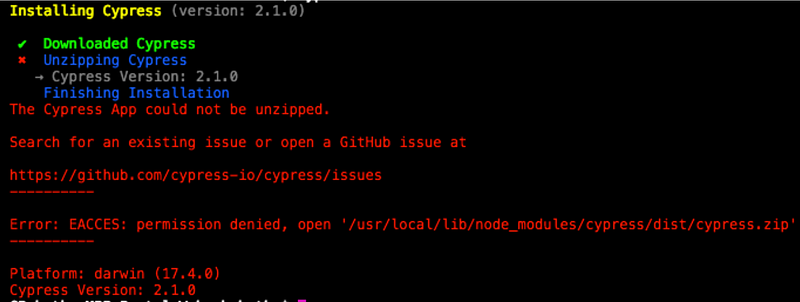
Reference: Github issue

Solution -1:

One of alternate way to install as recommended in cypress website is to manually download the zip file from CDN and then try the installation steps.

Step 1: Download the zip file and save it your preferred desktop location. Do not unzip

https://download.cypress.io/desktop

Step 2: In the Vscode Terminal run the following command:

setx CYPRESS_INSTALL_BINARY C:\\Users\\MyDocuments\\cypress.zip

Step 3: Above command will take some time to extract the zip file. Restart the vscode.

Step 4: Now open a new Terminal and run the following command

npm i cypress --save-dev

This will find the extracted cypress files which is now pointing to the global config path instead of trying to extract from the cypress library.

It may take around 10mins or less based on the Internet speed.

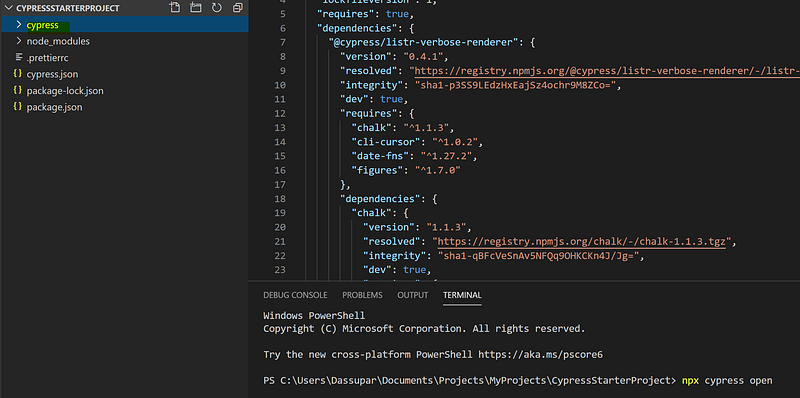
Step 5: Once cypress is installed, you may notice that “package.json” may show the cypress under dev dependencies. However you may notice that there is no folder called ‘Cypress’ yet in the project directory. So run this command:

npx cypress open

This will open the dashboard service in a new window. At this time you will see that cypress folder is now visible under project directory.
Solution -2:

In case of “Error: self signed certificate in certificate chain”, follow the steps as below:

  • Disconnect from the company VPN.
  • Run the cypress install command again with ssl as false
npm i cypress --save-dev --strict-ssl=false

This will bypass the ssl certificate error and install the cypress.

References:

https://docs.cypress.io/guides/references/advanced-installation

Happy Reading!!!

Please like and comment for any other issues which you might have encountered.

Cypressio
Error Handling
How To
JavaScript
Recommended from ReadMedium