
How To Import Blog Posts From Your WordPress Blog To Medium?
Importing your blog posts from your blog to Medium.com and make more money.

How you can easily import blog posts from your blog to Medium profile? This is a very in-detail post about importing content from your blog and exporting it to Medium. Medium is a platform where you could create unique content or publish your own content to its built-in audience. An article published in Forbes magazine might be added to Medium and might made you thousands of dollars.
Rule#1: You own your content your publish on Medium.
While publishing on Medium, you own your content. If you want to import content to Medium, you should remember Rule#1 that you should own your content. An article of your published on Forbes or any other authority site can be published on Medium. Medium is a very powerful platform where it has one of the premium business models.
Some Search Engine optimization things you need to know:
- If you are importing all your blog content to Medium then you don’t need to perform the process of making it Non-index by the search engines.
- If you are importing a single blog post from Blog to Medium, then you need to perform a process of making it no-index by the search engines otherwise search engines might penalize you for duplicate content.
Importing a single story from your WordPress blog to Medium:
Here is a step-by-step process of importing a single story from your WordPress blog to Medium.
- Go to your blog post that you want to import and copy the whole content.
- Go to your Medium profile and add the content you have copied from your blog post.
- Optimize your story by adding tags, an Image, and a great title and sub-title.
- Now, Click on the three horizontal dots on top-right of the story draft section and click on “More setting”
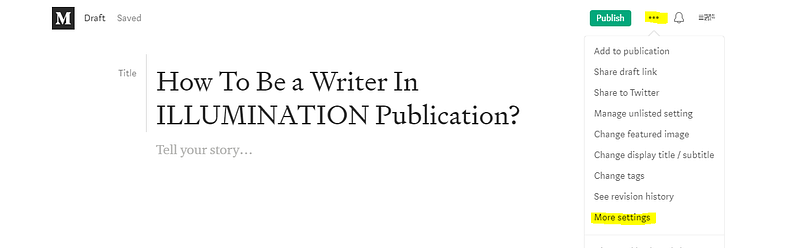
- Now, scroll down till the end and click on “Advance setting” and tick the option of “This story is published elsewhere”
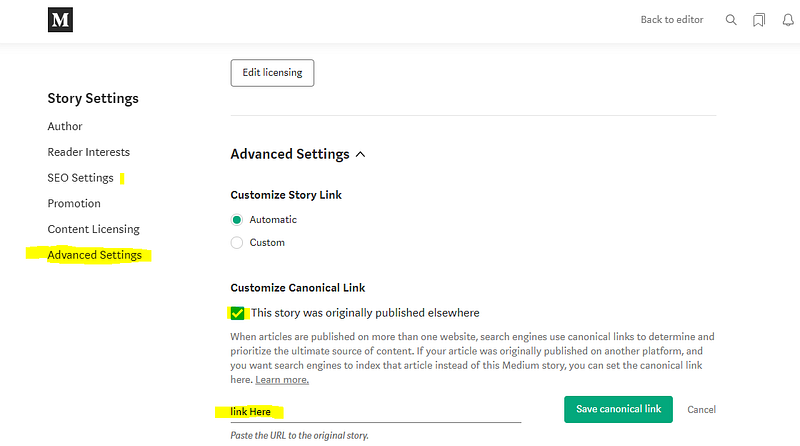
You have to paste the link of your blog post in the Link here option and save the canonical link. When you are done adding your blog post link, you are done, now you can publish your story in Medium while worrying about Google search being penalized for your blog.
Before you import your content to Medium, the best solution is to create a publication. Now, creating a publication is only available to Medium members, you can Join Medium Membership for $5/month and support writers and get more features.
Importing all blog content from Blog to Medium:
- Go to your WordPress dashboard.
- Go to setting and then go to User and Save all your blog content into a. Zip file.
- Go to Medium.com, and click on your profile. In the Menu option, click on “Stories”
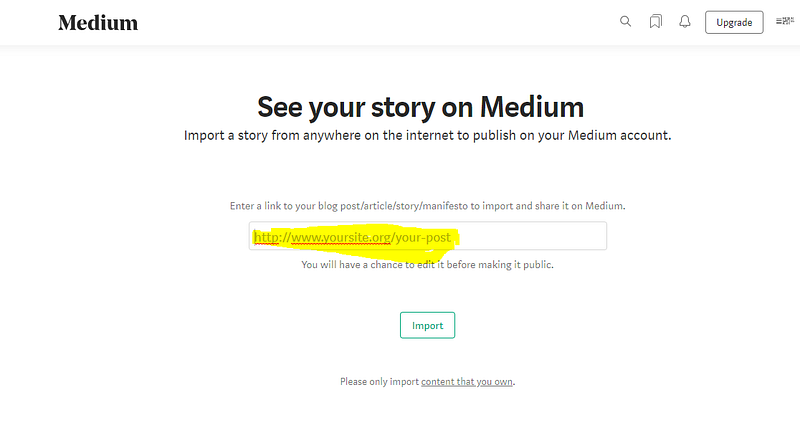
- On the Top-Right side, there will be an option of Importing a story.
- Click on it and You will see a new window where Medium will want to know your content.
- Enter your blog link.
I hope this helps.
For knowing more writing, marketing, and make money through writing platforms, you can join 200+ writers here: Subscribe to my newsletter
Disclosure: Some links in the story are affiliate links. If you choose to buy anything, I will make a small commission which will be at no additional cost to you.
Read more Related Stories:
- What is a Good read ratio on Medium?
- Why Medium Don’t allow custom domain anymore?
- 3 Powerful ways to make money through Medium?