
How to implement pagination in Firestore using Jetpack Compose?
A simple solution for implementing pagination in Cloud Firestore using Jetpack Compose and Paging v3 library for Android.
When we are dealing with a large amount of data, it’s already known that we cannot read all that data at once. Why? Because it will take an enormous amount of time only to download it. If the data doesn’t fit into the memory, an OutOfMemoryError might also be thrown. From the user perspective, I’m also sure that nobody will be interested in reading so much information. Besides that, when it comes to Cloud Firestore, everything it’s about the number of reads and writes we perform. So it won’t be feasible to read all the documents that exist in a collection. So the best solution that we have is to paginate the data, by getting it progressively in smaller chunks.
In this article, I’ll try to explain how the Paging v3 library works with Cloud Firestore. I will use the MVVM Architecture Pattern with Flow and ViewModel. For the asynchronous calls to Firestore, I will use Kotlin Coroutines, for dependency injection I will use Hilt for Android, and for the UI I’ll use Jetpack Compose.
On the other hand, if you are interested in how to paginate the Realtime Database, then please check the following article:
If you are also interested in the old way of paginating the data using a RecyclerView and an adapter, please check the following article:
To see how the Paging v3 library work with Jetpack Compose, we’ll create a very simple application with two screens. In one we’ll display some products that exist in a Firestore collection and in the other one we’ll display the product details. This is what the products collection looks like:
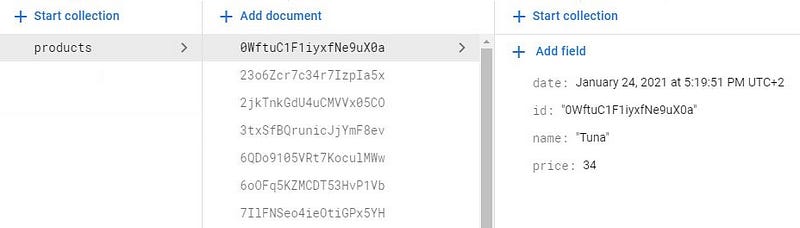
As you can see in the database schema, each document within this collection is a Product object. Here is the corresponding data class:
data class Product (
    var id: String? = null,
    var name: String? = null,
    var price: Double? = null
)
How can we paginate the products in clean architecture?
If you read some of my latest articles, you’re probably already familiar with the fact that I’m a fan of the MVVM architecture pattern. That being said, the code in the project is divided into three separate layers, the data layer, the domain layer, and the presentation layer:
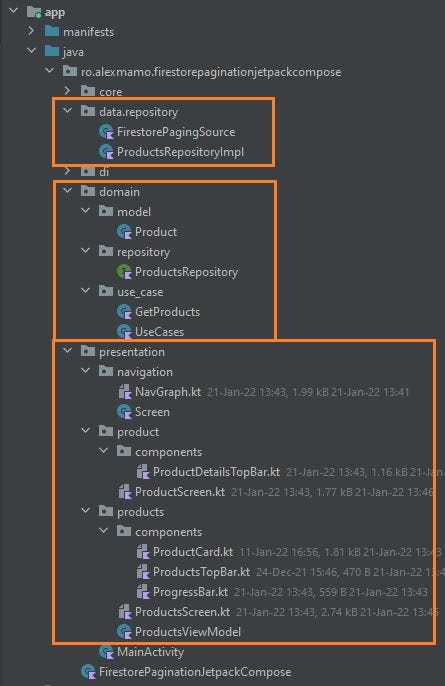
When talking about the data layer, because it’s a very simple app, it only contains two classes. The first one is called FirestorePagingSource, where we set up a stream of paged data from Firestore:
This can also be called our network data source. Our intention is to propagate the query results to the products screen. As you can see, this class includes a suspendload() function, which is especially overridden to indicate how to retrieve the paged data from Firestore. So I created this class to directly use Kotlin coroutines for our asynchronous data loading. Please also note that the LoadParams object that is received as an argument contains the result of the load operation. The load() function returns an object of a typeLoadResult which is a sealed class that takes the form of LoadResult.Page if the load is successful, or LoadResult.Error if the load fails.
And the second class is the ProductsRepositoryImpl class:
Where we inject in the constructor the FirestorePagingSource object and the PagingConfig object in order to set up the Pager object and return a flow. Here we set up a stream of PagingData. The Pager class contains functions that expose the stream of PagingData objects from thePagingSource. When we create a new instance of the Pager class, it’s mandatory to provide an object of type PagingConfig, to tell the Pager how to load the data. In this example, I have added in the AppModule class the creation of the corresponding objects:
I have set an additional property called pageSize which is set to 10, but there are also other properties like initialLoadSize or prefetchDistance.
Since we are using in this project use cases, in the use_case package inside the domain layer, we have added a use case object for the read operation. This operation is present inside the UseCases class:
data class UseCases(
    val getProducts: GetProducts
)
And here is the corresponding GetProducts class:
class GetProducts(
    private val repository: ProductsRepository
) {
    operator fun invoke() = repository.getProducts()
}
But why do we do that? Simply to be able to inject an instance of the UseCases class inside the ProductsViewModel class constructor.
One more thing to note is that the cachedIn() function is responsible for the data stream to be shareable. Besides that, we can always use the already cached products. This example uses the viewModelScope that is provided by the Lifecycle’s lifecycle-viewmodel-ktx dependency. The mechanism is quite simple, the Pager object that was earlier created calls the load() function from FirestorePagingSource class, by providing theLoadParams object and receiving back an LoadResult object.
Going forward to the presentation layer, inside it, we can find the MainActivity:
Where we create the NavGraph. Inside this composable function, we create the NavController and set the NavHost:
To be able to pass a Product object from one screen to another, we need to convert the object into JSON. This operation is needed because we cannot simply pass a Serializable object to NavArguments. It has to be a String!
Besides the activity, there are also two more UI-related packages present, one package for each screen. Inside the products package, we can find the ProductsScreen:
In Jetpack Compose we have LazyColumn and LazyRow as a substitute for RecyclerView to display a list of data. So I have simply used the first one.
As you can see, we also have the possibility to display the loading state. The LoadingState can be either LoadState.Loading, if there is an active load operation or LoadState.Error, if there is an error. For simplicity, I have implemented in this example only these two but in a real project, I encourage you to implement LoadState.NotLoadingas well.
Inside the product package, we can find the ProductScreen:
Since the “startDestination” in the NavHost is the ProductsScreen, when we click on a specific product, we navigate further to the ProductScreen to see the corresponding details. To keep things simple, I have only created a Column with a Text only for two fields, name, and price.
When we launch the app the progress bar is displayed twice. Since we load the data in chunks of 10 items, the progress bar is displayed for the first 10 products. Since all 10 products are visible on the screen, another call to Firestore is performed, to get the next 10 products. Hence the second display of the progress bar. Please also note, that when we hit back, and we navigate from the product details screen back to the products screen the position is maintained. It’s really helpful because can continue to scroll from the last visited product.
Conclusion
That’s the simplest solution for implementing pagination in Firestore using a clean architecture and Jetpack Compose. The new paging library it’s much easier to use and implement and works pretty well with Cloud Firestore.
So I hope you found this article useful and if you have any questions regarding this topic, feel free and leave a comment in the section below.
If you wanna support me, please join me!
Thanks for staying with me. You can find the full source code here and you can also see it on youtube:
#BetterTogether 🔥


