
CQRS and MediatR in ASP.NET Core: A Practical Guide
Command Query Responsibility Segregation (CQRS) is a pattern that separates the concerns of reading and writing data in an application. It provides a clear separation between commands that modify data (write operations) and queries that retrieve data (read operations). By using CQRS, we can achieve a more maintainable and scalable architecture.
In this article, we will explore how to implement CQRS in an ASP.NET Core 6 using MediatR, a popular library for implementing the mediator pattern.
What is MediatR?
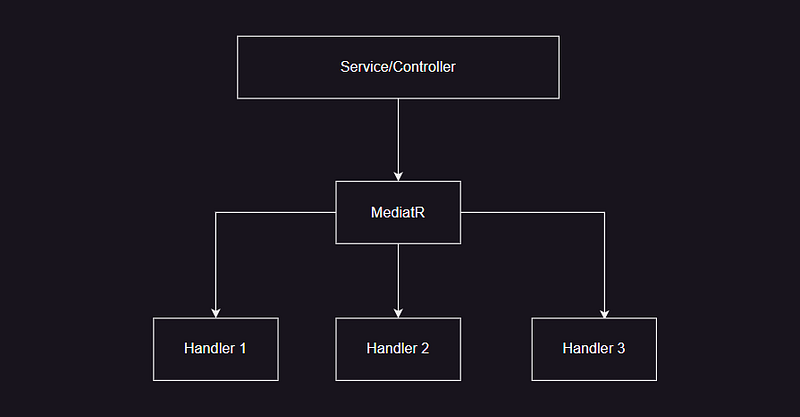
MediatR is a simple mediator library for .NET that allows us to centralize the processing of requests (commands and queries) in our application. It provides a straightforward way to decouple the sender and receiver of a request by using the mediator pattern.
The key components of MediatR are:
- Requests: These represent the commands or queries sent to the mediator.
- Handlers: These are the components responsible for handling the requests.
- Mediator: It acts as the central hub for sending requests to their corresponding handlers.
Setting up
Create a new ASP.NET Core Web API project.
Once the project is created, install the MediatR NuGet package.
Install-Package MediatR
In the Program.cs, add the following code to register MediatR.
builder.Services.AddMediatR(cfg => cfg.RegisterServicesFromAssembly(Assembly.GetExecutingAssembly()));
Defining the model
Let’s create a simple example of a bookstore application where we have commands to add books and queries to retrieve books.
public class Book
{
    public Book()
    { }

    public Book(string title, string author)
    {
        Title = title;
        Author = author;
    }

    public int Id { get; set; }
    public string Title { get; set; }
    public string Author { get; set; }
}
Creating Requests and Handlers
To implement CQRS, we need to define the requests and their corresponding handlers.
Let’s create a record for AddBookCommand since record types are highly suitable for data transfer objects (DTOs).
public record AddBookCommand(string Title, string Author) : IRequest<Book>;Create a handler called AddBookCommandHandler.
public class AddBookCommandHandler : IRequestHandler<AddBookCommand, Book>
{
    public Task<Book> Handle(AddBookCommand request, CancellationToken cancellationToken)
    {
        Book book = new(request.Title, request.Author);

        // Logic to add the book to the database

        return Task.FromResult(book);
    }
}
In the above code, we define the AddBookCommand record, which represents a command to add a book. It implements the IRequest<Book> interface from MediatR. We also define the AddBookCommandHandler class, which implements the IRequestHandler<AddBookCommand, Book> interface to handle the command. Inside the Handle method, you can write the logic to add the book to the database.
Let's do the same process for GetAllBooks. Create a record called GetAllBooksQuery.
public record GetAllBooksQuery : IRequest<List<Book>>;Create a handler GetAllBooksQueryHandler
public class GetAllBooksQueryHandler : IRequestHandler<GetAllBooksQuery, List<Book>>
{
    public Task<List<Book>> Handle(GetAllBooksQuery request, CancellationToken cancellationToken)
    {
        // Logic to retrieve all books from the database

        var books = new List<Book>
        {
            new Book { Id = 1, Title = "Book 1", Author = "Author 1" },
            new Book { Id = 2, Title = "Book 2", Author = "Author 2" },
        };

        return Task.FromResult(books);
    }
}
In the above code, we define the GetAllBooksQuery record, which represents a query to retrieve all books. It also implements the IRequest<List<Book>> interface from MediatR. We then define the GetAllBooksQueryHandler class, which handles the query and returns a list of books. In this example, we simulate the retrieval of books by returning a hardcoded list, but in a real-world scenario, you would typically query the database.
Using MediatR in Controllers
Now that we have defined our requests and handlers, let’s see how to use them in our controllers.
Create a BookController.
[ApiController]
[Route("api/books")]
public class BookController : ControllerBase
{
    private readonly IMediator _mediator;

    public BookController(IMediator mediator)
    {
        _mediator = mediator;
    }

    [HttpPost]
    [ProducesResponseType(StatusCodes.Status201Created)]
    [ProducesResponseType(StatusCodes.Status400BadRequest)]
    public async Task<IActionResult> AddBook(AddBookCommand command)
    {
        await _mediator.Send(command);

        return Ok(StatusCodes.Status201Created);
    }

    [HttpGet]
    [ProducesResponseType(StatusCodes.Status200OK, Type = typeof(List<Book>))]
    public async Task<IActionResult> GetAllBooks()
    {
        var books = await _mediator.Send(new GetAllBooksQuery());

        return Ok(books);
    }
}
In the above code, we inject the IMediator interface into the BooksController constructor. We then define two action methods: AddBook and GetAllBooks. Inside these methods, we create instances of our commands and queries and use the _mediator instance to send them. The Send method of the mediator handles the communication with the corresponding handlers and executes the logic defined in them.
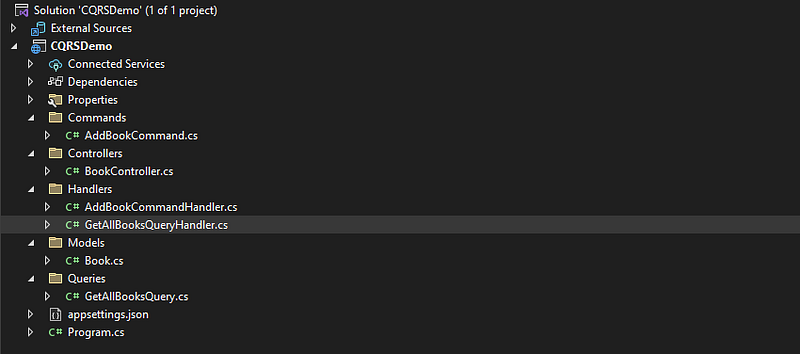
Folder Structure
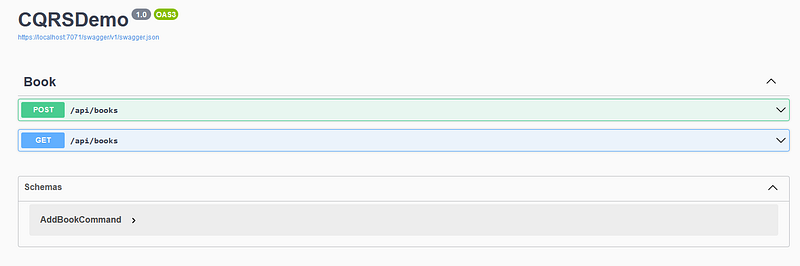
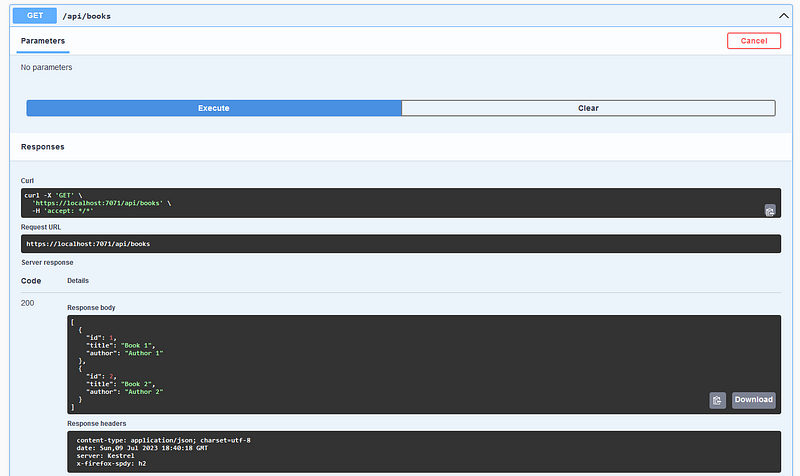
Testing
Final Thoughts
By applying the CQRS pattern, we can achieve better separation of concerns and improve the scalability and maintainability of our application.
Happy coding!
Thanks for reading!
Through my Medium articles, I share insights on web development, career tips, and the latest tech trends. Join me as we explore these exciting topics together. Let’s learn, grow, and create together!
👏 Please clap for the story to help the article be spread
➕More stories about Programming, Careers, and Tech Trends.
🔔 Join me on Medium | Twitter | LinkedIn
Level Up Coding
Thanks for being a part of our community! Before you go:
- 👏 Clap for the story and follow the author 👉
- 📰 View more content in the Level Up Coding publication
- 💰 Free coding interview course ⇒ View Course
- 🔔 Follow us: Twitter | LinkedIn | Newsletter
🚀👉 Join the Level Up talent collective and find an amazing job


