avatarAlbin Issac

Free AI web copilot to create summaries, insights and extended knowledge, download it at here

5819

Abstract

uctured"</span> <span class="hljs-attr">sling:resourceType</span>=<span class="hljs-string">"granite/ui/components/coral/foundation/form/select"</span> <span class="hljs-attr">fieldDescription</span>=<span class="hljs-string">"Choose Column style(Advanced for column customization)."</span> <span class="hljs-attr">fieldLabel</span>=<span class="hljs-string">"Presets"</span> <span class="hljs-attr">name</span>=<span class="hljs-string">"./presets"</span>></span> <span class="hljs-tag"><<span class="hljs-name">items</span> <span class="hljs-attr">jcr:primaryType</span>=<span class="hljs-string">"nt:unstructured"</span>></span> <span class="hljs-tag"><<span class="hljs-name">option1</span> <span class="hljs-attr">jcr:primaryType</span>=<span class="hljs-string">"nt:unstructured"</span> <span class="hljs-attr">text</span>=<span class="hljs-string">"2 Column(50%,50%) No Offset"</span> <span class="hljs-attr">value</span>=<span class="hljs-string">"50-50-no-offset"</span>/></span> <span class="hljs-tag"><<span class="hljs-name">option2</span> <span class="hljs-attr">jcr:primaryType</span>=<span class="hljs-string">"nt:unstructured"</span> <span class="hljs-attr">text</span>=<span class="hljs-string">"2 Column(50%,50%) with Offset"</span> <span class="hljs-attr">value</span>=<span class="hljs-string">"50-50-with-offset"</span>/></span> <span class="hljs-tag"><<span class="hljs-name">option3</span> <span class="hljs-attr">jcr:primaryType</span>=<span class="hljs-string">"nt:unstructured"</span> <span class="hljs-attr">text</span>=<span class="hljs-string">"2 Column(60%,40%)"</span> <span class="hljs-attr">value</span>=<span class="hljs-string">"60-40"</span>/></span> <span class="hljs-tag"><<span class="hljs-name">option10</span> <span class="hljs-attr">jcr:primaryType</span>=<span class="hljs-string">"nt:unstructured"</span> <span class="hljs-attr">text</span>=<span class="hljs-string">"Advanced"</span> <span class="hljs-attr">value</span>=<span class="hljs-string">"Advanced"</span>/></span> <span class="hljs-tag"></<span class="hljs-name">items</span>></span> <span class="hljs-tag"></<span class="hljs-name">presets</span>></span> <span class="hljs-tag"><<span class="hljs-name">colnums</span> <span class="hljs-attr">granite:class</span>=<span class="hljs-string">"columns"</span> <span class="hljs-attr">jcr:primaryType</span>=<span class="hljs-string">"nt:unstructured"</span> <span class="hljs-attr">sling:resourceType</span>=<span class="hljs-string">"granite/ui/components/coral/foundation/form/select"</span> <span class="hljs-attr">fieldDescription</span>=<span class="hljs-string">"Choose the number of column(s) will be created."</span> <span class="hljs-attr">fieldLabel</span>=<span class="hljs-string">"Columns"</span> <span class="hljs-attr">name</span>=<span class="hljs-string">"./columns"</span>></span> <span class="hljs-tag"><<span class="hljs-name">items</span> <span class="hljs-attr">jcr:primaryType</span>=<span class="hljs-string">"nt:unstructured"</span>></span> <span class="hljs-tag"><<span class="hljs-name">x0031</span> <span class="hljs-attr">jcr:primaryType</span>=<span class="hljs-string">"nt:unstructured"</span> <span class="hljs-attr">text</span>=<span class="hljs-string">"1"</span> <span class="hljs-attr">value</span>=<span class="hljs-string">"1"</span>/></span> <span class="hljs-tag"><<span class="hljs-name">x0032</span> <span class="hljs-attr">jcr:primaryType</span>=<span class="hljs-string">"nt:unstructured"</span> <span class="hljs-attr">text</span>=<span class="hljs-string">"2"</span> <span class="hljs-attr">value</span>=<span class="hljs-string">"2"</span>/></span> <span class="hljs-tag"></<span class="hljs-name">items</span>></span> <span class="hljs-tag"></<span class="hljs-name">colnums</span>></span> <span class="hljs-tag"></<span class="hljs-name">items</span>></span> <span class="hljs-tag"></<span class="hljs-name">column</span>></span> <span class="hljs-tag"></<span class="hljs-name">items</span>></span> <span class="hljs-tag"></<span class="hljs-name">presets</span>></span> <span class="hljs-tag"></<span class="hljs-name">items</span>></span> <span cla

Options

ss="hljs-tag"></<span class="hljs-name">content</span>></span> <span class="hljs-tag"></<span class="hljs-name">jcr:root</span>></span></pre></div><p id="e754">Add a property with name granite:class to the required elements — this class names will be used to locate the dialog elements in the javascript.</p><figure id="a453"><img src="https://cdn-images-1.readmedium.com/v2/resize:fit:800/1*JrsMtU1-GeAL-Evseo-gBQ.png"><figcaption></figcaption></figure><figure id="174f"><img src="https://cdn-images-1.readmedium.com/v2/resize:fit:800/1*KJRdBTA-PzlnSYUoBln-Jw.png"><figcaption></figcaption></figure><figure id="8d88"><img src="https://cdn-images-1.readmedium.com/v2/resize:fit:800/1*XwkZEUi8rhXddR6zBwaZSw.png"><figcaption></figcaption></figure><h1 id="e115">Define the Event Listener</h1><p id="3e28">Let us now define an event listener that will hide and show the tabs as required.</p><p id="fbc4">Define a cq:ClientLibraryFolder node under the component with the name clientlibs and add the below properties.</p><p id="53c5">categories (String[]) — <define category="" name=""> e.g customvalidation</define></p><figure id="de02"><img src="https://cdn-images-1.readmedium.com/v2/resize:fit:800/1*ks72MNzrhTc7lTZuwYxPRw.png"><figcaption></figcaption></figure><p id="2e15">Create a folder with name js and add a file with name js.txt under it. Also, Add a file with name event.js under clientlibs folder.</p><figure id="8bc3"><img src="https://cdn-images-1.readmedium.com/v2/resize:fit:800/1*hm4gSucv0lXbBJvXXQl8-Q.png"><figcaption></figcaption></figure><p id="1b7e">Add the below script in event.js</p><div id="8f48"><pre>(<span class="hljs-keyword">function</span> (<span class="hljs-params">document, , Coral</span>) { <span class="hljs-keyword">var</span> <span class="hljs-symbol">doc</span> = (document); <span class="hljs-symbol">doc</span>.on(<span class="hljs-string">'foundation-contentloaded'</span>, <span class="hljs-keyword">function</span>(<span class="hljs-params">e</span>) {</pre></div><div id="0811"><pre><span class="hljs-function"><span class="hljs-title">if</span><span class="hljs-params">((<span class="hljs-string">'.presets coral-select-item:selected'</span>)</span></span><span class="hljs-selector-class">.val</span>()!=<span class="hljs-string">'Advanced'</span>) {</pre></div><div id="4d96"><pre>(<span class="hljs-string">'.columns'</span>).parent().addClass(<span class="hljs-string">"hide"</span>);</pre></div><div id="25aa"><pre>}</pre></div><div id="c626"><pre>(<span class="hljs-string">'.presets'</span>, e.target).each(<span class="hljs-keyword">function</span> (<span class="hljs-params">i, element</span>) {</pre></div><div id="f155"><pre>Coral.commons.ready(element, <span class="hljs-keyword">function</span> <span class="hljs-params">(component)</span> {</pre></div><div id="cda5"><pre>(component).on(<span class="hljs-string">"change"</span>,<span class="hljs-keyword">function</span> (<span class="hljs-params">event</span>) {</pre></div><div id="3e4a"><pre><span class="hljs-keyword">if</span>(component.value==<span class="hljs-string">'Advanced'</span>) { (<span class="hljs-string">'.columns'</span>).parent().removeClass(<span class="hljs-string">"hide"</span>); (<span class="hljs-string">'.title'</span>).prop(<span class="hljs-string">'checked'</span>, <span class="hljs-literal">true</span>); }<span class="hljs-keyword">else</span> { (<span class="hljs-string">'.columns'</span>).parent().addClass(<span class="hljs-string">"hide"</span>); (<span class="hljs-string">'.title'</span>).prop(<span class="hljs-string">'checked'</span>, <span class="hljs-literal">false</span>); } }); });</pre></div><div id="35ea"><pre>}); }); })(document, Granite.<span class="hljs-variable">$,</span> Coral);</pre></div><p id="9c70">This script hide dropdown with class name “.columns” on dialog load, register a change event on the drop down with class name “.presets”.</p><p id="a2d0">On-change of the value in the drop-down with class name “.presets”, if the selected value is ‘Advanced’ then un-hide the drop-down with class “.columns “ and also select the checkbox with class name “.title”</p><p id="c3a0">If the value is other than ‘Advanced’ then hide dropdown with class “.columns “ and un-select the checkbox with class name “.title”</p><p id="06c6">Add the below content inside js.txt</p><p id="0a59">#base=js event.js</p><p id="00bf">Add the below property in cq:dialog node</p><p id="a50d">extraClientlibs String[] — customvalidation(the client library defined in the previous step)</p><figure id="c2aa"><img src="https://cdn-images-1.readmedium.com/v2/resize:fit:800/1*FkDwOkpeCOCvo1EO6-K_VA.png"><figcaption></figcaption></figure><p id="78ec">Author the component to a page</p><p id="49d3">On dialog load, the drop-down with class name “.columns” hided</p><p id="e3c3">On change of value in the drop-down with class name “.presets”, if the selected value is ‘Advanced’ then un-hide the drop-down with class “.columns” and also select the checkbox with class name “.title”</p><p id="19ed">If the value is other than ‘Advanced’ then hide dropdown with class “.columns “ and un-select the checkbox with class name “.title”</p><figure id="227c"><img src="https://cdn-images-1.readmedium.com/v2/resize:fit:800/1*qjpaaLFklK5g2hkkdWLtZQ.png"><figcaption></figcaption></figure><figure id="18e5"><img src="https://cdn-images-1.readmedium.com/v2/resize:fit:800/1*aektTQ3m22e7EIBGgQQtng.png"><figcaption></figcaption></figure><p id="5160">Sample Dialog — <a href="https://github.com/techforum-repo/youttubedata/blob/master/aem/handle-coral-ui3-select-change-event-1.0.zip">https://github.com/techforum-repo/youttubedata/blob/master/aem/handle-coral-ui3-select-change-event-1.0.zip</a></p></article></body>

How to handle the Coral UI 3 Select(Dropdown) change event in Touch UI dialogs?

This tutorial explains the approach to handle the change event of Coral UI 3 Select(Dropdown) in Touch UI dialogs.

Define Dialog

As a first step, define a Coral UI 3 Touch UI dialog (cq:dialog) with required fields. The XML structure of the sample dialog is below

<?xml version="1.0" encoding="UTF-8"?>
<jcr:root xmlns:sling="http://sling.apache.org/jcr/sling/1.0" xmlns:granite="http://www.adobe.com/jcr/granite/1.0" xmlns:cq="http://www.day.com/jcr/cq/1.0" xmlns:jcr="http://www.jcp.org/jcr/1.0" xmlns:nt="http://www.jcp.org/jcr/nt/1.0"
    jcr:primaryType="nt:unstructured"
    jcr:title="Column Component Responsive"
    sling:resourceType="cq/gui/components/authoring/dialog"
    extraClientlibs="[customvalidation]">
    <content
        jcr:primaryType="nt:unstructured"
        sling:resourceType="granite/ui/components/coral/foundation/tabs">
        <items
            jcr:primaryType="nt:unstructured"
            sling:hideChildren="*">
            <presets
                jcr:primaryType="nt:unstructured"
                jcr:title="Presets"
                sling:resourceType="granite/ui/components/coral/foundation/fixedcolumns">
                <items jcr:primaryType="nt:unstructured">
                    <column
                        jcr:primaryType="nt:unstructured"
                        sling:resourceType="granite/ui/components/coral/foundation/container">
                        <items jcr:primaryType="nt:unstructured">
                            <title
                                granite:class="title"
                                jcr:primaryType="nt:unstructured"
                                sling:resourceType="granite/ui/components/coral/foundation/form/checkbox"
                                fieldDescription="Note: Titles are not available on the Advanced preset"
                                fieldLabel="Add Title to Columns?"
                                name="./title"
                                text="Add Title to Columns?"/>
                            <padding
                                jcr:primaryType="nt:unstructured"
                                sling:resourceType="granite/ui/components/coral/foundation/form/checkbox"
                                fieldDescription="check to remove padding from columns"
                                fieldLabel="Remove Padding from Columns?"
                                name="./removePadding"
                                text="Remove Padding from Columns?"/>
                            <presets
                                granite:class="presets"
                                jcr:primaryType="nt:unstructured"
                                sling:resourceType="granite/ui/components/coral/foundation/form/select"
                                fieldDescription="Choose Column style(Advanced for column customization)."
                                fieldLabel="Presets"
                                name="./presets">
                                <items jcr:primaryType="nt:unstructured">
                                    <option1
                                        jcr:primaryType="nt:unstructured"
                                        text="2 Column(50%,50%) No Offset"
                                        value="50-50-no-offset"/>
                                    <option2
                                        jcr:primaryType="nt:unstructured"
                                        text="2 Column(50%,50%) with Offset"
                                        value="50-50-with-offset"/>
                                    <option3
                                        jcr:primaryType="nt:unstructured"
                                        text="2 Column(60%,40%)"
                                        value="60-40"/>
                                    <option10
                                        jcr:primaryType="nt:unstructured"
                                        text="Advanced"
                                        value="Advanced"/>
                                </items>
                            </presets>
                            <colnums
                                granite:class="columns"
                                jcr:primaryType="nt:unstructured"
                                sling:resourceType="granite/ui/components/coral/foundation/form/select"
                                fieldDescription="Choose the number of column(s) will be created."
                                fieldLabel="Columns"
                                name="./columns">
                                <items jcr:primaryType="nt:unstructured">
                                    <_x0031_
                                        jcr:primaryType="nt:unstructured"
                                        text="1"
                                        value="1"/>
                                    <_x0032_
                                        jcr:primaryType="nt:unstructured"
                                        text="2"
                                        value="2"/>
                                </items>
                            </colnums>
                        </items>
                    </column>
                </items>
            </presets>
        </items>
    </content>
</jcr:root>

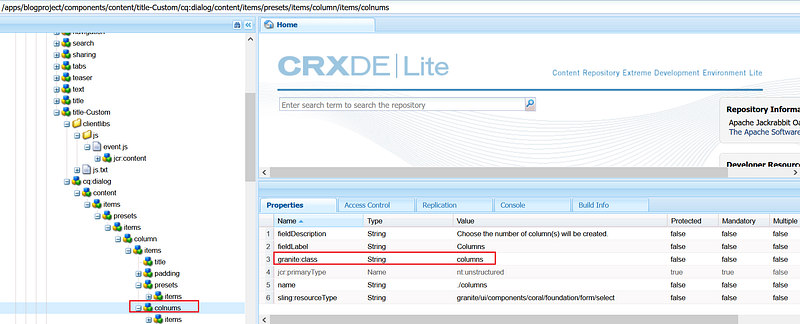
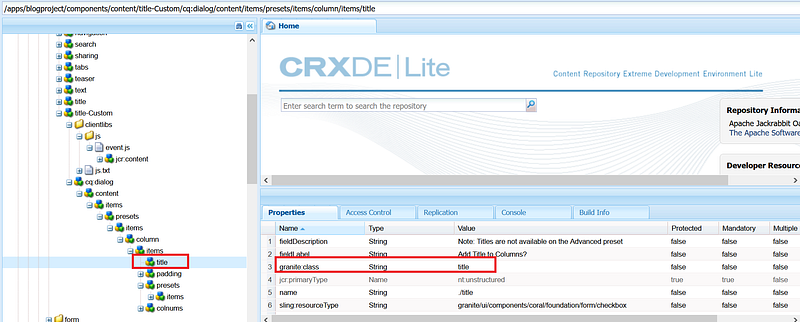
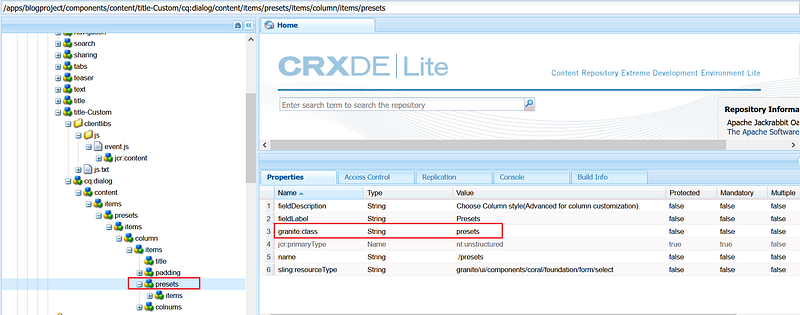
Add a property with name granite:class to the required elements — this class names will be used to locate the dialog elements in the javascript.
Define the Event Listener

Let us now define an event listener that will hide and show the tabs as required.

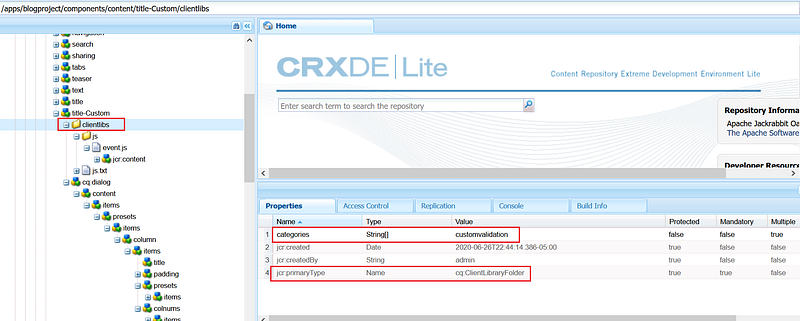
Define a cq:ClientLibraryFolder node under the component with the name clientlibs and add the below properties.

categories (String[]) — e.g customvalidation
Create a folder with name js and add a file with name js.txt under it. Also, Add a file with name event.js under clientlibs folder.
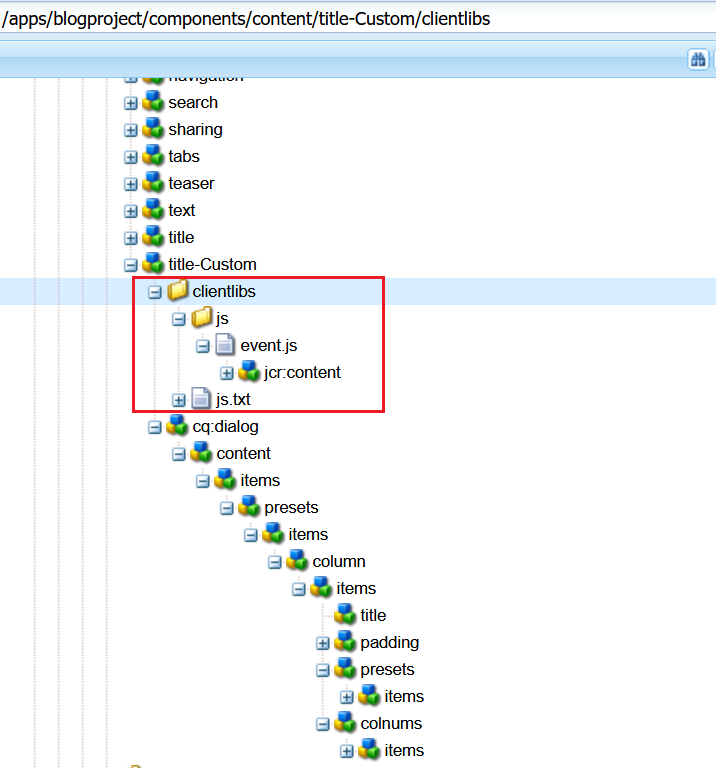
Add the below script in event.js

(function (document, $, Coral) {
var $doc = $(document);
 $doc.on('foundation-contentloaded', function(e) {
if($('.presets coral-select-item:selected').val()!='Advanced')
      {
$('.columns').parent().addClass("hide");
}
$('.presets', e.target).each(function (i, element) {
Coral.commons.ready(element, function (component) {
$(component).on("change",function (event) {
if(component.value=='Advanced')
    {
     $('.columns').parent().removeClass("hide");
     $('.title').prop('checked', true);
    }else
    {
     $('.columns').parent().addClass("hide");
     $('.title').prop('checked', false);
    }
   });
  });
});
 });
})(document, Granite.$, Coral);

This script hide dropdown with class name “.columns” on dialog load, register a change event on the drop down with class name “.presets”.

On-change of the value in the drop-down with class name “.presets”, if the selected value is ‘Advanced’ then un-hide the drop-down with class “.columns “ and also select the checkbox with class name “.title”

If the value is other than ‘Advanced’ then hide dropdown with class “.columns “ and un-select the checkbox with class name “.title”

Add the below content inside js.txt

#base=js event.js

Add the below property in cq:dialog node

extraClientlibs String[] — customvalidation(the client library defined in the previous step)
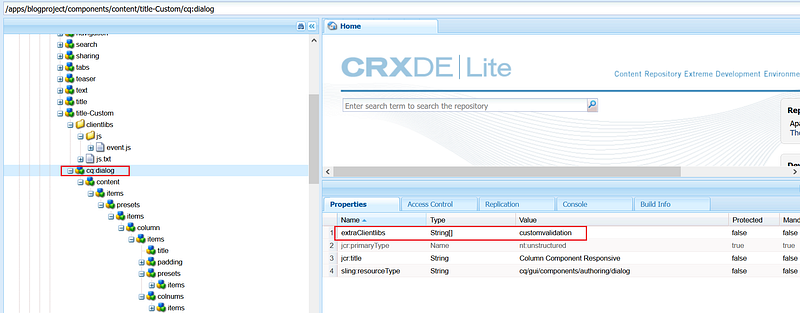
Author the component to a page

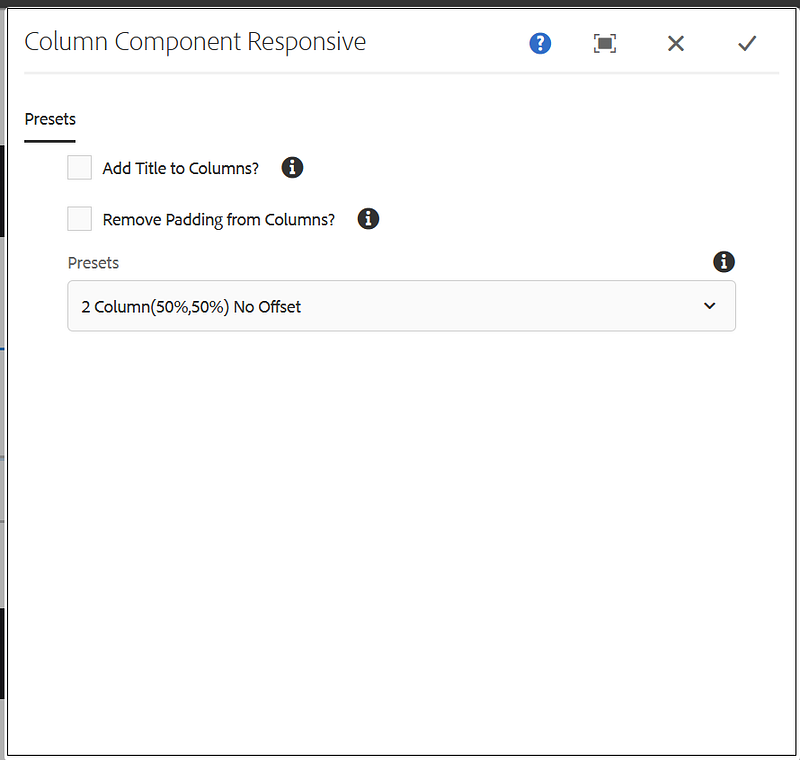
On dialog load, the drop-down with class name “.columns” hided

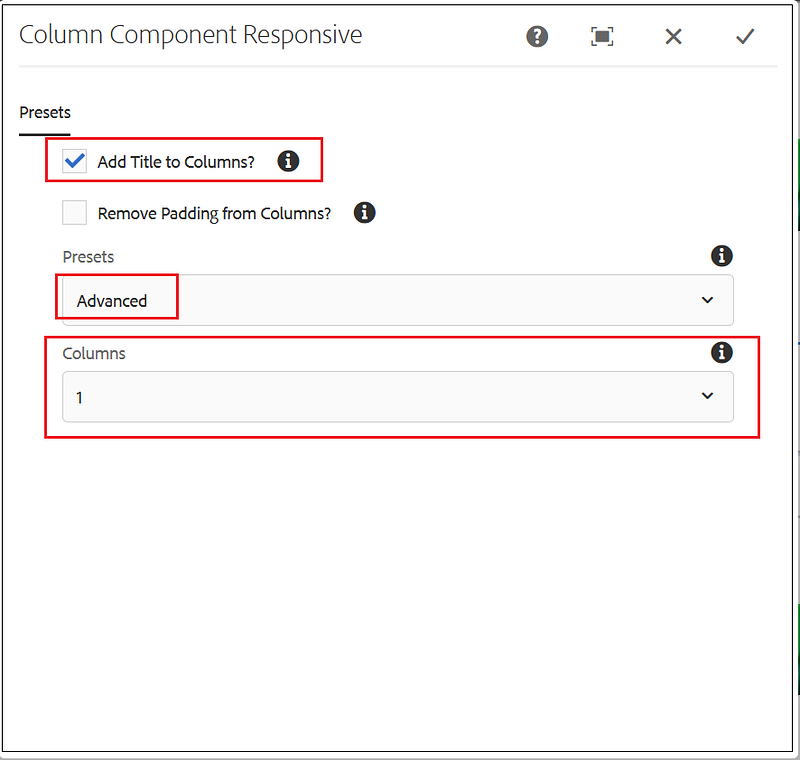
On change of value in the drop-down with class name “.presets”, if the selected value is ‘Advanced’ then un-hide the drop-down with class “.columns” and also select the checkbox with class name “.title”

If the value is other than ‘Advanced’ then hide dropdown with class “.columns “ and un-select the checkbox with class name “.title”
Sample Dialog — https://github.com/techforum-repo/youttubedata/blob/master/aem/handle-coral-ui3-select-change-event-1.0.zip

Aem
Software Development
Programming
CMS
Adobe
Recommended from ReadMedium