
How to Handle Routing with Vue Router in Vue 3
Routing with Vue Router 4 : A Complete Guide

Vuejs 3 comes bundled with some new and amazing features. Some of these features include but are not limited to: optimizations, improved TypeScript support, global mounting, migration to the new composition-API among others.
In this article, we are going to explore vue-router 4 which is the official and latest library to handle routing in Vue.js. Routing enables us to navigate across applications back and forth. We will configure routing in a Vue.js app and look into some nice capabilities that is built into vue-router 4.
In this article, we are going to assume you have a scaffold of Vue.js 3 application. Check out this guide if you want to scaffold a fresh Vue.js application.
Installation
Depending on your preferred package manager, you can install vue-router 4 by running the following command on your terminal.
Using NPM
npm install vue-router@4Using YARN
yarn add vue-router@4After successfully installation, we will now configure vue-router so we handle routing in our application.
Configuring routes
On the root directory of your file, create a folder and name it router. Inside the folder, create a file named index.ts. This file will contain all of our application routes/paths with the necessary configurations.
In the code snippet above, we have imported createWebHistory and createRouter from Vue router. createWebHistory enables us to implement the different web routing modes. We can either use Hash, HTML 5, and Memory modes. In our configuration here we are using the HTML 5 mode by setting `history: createWebHistory()`
Hash mode uses the (#) before the actual url and may make your url look a little untidy and has some bad impacts on SEO too. Incase you want to try the hash mode, import createWebHashHistory from vue-router and set `history: createWebHashHistory()`.
Same applies to Memory mode, import createMemoryHistory from vue-router and set `history: createMemoryHistory()`.
createRouter will enables us to create an instance of our router and allow us to pass in the routes we had specified above.
Locate app.vue file and have router-view somewhere in the template. This is the section where all the matched routes will be rendered.
Mounting the router
Now we have set up our simple routing but yet we cant access the necessary paths. We need to mount the whole router instance to the application entry file so that our application can be aware of the routing we provided.
Open your main.js or main.ts file if you choose TypeScript during installing and have the following.
Here we are importing the router configuration file and have the whole app register the router instance. Now all of our routing configuration is available on the whole app and we can navigate through /home /about and /contact.
If you try to navigate to a route not configured such as /users , Vuejs will throw an error. We will see how to handle and catch routes not configured in our application later in the article.
To link between the routes we have setup, you need to use router-link as shown below. Using this is beneficial since it doesn't refresh the page as opposed to a tag and also makes it easier for vue-router to handle the functionality well.
// go to /contact page<router-link to="/contact">Contact</router-link>// go to /about page<router-link to="/about">About</router-link>Redirects
We can handle redirects seamlessly with vue-router. Assume a case where you want users visiting the path /home to be redirected to / , we can handle that as shown below.
Now when a user navigate to /home , they will be redirect to / route. Redirects can also be useful when you want to allow certain routes to be only accessed by certain users.
Lazy loading routes
Lazy loading routes ensures that only needed routes are loaded and others are loaded on demand when necessarily needed. This provides some performance improvement especially when you have a large application with lots of routes and components.
To lazy load routes, you need only to add dynamic imports to routes that you want to lazy load. We can implement it as shown below.
Nested routes
With vue-router, we can configure nested routes, i.e parent to child routes. We can have components branch off into child components as shown in the image below. When nesting child routes from parent, we need to include /router-view in oder to render the matched child routes.
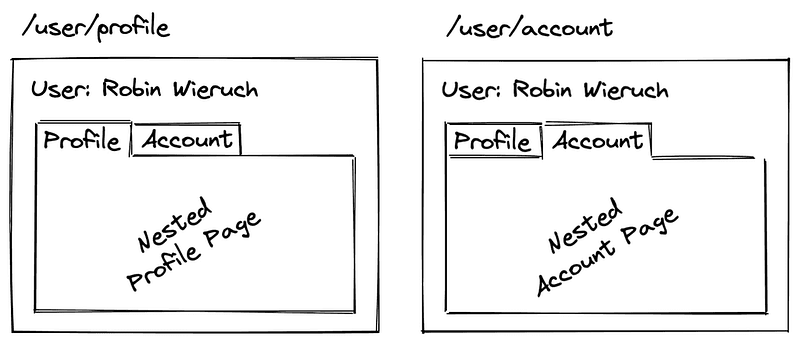
We can set nested routes as shown below.
Route meta fields
Route meta fields gives us the capability to append information on routes that we can manipulate later. We can specify routes that either need authentication for access or other relevant information we may want.
Here we have provided the /meta field property with some information. On the router instance, we can check if the user is authenticated we grant access to that particular path. We can also provide information such as the /title .
Not Found Routes
We can also catch some routes that are not configured in our routing. We can return a dedicated 404 Not Found component. To catch routes not configured we use the /catchall * .
Dynamic Routing
Dynamic routing ensures that you map different routes to the same component. Assume you have various posts containing different cid and you would want to render the same component depending on the cidparam provided.
You can configure routes for dynamic routing as shown below. You only need to add a colon after the path and provide the name of the param. In the case here, we have the cid param.
Accessing route params
In the component template you can access the cid param as shown below 👇.
<template>{{ $route.param.cid }}</template>Before you go
I hope you found this piece helpful on how to handle routing with vue-router 4 in a Vuejs 3 application.
Occasionally, I send out an exclusive email with tips, articles, apps, books, and ideas I have found useful and related to technical writing.
Join others like you who want to improve their technical writing game.
More reads
Level Up Coding
Thanks for being a part of our community! Before you go:
- 👏 Clap for the story and follow the author 👉
- 📰 View more content in the Level Up Coding publication
- 🔔 Follow us: Twitter | LinkedIn | Newsletter
🚀👉 Join the Level Up talent collective and find an amazing job


