
How to Handle Exceptions in Flask
Better alert handling for better programming

What’s a Python Exception?
This tutorial will introduce you to exceptions and how to handle exceptions in Flask. By the end of this tutorial, you’ll be able to create custom exceptions for your code.
Run the program, and enter a string instead of a number as the input. If you run the program, it’ll work as long as the input is an integer. If you input a string instead of a number, you’ll get a ValueError, as shown below.
Please enter a number between 1 and 10: fur
Traceback (most recent call last):
File “main.py”, line 9, in <module>
number = int(input(‘Please enter a number between 1 and 10: ‘))
ValueError: invalid literal for int() with base 10: ‘b’
The program above calculates the square of the number entered by the user. But suppose the user instead enters a string or a special character, if the program doesn’t check if the input is a valid integer, the program will throw an exception.
Therefore, it’s important to catch errors where they occur instead of waiting for the whole program to crash. We’ll include try/except clauses to catch any errors that might occur in the program. The program will look like this:
In Python, we use try and except blocks to catch and handle exceptions. The code after the try statement is Python executed as a normal part of the program. After the except statement, the code is the program’s response to any exceptions in the preceding try clause.
Why Is It Important to Handle Exceptions in Flask?
- Enables the smooth flow of programs: Handling exceptions at every possible aspect allows your code to run smoothly regardless of any errors
- Security purposes: Handling exceptions from a security point also helps secure your programs since you’re unlikely to leak or expose your code’s configurations to random people
Flask REST API example
You’ll use the Flask API to implement your own browsable API.
You’ll develop a REST API for a library store. The API will be able to:
- Add a new book entry
- View all the books available in the library
Prerequisites
The project will use the following dependencies
- Python
- Flask
- Flask-SQLAlchemy
- Flask API
- Create a new project.
mkdir library
2. Create and activate the virtual environment.
cd library
python3.6 -m venv env
source env/bin/activate
3. Install all the dependencies.
(env)$ pip install flask
(env)$ pip install flask-sqlalchemy
(env)$ pip install flask-api
(env)$ pip freeze > requirements.txt
4. Create files and folders to match the directory structure shown below:
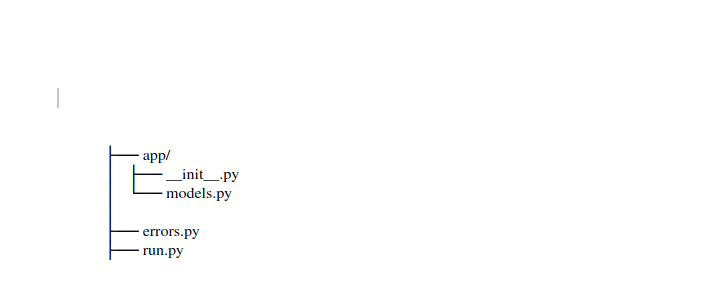
Database configurations
You’ll use the SQLite database and Flask-SQLAlchemy. Flask-SQLAlchemy is a Flask extension that provides support for SQLAlchemy.
Define configurations for the database.
Inside the app/__init__.py file, and add the following:
Models
Add the following to the models.py file:
Next, define an entry point to start your app. Inside the run.py file, add the following code:
db.create.all() will create database tables when you run the app for the first time. Setting debug = true is important for debugging the app, but it’s not recommended in production.
Run the following command in the terminal:
(env)$ python run.pyLet’s define the first route and see how to handle exceptions. In the run.py file, add the following:
Now run the app again:
python run.pyNavigate to http://localhost:5000/books/ on your browser, and you should see an empty list of books because you haven’t added any book entries yet. Add several book entries, and refresh the page.
Handling exceptions
The POST request expects data from the user. However, this program can go wrong if there isn’t any input data to send. The code will throw an error, as shown in this stack trace.
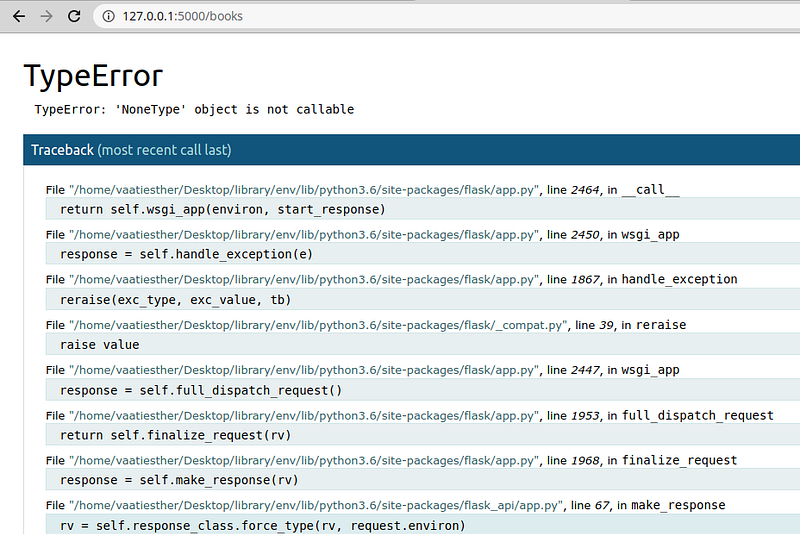
Therefore, you’ll want to raise an exception if no data is present in the POST request. Flask comes with built-in exceptions that you can raise. You can also use a subclass of the APIException. We’ll use the APIException class to raise an exception if there’s no data in the POST request.
- Create a file,
error.py, in the app directory, and add the code below.
2. Edit the POST request to raise the InvalidParameter exception.
3. Now when you perform a POST request with no data, the response will look something like this:
HTTP 404 NOT FOUND
Content-Type: application/json
{
“message”: “Invalid parameters”
}
Custom errors
Sometimes if a route doesn’t exist, you might want to return a 404 error — e.g., the ID number of a book like this: http://127.0.0.1:5000/books/20000 may exist. If the user tries to access such an URL, a route is executed and will return a 404 error like this:
Not Found
The requested URL was not found on the server. If you entered the URL manually, please check your spelling and try again.
A 404 error is shown whenever a page isn’t found; it’s essential to have a custom error page whenever a user navigates to a page that doesn’t exist.
You can create a customized 404 page to handle this kind of error. You’ll need to create a 404 template file and a 404 function in the __init__.py file.
- Create a new file called
404.htmlin thetemplatesfolder in theappdirectory, and add the following:
{% block body %}
<h1>Page Not Found</h1>
<p>Woops, that page doesn’t exist! (404)</p>
<p>Take me back <a href=”{{ url_for(‘index’) }}”>HOME</a>
{% endblock %}
2. Next, add the error handler wrapper to the __init__.py file.
3. Don’t forget the import for rendering the template.
from flask import request, render_template4. Now when a user navigates to a page that doesn’t exist, they’ll see this message:
Page Not Found
Woops, that page doesn’t exist! (404)
Take me back HOME
Conclusion
Hopefully, this article has helped you understand how to deal with exceptions. You can find more information on the Flask documentation site.


