avatarKai Wong

Free AI web copilot to create summaries, insights and extended knowledge, download it at here

3595

Abstract

fonts aren’t listed, at least one font is likely because someone probably played around with fonts to establish a company logo and tagline.</p><p id="03b0"><a href="https://www.smashingmagazine.com/2009/03/10-principles-for-readable-web-typography/">You could go in-depth into typography here, thinking about letter spacing, line height, contrast, focus points, etc</a>. But what we’re concerned about isn’t beautiful web typography: it’s consistency.</p><p id="52fb">The main thing is to establish consistency across your entire website with your fonts. For example, the title text for the entire page and the header for a particular section might look different, but you want to make sure that it’s the same font.</p><p id="014b">Figma makes this incredibly easy by establishing text styles to serve this purpose.</p><figure id="59c7"><img src="https://cdn-images-1.readmedium.com/v2/resize:fit:800/1*7JXVqFeDQbL5cUWD5a-ZDA.png"><figcaption>Create and manage text styles through Figma’s Design tab</figcaption></figure><p id="720f"><b>Align UX writing and copywriting with a copy language spreadsheet</b></p><p id="46c8">If people confuse copywriting with UX writing, you might as well use that to your advantage.</p><figure id="fc01"><img src="https://cdn-images-1.readmedium.com/v2/resize:fit:800/1*X5dEIG1TnA5bpF_Ms8oJng.png"><figcaption><a href="https://uxdesign.cc/how-to-build-a-better-product-with-ux-writing-926d78209ce8">https://uxdesign.cc/how-to-build-a-better-product-with-ux-writing-926d78209ce8</a></figcaption></figure><p id="611f">While we may use certain words to explain what we’re doing to users, they might be landmines from a marketing perspective. Or, the elements of the product we find most useful might help other members of the team understand how we should talk about it.</p><p id="da9b">This is where keeping a spreadsheet of the current copy can be helpful for your team to weigh in.</p><p id="1e8d">For example, one back and forth discussion came from the phrase “Discover and purchase x content.” Team members objected to the word “purchase” since it not only raised a whole lot of questions (i.e., What sort of format would the purchase come in (.pdf, .docx, etc.), Is this a subscription, etc.), it missed the point of what we were trying to convey.</p><p id="ca64"><b>Have a ‘brain dump’ section about what you’re trying to convey</b></p><p id="5dfb">Anyone who’s dabbled in writing will tell you that sometimes, the hardest thing to do is cut down the number of words you use. People aren’t going to read 12 paragraphs of text to understand what you offer, but getting from 12 paragraphs to 1 sentence requires a ton of work.</p><p id="98f7">That’s why one of the most valuable things (on your spreadsheet) is to have a ‘brain dump’ section, where you can explain what you’re trying to convey in a lot of words.</p><p id="ffc2">This really helped me with a “How it Works” page. The typical “How it works” page has one word (or a short sentence) as a header for a step and maybe a few sentences to explain in greater detail.</p><figure id="0544"><img src="https://cdn-images-1.readmedium.com/v2/resize:fit:800/1*YTmK8kWcMdP-ocqtETAUBg.png"><figcaption><a href="https://www.upwork.com/i/how-it-works/freelancer/">A How it works page from Upwork</a></figcaption></figure><p id="d9ea">Figuring out the right word or phrase requires a lot of careful consideration, and one thing that can help is to summarize what you’re trying to tell your user in this section. Writing it down makes it so that the team can see what you’re thinking, and they can tweak it as nec

Options

essary.</p><p id="97e1">The correct word can often mean the difference in your user's understanding of what you’re trying to convey and them missing the point. But that’s not all.</p><p id="a4b8"><b>Understand the reading level</b></p><p id="693c"><a href="https://www.nngroup.com/articles/plain-language-experts/">Plain and simple language works best for everyone, even experts.</a> As a result, one thing you need to check constantly is your website's reading level<a href="https://www.nngroup.com/articles/legibility-readability-comprehension/">.</a></p><p id="0230">Fortunately, there are many free tools to easily check this in the digital content age. Anything from <a href="https://hemingwayapp.com/">Hemingwayapp</a> to <a href="https://prowritingaid.com/">Prowritingaid</a>, <a href="https://app.grammarly.com/">Grammarly</a>, and even <a href="https://support.microsoft.com/en-us/office/get-your-document-s-readability-and-level-statistics-85b4969e-e80a-4777-8dd3-f7fc3c8b3fd2">Microsoft Word</a> provides you with a ‘reading level’ of your text just by copy-pasting it into their application.</p><p id="a742">The Nielsen Norman Group recommends your text be at an <a href="https://www.nngroup.com/articles/legibility-readability-comprehension/">8th-grade reading level if you’re writing for a general audience and a 12th-grade reading level for specialized or B2B audiences.</a></p><p id="971e">If you’re running into issues with the reading level, here are some things you can look for:</p><ul><li>Can you simplify jargon or terminology into something more generic (i.e., “from planning to point-of-care” → “from beginning to end.”)?</li><li>Are you using words that have simpler alternatives? Hemingway app is great for this (it highlights it in magenta).</li><li>Are your sentences/paragraphs too long? Prowritingaid/Grammarly is great for this since it shows you lengthy sentences.</li></ul><p id="2562">You don’t have to be perfect at UX writing because you have one built-in process to help you: user testing.</p><h2 id="fe64">Do your best, then user test.</h2><p id="c729">You don’t have to spend hours laboring over a few words: do the best you can and seek user feedback. You’re trying to convey things as best you can and then check to see if your users are on the same page.</p><p id="7875">This is an advantage that UX has over other teams, like Marketing. We can see feedback on things that are not finalized, like prototypes and text. A simple user testing question can give you insight as to whether your words make sense:</p><p id="07f6">“There are some labels on the sidebar navigation. Could you tell me what you think they mean?”</p><p id="af69">Remember, you’re not the ultimate judge of whether something’s easy to read: your users are.</p><p id="55b1">While the world of UX writing may be very deep, it doesn’t take much investment to get it to the point where you can user test it. So if you spot words that seem like they might be hard for your user to understand, don’t be afraid to jump in and spend some time working on the UX writing.</p><p id="ee43">The words you use, just like the way you design things, can impact how your users use your product.</p><p id="9ccf"><i>Kai Wong is a Senior UX Designer, Design Writer, and author of <a href="https://dataanddesign.substack.com/publish?utm_source=menu">the Data and Design newsletter</a>. His new book, <a href="https://christopherkaiwong.gumroad.com/l/umwxi/medium33">Data-informed UX Design,</a> explains small changes you can make regarding data to improve your UX Design process.</i></p></article></body>

How to get started with UX writing when your project really needs it

What you should do if no one knows how to write good copy

Photo by Judit Peter: https://www.pexels.com/photo/person-writing-on-a-notebook-beside-macbook-1766604/

My writing habit and UX work crossed paths when I did UX writing for a re-designed website.

One thing you’ll encounter when working with Subject Matter Experts (SMEs) is that they often spent a ton of time working in specific environments and using certain terminology. As a result, they’re often biased about what they think the average person can understand.

https://xkcd.com/2501/

So when I had to re-design a web application created by technical experts, I knew that I needed to start with the writing right away. Even though I had specialized knowledge in the field, I couldn’t understand some of the terminology and phrases on the landing page.

It might have been second nature to some team members, but it was a surefire way for new users to get lost.

To fix this, I had to get a crash course in UX writing, and that started by understanding what this field was.

Copywriting, UX writing, and Content design

First of all, many terms get thrown around when it comes to the idea of writing and design.

The ‘big 4’ are often called UX writing, Copywriting, Content Strategy, and Content Design. They all have slightly different definitions, but what I’ll be focusing on is UX writing.

UX writing is focused on writing the UI elements for digital product use. In essence, they’re the ones that take what may be lorem ipsum (or sketch copy) and turn it into something our users can understand. These may include:

  • Buttons
  • Error messages
  • Controls
  • Instructions
  • Notifications
  • Onboarding sequences
  • etc.

They’re the ones that have to think about what the reader can understand when they read labels and text, and they have to think about anything unclear to your target audience.

This means that you have to start at the very beginning when you’re wearing the UX writer hat. Here are some of the lessons that I learned from UX writing.

Tips for getting started as an (unofficial) UX writer

Check your style guide (and see if it works)

One of the first things you should do when starting is to check the style guide. For example, your style guide might have three font categories: “Header,” “Subheader,” and “Body.”

The fonts listed here are your UX writing canvas: these are the fonts that you’ll use to create text elements throughout your website. Even if these fonts aren’t listed, at least one font is likely because someone probably played around with fonts to establish a company logo and tagline.

You could go in-depth into typography here, thinking about letter spacing, line height, contrast, focus points, etc. But what we’re concerned about isn’t beautiful web typography: it’s consistency.

The main thing is to establish consistency across your entire website with your fonts. For example, the title text for the entire page and the header for a particular section might look different, but you want to make sure that it’s the same font.

Figma makes this incredibly easy by establishing text styles to serve this purpose.
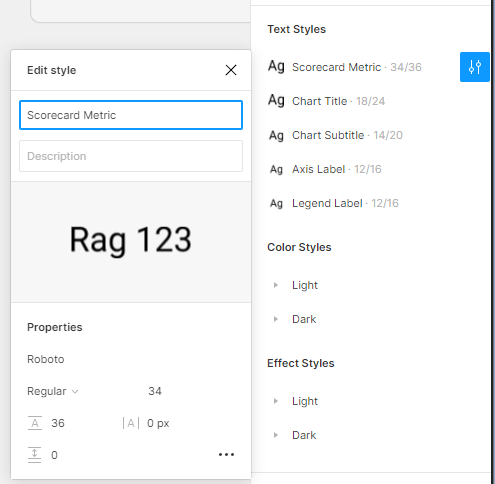
Create and manage text styles through Figma’s Design tab

Align UX writing and copywriting with a copy language spreadsheet

If people confuse copywriting with UX writing, you might as well use that to your advantage.
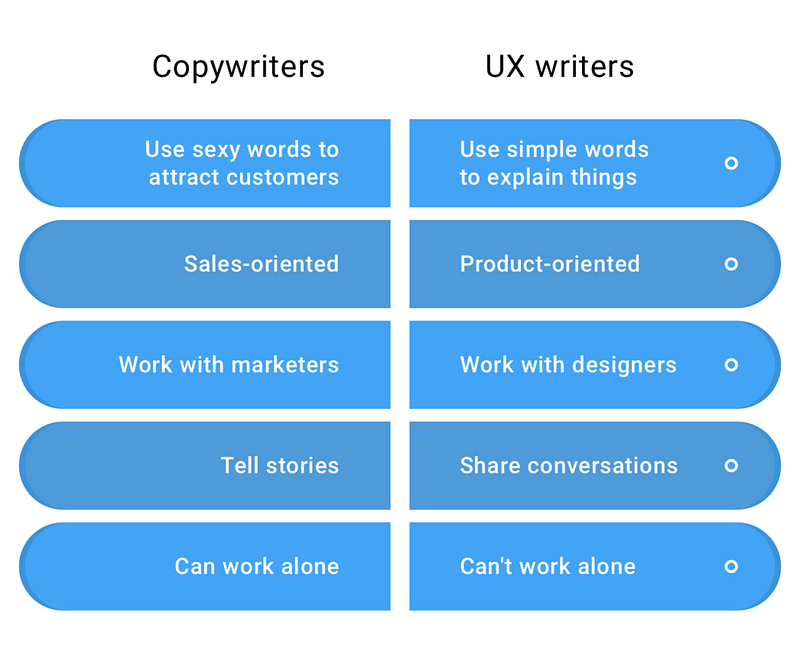
https://uxdesign.cc/how-to-build-a-better-product-with-ux-writing-926d78209ce8

While we may use certain words to explain what we’re doing to users, they might be landmines from a marketing perspective. Or, the elements of the product we find most useful might help other members of the team understand how we should talk about it.

This is where keeping a spreadsheet of the current copy can be helpful for your team to weigh in.

For example, one back and forth discussion came from the phrase “Discover and purchase x content.” Team members objected to the word “purchase” since it not only raised a whole lot of questions (i.e., What sort of format would the purchase come in (.pdf, .docx, etc.), Is this a subscription, etc.), it missed the point of what we were trying to convey.

Have a ‘brain dump’ section about what you’re trying to convey

Anyone who’s dabbled in writing will tell you that sometimes, the hardest thing to do is cut down the number of words you use. People aren’t going to read 12 paragraphs of text to understand what you offer, but getting from 12 paragraphs to 1 sentence requires a ton of work.

That’s why one of the most valuable things (on your spreadsheet) is to have a ‘brain dump’ section, where you can explain what you’re trying to convey in a lot of words.

This really helped me with a “How it Works” page. The typical “How it works” page has one word (or a short sentence) as a header for a step and maybe a few sentences to explain in greater detail.
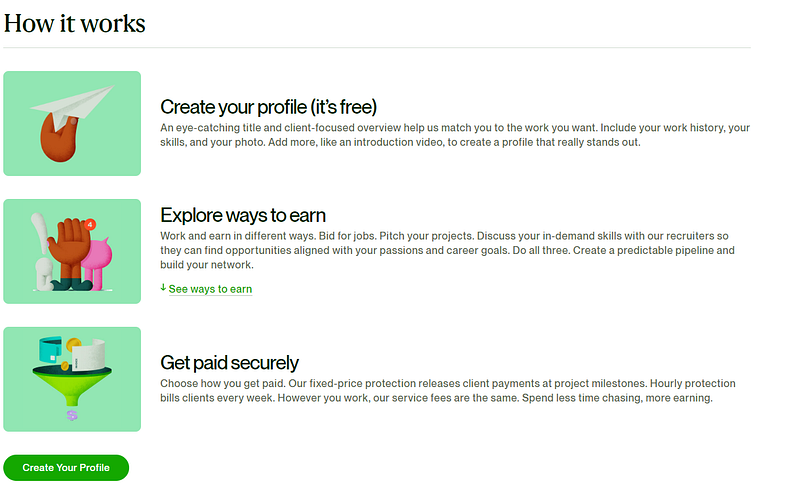
A How it works page from Upwork

Figuring out the right word or phrase requires a lot of careful consideration, and one thing that can help is to summarize what you’re trying to tell your user in this section. Writing it down makes it so that the team can see what you’re thinking, and they can tweak it as necessary.

The correct word can often mean the difference in your user's understanding of what you’re trying to convey and them missing the point. But that’s not all.

Understand the reading level

Plain and simple language works best for everyone, even experts. As a result, one thing you need to check constantly is your website's reading level.

Fortunately, there are many free tools to easily check this in the digital content age. Anything from Hemingwayapp to Prowritingaid, Grammarly, and even Microsoft Word provides you with a ‘reading level’ of your text just by copy-pasting it into their application.

The Nielsen Norman Group recommends your text be at an 8th-grade reading level if you’re writing for a general audience and a 12th-grade reading level for specialized or B2B audiences.

If you’re running into issues with the reading level, here are some things you can look for:

  • Can you simplify jargon or terminology into something more generic (i.e., “from planning to point-of-care” → “from beginning to end.”)?
  • Are you using words that have simpler alternatives? Hemingway app is great for this (it highlights it in magenta).
  • Are your sentences/paragraphs too long? Prowritingaid/Grammarly is great for this since it shows you lengthy sentences.

You don’t have to be perfect at UX writing because you have one built-in process to help you: user testing.

Do your best, then user test.

You don’t have to spend hours laboring over a few words: do the best you can and seek user feedback. You’re trying to convey things as best you can and then check to see if your users are on the same page.

This is an advantage that UX has over other teams, like Marketing. We can see feedback on things that are not finalized, like prototypes and text. A simple user testing question can give you insight as to whether your words make sense:

“There are some labels on the sidebar navigation. Could you tell me what you think they mean?”

Remember, you’re not the ultimate judge of whether something’s easy to read: your users are.

While the world of UX writing may be very deep, it doesn’t take much investment to get it to the point where you can user test it. So if you spot words that seem like they might be hard for your user to understand, don’t be afraid to jump in and spend some time working on the UX writing.

The words you use, just like the way you design things, can impact how your users use your product.

Kai Wong is a Senior UX Designer, Design Writer, and author of the Data and Design newsletter. His new book, Data-informed UX Design, explains small changes you can make regarding data to improve your UX Design process.

UX
UX Design
Ux Writing
Design
UX Research
Recommended from ReadMedium