avatarEverstake

Free AI web copilot to create summaries, insights and extended knowledge, download it at here

6088

Abstract

Low risks</b>. UST is a stablecoin pegged to the US dollar, so you are protected from the high volatility of cryptocurrencies.</li><li><b>Profitability significantly exceeds bank deposits</b>.</li><li><b>Simplicity</b>. The process is similar to depositing in banks, only simpler.</li></ul><p id="8f2f">The next way to make money with Anchor Protocol is to borrow UST tokens providing bAssets as collateral. This can be done using the tab <b>Borrow</b>.</p><figure id="a816"><img src="https://cdn-images-1.readmedium.com/v2/resize:fit:800/0*PhtrgolY6x1XKM5N"><figcaption></figcaption></figure><p id="da19">Scroll down the <b>Borrow</b> page to check the <b>Collateral list</b>. Here you can see that bLUNA and bETH are the bonded assets that can be used as collateral.</p><figure id="5148"><img src="https://cdn-images-1.readmedium.com/v2/resize:fit:800/0*GczKXSpgIaSFzP8O"><figcaption></figcaption></figure><p id="7569">To get bLUNA or bETH you need to bond LUNA or ETH tokens.</p><p id="0a8c">If you want to provide bETH as collateral, go to the <a href="https://anchor.lido.fi/">LIDO website</a> by clicking the button <b>GET</b> near the bETH ticker.</p><figure id="8737"><img src="https://cdn-images-1.readmedium.com/v2/resize:fit:800/0*4jvdQtbp4PTiqrpN"><figcaption></figcaption></figure><p id="383f">Connect your ETH compatible wallet, convert ETH to bonded ETH, and send bETH tokens to your Terra wallet address.</p><figure id="e655"><img src="https://cdn-images-1.readmedium.com/v2/resize:fit:800/0*07hIj1dsNRyWyFtC"><figcaption></figcaption></figure><p id="70e1">If you have bAssets that have been transferred to Terra through Wormhole (webETH), they must go through the convert operation to be used as collateral on Anchor. You can Convert Wormhole bAsset in the next tab <b>bASSET</b>.</p><figure id="dd34"><img src="https://cdn-images-1.readmedium.com/v2/resize:fit:800/0*0C5nih2IvmR8O1Vf"><figcaption></figcaption></figure><p id="5fd6">Choose bETH/webETH option and convert Wormhole tokens into bAssets that are usable on Anchor.</p><figure id="b9cc"><img src="https://cdn-images-1.readmedium.com/v2/resize:fit:800/0*24Eu3rKI7z58yNco"><figcaption></figcaption></figure><p id="c465">In the <b>bASSET</b> tab you can also bond LUNA tokens to mint bLUNA. For this purpose choose the LUNA/bLUNA option.</p><figure id="3da0"><img src="https://cdn-images-1.readmedium.com/v2/resize:fit:800/0*WPSgBxh5YykfFUs3"><figcaption></figcaption></figure><p id="856d">Enter the amount of LUNA for bonding, click the <b>Mint </b>button and confirm the transaction in the Terra Station extension window.</p><p id="1d94">In the future, if you want to redeem your LUNA tokens, you need to burn bLUNA. This can be done in the <b>Burn </b>tab in two ways:</p><figure id="64f8"><img src="https://cdn-images-1.readmedium.com/v2/resize:fit:800/0*YgFyBMDyfatbYozj"><figcaption></figcaption></figure><ul><li><b>Burn</b> is the first type of bLUNA burning, which takes from 21 to 24 days. When choosing this method, slashing events during the specified period may affect the final amount withdrawn.</li></ul><figure id="5ad5"><img src="https://cdn-images-1.readmedium.com/v2/resize:fit:800/0*kBIu3D8Ip9In9DWM"><figcaption></figcaption></figure><ul><li><b>Instant burn</b> is a function for instant burning of bLUNA. This way, you don’t have to wait until the end of the unbonding period, but the amount of LUNA tokens received will be less.</li></ul><figure id="ee79"><img src="https://cdn-images-1.readmedium.com/v2/resize:fit:800/0*x7cgzNZueHP0S4I-"><figcaption></figcaption></figure><p id="9460">In the <b>bASSET</b> tab you can also claim staking rewards from minted bAssets that have not been provided as collateral, as well as withdraw LUNA tokens after unbonding.</p><figure id="5784"><img src="https://cdn-images-1.readmedium.com/v2/resize:fit:800/0*8TegC2ailr2wG_Vd"><figcaption></figcaption></figure><p id="78f4">To borrow UST tokens, go back to the <b>Borrow </b>tab and<b> </b>provide available bAssets as collateral. In the <b>Collateral List </b>section, click the <b>Provide </b>button<b> </b>and<b> </b>confirm the transaction in the Terra Station extension window.</p><figure id="fd3c"><img src="https://cdn-images-1.readmedium.com/v2/resize:fit:800/0*8RxB9kVLvxzuB18h"><figcaption></figcaption></figure><p id="c098">Аfter providing the collateral, a<b> Borrow Usage </b>indicator will appear on the page. It is the percentage of the borrow limit used. The borrow limit and usage may fluctuate depending on the collateral value. For Anchor Protocol, borrowing is available only up to 95% borrow usage. If the borrow usage reaches the maximum 100%, a portion of your collateral may be immediately liquidated to repay part of the loan.</p><figure id="b4ac"><img src="https://cdn-images-1.readmedium.com/v2/resize:fit:800/0*Qsj3ZWgfkEeeg9RN"><figcaption></figcaption></figure><p id="4376">Click on the <b>Borrow </b>button and set the borrow limit in the appeared window. After that, you will see the corresponding amount of UST that can be borrowed. Do not set the borrow limit too high to reduce the risks of collateral liquidation. The Anchor’s recommended borrow usage is 75%. Click the <b>Proceed </b>button<b> </b>and<b> </b>confirm the transaction in the Terra Station extension window.</p><figure id="4749"><img src="https://cdn-images-1.readmedium.com/v2/resize:fit:800/0*YudJkFkvfn-UEvz6"><figcaption></figcaption></figure><p id="067c">Now in the <b>Borrow</b> tab you can check the indicators showing the value of your collateral, borrowed value and <b>Net APR. </b>The last one shows the difference between the annual percentage yield return determined by ANC rewards given to borrowers (<b>Distribution APR</b>) and the annualized rate of current interest on loans (<b>Borrow APR</b>). When <b>Net APR </b>is a positive number, it means that ANC rewards distributed to borrowers are greater than the interest they pay for the loan.</p><figure id="3677"><img src="https://cdn-images-1.readmedium.com/v2/resize:fit:800/0*5hc6oVNpYMTDKSlG"><figcaption></figcaption></figure><p id

Options

="b364">In the last <b>Govern </b>tab, you can stake ANC tokens or add them along with UST to the liquidity pool.</p><figure id="1fad"><img src="https://cdn-images-1.readmedium.com/v2/resize:fit:800/0*N7T2ZIir4cHCgqN_"><figcaption></figcaption></figure><p id="8efd">To buy or sell ANC tokens, click on the button <b>Trade ANC</b>, enter the desired ANC or UST amount<b> </b>and click <b>Proceed</b>. Make sure you have enough UST to pay for a transaction fee and confirm it.</p><figure id="1765"><img src="https://cdn-images-1.readmedium.com/v2/resize:fit:800/0*4Qq0R4UxOyzJfSys"><figcaption></figcaption></figure><p id="7f56">To stake ANC tokens, press the button <b>Gov Stake</b>. In the <b>ANC Governance </b>tab<b> </b>enter the amount of ANC you wish to stake, click <b>Stake</b> and confirm the transaction in the Terra Station extension window.</p><figure id="0cdb"><img src="https://cdn-images-1.readmedium.com/v2/resize:fit:800/0*aYswD87Xw8An4TUx"><figcaption></figcaption></figure><p id="967b">As it was mentioned earlier, in addition to staking ANC tokens in the <b>Govern </b>tab, you can add ANC and UST tokens to liquidity pools and receive income from farming. To provide liquidity, go to the <b>Pool </b>tab and specify the amount of ANC tokens to be added to the pool. The value of UST in the other field will be pulled up automatically.</p><figure id="2b5e"><img src="https://cdn-images-1.readmedium.com/v2/resize:fit:800/0*4AIHdhO08iLN6_lC"><figcaption></figcaption></figure><p id="8933">Click the <b>Add Liquidity</b> button, confirm the transaction, and you will receive LP tokens. To earn ANC rewards, stake LP tokens in the next <b>Stake </b>tab. Later in the <b>Unstake </b>tab, you can unstake LP tokens to withdraw provided liquidity.</p><figure id="dcb5"><img src="https://cdn-images-1.readmedium.com/v2/resize:fit:800/0*ritkstIclgToaTXk"><figcaption></figcaption></figure><h1 id="6fb0">Pros</h1><ul><li><b>High profitability</b>. Higher than UST deposits.</li><li><b>Increased profitability</b>. With the growth of ANC rate, you will receive additional income.</li><li><b>The ability to farm tokens for ANC holders</b>.</li></ul><h1 id="7eeb">Cons</h1><ul><li><b>Risks of impermanent loss </b>related to the volatility of cryptocurrency.</li><li><b>Fall of ANC rate.</b> If the price of ANC decreases, the profitability will also drop as your share in the liquidity pool decreases.</li></ul><p id="6af5">In <b>My Page</b> tab you can track and claim all the rewards from staking ANC, adding ANC and UST tokens to the liquidity pool, and borrowing UST.</p><figure id="2408"><img src="https://cdn-images-1.readmedium.com/v2/resize:fit:800/0*EtO89AvN48iroecW"><figcaption></figcaption></figure><p id="e883"><b>My Page</b> tab also provides you with quick access to all functions of the protocol and displays the transaction history.</p><h1 id="20a0">Anchor Protocol Farming Strategies</h1><p id="fff0">By combining different features available on the Anchor platform, you can use several strategies for yield farming. We will share a few of these strategies which can be used to generate higher income.</p><p id="290c"><b>The first strategy</b> is a combination of loans and deposits. For example, holders of bLUNA tokens can provide them as collateral, borrow UST and then deposit borrowed UST to the Anchor platform to generate income. Here’s how to do this:</p><ol><li>Convert LUNA to bLUNA in the tab <b>bAsset</b>;</li><li>Provide tokens as collateral and borrow UST in the tab <b>Borrow</b>;</li><li>Make a UST deposit in the tab <b>Earn</b>.</li></ol><p id="ee81">Thus, you will receive income from loans and deposits at the same time.</p><p id="c382"><b>Pros</b></p><ul><li><b>Increased income</b>.</li><li><b>Stabilizing the rate</b>: even if LUNA price rises, you will give back the fixed amount of UST you borrowed. This will also allow generating income from LUNA growth.</li></ul><p id="70ea"><b>Cons</b></p><ul><li><b>Collateral liquidation</b>. If LUNA price falls and the value of collateral is lower than the value of borrowed funds with interest, then your collateral will be automatically liquidated. Your bLUNA tokens will be sold at a lower price to cover the loan.</li></ul><p id="754a"><b>The second strategy</b> is similar to the previous one with the only difference that after borrowing UST, you can add them to the ANC-UST liquidity pool instead of depositing. This will increase your returns, but at the same time there will be risks due to ANC volatility. The profitability of providing ANC liquidity is constantly changing depending on the activity on Anchor Protocol, and at the time of writing this article is about 60% APR.</p><p id="dfab"><b>Another strategy</b> is to exchange borrowed UST tokens for ANC and stake them. This option is less profitable (approximately 14% APR at the time of writing) and riskier, therefore it is suitable only for ANC holders.</p><p id="54d0"><b>Pros</b></p><ul><li><b>Increased profitability</b>.</li><li><b>Reducing risks due to the use of stablecoins </b>(when choosing liquidity mining).</li></ul><p id="c302"><b>Cons</b></p><ul><li><b>Volatility of ANC tokens</b>.</li></ul><h1 id="579d">Conclusion</h1><p id="ac3d">The Anchor platform provides a flexible system to earn income. Users can use different functions and combine them to increase their earnings. The only thing to remember is that there are also some risks that we described earlier in the article.</p><p id="9869"><i>Subscribe to <b>Everstake</b> on social networks to get all recent updates and useful information about PoS blockchains!</i></p><p id="d90f"><a href="https://stake.is/F/medium"><b><i>Medium</i></b></a></p><p id="4874"><a href="https://everstake.one/"><b><i>Website</i></b></a></p><p id="c915"><a href="https://stake.is/Ea/twitter"><b><i>Twitter</i></b></a></p><p id="6560"><a href="https://stake.is/ef/tg"><b><i>Telegram</i></b></a></p><p id="3043"><a href="https://stake.is/f/facebook"><b><i>Facebook</i></b></a></p><p id="16ef"><a href="https://stake.is/E/reddit"><b><i>Reddit</i></b></a></p></article></body>

How to Get Started with Anchor Protocol: A Step-By-Step Guide and Yield Farming Strategies

Anchor Protocol is a savings protocol based on the Terra blockchain that provides its users with low-volatile up to 20% yields. In this article, we will share a step-by-step guide on using the platform, as well as yield farming strategies on Anchor. If you want ​​to dive deeper into the topic, read our article Anchor Protocol: A Savings Protocol Offering Up To 20% APY.
Getting Started with Anchor Protocol

Anchor is a part of the Terra ecosystem, and it works with the Terra Station wallet. The first thing to do is to download and install the Terra Station Google Chrome extension, where you can store LUNA and UST tokens.
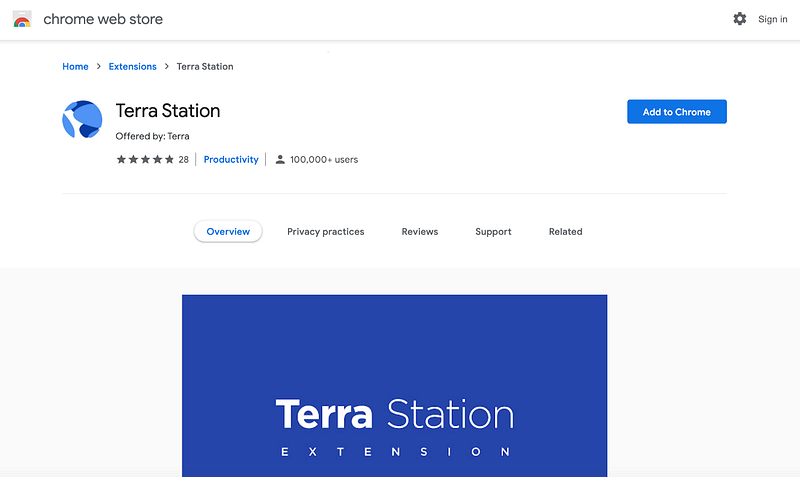
Terra Station is also available on mobile devices based on iOS and Android.

After installing the extension, you need to create a new Terra wallet or import an existing one from a seed phrase. Do not forget to create a backup when creating your crypto wallet (write down and save the seed phrase) so that you can easily restore your wallet if you forget your password. After you have installed and created the Terra Station wallet, you need to receive UST tokens (and, if necessary, LUNA).

Where to get LUNA and UST tokens

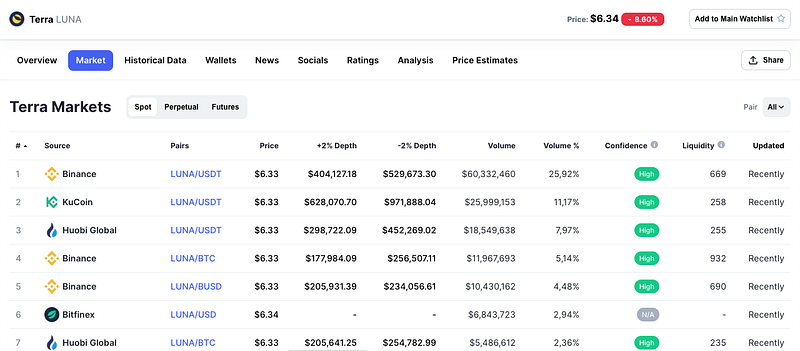
LUNA and UST tokens are traded on various centralized (CEX) and decentralized (DEX) crypto exchanges. A list of available exchanges can be found on the CoinMarketCap website. Finding the list of sites is quite simple:

1. Go to CoinMarketCap.

2. Enter the name or ticker of the token into the search bar, for example, UST or LUNA.
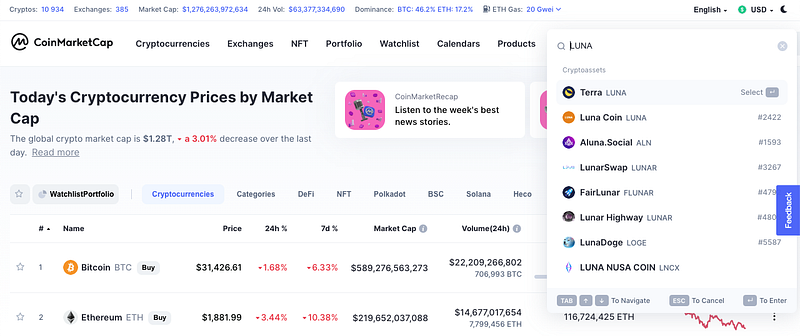
3. Select the necessary token and go to the Market tab on its page. All sites on which the required token is traded will be displayed on this tab. Go to any exchange you like and buy LUNA or UST tokens there.
After purchasing tokens, you need to transfer them to your wallet. Open the extension and copy the wallet address by clicking on it. Please note that Terra Station does not have a Memo function, so you will not need to deal with that. Then send the tokens purchased at the exchange to your address.
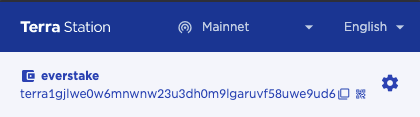
If you already have LUNA tokens, you can exchange them for UST using the Terra Station wallet in the section Swap. Here, you can also exchange UST for LUNA, as well as all other tokens from the Terra ecosystem.

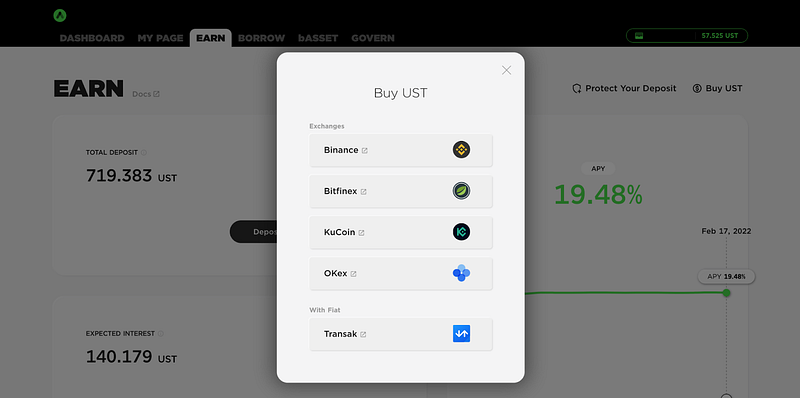
There is also an option to buy UST directly on the Anchor platform with cards and bank transfers worldwide. For this purpose, you can click Buy UST and select Transak.
Anchor Protocol Features

Once you have funded your account, you can start using Anchor Protocol. Let’s get acquainted with the main functions of the platform. Go to the Anchor web app and choose the Earn tab to deposit UST tokens.

This is the simplest strategy for generating income using Anchor Protocol, which is similar to bank deposits, but the difference is that the platform is decentralized and offers higher returns. Currently, the yield on UST savings deposits reaches 20% per annum.

To receive income from UST deposits, you just need to deposit them by clicking the button Deposit.

You can deposit any amount: there are no minimum and maximum thresholds. After that, click the button Proceed and confirm the transaction in the Terra Station extension window. Enter your wallet password and click the button Post.
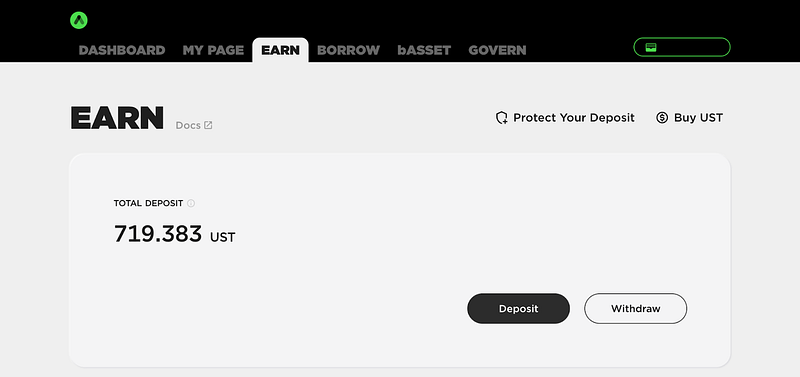
Done and done! You have made a deposit in UST tokens. The Earn tab has a convenient calculator where you can check the approximate income on your deposit for a year, month, week, and day in aUST tokens.
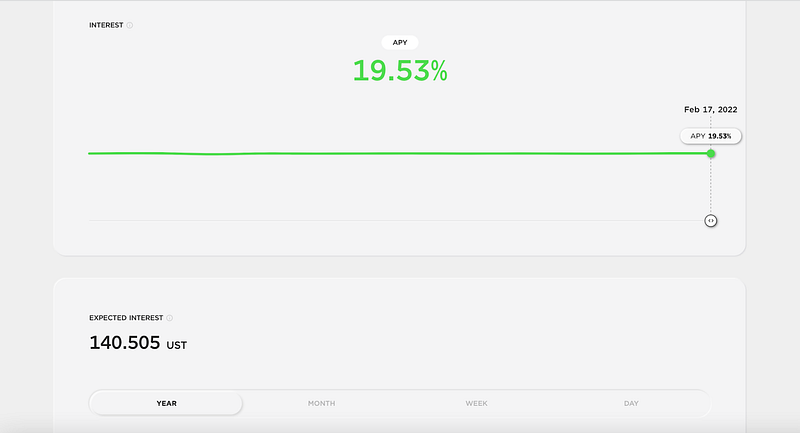
aUST is a token used for savings deposits on Anchor protocol. After depositing a certain amount of UST into Anchor, users automatically receive aUST tokens, which can then be used to generate income on the Anchor platform. Likewise, when you withdraw stablecoins from Anchor, you are actually trading aUST for UST. You can find out more about aTerra assets here.

Pros of deposits on Anchor Protocol:

  • Low risks. UST is a stablecoin pegged to the US dollar, so you are protected from the high volatility of cryptocurrencies.
  • Profitability significantly exceeds bank deposits.
  • Simplicity. The process is similar to depositing in banks, only simpler.

The next way to make money with Anchor Protocol is to borrow UST tokens providing bAssets as collateral. This can be done using the tab Borrow.
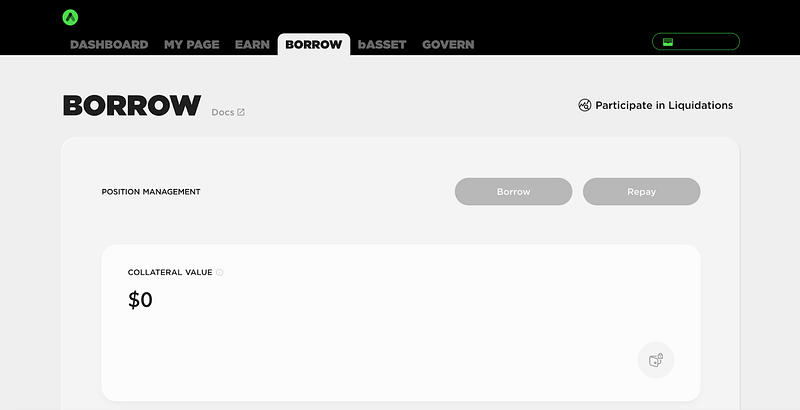
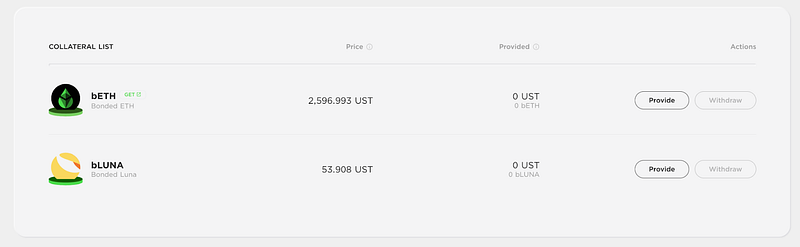
Scroll down the Borrow page to check the Collateral list. Here you can see that bLUNA and bETH are the bonded assets that can be used as collateral.
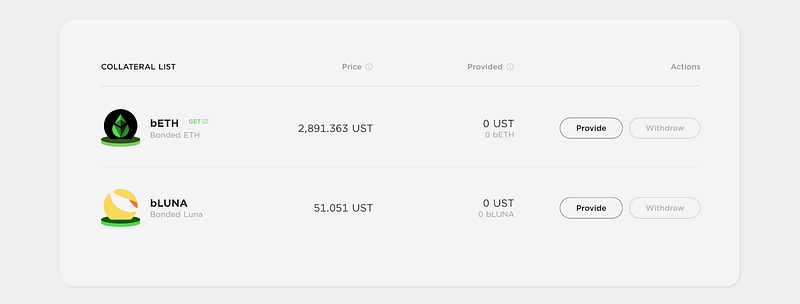
To get bLUNA or bETH you need to bond LUNA or ETH tokens.

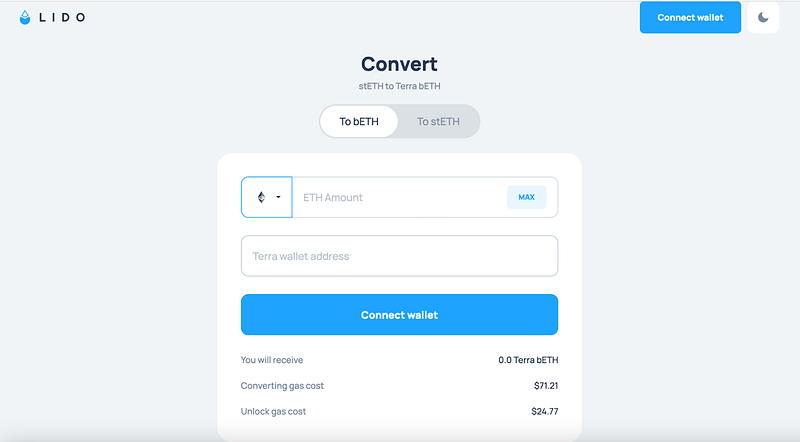
If you want to provide bETH as collateral, go to the LIDO website by clicking the button GET near the bETH ticker.

Connect your ETH compatible wallet, convert ETH to bonded ETH, and send bETH tokens to your Terra wallet address.
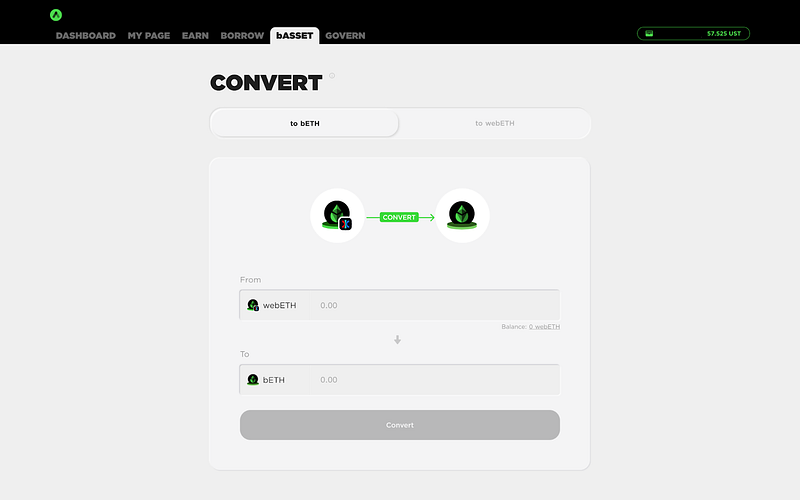
If you have bAssets that have been transferred to Terra through Wormhole (webETH), they must go through the convert operation to be used as collateral on Anchor. You can Convert Wormhole bAsset in the next tab bASSET.
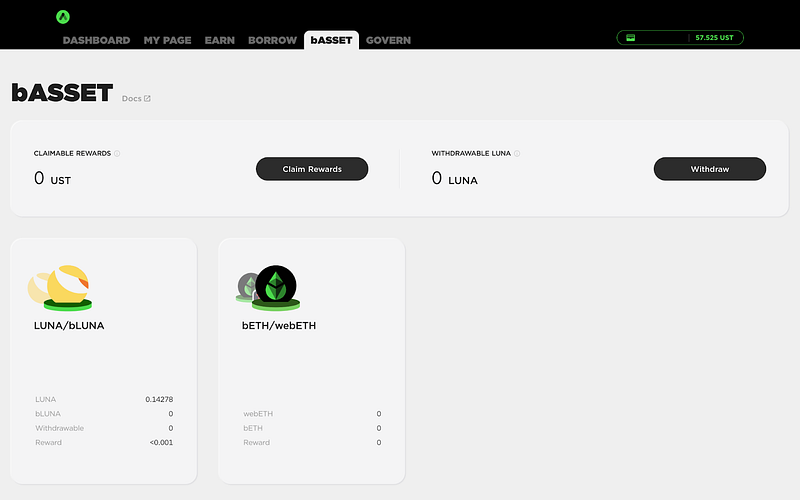
Choose bETH/webETH option and convert Wormhole tokens into bAssets that are usable on Anchor.
In the bASSET tab you can also bond LUNA tokens to mint bLUNA. For this purpose choose the LUNA/bLUNA option.
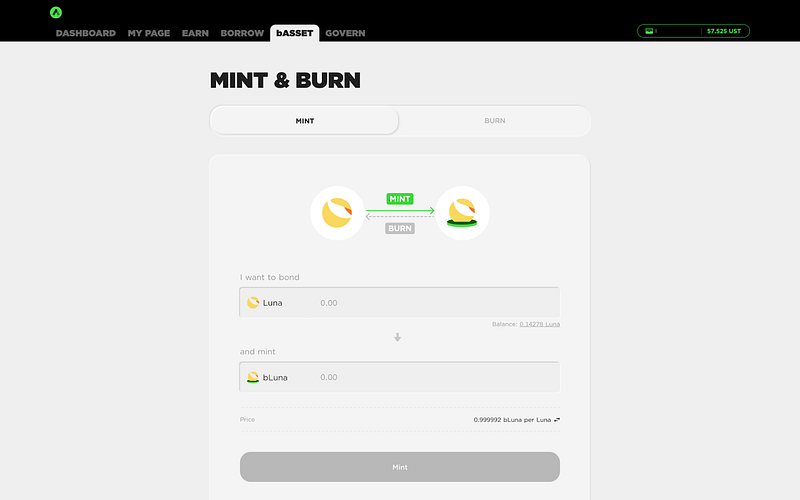
Enter the amount of LUNA for bonding, click the Mint button and confirm the transaction in the Terra Station extension window.

In the future, if you want to redeem your LUNA tokens, you need to burn bLUNA. This can be done in the Burn tab in two ways:
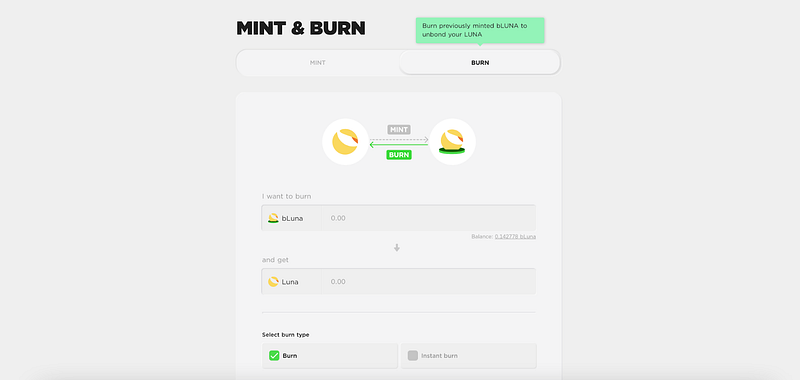
  • Burn is the first type of bLUNA burning, which takes from 21 to 24 days. When choosing this method, slashing events during the specified period may affect the final amount withdrawn.
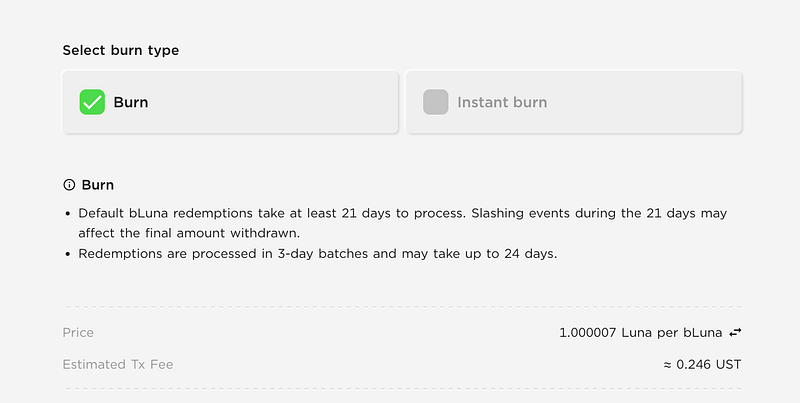
  • Instant burn is a function for instant burning of bLUNA. This way, you don’t have to wait until the end of the unbonding period, but the amount of LUNA tokens received will be less.
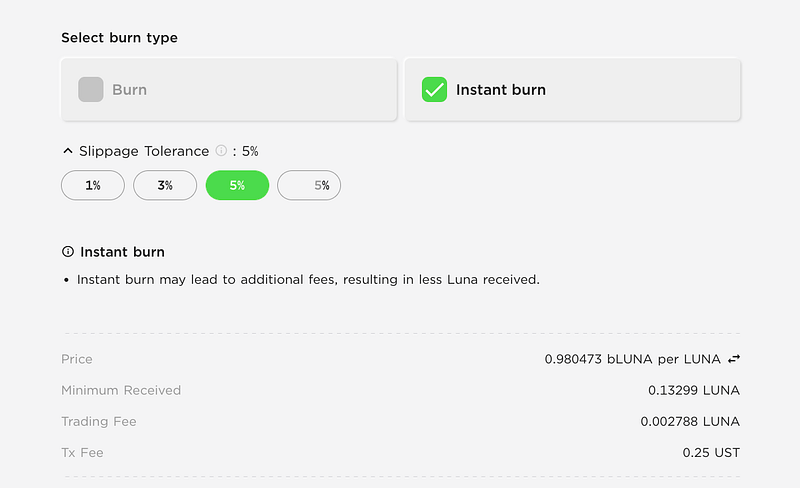
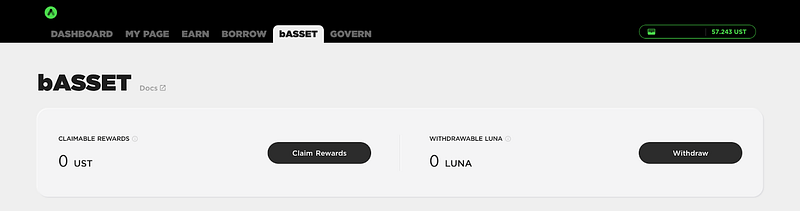
In the bASSET tab you can also claim staking rewards from minted bAssets that have not been provided as collateral, as well as withdraw LUNA tokens after unbonding.
To borrow UST tokens, go back to the Borrow tab and provide available bAssets as collateral. In the Collateral List section, click the Provide button and confirm the transaction in the Terra Station extension window.
Аfter providing the collateral, a Borrow Usage indicator will appear on the page. It is the percentage of the borrow limit used. The borrow limit and usage may fluctuate depending on the collateral value. For Anchor Protocol, borrowing is available only up to 95% borrow usage. If the borrow usage reaches the maximum 100%, a portion of your collateral may be immediately liquidated to repay part of the loan.
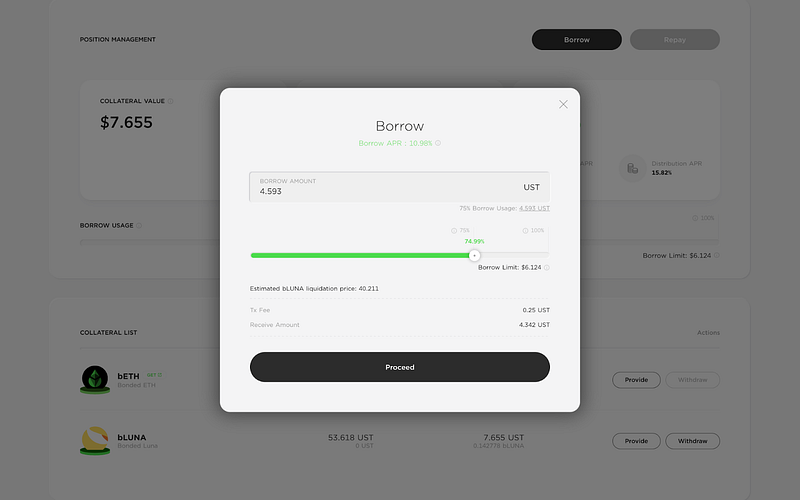
Click on the Borrow button and set the borrow limit in the appeared window. After that, you will see the corresponding amount of UST that can be borrowed. Do not set the borrow limit too high to reduce the risks of collateral liquidation. The Anchor’s recommended borrow usage is 75%. Click the Proceed button and confirm the transaction in the Terra Station extension window.
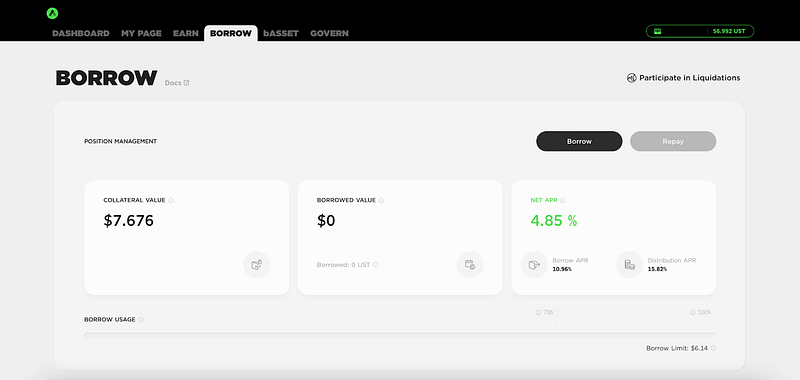
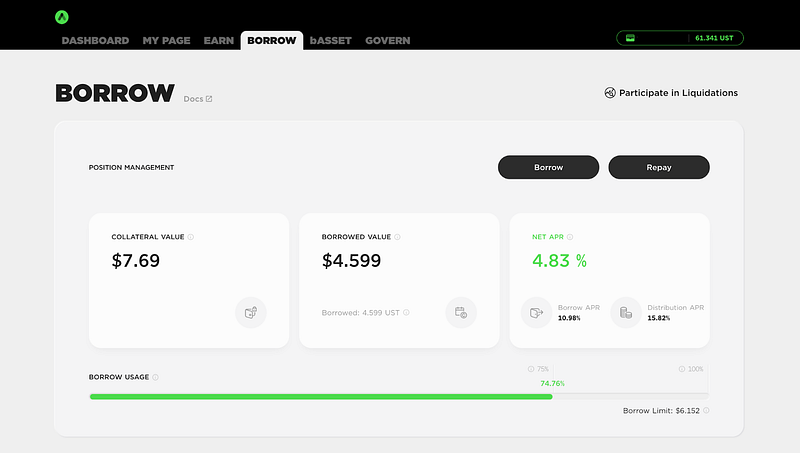
Now in the Borrow tab you can check the indicators showing the value of your collateral, borrowed value and Net APR. The last one shows the difference between the annual percentage yield return determined by ANC rewards given to borrowers (Distribution APR) and the annualized rate of current interest on loans (Borrow APR). When Net APR is a positive number, it means that ANC rewards distributed to borrowers are greater than the interest they pay for the loan.
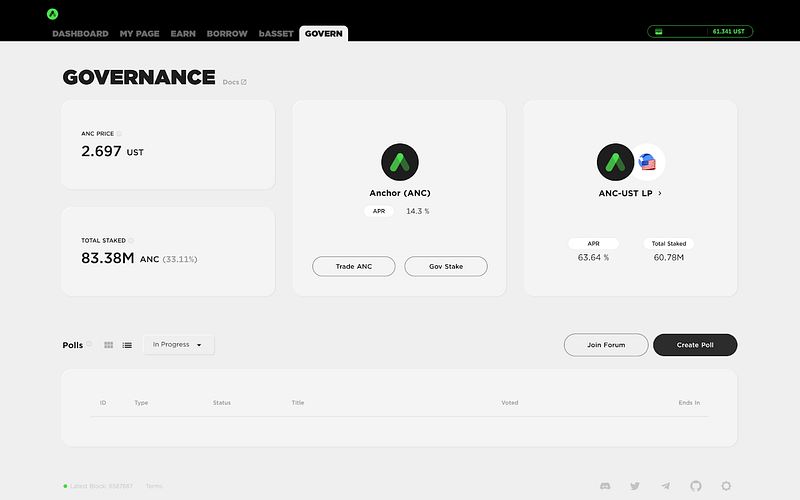
In the last Govern tab, you can stake ANC tokens or add them along with UST to the liquidity pool.
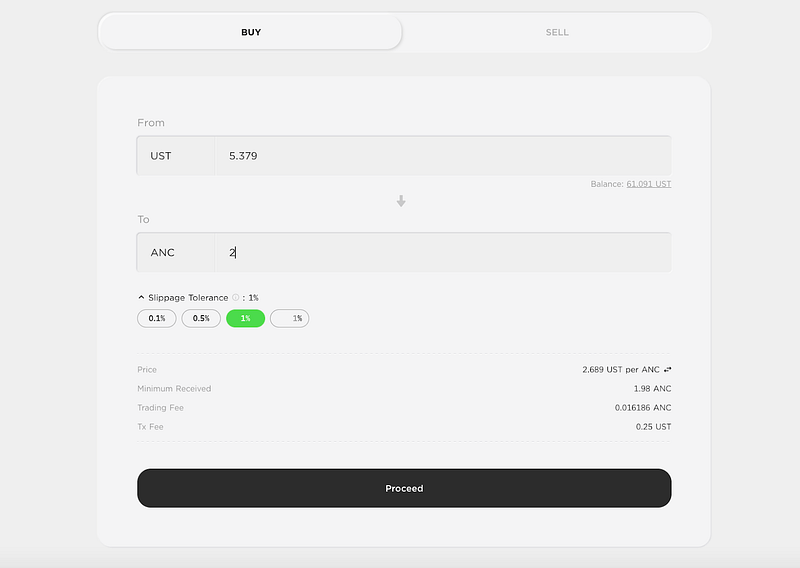
To buy or sell ANC tokens, click on the button Trade ANC, enter the desired ANC or UST amount and click Proceed. Make sure you have enough UST to pay for a transaction fee and confirm it.
To stake ANC tokens, press the button Gov Stake. In the ANC Governance tab enter the amount of ANC you wish to stake, click Stake and confirm the transaction in the Terra Station extension window.
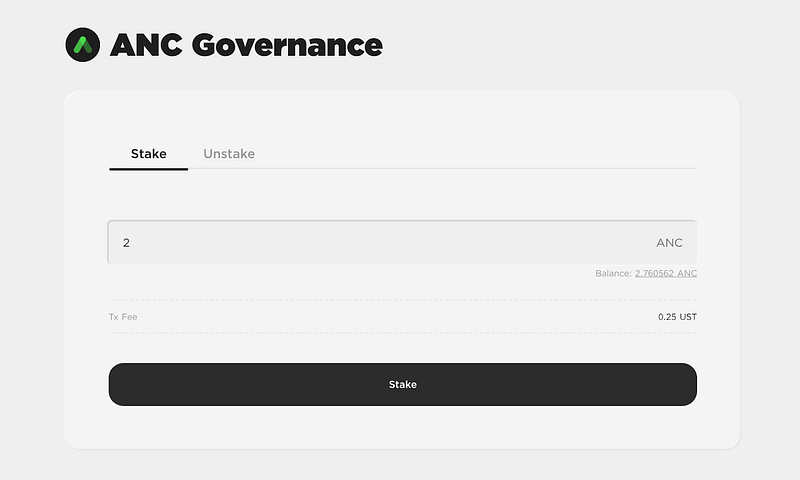
As it was mentioned earlier, in addition to staking ANC tokens in the Govern tab, you can add ANC and UST tokens to liquidity pools and receive income from farming. To provide liquidity, go to the Pool tab and specify the amount of ANC tokens to be added to the pool. The value of UST in the other field will be pulled up automatically.
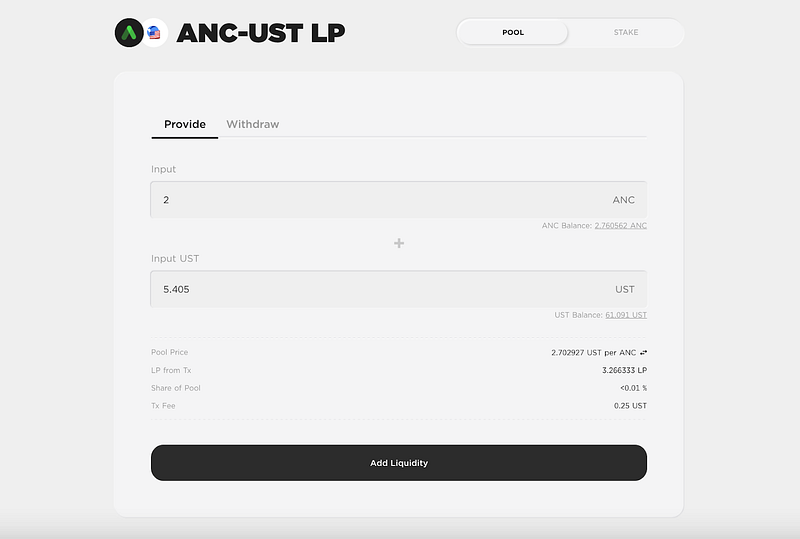
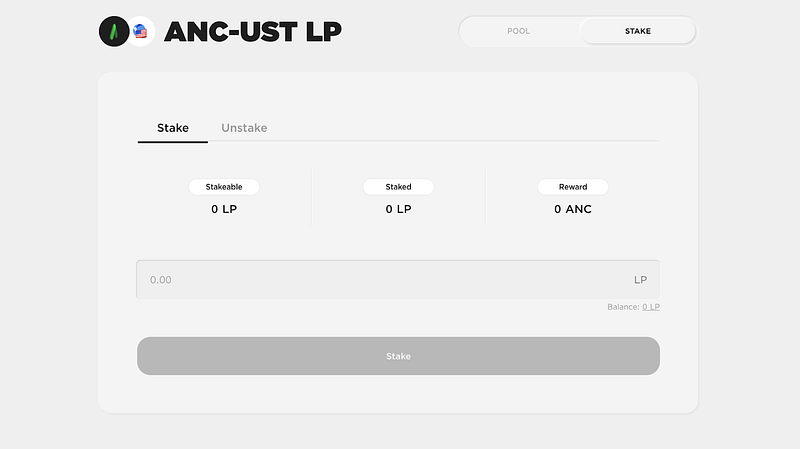
Click the Add Liquidity button, confirm the transaction, and you will receive LP tokens. To earn ANC rewards, stake LP tokens in the next Stake tab. Later in the Unstake tab, you can unstake LP tokens to withdraw provided liquidity.
Pros

  • High profitability. Higher than UST deposits.
  • Increased profitability. With the growth of ANC rate, you will receive additional income.
  • The ability to farm tokens for ANC holders.

Cons

  • Risks of impermanent loss related to the volatility of cryptocurrency.
  • Fall of ANC rate. If the price of ANC decreases, the profitability will also drop as your share in the liquidity pool decreases.

In My Page tab you can track and claim all the rewards from staking ANC, adding ANC and UST tokens to the liquidity pool, and borrowing UST.
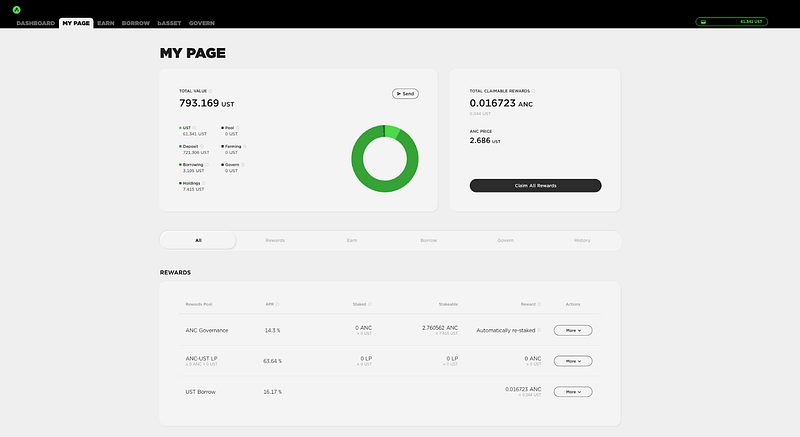
My Page tab also provides you with quick access to all functions of the protocol and displays the transaction history.

Anchor Protocol Farming Strategies

By combining different features available on the Anchor platform, you can use several strategies for yield farming. We will share a few of these strategies which can be used to generate higher income.

The first strategy is a combination of loans and deposits. For example, holders of bLUNA tokens can provide them as collateral, borrow UST and then deposit borrowed UST to the Anchor platform to generate income. Here’s how to do this:

  1. Convert LUNA to bLUNA in the tab bAsset;
  2. Provide tokens as collateral and borrow UST in the tab Borrow;
  3. Make a UST deposit in the tab Earn.

Thus, you will receive income from loans and deposits at the same time.

Pros

  • Increased income.
  • Stabilizing the rate: even if LUNA price rises, you will give back the fixed amount of UST you borrowed. This will also allow generating income from LUNA growth.

Cons

  • Collateral liquidation. If LUNA price falls and the value of collateral is lower than the value of borrowed funds with interest, then your collateral will be automatically liquidated. Your bLUNA tokens will be sold at a lower price to cover the loan.

The second strategy is similar to the previous one with the only difference that after borrowing UST, you can add them to the ANC-UST liquidity pool instead of depositing. This will increase your returns, but at the same time there will be risks due to ANC volatility. The profitability of providing ANC liquidity is constantly changing depending on the activity on Anchor Protocol, and at the time of writing this article is about 60% APR.

Another strategy is to exchange borrowed UST tokens for ANC and stake them. This option is less profitable (approximately 14% APR at the time of writing) and riskier, therefore it is suitable only for ANC holders.

Pros

  • Increased profitability.
  • Reducing risks due to the use of stablecoins (when choosing liquidity mining).

Cons

  • Volatility of ANC tokens.

Conclusion

The Anchor platform provides a flexible system to earn income. Users can use different functions and combine them to increase their earnings. The only thing to remember is that there are also some risks that we described earlier in the article.

Subscribe to Everstake on social networks to get all recent updates and useful information about PoS blockchains!

Medium

Website

Twitter

Telegram

Facebook

Reddit

Everstake
Terra Luna
Anchor Protocol
Yield Farming
Recommended from ReadMedium