
How to Get Index of an Item or Element in a List in Python | Python Tutorial
Python get indices of item in list

Lists are a built-in data type in python.
In the list, you can store related items under one variable name. Lists do not have a fixed size.
Lists are not like strings, they can be easily mutated.
In Python, lists are enclosed in square brackets and elements are separated by commas.
Each element present inside the list has its unique position called index.
If you want to access any element present in the list, you can access them by specifying the index of the element.
The index of a list starts with 0. The first element of the list has an index of 0 and not 1. The second element of the list has an index of 1 and not 2.
An example
a = ['hello','hey','why']print(a[0])
print(a[1])
print(a[2])//Output
hello
hey
whyMost programmers when they start to learn to code face some problems in dealing with this.
Just remember one thing when dealing with an index in a list, the value of the index will always be one less than its actual position.
Operation on lists
Lists are a type of sequence.
Lists support all kinds of sequence operations that apply to strings.
All sequence operations on strings return a string.
When working with lists, it will return a list when performing any type of sequential operation.
Some examples
a = ['hello','hey','why']print(len(a))//Result:
3Just like we can use len on a string, we used it on a list and it worked as expected.
a = ['hello','hey','why']print(a[0])
print(a[:-1])
print(a + [1,2,4])//Result:hello
['hello', 'hey']
['hello', 'hey', 'why', 1, 2, 4]Get the index of an item or element in a list in Python
So far we have seen how to access the elements of a list using an index number.
But in our day-to-day as programmers, many times when we work with the list we don’t know the index number of the different elements.
That’s why we need to know how to get indices of different elements in the list.
Let’s dive into this one.
Using the index() method in Python
The length of the lists can sometimes be very big. Sometimes it becomes impossible for programmers to know the index of an element directly.
This is when we need to use the built-in function called index().
This function can help you find the index of any element present in the list.
You just need to pass the element as an argument to this function. Once you pass the element as an argument, it handles everything for you and simply returns the index of that element in the list.
Syntax of index() function
any_list.index(element, start, end)The name any_list will refer to the name of the list you are trying to search from.
element: — This parameter is compulsory. You need to specify the element whose index you want to find out.
start: — This parameter is optional. You may or may not specify the index to start the search with. If you don’t mention this parameter when you use the index() function by default it will start from the first element.
end: — This parameter is optional. You may or may not specify the index to end the search. If you don’t mention this parameter when you use the index() function by default it will end at the last element.
How does the index() function return values?
The index function will return the index of the element passed as a parameter.
If the element or Item is not found in the list, it will not return the index of the element. Instead, it will return ValueError.
An example
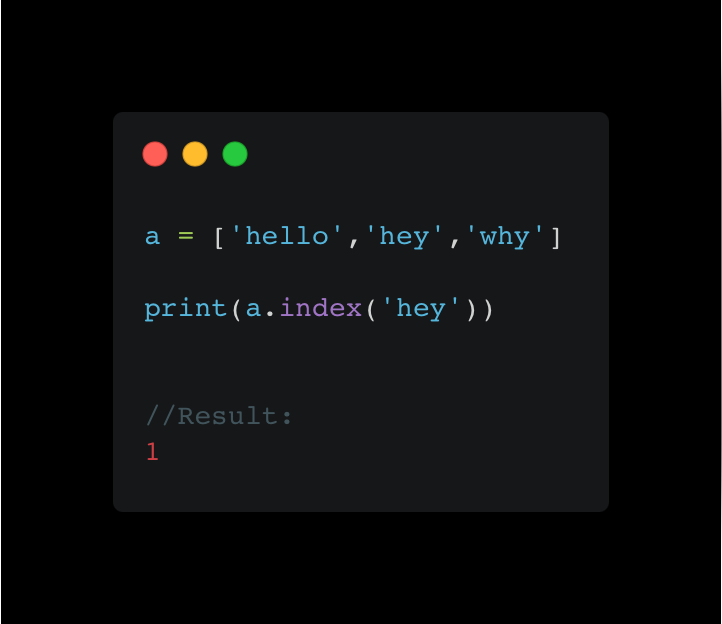
In the example above, we have used the index function to find the index of the element ‘hey’ from the list a.
In the following example, we are going to use the optional parameters of the index function.
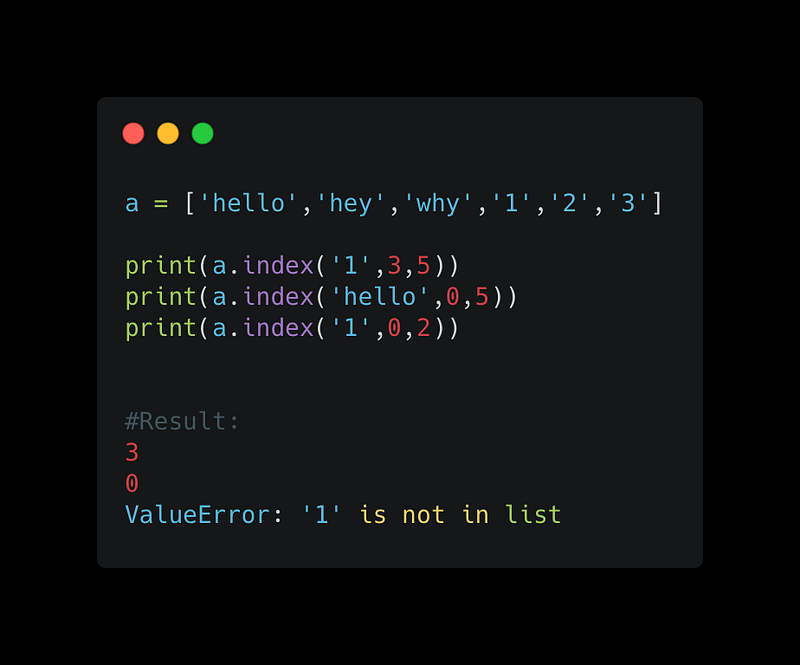
In the above code, first, we look for element ‘1’ between index 3 and 5.
3 is returned by the index function. Element ‘1’ is present at index three.
In the second example, we look for the ‘hello’ element between index 0 and 5.
0 is returned by the index function. The element ‘hello’ is present at index 0.
With the third example, we look for element ‘1’ again, but this time between index 0 and 2.
ValueError is returned since element ‘1’ is not present between any of those positions.
Use a for loop to get the index of an element or element in a list
a = ['hello','hey','why','1','2','3']for i in range(len(a)):
print(i)//Result:
0
1
2
3
4
5In the code above, the loop will iterate through the entire list, from the beginning to the end.
The len() function calculates the length of the list.
Finally, when you run the above code, you can easily get the index of all the elements present in the list.
Summary
You can use the index() function and the for loop to get the index of elements in a list.
The index() function is built in and you can get the index of elements using it directly.
With for loop, you have to use some other built-in functions to get the indices.
Do You Want to Fast Track Your Career as a Programmer
Join a group of people who love programming and technology.
With the help of our community, we will fix major problems in the life of programmers and discuss frontend as well as backend engineering.
We will help you reprogram your understanding of various things in technology.


