avatarLuciano Giavedoni

Free AI web copilot to create summaries, insights and extended knowledge, download it at here

1355

Abstract

-ons panel, search for “cryptowallet”, click on “+ FREE” to install it.</h2><figure id="3a27"><img src="https://cdn-images-1.readmedium.com/v2/resize:fit:800/1*l-WRN-1yVufRI4F8m_sNjQ.png"><figcaption></figcaption></figure><h2 id="7cd0">3. Choose under which account you want to install the Add-on.</h2><figure id="b916"><img src="https://cdn-images-1.readmedium.com/v2/resize:fit:800/1*ZxJMkj_IP8jm6bS_tenIwg.png"><figcaption></figcaption></figure><h2 id="e517">4. CRYPTOWALLET needs to connect to an external API, click on “Allow”.</h2><figure id="e987"><img src="https://cdn-images-1.readmedium.com/v2/resize:fit:800/1*F9JTiyRUV250uFCPzw1B0A.png"><figcaption></figcaption></figure><p id="477d">And that’s it! From there the <code>=CRYPTOWALLET()</code> function is available on any new spreadsheet you create.</p><figure id="931e"><img src="https://cdn-images-1.readmedium.com/v2/resize:fit:800/1*5C4PIUVVr515niBTUZdCBg.png"><figcaption></figcaption></figure><h1 id="a74d">How to use</h1><h2 id="3849">Example</h2><ul><li><code>=CRYPTOWALLET("BTC","YOUR_WALLET_ADDRESS")</code> returns the balance of your Bitcoin address.</li><li><code>=CRYPTOWALLET("ETH","YOUR_WALLET_ADDRESS")</code> returns the balance of your Ethereum address.</li><li><code>=CRYPTOWALLET("DASH","YOUR_WALLET_ADDRESS")</code> returns the balance of your Dash address.</li></ul><h2

Options

id="8172">How to convert the balance to currency (USD / EUR)?</h2><p id="063f">For that the best will be to use the <a href="https://chrome.google.com/webstore/detail/cryptofinance">CRYPTOFINANCE</a> Add-on: <a href="https://goo.gl/WA69FV">https://goo.gl/WA69FV</a></p><h1 id="d922">How to send feedback and ask questions</h1><p id="aa12">Get in touch on Twitter:</p><div id="ed52" class="link-block"> <a href="https://twitter.com/lgiavedoni"> <div> <div> <h2>Luciano Giavedoni (@lgiavedoni) | Twitter</h2> <div><h3>The latest Tweets from Luciano Giavedoni (@lgiavedoni): "commercetools Labs - New Experiment with facial recognition…</h3></div> <div><p>twitter.com</p></div> </div> <div> <div style="background-image: url(https://miro.readmedium.com/v2/resize:fit:320/0*PAZshAx9Y38C6q6a.)"></div> </div> </div> </a> </div><h2 id="9b1a">Do you find CRYPTOWALLET very useful and want to thank me?</h2><p id="c846">I accept Bitcoin donation: 147EgBts7ruUjaVSpDSdpEAs1E9r4DnGTt</p><figure id="c187"><img src="https://cdn-images-1.readmedium.com/v2/resize:fit:800/1*WRZZWqpfMJadZF56ThCe1Q.png"><figcaption>Bitcoin address where to send your donation</figcaption></figure></article></body>

How to get crypto balance from your wallet in Google Sheets

Add-ons for google sheets that let you get the crypto balance from your wallet
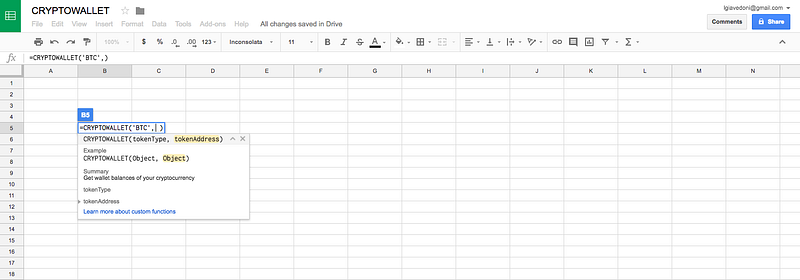
The CRYPTOWALLET function on Google Sheets.

Why?

Keeping track of your crypto-currency portfolio can be challenging.There are a few services out there, but nothing beats the flexibility of a spreadsheet.

Google Sheets is a very convenient spreadsheet tool. But as of today there are not many services that let you get information about crypto-currency.

The CRYPTOWALLET() function, available as a Google Sheets Add-On, uses several APIs to returns the balance of your wallet.

As of today I offer support for:

  • BTC
  • ETH
  • DASH
  • IOTA

How to install

1. Go to the “Add-ons” menu, and click on “Get add-ons”.
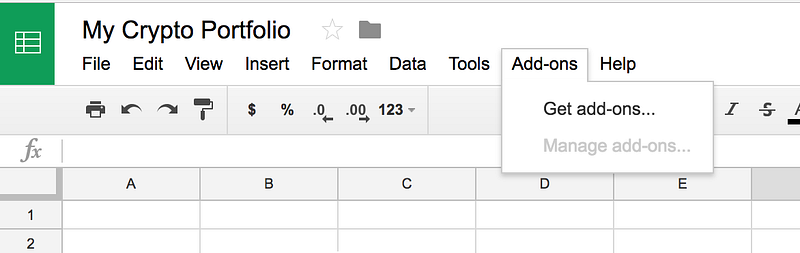
2. On the Add-ons panel, search for “cryptowallet”, click on “+ FREE” to install it.
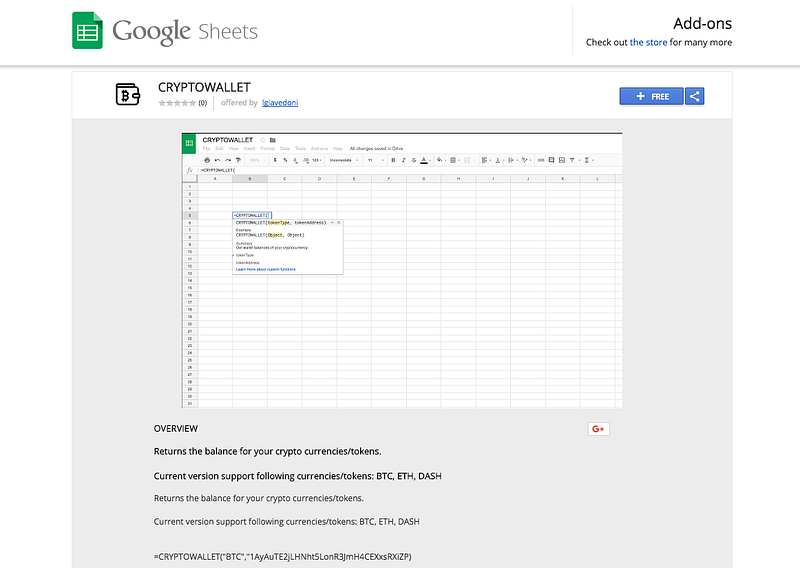
3. Choose under which account you want to install the Add-on.
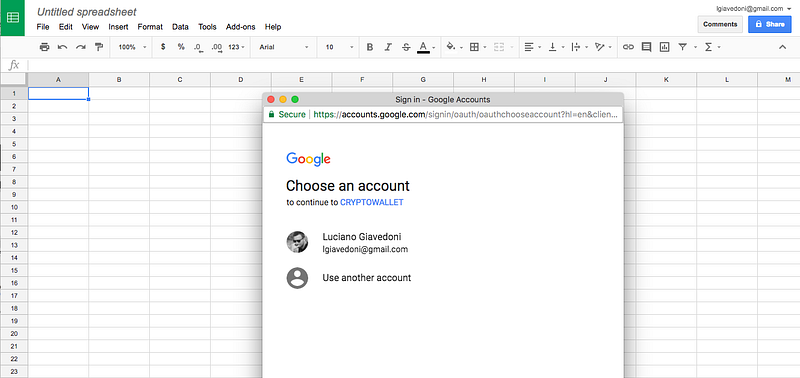
4. CRYPTOWALLET needs to connect to an external API, click on “Allow”.
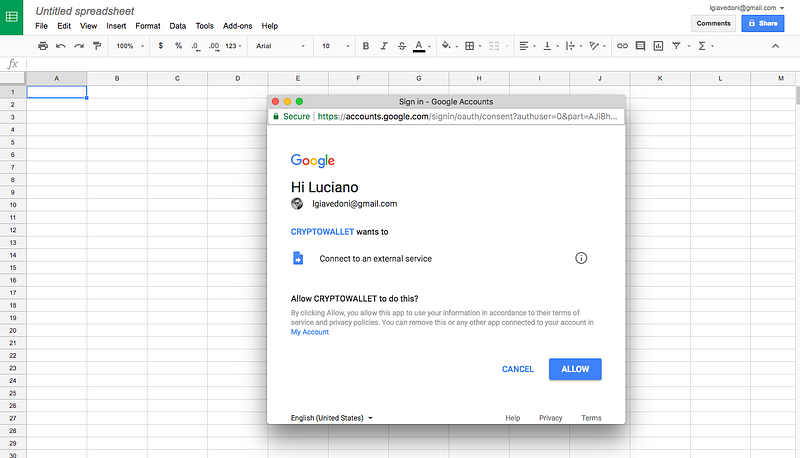
And that’s it! From there the =CRYPTOWALLET() function is available on any new spreadsheet you create.
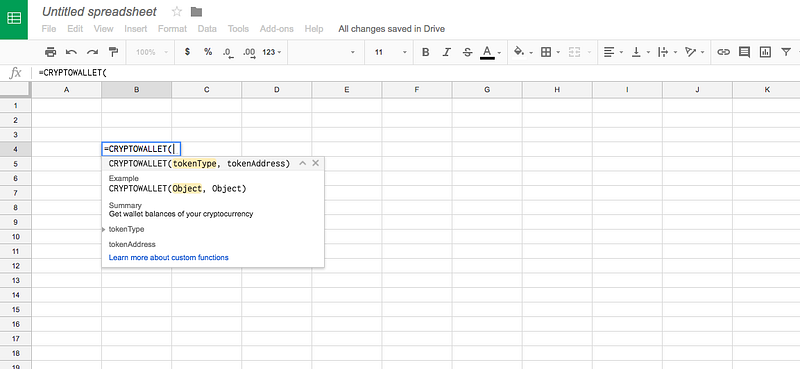
How to use

Example

  • =CRYPTOWALLET("BTC","YOUR_WALLET_ADDRESS") returns the balance of your Bitcoin address.
  • =CRYPTOWALLET("ETH","YOUR_WALLET_ADDRESS") returns the balance of your Ethereum address.
  • =CRYPTOWALLET("DASH","YOUR_WALLET_ADDRESS") returns the balance of your Dash address.

How to convert the balance to currency (USD / EUR)?

For that the best will be to use the CRYPTOFINANCE Add-on: https://goo.gl/WA69FV

How to send feedback and ask questions

Get in touch on Twitter:

Do you find CRYPTOWALLET very useful and want to thank me?

I accept Bitcoin donation: 147EgBts7ruUjaVSpDSdpEAs1E9r4DnGTt

Bitcoin address where to send your donation
Bitcoin
Cryptocurrency
Ethereum
Google Sheets
Trading
Recommended from ReadMedium