
3 Ways to Get Notified with Python
Now you can Work on Other Projects while Waiting for the Training to be Done
Motivation
As a data scientist or programmer, it might take you a lot of time to process your data and train your model. It is inefficient to constantly check the training on your screen, especially when the training can take hours or days. Are there ways that you can get a notification when your training is done with Python?
Yes, you can get notified by:
- noise
- slack
Each of these methods just takes you 2 or 3 more lines of codes. Let’s find out how to create your own system to get notified using these methods.
Make noise
If you are doing something close to your computer while waiting for the training to be done, simply making a noise when the training is complete is a good enough solution.
I found this code snippet on StackOverflow. The function below creates beep noise with specified duration and frequency
On Windows
On Linux and Mac
You need to install sox to run the code below
On Linux, run
sudo apt install soxOn Mac, run
sudo port install soxSimply insert function make_noise() at the bottom of your training code
Once the training finishes running, the function make_noise() will be executed and there will be a noise! If you are doing something else, you can stop what you are doing and check on your training results.
Making noise is a great way to get notified, but what if you are not close to your computer when the training is complete? Plus you might want to let your teammates know when the training is complete. That is when sending an email comes in handy.
There is a Python library called knockknock that allows you to get a notification when your training is complete or when it crashes during the process. All it takes to get a notification is two additional lines of code.
To install knock-knock, type
pip install knockknockYou need a Gmail email address to send an email with knock-knock. Make sure to turn on the less secure apps feature for knockknock to use your Gmail account. It is ideal to create another Gmail account to send a notification in order to secure your main Gmail account.
To send an email, simply insert a decorator @email_sender() above your training function
You can send an email to one person or a list of people with recipient_emails=[“[email protected]”, “[email protected]”] .
If sender_email is not specified, then the first email in recipient_emails will be used as the sender's email.
Now when you run your script
python yourscript.pyYou will receive an email when the training is complete.
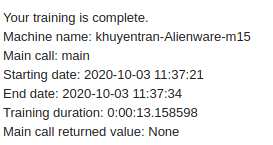
Try this on your existing script and check your email!
Slack
Slack is a common platform for many teams to discuss their work and share their progress. If you are using Slack, you might wish to send it to a channel in your company, for example, channel #developer, to notify your developer team when the training is finished. Luckily, knock-knock also allows you to send a notification when the training finishes!
To send a notification to your Slack, start with enabling and creating an incoming webhook. Then simply specify the webhook URL of your slack room with webhook_url and the channel to notify with channel.
In case you want to tag your teammate, adduser_mentions=[“your_slack_id”, “your_teammate_slack_id”] to @slack_sender
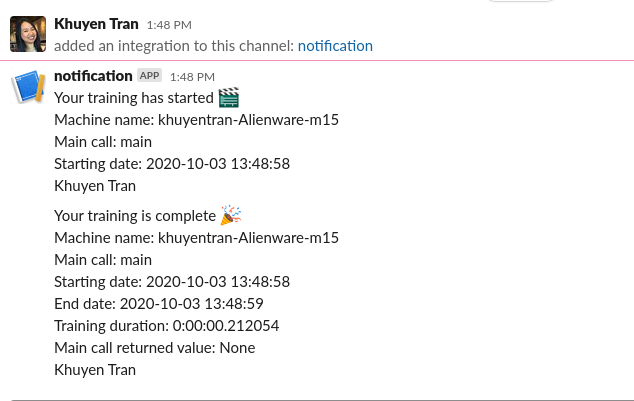
Now when you run your script, a message should be sent to your slack channel when the code finishes executing!
Conclusion
Congratulations! You have just learned how to get notified by making noise, sending a notification to your email, or Slack channel. Now you don’t need to constantly check your computer to find out whether the training has complete anymore! You and your teammates can work on other projects while waiting for the training to finish.
Check knock-knock if you want to use Telegram messenger, text message, or other ways to get notifications.
The source code for this article can be found here:
I like to write about basic data science concepts and play with different algorithms and data science tools. You could connect with me on LinkedIn and Twitter.
Star this repo if you want to check out the codes for all of the articles I have written. Follow me on Medium to stay informed with my latest data science articles like these:


