avatarBurk

Free AI web copilot to create summaries, insights and extended knowledge, download it at here

2923

Abstract

te of signup, names, source of the subscription, and a checkbox for potential unsubscribes.</p><figure id="d793"><img src="https://cdn-images-1.readmedium.com/v2/resize:fit:800/1*9faaVRGiRoYnTN5d4nUz4g.jpeg"><figcaption>Screenshot of <a href="https://burk.gumroad.com/l/newslettersubscriberexport">free Notion template on Gumroad</a></figcaption></figure><p id="f6cc"><b>Let’s dive deeper!</b></p><p id="4520">The automation works with <a href="https://zapier.com/"><i>Zapier</i></a>.</p><p id="901e"><i>Zapier</i> is a powerful tool that does get pretty expensive if you need extensive capabilities. Luckily, for our use case, the free account is enough.</p><p id="8bd9">With this free account, you can automate quite a number of tasks. I’ve set <i>Zapier</i> up with <a href="https://getrevue.co/"><i>Revue</i></a> and <a href="https://notion.so/"><i>Notion</i></a>.</p><p id="9ece">Whenever I get a new <i>Revue</i> subscriber, the data is automatically transferred to my Notion database and hence backed up and tagged with the relevant details.</p><p id="8ee5">Here’s how it works.</p><h1 id="86c2">Zapier workflow</h1><ol><li>You create a free account with <a href="https://zapier.com/sign-up"><i>Zapier</i></a>.</li><li>Then, you <b>create a new Zap,</b> as they call it.</li><li>You <b>connect <i>Zapier</i> to your newsletter provider</b> of choice, in my case <i>Revue</i>. But you’ll find many of the popular options here, including <i>ConvertKit</i>, <i>Mailchimp</i>, <i>MailerLite</i>, <i>Gumroad</i>, <i>Sendinblue</i>, etc.</li><li>Afterward, you <b>connect your <i>Notion</i> account</b> and the correct database.</li><li>Lastly, you <b>connect the appropriate <i>Notion</i> fields to the <i>Revue</i> values</b>, the email field to the email address from <i>Revue</i>, first and last name to their respective Notion columns.</li><li>Additionally, I manually <b>add the source (as plain text) to the <i>Notion</i> database</b>. In my case, I write “<i>Revue</i>” to the Notion source column. This way, I know the subscriber came from <i>Revue</i>. If you add another Zap for a second platform like <i>ConvertKit</i>, you repeat steps 1–5 and add the source “<i>ConvertKit</i>” as plain text.</li></ol><h1 id="ea03">Do it yourself</h1><p id="ea56">Let’s stop with the theory. Go try it for yourself!</p><p id="4561"><b>I have made my <i>Notion</i> template available on <a href="https://burk.gumroad.com/l/newslettersubscriberexport">Gumroad</a></b>. <a href="https://burk.gumroad.com/l/newslettersubscriberexport">Download it there</a>, add a <i>Zapier</i> account, and connect to your newsletter platform(s) of choice.</p><p id="ddb0">Afterward, each new subscriber will automatically be added to your Notion database with all relevant info.</p><h1 id="1480">The bottom line</h1><p id="5005">You need an email list. This will be your audience, your true fans, people who want to receive your creations in t

Options

heir inbox. It’s powerful.</p><p id="60bb">With my simple Notion template, you can automate the process of gathering and managing your subscriber data quickly and easily.</p><p id="2164">Let’s recap:</p><ol><li>Download my template from <a href="https://burk.gumroad.com/">Gumroad</a>.</li><li>Create a free <a href="https://zapier.com/"><i>Zapier</i></a> account.</li><li>Connect your newsletter platform and <i>Notion</i> to <i>Zapier</i>.</li><li>Follow the steps within <i>Zapier</i> to align the details.</li><li><b></b> Done. Watch your database grow automatically.</li></ol><p id="c28a">If you have question about the template, reach out to me. You’ll find my info at the bottom of the template.</p><p id="6992"><i>P.S.: First, you should get my posts in your inbox. <a href="https://burkrosemann.medium.com/subscribe"><b>Do that here</b></a>! Secondly, if you like to experience Medium yourself, consider supporting me and thousands of other writers <a href="https://burkrosemann.medium.com/membership"><b>by signing up for a membership</b></a>. It only costs 5 per month, and you have the chance to make money with your writing as well. When I started, <b>I made 3000 in 6 months</b>. By signing up <a href="https://burkrosemann.medium.com/membership"><b>with this link</b></a>, you’ll support me directly with a portion of your fee, it won’t cost you more. If you do so, thank you a million times! Lastly, <a href="https://burk.gumroad.com/"><b>I create freebies</b></a> all the time. <a href="https://letters.byburk.net/"><b>Subscribe for more</b></a>.</i></p><div id="2c40" class="link-block"> <a href="https://burkrosemann.medium.com/membership"> <div> <div> <h2>Join Medium with my referral link - Burk</h2> <div><h3>As a Medium member, a portion of your membership fee goes to writers you read, and you get full access to every story…</h3></div> <div><p>burkrosemann.medium.com</p></div> </div> <div> <div style="background-image: url(https://miro.readmedium.com/v2/resize:fit:320/0*KUdXo2shqbgWxdlu)"></div> </div> </div> </a> </div><div id="9e2a" class="link-block"> <a href="https://burkrosemann.medium.com/list/68d24fad68fa"> <div> <div> <h2>How to Make Thousands Of $$$ Online</h2> <div><h3>This is a collection of inspiring stories about making money online. There's a niche for everything. The possibilities…</h3></div> <div><p>burkrosemann.medium.com</p></div> </div> <div> <div style="background-image: url(https://miro.readmedium.com/v2/resize:fit:320/0*f4c7c6a2672d51da25faa6aad8a2c488f3a86b71.jpeg)"></div> </div> </div> </a> </div></article></body>

How to Gather Subscribers From Different Platforms In One Place, Automatically

Netz Vektor erstellt von pch.vector — de.freepik.com

“You need a newsletter” — basically every creator out there.

I agree.

You don’t need a newsletter to write a newsletter, though.

You want a newsletter to grow a platform-independent audience that you can “take” with you from one platform to the next.

Moreover, you might gather subscribers in multiple places. Maybe you have a ConvertKit newsletter, a LinkedIn email list, and a Revue embed on your Twitter profile.

  • That’s great, because it theoretically 3x the chances of getting subscribers.
  • It’s inconvenient, because you have subscribers in three different places.

Here’s an easy fix to gather those subscribers automatically.

Problem

I’ve switched newsletter platforms a few times in the past. From ConvertKit to Substack, from Substack to Revue.

Additionally, I have a couple of email lists. My newsletter, a Gumroad customer list, my Medium subscribers, and more.

If I wanted to switch providers, I’d have to export all subscriber data from various places and import that into the new tool.

Sounds familiar?

Solution

That’s why I created a Notion template that automatically gathers all my subscriber data from different platforms in one place.

This has multiple upsides:

  1. Backup. I have an automatic copy of subscribers in my Notion workspace, in case something happens with the platform.
  2. No hassle. Since this workflow runs automatically, I don’t have to worry about losing data, managing new subscribers, manually copying them over, etc.
  3. Filtering. By tagging subscriber data with relevant info within Notion and via the automation itself, I can filter for and target specific user groups.

Notion & Zapier

To achieve this automation, I created a simple, yet effective Notion database for subscribers with a few key pieces of information like email address, date of signup, names, source of the subscription, and a checkbox for potential unsubscribes.
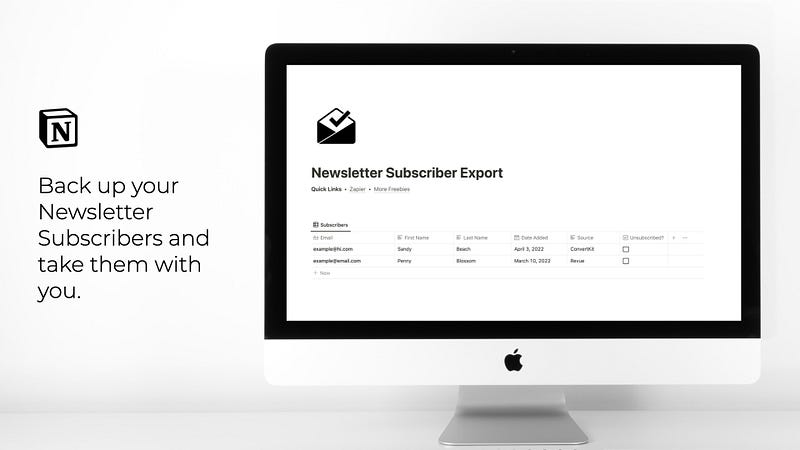
Screenshot of free Notion template on Gumroad

Let’s dive deeper!

The automation works with Zapier.

Zapier is a powerful tool that does get pretty expensive if you need extensive capabilities. Luckily, for our use case, the free account is enough.

With this free account, you can automate quite a number of tasks. I’ve set Zapier up with Revue and Notion.

Whenever I get a new Revue subscriber, the data is automatically transferred to my Notion database and hence backed up and tagged with the relevant details.

Here’s how it works.

Zapier workflow

  1. You create a free account with Zapier.
  2. Then, you create a new Zap, as they call it.
  3. You connect Zapier to your newsletter provider of choice, in my case Revue. But you’ll find many of the popular options here, including ConvertKit, Mailchimp, MailerLite, Gumroad, Sendinblue, etc.
  4. Afterward, you connect your Notion account and the correct database.
  5. Lastly, you connect the appropriate Notion fields to the Revue values, the email field to the email address from Revue, first and last name to their respective Notion columns.
  6. Additionally, I manually add the source (as plain text) to the Notion database. In my case, I write “Revue” to the Notion source column. This way, I know the subscriber came from Revue. If you add another Zap for a second platform like ConvertKit, you repeat steps 1–5 and add the source “ConvertKit” as plain text.

Do it yourself

Let’s stop with the theory. Go try it for yourself!

I have made my Notion template available on Gumroad. Download it there, add a Zapier account, and connect to your newsletter platform(s) of choice.

Afterward, each new subscriber will automatically be added to your Notion database with all relevant info.

The bottom line

You need an email list. This will be your audience, your true fans, people who want to receive your creations in their inbox. It’s powerful.

With my simple Notion template, you can automate the process of gathering and managing your subscriber data quickly and easily.

Let’s recap:

  1. Download my template from Gumroad.
  2. Create a free Zapier account.
  3. Connect your newsletter platform and Notion to Zapier.
  4. Follow the steps within Zapier to align the details.
  5. Done. Watch your database grow automatically.

If you have question about the template, reach out to me. You’ll find my info at the bottom of the template.

P.S.: First, you should get my posts in your inbox. Do that here! Secondly, if you like to experience Medium yourself, consider supporting me and thousands of other writers by signing up for a membership. It only costs $5 per month, and you have the chance to make money with your writing as well. When I started, I made $3000 in 6 months. By signing up with this link, you’ll support me directly with a portion of your fee, it won’t cost you more. If you do so, thank you a million times! Lastly, I create freebies all the time. Subscribe for more.

Newsletter
Email Marketing
Productivity
Advice
Ideas
Recommended from ReadMedium