
How to flatten MultiIndex Columns and Rows in Pandas
6 Tricks to effectively flatten MultiIndex columns and rows in a Pandas DataFrame

A MultiIndex (also known as a hierarchical index) DataFrame allows you to have multiple columns acting as a row identifier and multiple rows acting as a header identifier.

MultIndex is very useful for doing sophisticated data analysis, especially for working with higher dimensional data. Pandas has various methods that can output a MultIndex DataFrame, for instance, groupby(), melt(), pivot_table(), stack() etc. However, sometimes it’s just easier to work with a single-level index in a DataFrame.
In this article, you’ll learn how to flatten MultiIndex columns and rows. This article is organized as follows:
- Flatten columns: use
get_level_values() - Flatten columns: use
to_flat_index() - Flatten columns: join column labels
- Flatten rows: flatten all levels
- Flatten rows: flatten a specific level
- Flatten rows: join row labels
Please check out the Notebook for source code. More tutorials are available from Github Repo.
1. MultiIndex columns: use get_level_values()
To start, let’s create a sample DataFrame and call groupby() to create a MultiIndex column:
df = pd.DataFrame({
    'name': ['Tom', 'James', 'Allan', 'Chris'],
    'year': ['2000', '2000', '2001', '2001'],
    'math': [67, 80, 75, 50],
    'star': [1, 2, 3, 4]
})
df_grouped = df.groupby('year').agg(
{ 'math': ['mean', 'sum'], 'star': 'sum'}
)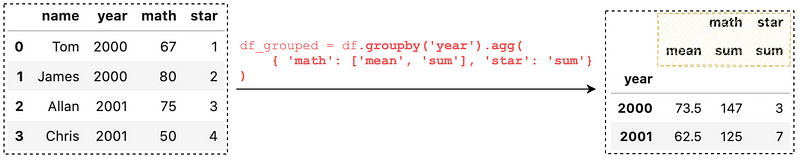
Running df_grouped.columns , we can see that we have a MultiIndex column
df_grouped.columnsMultiIndex([('math', 'mean'),
('math', 'sum'),
('star', 'sum')],
)The easiest way to flatten the MultiIndex columns is to set the columns to a specific level, for instance, set the columns to the top level:
df_grouped.columns = df_grouped.columns.get_level_values(0)
get_level_values(0) returns the top level and we assign the value to df_grouped.columns. This certainly does the job, but you may have already noticed that the result has 2 math columns.
2. Flatten columns: use to_flat_index()
As of Pandas version 0.24.0, the to_flat_index() converts a MultiIndex to an Index of Tuples containing the level values:
df_grouped.columns.to_flat_index()# output
Index([('math', 'mean'), ('math', 'sum'), ('star', 'sum')], dtype='object')By assigning the result to df_grouped.columns, the result will look like this:
df_grouped.columns = df_grouped.columns.to_flat_index()
3. Flatten columns: join column labels
If you want a better human-readable single-level index, you can join the values in the MultiIndex:
['_'.join(col) for col in df_grouped.columns.values]# output
['math_mean', 'math_sum', 'star_sum']By assigning the result to df_grouped.columns, the result will look like this:
df_grouped.columns
  = ['_'.join(col) for col in df_grouped.columns.values]
4. Flatten rows: flatten all levels
Suppose we have the following DataFrame with MultiIndex rows:
multi_index = pd.MultiIndex.from_tuples([
  ('Oxford', 'A', '01-01-2022'),
  ('Oxford', 'B', '01-01-2022'),
  ('Oxford', 'A', '02-01-2022'),
  ('Oxford', 'B', '02-01-2022'),
  ('London', 'C', '01-01-2022'),
  ('London', 'D', '01-01-2022'),
  ('London', 'C', '02-01-2022'),
  ('London', 'D', '02-01-2022')],
  names=['Location','Store', 'Date']
)
data = {
'Num_employee': [1,2,3,4,5,6,7,8],
'Sales': [11,22,33,44,55,66,77,88]
}df = pd.DataFrame(data, index=multi_index)
We can simply call reset_index() to flatten every level of the MultiIndex:
df.reset_index()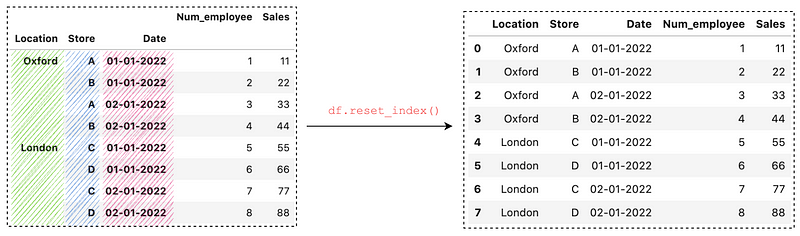
5. Flatten rows: flatten a specific level
The first argument in reset_index() controls the level to be flattened. It defaults to None which flatten all levels. To flatten a level or a list of levels, we can pass a number/string or a list:
# Flatten 'Date' level
df.reset_index(2)
df.reset_index('Date')
# Flatten 'Store' and 'Date'
df.reset_index([1, 2])
df.reset_index(['Store', 'Date'])
6. Flatten rows: join row labels
Similarly, we can join the values in the MultiIndex to create a better human-readable single index:
['_'.join(col) for col in df.index.values]# output
['Oxford_A_01-01-2022',
'Oxford_B_01-01-2022',
'Oxford_A_02-01-2022',
'Oxford_B_02-01-2022',
'London_C_01-01-2022',
'London_D_01-01-2022',
'London_C_02-01-2022',
'London_D_02-01-2022']By assigning the result to df.columns, the result will look like this:
df.index = ['_'.join(col) for col in df.index.values]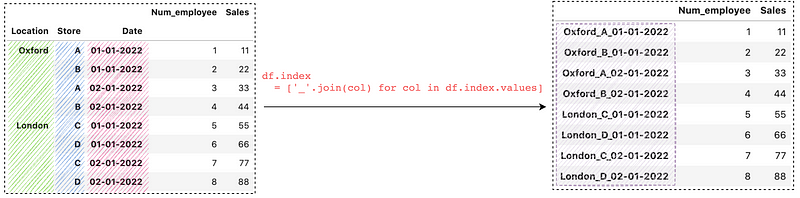
Conclusion
In this article, we have covered 6 use cases about flattening MultiIndex columns and rows in Pandas. I hope this article will help you to save time in analyzing data.
Thanks for reading. Please check out the Notebook for the source code and stay tuned if you are interested in the practical aspect of machine learning. More tutorials are available from the Github Repo.


