avatarRaja Tamil

Free AI web copilot to create summaries, insights and extended knowledge, download it at here

2693

Abstract

ass="hljs-comment">//cors-anywhere.herokuapp.com/corsdemo</span></pre></div><h1 id="3acd">Node.js Server-Side Only Web App</h1><p id="e96f">If you’re making an HTTP request to an external server API (in my case I use Google Maps API) from a server rather than client, you won’t have any problem dealing with CORS error because it's just purely how the browser handles an HTTP request.</p><blockquote id="df7d"><p>Check out <a href="https://softauthor.com/create-nodejs-express-app-faster/">Up and Running With NodeJS Express App In A Minute (2022)</a></p></blockquote><div id="aef7"><pre><span class="hljs-keyword">const</span> { <span class="hljs-keyword">default</span>: axios } = <span class="hljs-keyword">require</span>(<span class="hljs-string">'axios'</span>); <span class="hljs-keyword">const</span> <span class="hljs-variable constant_">express</span> = <span class="hljs-keyword">require</span>(<span class="hljs-string">'express'</span>); <span class="hljs-keyword">const</span> <span class="hljs-variable constant_">app</span> = <span class="hljs-title function_ invoke__">express</span>();</pre></div><div id="abfb"><pre>app.<span class="hljs-keyword">get</span>(<span class="hljs-string">"/"</span>, (req, res) => { axios.<span class="hljs-keyword">get</span>(<span class="hljs-comment">'https://maps.googleapis.com/maps/api/place/details/json?place_id=ChIJryijc9s0K4gRG9aU7SDTXdA&amp;key=[YOUR_API_KEY]')</span> .<span class="hljs-keyword">then</span>(<span class="hljs-keyword">function</span> (<span class="hljs-built_in">response</span>) { res.send(<span class="hljs-built_in">response</span>.data); }) .catch(<span class="hljs-keyword">function</span> (<span class="hljs-keyword">error</span>) { console.<span class="hljs-built_in">log</span>(<span class="hljs-keyword">error</span>); }); });</pre></div><div id="b33c"><pre>app.listen(<span class="hljs-number">3000</span>)<span class="hljs-comment">;</span></pre></div><h1 id="3585">Client-Server App</h1><p id="b7fc">Let’s talk about how to fix the CORS issue when you’re building a web app that separates the front-end app from the server-side API.</p><p id="6ac9">Keep the <a href="https://softauthor.com/category/google-maps-api/">Google Maps API </a>request in the server-side code which is running on the localhost:3000.</p><p id="ce1d">Then, change the URL of the fetch request on the client from the <a href="https://softauthor.com/category/google-maps-api/">Google Maps API </a>URL to localhost:3000.</p><div id="4103"><pre>fetch(<span class="hljs-string">"http://localhost:3000/"</span>) .then(<span class="hljs-function"><span class="hljs-params">res

Options

ponse</span> =></span> { <span class="hljs-built_in">console</span>.<span class="hljs-built_in">log</span>(response); })</pre></div><p id="0e61">And it’ll throw the same CORS error as before.</p><p id="a367">The good news is the CORS error is coming from my own server that is running on the localhost:3000 instead of a third-party server like Google Maps API that I do not have any control over to change any code on the back end.</p><p id="c75e">To fix that, you’ll need to add a response header called Access-Control-Allow-Origin on the server-side app passing the client-side URL that you want to give access to.</p><p id="d309">In my case, I’m running my client-side app on localhost:5501 or 127.0.0.1:5501</p><p id="7cac">What that means is, no other client web app can consume your server to get external API data, in this case, Google Maps API, which basically means you’ve created your own CORS proxy server instead of using a third party one like <a href="https://www.heroku.com/">Heroku</a>.</p><div id="1cd7"><pre>app.<span class="hljs-title function_">get</span>(<span class="hljs-string">"/"</span>, <span class="hljs-function">(<span class="hljs-params">req, res</span>) =></span> { ... .<span class="hljs-title function_">then</span>(<span class="hljs-keyword">function</span> (<span class="hljs-params">response</span>) { res.<span class="hljs-title function_">header</span>(<span class="hljs-string">"Access-Control-Allow-Origin"</span>, <span class="hljs-string">"http://localhost:5501"</span>); <span class="hljs-comment">// update to match the domain you will make the request from</span> res.<span class="hljs-title function_">send</span>(response.<span class="hljs-property">data</span>); }) ... });</pre></div><figure id="0a51"><img src="https://cdn-images-1.readmedium.com/v2/resize:fit:800/0*2JX2nUV7vpPQdwn0.png"><figcaption></figcaption></figure><p id="158f">This way, you’ve permanently fixed the CORS error and you’ll never see them again.</p><h1 id="4bc7">Deployment</h1><p id="0f27">You can use services like Firebase to deploy your client and server-side app quickly for FREE if you’re not worried about the custom domain.</p><p id="03b8">For the front-end deployment, you can use <a href="https://softauthor.com/deploy-vue-js-app-on-firebase-hosting/">Firebase hosting</a>.</p><p id="09b4">For the Node.js app deployment, you can move your code to <a href="https://firebase.google.com/docs/functions/http-events">Firebase Cloud Function </a>and deploy it.</p><p id="196a">If you’ve any questions or concerns, please let me know in the comment section below.</p><p id="4c6f">Thanks for reading.</p></article></body>

How To Fix CORS Issue Permanently Right Now (2022)

If you want to learn how to fix the CORS issue permanently, no matter what type of web app you’re building, you’ve come to the right place!

Front-end Only JavaScript App (React, Vue or Angular)

Let’s say you want to get some data from an external server API, such as Google Maps API, from your client-side app like the code below.

fetch("https://maps.googleapis.com/maps/api/place/details/json?place_id=ChIJryijc9s0K4gRG9aU7SDTXdA&key=[YOUR_API_KEY]")
.then(response => {
   console.log(response);
})

If you run the above code, you will get the CORS Error.

If you want to know the what, why and how about CORS, check this out.

To quickly fix it, use one of the public CORS proxy servers.

I use Heroku CORS proxy server in this example.

Append the proxy server to your API URL.

https://cors-anywhere.herokuapp.com

You may get the 403 forbidden error even after adding the Heroku CORS proxy URL.
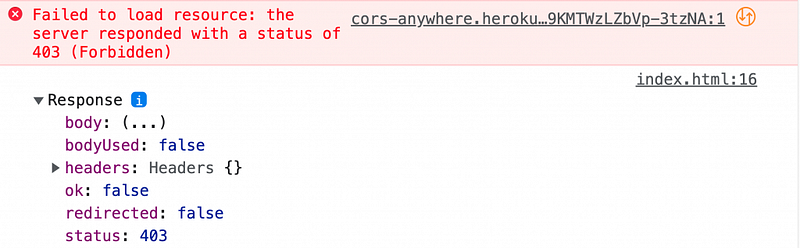
To fix this, you need to request temporary access to the Heroku Proxy Server by going to the below URL.

https://cors-anywhere.herokuapp.com/corsdemo

Node.js Server-Side Only Web App

If you’re making an HTTP request to an external server API (in my case I use Google Maps API) from a server rather than client, you won’t have any problem dealing with CORS error because it's just purely how the browser handles an HTTP request.

Check out Up and Running With NodeJS Express App In A Minute (2022)

const { default: axios } = require('axios');
const express = require('express');
const app = express();
app.get("/", (req, res) => {
    axios.get('https://maps.googleapis.com/maps/api/place/details/json?place_id=ChIJryijc9s0K4gRG9aU7SDTXdA&key=[YOUR_API_KEY]')
        .then(function (response) {
            res.send(response.data);
        })
        .catch(function (error) {
            console.log(error);
        });
});
app.listen(3000);

Client-Server App

Let’s talk about how to fix the CORS issue when you’re building a web app that separates the front-end app from the server-side API.

Keep the Google Maps API request in the server-side code which is running on the localhost:3000.

Then, change the URL of the fetch request on the client from the Google Maps API URL to localhost:3000.

fetch("http://localhost:3000/")
.then(response => {
   console.log(response);
})

And it’ll throw the same CORS error as before.

The good news is the CORS error is coming from my own server that is running on the localhost:3000 instead of a third-party server like Google Maps API that I do not have any control over to change any code on the back end.

To fix that, you’ll need to add a response header called Access-Control-Allow-Origin on the server-side app passing the client-side URL that you want to give access to.

In my case, I’m running my client-side app on localhost:5501 or 127.0.0.1:5501

What that means is, no other client web app can consume your server to get external API data, in this case, Google Maps API, which basically means you’ve created your own CORS proxy server instead of using a third party one like Heroku.

app.get("/", (req, res) => {
     ...
     .then(function (response) {
        res.header("Access-Control-Allow-Origin", "http://localhost:5501"); // update to match the domain you will make the request from
        res.send(response.data);
      })
     ...
});
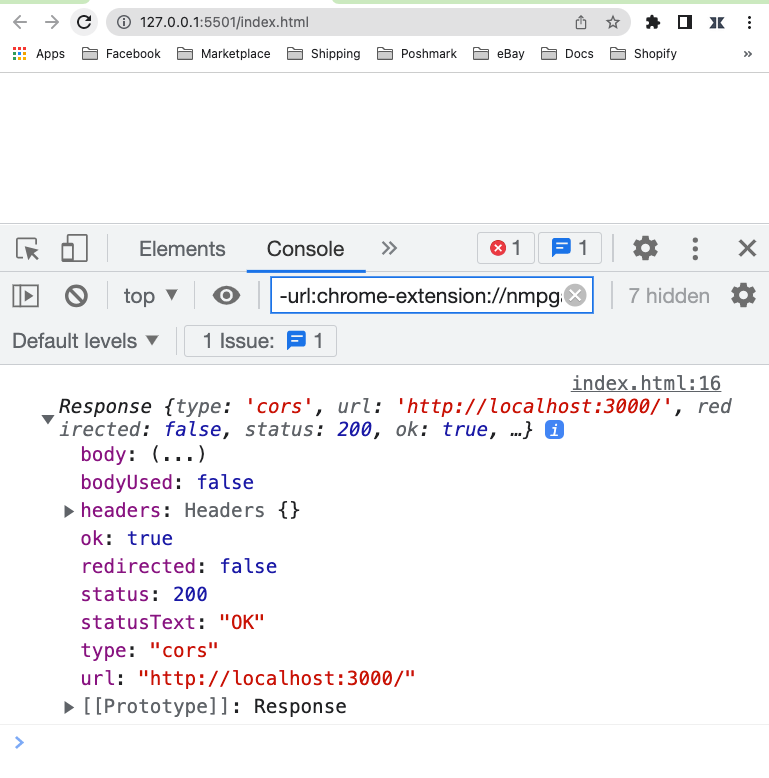
This way, you’ve permanently fixed the CORS error and you’ll never see them again.

Deployment

You can use services like Firebase to deploy your client and server-side app quickly for FREE if you’re not worried about the custom domain.

For the front-end deployment, you can use Firebase hosting.

For the Node.js app deployment, you can move your code to Firebase Cloud Function and deploy it.

If you’ve any questions or concerns, please let me know in the comment section below.

Thanks for reading.

JavaScript
Nodejs
Programming
Recommended from ReadMedium