How to Finetune Gemma Models with HuggingFace and PEFT

Google Deepmind’s open weights language model, Gemma, has been made available to the wider open-source community through Hugging Face. Offered in two sizes, 2 billion and 7 billion parameters, Gemma comes in both pre-trained and instruction-tuned versions. It is accessible on Hugging Face, supported by TGI, and can be easily deployed and fine-tuned using Vertex Model Garden and Google Kubernetes Engine.
The code used in this story are all from HuggingFace. We just reshared them in our way.
What is Gemma
Gemma is a family of 4 new LLM models by Google based on Gemini. This set of large language models, called Gemma, in two sizes (2 billion and 7 billion parameters). These models can be used for various tasks like writing, translating, and answering questions. They can run on many computers without needing special techniques to be smaller and can remember information from up to 8,000 words of text. Each size comes in two versions: a general one and one fine-tuned for specific instructions.
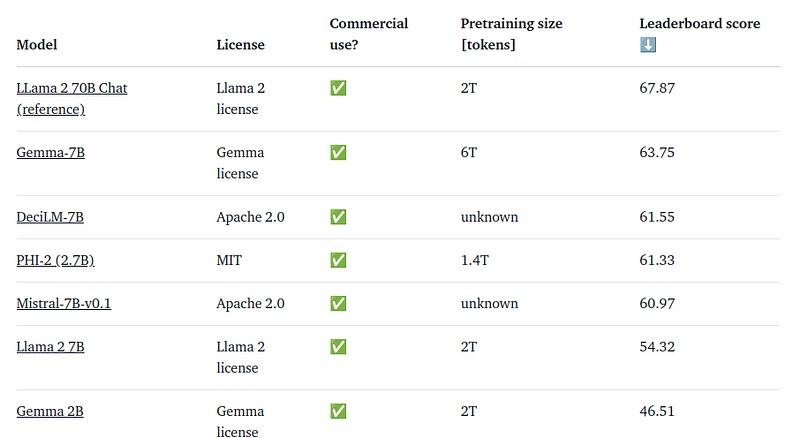
How to Finetune Gemma Models with HuggingFace and PEFT
Before accessing Gemma model artifacts, users must accept the consent form.
Downloading the Model and Tokenizer:
- Users who have submitted the consent form can access the model artifacts from the Hugging Face Hub.
- This example demonstrates downloading the model and tokenizer, along with a
BitsAndBytesConfigfor weight-only quantization.
import torch
from transformers import AutoTokenizer, AutoModelForCausalLM, BitsAndBytesConfig

model_id = "google/gemma-2b"
bnb_config = BitsAndBytesConfig(
    load_in_4bit=True,
    bnb_4bit_quant_type="nf4",
    bnb_4bit_compute_dtype=torch.bfloat16
)

tokenizer = AutoTokenizer.from_pretrained(model_id, token=os.environ['HF_TOKEN'])
model = AutoModelForCausalLM.from_pretrained(model_id, quantization_config=bnb_config, device_map={"":0}, token=os.environ['HF_TOKEN'])
Now, lets test model before starting the finetuning:
text = "Quote: Imagination is more"
device = "cuda:0"
inputs = tokenizer(text, return_tensors="pt").to(device)

outputs = model.generate(**inputs, max_new_tokens=20)
print(tokenizer.decode(outputs[0], skip_special_tokens=True))
The model does a reasonable completion with some extra tokens:
Quote: Imagination is more important than knowledge. Knowledge is limited. Imagination encircles the world.

-Albert Einstein

I
Ok. Let’s start the finetubing process. We will use the English quotes dataset for this.
from datasets import load_dataset

data = load_dataset("Abirate/english_quotes")
data = data.map(lambda samples: tokenizer(samples["quote"]), batched=True)
And now we use LoRA config:
import transformers
from trl import SFTTrainer

def formatting_func(example):
    text = f"Quote: {example['quote'][0]}\nAuthor: {example['author'][0]}"
    return [text]

trainer = SFTTrainer(
    model=model,
    train_dataset=data["train"],
    args=transformers.TrainingArguments(
        per_device_train_batch_size=1,
        gradient_accumulation_steps=4,
        warmup_steps=2,
        max_steps=10,
        learning_rate=2e-4,
        fp16=True,
        logging_steps=1,
        output_dir="outputs",
        optim="paged_adamw_8bit"
    ),
    peft_config=lora_config,
    formatting_func=formatting_func,
)
trainer.train()
Once this is done, we can start testing the finetuned Gemma with the same prompt we used earlier:
text = "Quote: Imagination is"
device = "cuda:0"
inputs = tokenizer(text, return_tensors="pt").to(device)

outputs = model.generate(**inputs, max_new_tokens=20)
print(tokenizer.decode(outputs[0], skip_special_tokens=True))
Summary
This was a simple story inspired by an article on HuggingFace on how to finetune Gemma models. in case you liked it, Please Clap for this story.
If you like the article and would like to support me make sure to: 📰 View more content on my medium profile and 👏Clap for this article 📰 View more content on AI-ContentLab Blog 🚀👉 Read more related articles to this one on Medium
In Plain English 🚀
Thank you for being a part of the In Plain English community! Before you go:
- Be sure to clap and follow the writer ️👏️️
- Follow us: X | LinkedIn | YouTube | Discord | Newsletter
- Visit our other platforms: Stackademic | CoFeed | Venture | Cubed
- More content at PlainEnglish.io


