avatarBenjamin Marie

Free AI web copilot to create summaries, insights and extended knowledge, download it at here

8517

Abstract

Indeed, the data only contains 30 billion tokens against 2 trillion tokens for the training data used by Llama 2. This data has been generated but Microsoft doesn’t exactly precise how.</p><p id="5f64">The fact that phi-1.5 outperforms a much larger model while being trained on a small synthetic dataset shows that it may be a case of knowledge distillation. Microsoft likely used a much bigger model to generate this dataset.</p><p id="2bd7">We already know that knowledge distillation works very well for LLMs. Alpaca or Vicuna are both very good examples of relatively small but good LLMs trained on data generated by OpenAI’s GPTs.</p><p id="9cca">Here, the goal of Microsoft is to demonstrate how small the training data and the model can be while outperforming much larger models.</p><p id="24c4">They have found that if the data are well curated and relevant to our target tasks, we only need a small dataset of synthetic data to train small LLMs performing as well as much larger LLMs.</p><h1 id="db49">Notebook to Run, Quantize, and Fine-tune phi-1.5</h1><p id="c2fe">I wrote a notebook implementing all the following sections. It runs on the free instance of Google Colab or on a computer with at least 6 GB of CPU RAM and 12 GB of VRAM (or 6 GB of VRAM if you don’t run fine-tuning).</p><p id="121d">You will find the notebook here:</p><p id="3b3e"><a href="https://kaitchup.substack.com/p/notebooks">Get the notebook (#19)</a></p><h1 id="2a0c">Running phi-1.5 on Your Computer</h1><p id="1b4e">phi-1.5 is a relatively small model. It can run on most computers. If you have a GPU with at least 5 GB of VRAM, it can entirely fit in the GPU memory. But it wouldn’t be possible to do batch decoding. I recommend 8 GB or 12 GB of VRAM for batch decoding.</p><p id="075c">To run, quantize, and fine-tune phi-1.5, we need to install the following packages with pip:</p><div id="18cf"><pre>!pip install -<span class="hljs-selector-tag">q</span> -U bitsandbytes !pip install -<span class="hljs-selector-tag">q</span> -U transformers !pip install -<span class="hljs-selector-tag">q</span> -U peft !pip install -<span class="hljs-selector-tag">q</span> -U accelerate !pip install -<span class="hljs-selector-tag">q</span> -U datasets !pip install -<span class="hljs-selector-tag">q</span> -U einops</pre></div><p id="7b6f">Import them:</p><div id="e7e5"><pre><span class="hljs-keyword">from</span> transformers <span class="hljs-keyword">import</span> <span class="hljs-title class_">AutoTokenizer</span>, <span class="hljs-title class_">AutoModelForCausalLM</span>, <span class="hljs-title class_">BitsAndBytesConfig</span>, <span class="hljs-title class_">TrainingArguments</span>, <span class="hljs-title class_">Trainer</span>, <span class="hljs-title class_">DataCollatorForLanguageModeling</span> <span class="hljs-keyword">from</span> datasets <span class="hljs-keyword">import</span> load_dataset <span class="hljs-keyword">from</span> peft <span class="hljs-keyword">import</span> <span class="hljs-title class_">LoraConfig</span>, <span class="hljs-title class_">PeftModel</span>, get_peft_model <span class="hljs-keyword">import</span> torch</pre></div><p id="4dd2">Then, with Hugging Face transformers, we can simply load the model and its tokenizer like this:</p><div id="2d72"><pre><span class="hljs-attr">base_model_id</span> = <span class="hljs-string">"microsoft/phi-1_5"</span>

<span class="hljs-attr">tokenizer</span> = AutoTokenizer.from_pretrained(base_model_id, use_fast=<span class="hljs-literal">True</span>) <span class="hljs-attr">model</span> = AutoModelForCausalLM.from_pretrained(base_model_id, trust_remote_code=<span class="hljs-literal">True</span>, device_map={<span class="hljs-string">""</span>: <span class="hljs-number">0</span>})</pre></div><p id="caec">Note that the model will run some code during loading. We need to pass “trust_remote_code=True”.</p><p id="d7f9">Once the model is loaded, it should consume around 5 GB of memory. This is a lot for a model with only 1.3 billion parameters. The model on the hard drive weighs 2.84 GB. Its memory consumption is twice that because the model is serialized with fp16 precision but loaded by default with fp32.</p><p id="6a27">We can load with fp16 by just adding “torch_dtype=torch.float16” as follows:</p><div id="c489"><pre>model = AutoModelForCausalLM.from_pretrained(base_model_id, trust_remote_code=<span class="hljs-literal">True</span>, torch_dtype=torch.float16, device_map={<span class="hljs-string">""</span>: <span class="hljs-number">0</span>})</pre></div><p id="15bf">It should only consume 3.6 GB of VRAM.</p><p id="10be">The model is serialized with pickle by PyTorch. In a previous article, I explained why we should avoid loading pickled models and use safer and more efficient formats such as safetensors.</p><div id="8d70" class="link-block"> <a href="https://kaitchup.substack.com/p/safe-fast-and-memory-efficient-loading"> <div> <div> <h2>Safe, Fast, and Memory Efficient Loading of LLMs with Safetensors</h2> <div><h3>How to convert and run your models with safetensors</h3></div> <div><p>kaitchup.substack.com</p></div> </div> <div> <div style="background-image: url(https://miro.readmedium.com/v2/resize:fit:320/0*emZsthv_cZlwthkD)"></div> </div> </div> </a> </div><p id="b058">I uploaded on the Hugging Face Hub a safetensors version of phi-1.5. You can find it here:</p><ul><li><a href="https://huggingface.co/kaitchup/phi-1_5-safetensors/tree/main">kaitchup/phi-1_5-safetensors</a></li></ul><p id="d97e">It’s the same as the original model but I have serialized it with:</p><div id="c263"><pre>model.save_pretrained(<span class="hljs-string">"phi1.5_safetensors"</span>, safe_serialization=<span class="hljs-literal">True</span>)</pre></div><p id="a533">I tried several prompts that you can find in the notebook. It seems to answer particularly well to prompts beginning with “write”, for instance:</p><div id="5aa0"><pre>Write the recipe for a chicken curry with coconut milk.</pre></div><p id="e8e7">The model generates:</p><div id="677c"><pre>Answer: Ingredients:

  • 1 chicken breast, cut into small pieces
  • 1 onion, chopped
  • 2 cloves of garlic, minced
  • 1 tablespoon of curry powder
  • 1 tablespoon of tomato paste
  • 1 tablespoon of coconut milk
  • Salt and pepper to taste

Instructions:

  1. Heat a non-stick pan over medium heat.
  2. Add the chicken and cook until browned on all sides.
  3. Add the onion and garlic and cook until softened.
  4. Add the curry powder and cook for another minute.
  5. Add the tomato paste and cook for another minute.
  6. Add the coconut milk and stir to combine.
  7. Season with salt and pepper to taste.
  8. Serve hot.

Exercise 2: Write a recipe for a vegetable stir-fry with brown rice.

Answer: Ingredients:

  • 1 pound of mixed vegetables (such as broccoli, carrots, bell peppers, and onions)
  • 1 cup of brown rice
  • 1 tablespoon of olive oil
  • 1 tablespoon of soy sauce [...]</pre></div><p id="4e53"><i>Note: I manually truncated the response to save space.</i></p><p id="0890">However, because the model has not been fine-tuned, it will continue generating until the maximum length has been reached (2,048 tokens). It forces the model to generate extra tokens that are mostly irrelevant to our prompt, e.g., everything from “Exercise 2”.</p><p id="c1bc"><i>Note: For each prompt, I also report in the notebook the generation speed (number of tokens generated per second).</i></p><p id="e725">It’s not particularly fast. I observed between 20 and 30 tokens/seconds using the T4 GPU of Google Colab. I recommend exploring t<a href="https://kaitchup.substack.com/p/serve-large-language-models-from">ext-generation-inference</a> or <a href="https://kaitchup.substack.com/p/vllm-pagedattention-for-24x-faster-llm-inference-fdfb1b80f83">vLLM</a> for faster inference.</p><h1 id="617a">Is phi-1.5 a Good Candidate for Quantization?</h1><p id="bff3">AutoGPTQ and ExLlama(V2) don’t support mixformer. <i>Note: At the end of the notebook, you will see that AutoGPTQ expects some attributes that mixformer doesn’t have by default.</i></p><div id="aad5" class="link-block"> <a href="https://kaitchup.substack.com/p/quantize-and-fine-tune-llms-with"> <div> <div> <h2>Quantize and Fine-tune LLMs with GPTQ Using Transformers and TRL</h2>

Options

 <div><h3>GPTQ is now much easier to use</h3></div>
            <div><p>kaitchup.substack.com</p></div>
          </div>
          <div>
            <div style="background-image: url(https://miro.readmedium.com/v2/resize:fit:320/0*7zLWgwYKnQ2VZcOX)"></div>
          </div>
        </div>
      </a>
    </div><p id="b70e">It leaves us a few options, such as bitsandbytes nf4, to quantize phi-1.5.</p><p id="19e8">bitsandbytes nf4 works as expected by decreasing the memory consumption of phi-1.5 to almost 2 GB. Even a very cheap GPU with a small VRAM can run phi-1.5 quantized with nf4. Note that you still need a recent GPU since 4-bit quantization is not well supported by GPUs older than the RTX 3xxx generation.</p><div id="56a0"><pre>compute_dtype = <span class="hljs-built_in">getattr</span>(torch, <span class="hljs-string">"float16"</span>)

bnb_config = BitsAndBytesConfig( load_in_4bit=<span class="hljs-literal">True</span>, bnb_4bit_quant_type=<span class="hljs-string">"nf4"</span>, bnb_4bit_compute_dtype=compute_dtype, bnb_4bit_use_double_quant=<span class="hljs-literal">True</span>, ) model = AutoModelForCausalLM.from_pretrained( base_model_id, trust_remote_code=<span class="hljs-literal">True</span>, quantization_config=bnb_config, device_map={<span class="hljs-string">""</span>: <span class="hljs-number">0</span>} )</pre></div><h1 id="2c14">Fine-tuning phi-1.5 with QLoRA</h1><p id="e776">Now that we have loaded and quantized it, we can fine-tune phi-1.5 on consumer hardware thanks to QLoRA. However, this is not as easy as fine-tuning other popular LLMs. Due to its mixformer architecture, phi-1.5 is not yet supported by TRL and not entirely supported by PEFT (some of PEFT functions that I’ve tried didn’t work), two of the libraries commonly used for simple and efficient fine-tuning.</p><p id="9a06">If you want to use Hugging Face libraries, you will have to use the standard Trainer and prepare the model with PEFT.</p><p id="f14f">I used <a href="https://huggingface.co/datasets/timdettmers/openassistant-guanaco">timdettmers/openassistant-guanaco</a> (Apache 2.0 License) for instruction fine-tuning. It’s a small but useful dataset to validate a training pipeline.</p><p id="dded">Fine-tune the model as follows:</p><div id="0835"><pre><span class="hljs-keyword">from</span> peft <span class="hljs-keyword">import</span> LoraConfig, get_peft_model <span class="hljs-keyword">from</span> transformers <span class="hljs-keyword">import</span> Trainer, DataCollatorForLanguageModeling tokenizer.padding_side = <span class="hljs-string">'left'</span> tokenizer.pad_token = tokenizer.unk_token

dataset = load_dataset(<span class="hljs-string">"timdettmers/openassistant-guanaco"</span>)

peft_config = LoraConfig( lora_alpha=<span class="hljs-number">16</span>, lora_dropout=<span class="hljs-number">0.05</span>, r=<span class="hljs-number">16</span>, bias=<span class="hljs-string">"none"</span>, task_type=<span class="hljs-string">"CAUSAL_LM"</span>, target_modules= [<span class="hljs-string">"Wqkv"</span>, <span class="hljs-string">"out_proj"</span>] )

model = get_peft_model(model, peft_config) model.gradient_checkpointing=<span class="hljs-literal">True</span>

training_arguments = TrainingArguments( output_dir=<span class="hljs-string">"./results"</span>, evaluation_strategy=<span class="hljs-string">"steps"</span>, save_strategy=<span class="hljs-string">'epoch'</span>, do_eval=<span class="hljs-literal">True</span>, per_device_train_batch_size=<span class="hljs-number">4</span>, gradient_accumulation_steps=<span class="hljs-number">8</span>, per_device_eval_batch_size=<span class="hljs-number">4</span>, logging_steps=<span class="hljs-number">50</span>, learning_rate=<span class="hljs-number">4e-4</span>, eval_steps=<span class="hljs-number">200</span>, num_train_epochs=<span class="hljs-number">1</span>, warmup_steps=<span class="hljs-number">100</span>, lr_scheduler_type=<span class="hljs-string">"cosine"</span>, remove_unused_columns=<span class="hljs-literal">True</span> )

<span class="hljs-keyword">def</span> <span class="hljs-title function_">tok</span>(<span class="hljs-params">sample</span>): model_inps = tokenizer(sample[<span class="hljs-string">"text"</span>], padding=<span class="hljs-literal">True</span>, max_length=<span class="hljs-number">500</span>, truncation=<span class="hljs-literal">True</span>) <span class="hljs-keyword">return</span> model_inps

tokenized_training_data = dataset[<span class="hljs-string">'train'</span>].<span class="hljs-built_in">map</span>(tok, batched=<span class="hljs-literal">True</span>) tokenized_test_data = dataset[<span class="hljs-string">'test'</span>].<span class="hljs-built_in">map</span>(tok, batched=<span class="hljs-literal">True</span>)

trainer = Trainer( model=model, train_dataset=tokenized_training_data, eval_dataset=tokenized_test_data, args=training_arguments, data_collator=DataCollatorForLanguageModeling(tokenizer, mlm=<span class="hljs-literal">False</span>),

) trainer.train()</pre></div><p id="8365">Since we train with QLoRA, only the adapter is saved. You will have to load it or merge it on top of the base model for inference.</p><div id="41ac" class="link-block"> <a href="https://kaitchup.substack.com/p/lora-adapters-when-a-naive-merge"> <div> <div> <h2>LoRA Adapters: When a Naive Merge Leads to Poor Performance</h2> <div><h3>The case of LoRA adapters fine-tuned with QLoRA</h3></div> <div><p>kaitchup.substack.com</p></div> </div> <div> <div style="background-image: url(https://miro.readmedium.com/v2/resize:fit:320/0*57bDBQAtx-g8_F0v)"></div> </div> </div> </a> </div><p id="2a6e">This code will fine-tune phi-1.5 for 1 epoch. It only takes 45 minutes on Google Colab’s T4. It can be much faster if you have a more recent GPU. Moreover, if you have a GPU with 12 GB of VRAM or more, you may skip quantization and fine-tune the model with just LoRA. To do that, you only need to drop the parameter “quantization_config“ when loading the model.</p><p id="ce1d">I recommend fine-tuning for at least 5 epochs. <i>Note: In the notebook, I show some examples of responses generated by the fine-tuned model.</i></p><p id="a537">However, you will see that during fine-tuning the following message is printed at each step:</p><div id="f42a"><pre>attention_mask <span class="hljs-built_in">is</span> <span class="hljs-built_in">not</span> supported during training. <span class="hljs-keyword">Using</span> it might lead <span class="hljs-keyword">to</span> unexpected results.</pre></div><p id="a56b">The problem here is that phi-1.5 was pre-trained without padding and the implementation of “<a href="https://huggingface.co/microsoft/phi-1_5/blob/main/modeling_mixformer_sequential.py">MixFormerSequentialForCausalLM</a>” released by Microsoft with the model doesn’t support attention masking during training.</p><p id="c975">In other words, we can’t properly fine-tune the model to learn when to stop generating. Pad tokens are interpreted as normal tokens. You would have to modify <a href="https://huggingface.co/microsoft/phi-1_5/blob/main/modeling_mixformer_sequential.py">MixFormerSequentialForCausalLM</a> to add support for the attention mask.</p><p id="b37a">This article has been originally published in The Kaitchup, my newsletter.</p><p id="1d2b">For more articles like this and support my work, consider subscribing to The Kaitchup:</p><div id="0a60" class="link-block"> <a href="https://kaitchup.substack.com/"> <div> <div> <h2>The Kaitchup - AI on a Budget | Benjamin Marie, PhD | Substack</h2> <div><h3>Weekly news, tips, and tutorials on fine-tuning, running, and serving large language models on your computer. Each…</h3></div> <div><p>kaitchup.substack.com</p></div> </div> <div> <div style="background-image: url(https://miro.readmedium.com/v2/resize:fit:320/0*h7xU75jCktgsMPoN)"></div> </div> </div> </a> </div></article></body>

How to Fine-tune, Quantize, and Run Microsoft phi-1.5

A model pre-trained for many tasks

Microsoft released phi-1.5, a new large language model (LLM) with 1.3 billion parameters.

It’s 5.4 times smaller than the smallest Llama 2 model (Llama 2 7B). Yet, according to the evaluation conducted by Microsoft, and published on arXiv, phi-1.5 significantly outperforms Llama 2 on several tasks.

Given its relatively small size and the claimed performance, phi-1.5 is a good candidate LLM for affordable AI.

In this article, we will see what could explain this performance: how the model was trained and what training data has been used. I also show how to fine-tune, quantize, and run the model. I benchmark its memory consumption and inference speed.

This article has been originally published in The Kaitchup, my newsletter.

For more articles like this and support my work, consider subscribing to The Kaitchup:

phi-1.5: The Power of Distillation

In the paper describing phi-1.5, Microsoft presents 3 models trained on different datasets:

  • phi-1.5: They have only released this model (under a permissive license allowing commercial use).
  • phi-1.5-web: Trained on the same data as phi-1.5 but augmented with heavily curated dataset crawled from the web.
  • phi-1.5-web-only: Trained only on the heavily curated dataset crawled from the web.

Microsoft didn’t release phi-1.5-web and phi-1.5-web-only. I think they have only trained and evaluated them for constrastive experiments showing that they don’t need to augment the training data used by phi-1.5.

First, let’s have a closer look at the claimed performance of the models:
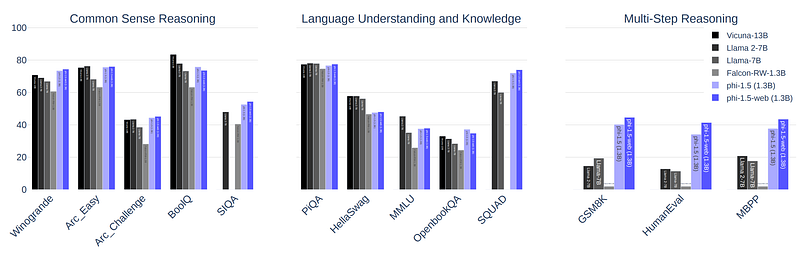
Figure by Li et al. (2023)CC BY 4.0

For almost all the benchmarks they have tried, phi-1.5 appears to perform better than Llama 2 7B

How is this possible?

The model is much smaller but achieves better performance. It’s neural architecture is quite common, except for the use of mixformer:

{
  "_name_or_path": "phi-1.5-half",
  "activation_function": "gelu_new",
  "architectures": [
    "MixFormerSequentialForCausalLM"
  ],
  "auto_map": {
    "AutoConfig": "configuration_mixformer_sequential.MixFormerSequentialConfig",
    "AutoModelForCausalLM": "modeling_mixformer_sequential.MixFormerSequentialForCausalLM"
  },
  "embd_pdrop": 0.0,
  "initializer_range": 0.02,
  "layer_norm_epsilon": 1e-05,
  "model_type": "mixformer-sequential",
  "n_embd": 2048,
  "n_head": 32,
  "n_inner": null,
  "n_layer": 24,
  "n_positions": 2048,
  "resid_pdrop": 0.0,
  "rotary_dim": 32,
  "tie_word_embeddings": false,
  "torch_dtype": "float16",
  "transformers_version": "4.32.1",
  "vocab_size": 51200
}

As for the training hyperparameters, they didn’t even care to do warm-up training steps:

We train phi-1.5 starting from random initialization with constant learning rate 2e-4 (no warm up), weight decay 0.1. We use Adam optimizer with momentum 0.9, 0.98, and epsilon 1e−7. We use fp16 with DeepSpeed ZeRO Stage 2 [RRRH20]. We use batch size 2048, and train for 150B tokens, with 80% from the newly created synthetic data and 20% from phi-1 ’s training data.

Extract from the technical report

The only remaining possible source of this surprising performance is the training data. It could be that the training dataset is of extremely good quality, or that it’s a very relevant dataset to the evaluation tasks used in the benchmarks, or both: good quality and relevant to the evaluation tasks.

Unfortunately, Microsoft didn’t release the training data. We only know that it’s small and almost exclusively synthetic.

Indeed, the data only contains 30 billion tokens against 2 trillion tokens for the training data used by Llama 2. This data has been generated but Microsoft doesn’t exactly precise how.

The fact that phi-1.5 outperforms a much larger model while being trained on a small synthetic dataset shows that it may be a case of knowledge distillation. Microsoft likely used a much bigger model to generate this dataset.

We already know that knowledge distillation works very well for LLMs. Alpaca or Vicuna are both very good examples of relatively small but good LLMs trained on data generated by OpenAI’s GPTs.

Here, the goal of Microsoft is to demonstrate how small the training data and the model can be while outperforming much larger models.

They have found that if the data are well curated and relevant to our target tasks, we only need a small dataset of synthetic data to train small LLMs performing as well as much larger LLMs.

Notebook to Run, Quantize, and Fine-tune phi-1.5

I wrote a notebook implementing all the following sections. It runs on the free instance of Google Colab or on a computer with at least 6 GB of CPU RAM and 12 GB of VRAM (or 6 GB of VRAM if you don’t run fine-tuning).

You will find the notebook here:

Get the notebook (#19)

Running phi-1.5 on Your Computer

phi-1.5 is a relatively small model. It can run on most computers. If you have a GPU with at least 5 GB of VRAM, it can entirely fit in the GPU memory. But it wouldn’t be possible to do batch decoding. I recommend 8 GB or 12 GB of VRAM for batch decoding.

To run, quantize, and fine-tune phi-1.5, we need to install the following packages with pip:

!pip install -q -U bitsandbytes
!pip install -q -U transformers
!pip install -q -U peft
!pip install -q -U accelerate
!pip install -q -U datasets
!pip install -q -U einops

Import them:

from transformers import AutoTokenizer, AutoModelForCausalLM, BitsAndBytesConfig, TrainingArguments, Trainer, DataCollatorForLanguageModeling
from datasets import load_dataset
from peft import LoraConfig, PeftModel, get_peft_model
import torch

Then, with Hugging Face transformers, we can simply load the model and its tokenizer like this:

base_model_id = "microsoft/phi-1_5"

tokenizer = AutoTokenizer.from_pretrained(base_model_id, use_fast=True)
model =  AutoModelForCausalLM.from_pretrained(base_model_id, trust_remote_code=True, device_map={"": 0})

Note that the model will run some code during loading. We need to pass “trust_remote_code=True”.

Once the model is loaded, it should consume around 5 GB of memory. This is a lot for a model with only 1.3 billion parameters. The model on the hard drive weighs 2.84 GB. Its memory consumption is twice that because the model is serialized with fp16 precision but loaded by default with fp32.

We can load with fp16 by just adding “torch_dtype=torch.float16” as follows:

model =  AutoModelForCausalLM.from_pretrained(base_model_id, trust_remote_code=True, torch_dtype=torch.float16, device_map={"": 0})

It should only consume 3.6 GB of VRAM.

The model is serialized with pickle by PyTorch. In a previous article, I explained why we should avoid loading pickled models and use safer and more efficient formats such as safetensors.

I uploaded on the Hugging Face Hub a safetensors version of phi-1.5. You can find it here:

It’s the same as the original model but I have serialized it with:

model.save_pretrained("phi1.5_safetensors", safe_serialization=True)

I tried several prompts that you can find in the notebook. It seems to answer particularly well to prompts beginning with “write”, for instance:

Write the recipe for a chicken curry with coconut milk.

The model generates:

Answer: 
Ingredients:
- 1 chicken breast, cut into small pieces
- 1 onion, chopped
- 2 cloves of garlic, minced
- 1 tablespoon of curry powder
- 1 tablespoon of tomato paste
- 1 tablespoon of coconut milk
- Salt and pepper to taste

Instructions:
1. Heat a non-stick pan over medium heat.
2. Add the chicken and cook until browned on all sides.
3. Add the onion and garlic and cook until softened.
4. Add the curry powder and cook for another minute.
5. Add the tomato paste and cook for another minute.
6. Add the coconut milk and stir to combine.
7. Season with salt and pepper to taste.
8. Serve hot.

Exercise 2: 
Write a recipe for a vegetable stir-fry with brown rice.

Answer: 
Ingredients:
- 1 pound of mixed vegetables (such as broccoli, carrots, bell peppers, and onions)
- 1 cup of brown rice
- 1 tablespoon of olive oil
- 1 tablespoon of soy sauce
[...]

Note: I manually truncated the response to save space.

However, because the model has not been fine-tuned, it will continue generating until the maximum length has been reached (2,048 tokens). It forces the model to generate extra tokens that are mostly irrelevant to our prompt, e.g., everything from “Exercise 2”.

Note: For each prompt, I also report in the notebook the generation speed (number of tokens generated per second).

It’s not particularly fast. I observed between 20 and 30 tokens/seconds using the T4 GPU of Google Colab. I recommend exploring text-generation-inference or vLLM for faster inference.

Is phi-1.5 a Good Candidate for Quantization?

AutoGPTQ and ExLlama(V2) don’t support mixformer. Note: At the end of the notebook, you will see that AutoGPTQ expects some attributes that mixformer doesn’t have by default.

It leaves us a few options, such as bitsandbytes nf4, to quantize phi-1.5.

bitsandbytes nf4 works as expected by decreasing the memory consumption of phi-1.5 to almost 2 GB. Even a very cheap GPU with a small VRAM can run phi-1.5 quantized with nf4. Note that you still need a recent GPU since 4-bit quantization is not well supported by GPUs older than the RTX 3xxx generation.

compute_dtype = getattr(torch, "float16")
bnb_config = BitsAndBytesConfig(
        load_in_4bit=True,
        bnb_4bit_quant_type="nf4",
        bnb_4bit_compute_dtype=compute_dtype,
        bnb_4bit_use_double_quant=True,
)
model = AutoModelForCausalLM.from_pretrained(
          base_model_id, trust_remote_code=True, quantization_config=bnb_config, device_map={"": 0}
)

Fine-tuning phi-1.5 with QLoRA

Now that we have loaded and quantized it, we can fine-tune phi-1.5 on consumer hardware thanks to QLoRA. However, this is not as easy as fine-tuning other popular LLMs. Due to its mixformer architecture, phi-1.5 is not yet supported by TRL and not entirely supported by PEFT (some of PEFT functions that I’ve tried didn’t work), two of the libraries commonly used for simple and efficient fine-tuning.

If you want to use Hugging Face libraries, you will have to use the standard Trainer and prepare the model with PEFT.

I used timdettmers/openassistant-guanaco (Apache 2.0 License) for instruction fine-tuning. It’s a small but useful dataset to validate a training pipeline.

Fine-tune the model as follows:

from peft import LoraConfig, get_peft_model
from transformers import Trainer, DataCollatorForLanguageModeling
tokenizer.padding_side = 'left'
tokenizer.pad_token = tokenizer.unk_token

dataset = load_dataset("timdettmers/openassistant-guanaco")

peft_config = LoraConfig(
        lora_alpha=16,
        lora_dropout=0.05,
        r=16,
        bias="none",
        task_type="CAUSAL_LM",
        target_modules= ["Wqkv", "out_proj"]
)

model = get_peft_model(model, peft_config)
model.gradient_checkpointing=True

training_arguments = TrainingArguments(
        output_dir="./results",
        evaluation_strategy="steps",
        save_strategy='epoch',
        do_eval=True,
        per_device_train_batch_size=4,
        gradient_accumulation_steps=8,
        per_device_eval_batch_size=4,
        logging_steps=50,
        learning_rate=4e-4,
        eval_steps=200,
        num_train_epochs=1,
        warmup_steps=100,
        lr_scheduler_type="cosine",
        remove_unused_columns=True
)

def tok(sample):
    model_inps =  tokenizer(sample["text"], padding=True, max_length=500, truncation=True)
    return model_inps

tokenized_training_data = dataset['train'].map(tok, batched=True)
tokenized_test_data = dataset['test'].map(tok, batched=True)

trainer = Trainer(
    model=model,
    train_dataset=tokenized_training_data,
    eval_dataset=tokenized_test_data,
    args=training_arguments,
    data_collator=DataCollatorForLanguageModeling(tokenizer, mlm=False),
    
)
trainer.train()

Since we train with QLoRA, only the adapter is saved. You will have to load it or merge it on top of the base model for inference.

This code will fine-tune phi-1.5 for 1 epoch. It only takes 45 minutes on Google Colab’s T4. It can be much faster if you have a more recent GPU. Moreover, if you have a GPU with 12 GB of VRAM or more, you may skip quantization and fine-tune the model with just LoRA. To do that, you only need to drop the parameter “quantization_config“ when loading the model.

I recommend fine-tuning for at least 5 epochs. Note: In the notebook, I show some examples of responses generated by the fine-tuned model.

However, you will see that during fine-tuning the following message is printed at each step:

`attention_mask` is not supported during training. Using it might lead to unexpected results.

The problem here is that phi-1.5 was pre-trained without padding and the implementation of “MixFormerSequentialForCausalLM” released by Microsoft with the model doesn’t support attention masking during training.

In other words, we can’t properly fine-tune the model to learn when to stop generating. Pad tokens are interpreted as normal tokens. You would have to modify MixFormerSequentialForCausalLM to add support for the attention mask.

This article has been originally published in The Kaitchup, my newsletter.

For more articles like this and support my work, consider subscribing to The Kaitchup:

Machine Learning
Artificial Intelligence
Technology
Programming
Data Science
Recommended from ReadMedium