
How to Find Medium Curation Topics
They were also removed from the story settings page

A lot of medium writers are frustrated with the recent curation changes. Curation topics are no longer displayed and you can only see the mention “chosen for further distribution” in your Stats page.
After the news was announced, Medium’s finest detectives were able to find out curation topics were hiding in the Reader Interests section in story settings, but it seems they were also removed from there.
While I believe these changes may be for the better (Medium said they removed topics to make the platform more relational), I understand why some writers would want to gauge their readers’ interests in order to get better at addressing a specific audience.
The good news is I discovered a trick to find the curation topics and it seems to work. It’s a bit nerdy but I promise you don’t need to be a geek for this.
Here are the steps:
Note: These are the steps for Google Chrome users, but it's very similar for other browsers.
- Go to your browser settings :
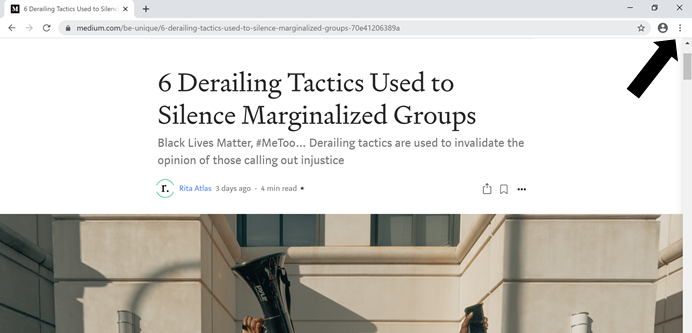
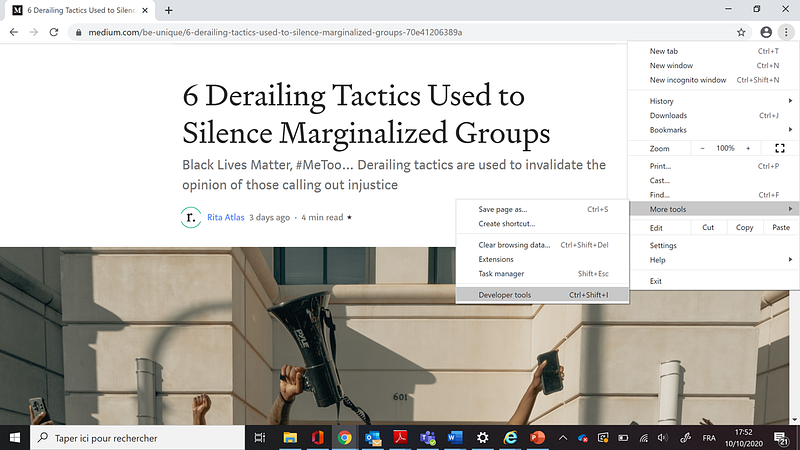
- Click on the “More tools” option then on “Developer tools”
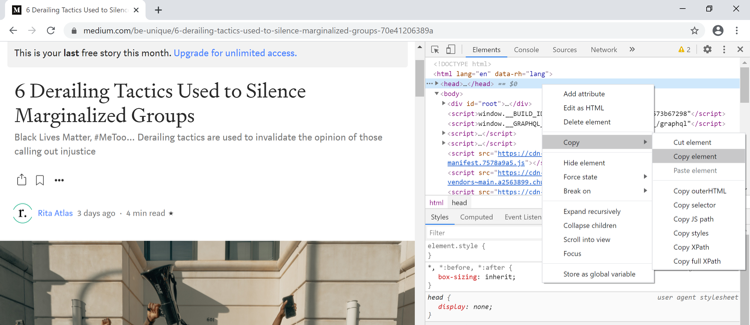
- In the code that appears on the right of your screen, right-click on <head>, then select Copy > Copy element
- Paste it in a text editor
- Search for “topic”
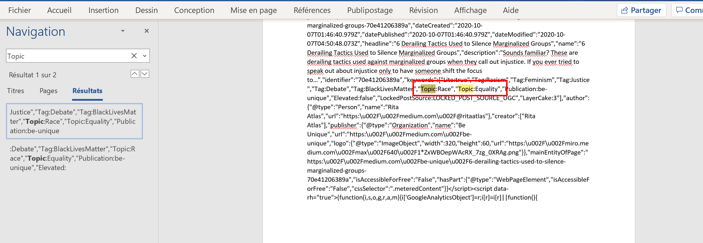
As you can see in the screenshot, my story was distributed in “Race” and “Equality”. I went to these topics pages and was able to find it there. I also used the same method on other curated stories and it worked.
This method may not be bulletproof, but it seems to work. Let me guys know if it works for you.


