avatarAlice

Free AI web copilot to create summaries, insights and extended knowledge, download it at here

1055

Abstract

69dc"><img src="https://cdn-images-1.readmedium.com/v2/resize:fit:800/1*WTrZJNdlwQJ5yQ-88vShQw.png"><figcaption>This is how it looked like in the past — Author</figcaption></figure><p id="59b6">So, how can writers know where to find to which topics their story is now assigned?</p><h1 id="5cb9">Exploring the code behind your story</h1><p id="57c9">The first step to finding out which topic your story has been curated into is to open your Medium account on a Google Chrome page. Get to the piece distributed and select “View Story.”</p><p id="662f">Click on the three vertical dots on the top right corner of your browser page, select the “More tools” and then click on “Developer tools”.</p><figure id="7982"><img src="https://cdn-images-1.readmedium.com/v2/resize:fit:800/1*09DWfOUZQrNsaNQDMQPEJw.png"><figcaption>How to get to the page code — Author</figcaption></figure><p id="9a8c">A new area will appear on the right side of the page.</p><figure id="2b1d"><img src="https://cdn-images-1.readmedium.com/v2/resize:fit:800/1*YhEgdyhHYwgSv7shX93Txg.png

Options

"><figcaption>A part of the page code — Author</figcaption></figure><p id="98e5">All you have to do now is click on the “Html” sign and press Ctrl+F for Computer or Cmd+F for Mac.</p><p id="d14a">A small search bar will appear; all you have to do now is type the word “<b>topic</b>” and press Enter.</p><p id="e3c9">The search will show you all the topic’s tag your story is distributed into.</p><figure id="54a4"><img src="https://cdn-images-1.readmedium.com/v2/resize:fit:800/1*rAa3oe-sVO8HugBsx_9_-Q.png"><figcaption>My story was distributed in Lifestyle, Productivity and Self. — Author</figcaption></figure><p id="e8eb">Finding out in which topics your Medium story has been curated won’t change your articles’ performances, but it will probably boost your confidence and make you happy about it.</p><p id="716f">I indeed will be satisfied with knowing in which topic my story is promoted!</p><p id="1b82"><a href="https://alicetoneatto.substack.com/"><i>Subscribe to my free newsletter to know when a new story goes live.</i></a></p></article></body>

How to Find in Which Topics Your Medium Story Is Distributed

It’s easier than you think

Photo by Jon Tyson on Unsplash

Lately, one of my articles got curated and distributed into three topics. I didn’t even realize that! Thankfully, Aimée Gramblin, one of the editors of Age of Empathy, left me a note notifying me about the good news.

How could I miss it? Lots of changes recently happened on Medium. One of them is the disappearing of the “Distributed by curators in” note we were once used to seeing under the story title. The topic tags also vanished from the stats page, and no email is sent to inform about the story distribution.
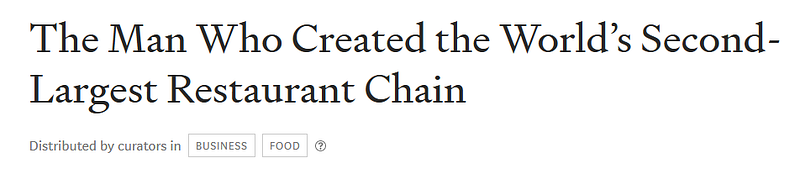
This is how it looked like in the past — Author

So, how can writers know where to find to which topics their story is now assigned?

Exploring the code behind your story

The first step to finding out which topic your story has been curated into is to open your Medium account on a Google Chrome page. Get to the piece distributed and select “View Story.”

Click on the three vertical dots on the top right corner of your browser page, select the “More tools” and then click on “Developer tools”.
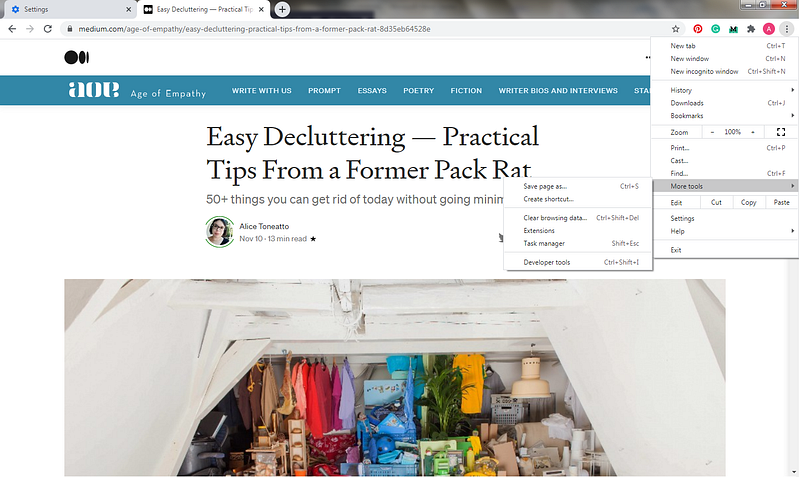
How to get to the page code — Author

A new area will appear on the right side of the page.
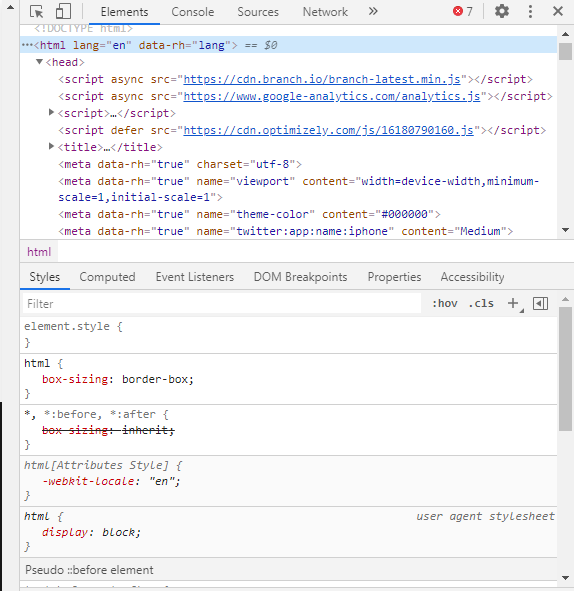
A part of the page code — Author

All you have to do now is click on the “Html” sign and press Ctrl+F for Computer or Cmd+F for Mac.

A small search bar will appear; all you have to do now is type the word “topic” and press Enter.

The search will show you all the topic’s tag your story is distributed into.
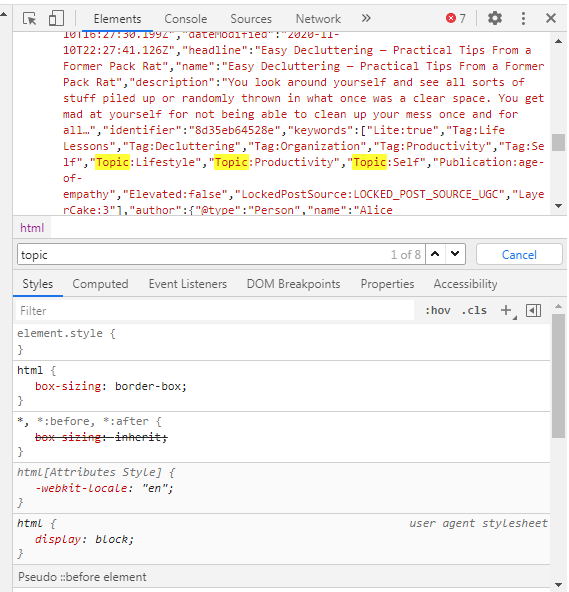
My story was distributed in Lifestyle, Productivity and Self. — Author

Finding out in which topics your Medium story has been curated won’t change your articles’ performances, but it will probably boost your confidence and make you happy about it.

I indeed will be satisfied with knowing in which topic my story is promoted!

Subscribe to my free newsletter to know when a new story goes live.

Writing On Medium
Medium Curation
Distribution
Curation
Writing Tips
Recommended from ReadMedium