
Writing
How to Find Free-to-Use Images on Google
Using copyright images could cost you $8000!
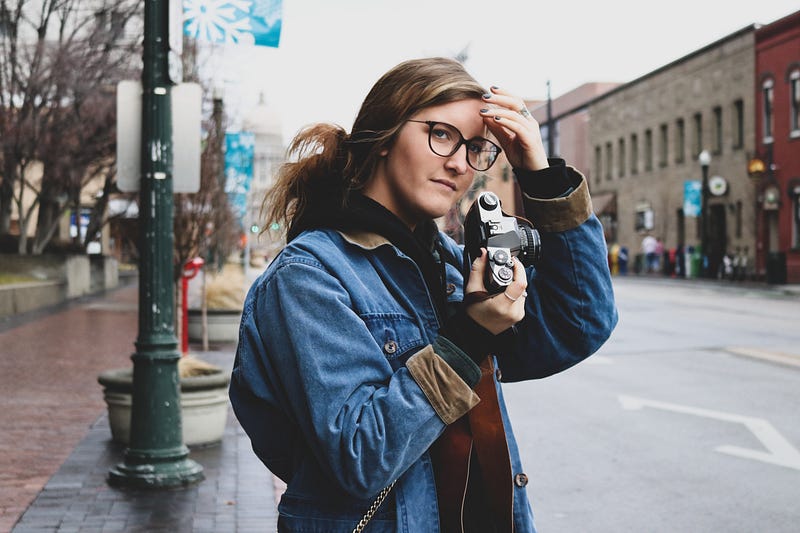
Are you aware that using copyright images could cost you a penalty of $8,000 even if you remove the image after being served a DMCA notice?
Most articles that I have encountered on Medium use and credit images from websites such as Unsplash and Pixabay. That is the safe and correct practice.
However, I have also seen writers who neither caption nor credit the photographers whose photos they are using. Worse, some writers use copyright images that are not free-to-use. I understand that some of these writers are unaware of the general rule of thumb for captioning images. I was there not too long ago either. However, ignorance will not protect you from the legal repercussions of violating copyright laws.
In this article, I will explain why you should stop using copyright images. I will also walk you through the steps to obtain free-to-use images from sources besides Unsplash and Pixabay.
The perils of copyright images
Any image or content posted online is protected under copyright laws. There are terms and conditions that you must adhere to if you wish to use photos that do not belong to you. These could be in the form of a fee or a request to attribute the image to its owner. Violating the terms and conditions could cost you $8,000 or more. Just think, how many articles would you have to write to make up for it?
If an image is not free-to-use, it is still considered as copyright infringement even if you attribute the image to its source. For more information, check out this article on the difference between fair use and free use.
What does royalty-free even mean?
If you are unaware, Getty Images and Shutterstock are not free-for-use. Yes, they are royalty-free. However, you are required to buy the license of the image to be able to use it. Otherwise, you are liable for copyright infringements. Again, $8,000!
Unconvinced? The following is what Shutterstock defines as ‘royalty-free’:
“‘Royalty-free’ refers to a licensing method under which image rights are sold at a flat rate for almost all purposes.”
- Shutterstock, 2010
In other words, by paying a fixed amount of money, you are permitted to use the image as often as you want. A royalty-free license means you do not have to pay the copyright holder to use the image each time, but royalty-free does not mean free-of-charge. The free in ‘royalty-free’ is misleading and I was confused for the longest time as well.
But what if I am unable to find my desired image on Unsplash or Pixabay?
When I wrote my article on celebrity altruism, I tried to find images of celebrities on Unsplash and Pixabay but to no avail. The best I could do was embed their Instagram posts in the main text. For my feature photo, I grudgingly settled with an image of the Hollywood sign from Unsplash.
Here, Tree Langdon ♾️ would like to remind everyone of the benefits of using unique images that have not been used over and over again. I, too, agree with Tree’s advice.
Two days after I wrote the article above, I spotted another article with the same image. I have also seen articles with identical feature images appearing side by side on my homepage. To avoid such ‘awkward’ situations, many of us have probably been tempted to search for images beyond Unsplash and Pixabay.
Now, what if I told you that you can use Google Images to source for images? The next section of this article will show you how.
Using Google Images to source for photos
As I mentioned earlier, I have previously written an article on celebrity altruism. Kim Kardashian is featured in it, and at the time, I wanted a photo of Kim as my feature image. However, Pixabay and Unsplash do not have any free-to-use images of Kim.
Recently, I learned that it is possible to find free-to-use images on Google Images. The caveat is that you must adhere to the conditions of the copyright holder.
Step 1: Search for an image on Google images. Do not select from any of the images that you see here because they are probably ‘royalty-free’ and not free-to-use. Instead, click on ‘tools’.

Step 2: A new row of filters (size, color, usage rights, type, and time) will appear. Now, click on ‘usage rights’.

Step 3: When a dropdown menu appears, select ‘labeled for reuse with modification’. Since Medium is paywalled, any image that you use should be considered for commercial reuse. In any case, it is also better to err on the safe side.
If you do not intend to modify the image (e.g. crop, watermark, edit white balance), you may select ‘labeled for reuse’ instead.
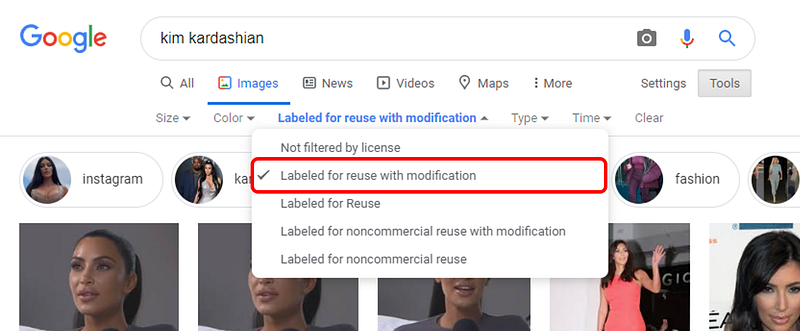
The images you see now will likely be free-to-use. However, Google is unable to verify the license validity and the terms that you must adhere to. Therefore, the onus is on you to check on these matters. It is tedious, but hey, if you are serious about using Kim’s images in your article, you would not want an army of lawyers hounding after you.
Please, double-check the license terms
If you are as paranoid as I am, and you should be because $8,000 is at stake here, please do yourself a favor and check the license terms of the image you have obtained.
Step 4: For instance, if I intend to include this image of Kim in my article on celebrity altruism, I would click the attached link to check its licensing at the image source.
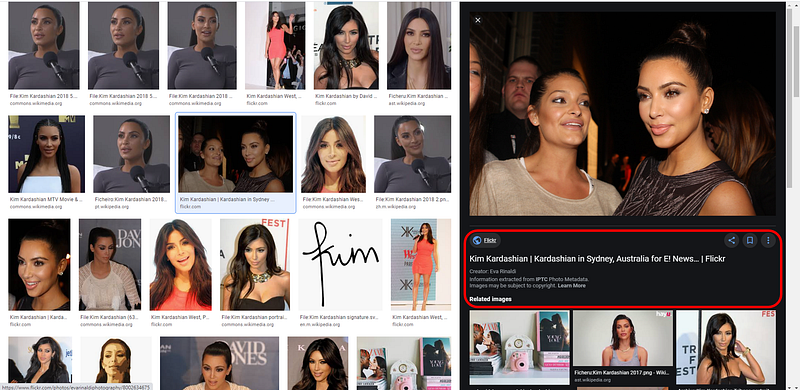
Step 5: Notice here that this image was taken by Eva Rinaldi. I would note down both the image URL and the name of the user who posted this image. Eventually, I will caption this image in my article as ‘Photo by Eva Rinaldi on Flickr’. Thanks, Eva!
Next, notice that this image is labeled as ‘some rights reserved.’ What could that mean? Am I allowed to use it? Click on ‘some rights reserved’ to find out.
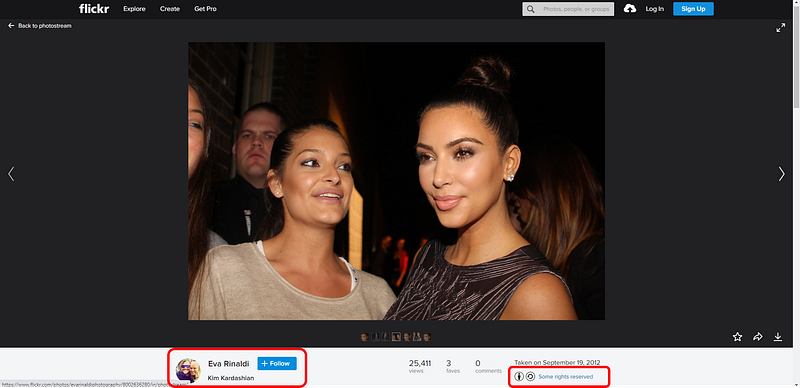
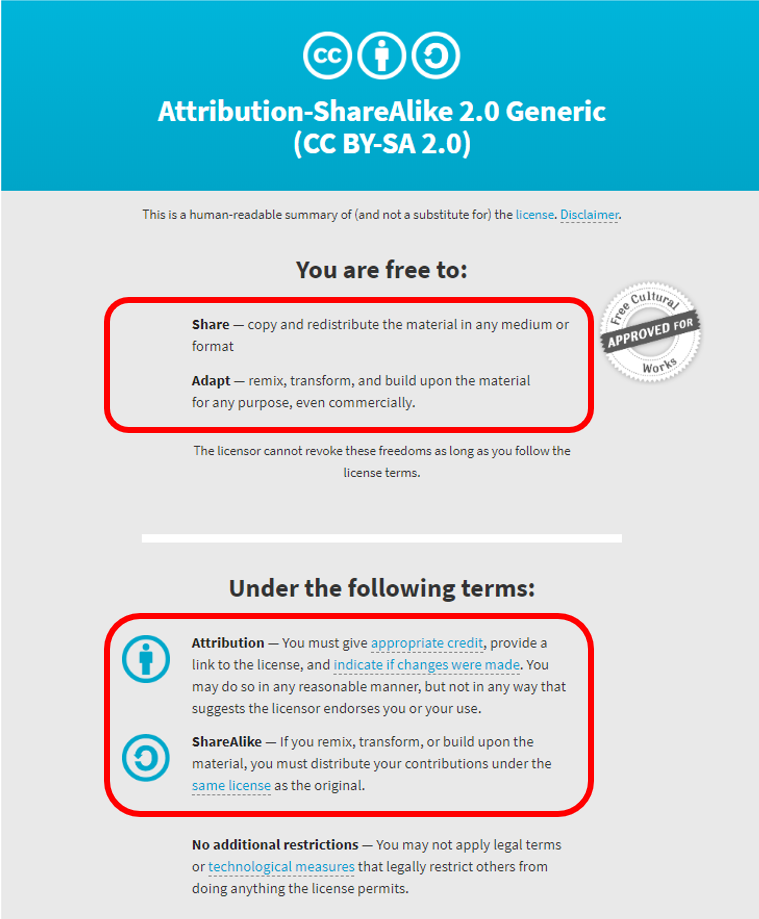
Step 6: Check the license terms. Clicking on ‘some rights reserved’ in the previous step opens a new window. Fortunately for me, this image is under a Creative Commons license. Under this license, I am allowed to use this image in my Medium article if I “give appropriate credit, provide a link to the license, and indicate if changes were made.” For ethical reasons, you should have been intending to do all of the above anyway.
Therefore, my caption will be ‘Photo by Eva Rinaldi on Flickr / Creative Commons’. You may mouse over to check out what links to park under each keyword.
Credit and caption the photos you use!
Remember that photographers are content creators and they ought to be given the credit they deserve. Just as we do not want others to plagiarise us, it is only appropriate to attribute any image we use to its source. Do not forget that your article earns you some money, and images play a major role in your earnings. Images captivate your audience (increases your read ratio) and sustain the interests of your readers (increases average reading time).
I would assume that most of us are aware of the conventions for crediting and captioning photos in our articles. If you are unaware of how to do so, please give Timothy Key’s comprehensive guide a read:
For more information on plagiarism, Holly Jahangiri provides a hilarious spin on an otherwise serious matter:
Key Takeaways
There you have it. Did anyone say something about not searching for images from Google Images? I have covered much ground in this article and here are the key takeaways:
- Do not use copyright images. Even if you credit or attribute the image, you may still be liable for legal action.
- Unsplash and Pixabay are safe choices.
- Search for unique images whenever possible. One way is to scroll through several pages. Try not to select the top result.
- When using Google Images, use filters to narrow down your search results to free-to-use images.
- Do not be complacent. Always check the license terms.
- Caption and credit your images appropriately.
I hope that this article has clarified some of the doubts that you may have, or even taught you a thing or two. If you have any questions or suggestions for free-to-use images, please leave a comment so we can learn from one another!
This article is one of a two-part series on image use. My friend, Chris Hedges, will be following up with a second article on image use. Check back to this space where I will update this story with the link to Chris’ story. Or better yet, follow Chris and you should be notified when his story is published. I promise it will be good!
For more information on formatting your articles on Medium, refer to the following articles by Timothy Key, Kevin Buddaeus, and Dr Mehmet Yildiz respectively: