
How to Explain Data using Gaussian Distribution and Summary Statistics with Python
A guide to discovering normal distribution and calculating key estimates of location & variability with Python

This is the second blog in the Stats series after explaining the taxonomy of data in the first blog. Here, we’ll learn to apply a few essential foundational concepts that help us describe the data using a set of statistical methods.
A sample is a snapshot of data from a larger dataset; this larger dataset which is all of the data that could be possibly collected is called population. In statistics, the population is a broad, defined, and often theoretical set of all possible observations that are generated from an experiment or from a domain.
These observations in the sample dataset often fit a certain kind of distribution which is commonly called the normal distribution and formally called Gaussian distribution. It is the most studied distribution because of which there is a subfield of statistics simply dedicated to Gaussian data.
What we’ll cover
In this post, we’ll focus on understanding:
- how normal distribution can be used to describe the data and observations from a machine learning model.
- estimates of location — the central tendency of a distribution.
- estimates of variability — the dispersion of data from the mean in the distribution.
- the code snippets for generating normally distributed data and calculating estimates using various python packages like numpy, scipy, matplotlib, etc.
Let’s get started…
Gaussian Distribution
When we plot a dataset such as a histogram, the shape of that charted plot is what we call its distribution. The most commonly observed shape of continuous values is the bell curve which is also called the Gaussian distribution a.k.a. normal distribution.
It is named after the German mathematician, Carl Friedrich Gauss. Some common example datasets that follow Gaussian distribution are:
- Body temperature
- People’s Heights
- Car mileage
- IQ scores
Let’s try to generate the ideal normal distribution and plot it using python.
Python code
We have libraries like Numpy, scipy, and matplotlib to help us plot an ideal normal curve.
import numpy as np
import scipy as sp
from scipy import stats
import matplotlib.pyplot as plt
## generate the data and plot it for an ideal normal curve## x-axis for the plot
x_data = np.arange(-5, 5, 0.001)## y-axis as the gaussian
y_data = stats.norm.pdf(x_axis, 0, 1)## plot data plt.plot(x_data, y_data) plt.show()
Output:
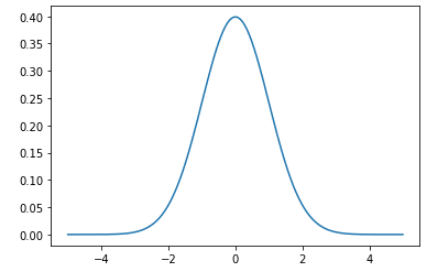
The points on the x-axis are the observations and the y-axis is the likelihood of each observation. We generated regularly spaced observations in the range (-5, 5) using np.arange() and then ran it by the norm.pdf() function with a mean of 0.0 and a standard deviation of 1 which returned the likelihood of that observation.
Observations around 0 are the most common and the ones around -5.0 and 5.0 are rare. The technical term for the pdf() function is the probability density function.
Testing for Gaussian Distribution
It is important to note that not all data fits the Gaussian distribution, and we have to discover the distribution either by reviewing histogram plots of the data or by implementing some statistical tests.
Some examples of observations that do not fit a Gaussian distribution and instead may fit an exponential (hockey-stick shape) include:
- People’s incomes
- Population of countries
- Sales of cars.
Until now, we have just talked about the ideal bell-shaped curve of the distribution but if we had to work with random data and figure out its distribution, this is how we would proceed:
- Let’s create some random data for this example using numpy’s
randn()function. - Plot the data using a histogram and analyze the returned graph for the expected shape.
- In reality, the data is rarely perfectly Gaussian, but it will have a Gaussian-like distribution and if the sample size is large enough, we treat it as Gaussian.
- You may have to change the plotting configuration(scale, number of bins, etc.) to look for the desired pattern.
Let’s check the code:
Python code:
##setting the seed for the random generation
np.random.seed(1)
##generating univariate data
data = 10 * np.random.randn(1000) + 100##plotting the data
plt.hist(data)
plt.show()Output:
Here’s the output of the code above with the histogram plot of the data.
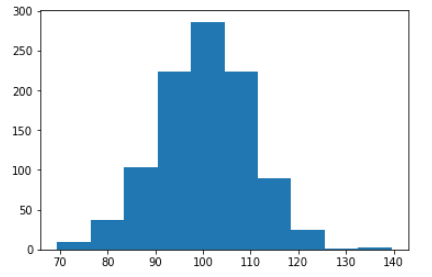
The plot looks more like a simple set of blocks but if we change the scale which in this case is the arbitrary number of bins in the histogram. Let’s specify the number of bins and plot:
plt.hist(data, bins=100)
plt.show()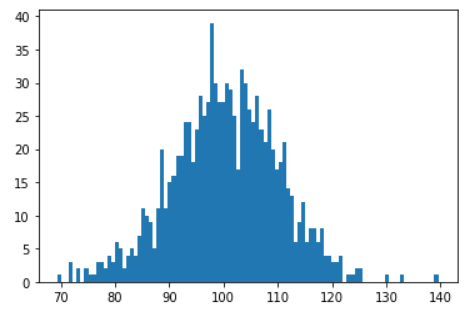
We can see that the curve looks closer to a Gaussian bell-shaped curve. Although, we should notice that we have a few observations that are going out of bounds and can be seen as noise. It points to another important conclusion that we should always expect some noise or outliers in our sample of data.
Estimates of Location
A fundamental step in exploring a dataset is getting a summarised value for each feature (variable): this is commonly an estimate of where most of the data is located (i.e., the central tendency).
At first, summarising the data might sound like a piece of cake i.e. just take the mean of the data. In reality, although the mean is very easy to compute and use, it may not always be the best measure for the central value. To solve this problem, statisticians have developed alternative estimates to mean.
We are going to use the Boston dataset from the sklearn package. I’ve dropped a few columns and this is what the dataframe looks like now:
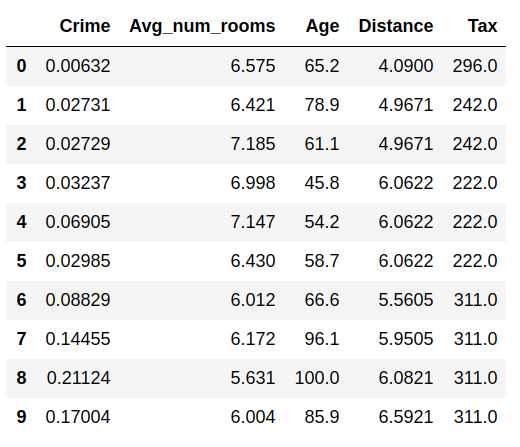
Let’s look over the commonly used estimates of location with the help of a sample dataset rather than greek symbols:
Mean
The sum of all values divided by the number of values.
A.k.a average
Python code: Calculating the mean of the Age variable in the data.
## we have a pandas dataframe that offer the mean() function
df['Age'].mean()
##output: 68.57490118577076Weighted mean
The sum of all values times a weight divided by the sum of the weights.
Two main motivations for using a weighted mean:
- Some observations are intrinsically more variable(high standard deviation) than others, and highly variable observations are given a lower weight.
- The collected data does not equally represent the different groups that we are interested in measuring.
A.k.a weighted average
Median
The value that separates one-half of the data from the other and thus dividing it into the higher and lower half.
A.k.a. 50th percentile
Python code:
## we have a pandas dataframe that offer the median() function
df['Age'].median()
##output: 77.5Percentile
The value such that P percent of the data lies below.
A.k.a. quantile
Python code: we can use the describe method to learn about the percentile
## we have a pandas dataframe that offer the describe() function
df.describe()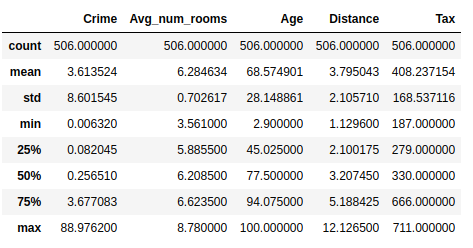
This gives summary statistics of all the numerical(metrics are different for categorical variables) variables.
Weighted median
The value such that one-half of the sum of the weights lies above and below the sorted data.
Trimmed mean
The average of all values after dropping a fixed number of extreme values. A trimmed mean eliminates the influence of extreme values. For example, while judging an event, we can calculate the final score using the trimmed mean of all the scores so that no judge can manipulate the result.
A.k.a. truncated mean
Python code: for this, we are going to use the stats module from the scipy library.
## trim = 0.1 drops 10% from each end
stats.trim_mean(df['Age'], 0.1)
##output: 71.19605911330049Outlier
A data value that is very different from most of the data. The median is referred to as a robust estimate of location since it is not influenced by outliers i.e. extreme cases whereas the mean is sensitive to outliers.
A.k.a. extreme value
Estimates of Variability
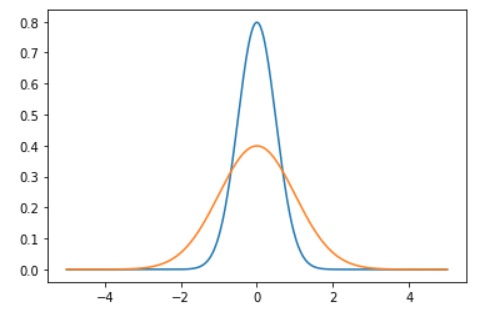
Besides location, we have another method of summarizing a feature. Variability, also referred to as dispersion, tells us how spread-out or clustered the data is.
Calculating the variability measures for the same dataframe using libraries like pandas, numpy, and scipy.
Deviations
The difference between the observed values and the estimate of location.
A.k.a. : errors, residuals
Variance
The sum of squared deviations from the mean divided by n — 1 where n is the number of data values.
A.k.a. : mean-squared-error
Python code:
## calculating variaince over Age variable
df['Age'].var()
Standard deviation
The square root of the variance.
Python code:
## calculating standard deviation over Age variable
df['Age'].std()
##output: 28.148861406903617Mean absolute deviation
The mean of the absolute values of the deviations from the mean. I’ve covered this in more detail along with a mathematical explanation here:
A.k.a. : l1-norm, Manhattan norm
Median absolute deviation from the median
The median of the absolute values of the deviations from the median.
Python code:
## calculating mean absolute deviation over Age variable
df['Age'].mad()
##output: 24.610885188020433Range
The difference between the largest and the smallest value in a data set.
We can calculate the range of a variable using the min and max from the summary statistics of the dataframe.
Python code:
##range of Age column
df['Age'].iloc[df['Age'].idxmax] - df['Age'].iloc[df['Age'].idxmin()]
##output: 97.1Order statistics
Metrics based on the data values sorted from smallest to biggest.
A.k.a. : ranks
Percentile
The value such that P percent of the values take on this value or less and (100–P) percent take on this value or more.
A.k.a. : quantile
Interquartile range
The difference between the 75th percentile and the 25th percentile.
A.k.a. : IQR
Python code:
# Computing IQR
Q1 = df['Age'].quantile(0.25)
Q3 = df['Age'].quantile(0.75)
IQR = Q3 - Q1
##Output: 49.04999999999999We’ll cover this in detail in the next blog along with the box plot visualization methods.
Next Up…
Now that we have a clear understanding of Gaussian distribution and common estimates of location and variability, we can summarise and interpret the data easily using these statistical methods.
In the next blog, we’ll cover all the basic data visualization charts and methods. We’ll learn how to chart time series data, summarize data distributions, and relationships.
Data Science with Harshit
With this channel, I am planning to roll out a couple of series covering the entire data science space. Here is why you should be subscribing to the channel:
- This series would cover all the required/demanded quality tutorials on each of the topics and subtopics like Python fundamentals for Data Science.
- Explained Mathematics and derivations of why we do what we do in ML and Deep Learning.
- Podcasts with Data Scientists and Engineers at Google, Microsoft, Amazon, etc, and CEOs of big data-driven companies.
- Projects and instructions to implement the topics learned so far. Learn about new certifications, Bootcamp, and resources to crack those certifications like this TensorFlow Developer Certificate Exam by Google.