
How to ensure OpenAI’s GPT-3 provides an accurate answer using embedding and semantic search
Chat with Knowledgebase using OpenAI ChatGPT API, Embedding, and Semantic Search

There are many articles on news outlets and social media stating that OpenAI’s ChatGPT hallucinates and confidently provides incorrect answers. I think this is a bit overblown because people also make mistakes. Therefore, I believe that ChatGPT is just as trustworthy as people.
Anyway, there is a way to compel OpenAI’s GPT-3 to give an accurate answer based on your knowledge base and stay on a specific topic. The answer given will be as precise as your knowledge base, and any topic not covered by it will result in an “I’m sorry, but the given context does not provide information on …..” response.
How (Overview)
It is fairly straightforward to ensure that OpenAI’s GPT-3 provides an accurate answer and stays on topic. All you need to do is:
- Create a knowledge base database using embedding.
- The semantic search of the knowledge base using the user question.
- Include the semantic search result(s) in the prompt with the same user question.
- Ask OpenAI GPT-3 to find the answer within the semantic search result(s).
- If GPT-3 finds an answer, it returns the answer.
- If GPT-3 does not find an answer, it returns "I’m sorry, but the given context does not provide information on …..”
How (Technical Overview)
Since this is a technical tutorial, let’s get technical.
The first step I outlined above involves using “embedding” as a keyword. Text embedding is a technique that represents words or phrases as dense vectors in a high-dimensional space. These vectors capture the meaning and relationships of the words or phrases in the text. Text embedding can be generated using techniques LLM, such as OpenAI GPT-3.
The second step involves using “semantic search” as a keyword. Semantic search uses embedding techniques, such as text embedding, to capture the meaning and relationships of the text. This allows it to return contextually relevant results even if they don’t contain exact keyword matches.
The rest of the steps are self-explanatory.
Tutorial
There are experts in this field who can better explain the intricacies of these technologies, so let’s move on to a tutorial on how to ensure OpenAI’s GPT-3 provides an accurate answer and stays on topic.
Tools
We will be using three tools in this tutorial:
- OpenAI GPT-3, specifically the new ChatGPT API (gpt-3.5-turbo). Not because this model is any better than other models, but because it is cheaper ($0.002 / 1K tokens) and good enough for this use case.
- Chroma, the AI-native open-source embedding database. Chroma is an easy-to-use embedding database when used in conjunction with LangChain; otherwise, it’s kind of unusable. If you want to deploy these types of applications in production, I recommend using Elasticsearch because it has wide adoption and has been around for years. Not because Elasticsearch is better than competitors, but because not many organizations like to add a new technology stack.
- LangChain, is a library that aims to assist developers in building applications that use Large Language Models (LLMs) by allowing them to integrate these models with other sources of computation or knowledge.
Data
We will be using Google Fi Help as the knowledge base data. I used to have an account with Google Fi and have had extensive experience using their Help website, which I found to be helpful. However, we will only be using a small fraction of their Help site as data.
Python Code
The code was developed using Google Colab. I like using Google Colab because it makes it easy for you to replicate the tutorial, but some of the code may only be relevant to Google Colab.
Install Python packages
%%writefile requirements.txt
openai
chromadb
langchain
tiktoken
unstructured
%pip install -r requirements.txt
Import Python Packages
import os
import platform

import openai
import chromadb
import langchain

from langchain.embeddings.openai import OpenAIEmbeddings
from langchain.vectorstores import Chroma
from langchain.text_splitter import TokenTextSplitter
from langchain.llms import OpenAI
from langchain.chains import ChatVectorDBChain
from langchain.document_loaders import UnstructuredURLLoader

import urllib
from urllib import request

from pprint import pprint

print('Python: ', platform.python_version())
Mount Google Drive on Colab
from google.colab import drive
drive.mount('/content/drive')
OpenAI API Key
os.environ["OPENAI_API_KEY"] = 'your openai api key'Data (Google Fi Help URLs)
urls = [
    "https://support.google.com/fi/answer/6172582?hl=en&ref_topic=4596407",
    "https://support.google.com/fi/answer/6201699?hl=en&ref_topic=4596407",
    "https://support.google.com/fi/answer/9462098?hl=en&ref_topic=4596407",
    "https://support.google.com/fi/answer/7131470?hl=en&ref_topic=4596407",
    "https://support.google.com/fi/answer/6181978?hl=en&ref_topic=4596407",
    "https://support.google.com/fi/answer/7535199?hl=en&ref_topic=4596407",
    "https://support.google.com/fi/answer/6309809?hl=en&ref_topic=4596407",
    "https://support.google.com/fi/topic/6183897?hl=en&ref_topic=4596407",
    "https://support.google.com/fi/answer/7644078?hl=en&ref_topic=4596407",
    "https://support.google.com/fi/answer/10093003?hl=en&ref_topic=4596407",
    "https://support.google.com/fi/answer/13318811?hl=en&ref_topic=4596407",

    "https://support.google.com/fi/answer/6078618?hl=en&ref_topic=4596517",
    "https://support.google.com/fi/answer/6150327?hl=en&ref_topic=4596517",
    "https://support.google.com/fi/answer/6242352?hl=en&ref_topic=4596517",
    "https://support.google.com/fi/answer/6062495?hl=en&ref_topic=4596517",
    "https://support.google.com/fi/answer/6211315?hl=en&ref_topic=4596517",
    "https://support.google.com/fi/answer/6224695?hl=en&ref_topic=4596517",
    "https://support.google.com/fi/answer/6330195?hl=en&ref_topic=4596517",
    "https://support.google.com/fi/answer/7359427?hl=en&ref_topic=4596517",
    "https://support.google.com/fi/answer/7540641?hl=en&ref_topic=4596517",
    "https://support.google.com/fi/answer/9823429?hl=en&ref_topic=4596517",
    "https://support.google.com/fi/answer/12812644?hl=en&ref_topic=4596517",

    "https://support.google.com/fi/answer/9462098?hl=en&ref_topic=4596410",
    "https://support.google.com/fi/topic/6216188?hl=en&ref_topic=4596410",
    "https://support.google.com/fi/topic/6216187?hl=en&ref_topic=4596410",
    "https://support.google.com/fi/topic/6216160?hl=en&ref_topic=4596410",
    "https://support.google.com/fi/answer/6172319?hl=en&ref_topic=4596410",
    "https://support.google.com/fi/topic/6216183?hl=en&ref_topic=4596410",
    "https://support.google.com/fi/answer/9462005?hl=en&ref_topic=4596410",
    "https://support.google.com/fi/answer/12831079?hl=en&ref_topic=4596410",

    "https://support.google.com/fi/topic/6216189?hl=en&ref_topic=6061834",
    "https://support.google.com/fi/topic/6216160?hl=en&ref_topic=6061834",
    "https://support.google.com/fi/topic/6216168?hl=en&ref_topic=6061834",
    "https://support.google.com/fi/answer/6181037?hl=en&ref_topic=6061834",
    "https://support.google.com/fi/topic/7206529?hl=en&ref_topic=6061834",
    "https://support.google.com/fi/answer/9462299?hl=en&ref_topic=6061834",
    "https://support.google.com/fi/answer/12999259?hl=en&ref_topic=6061834"

    "https://support.google.com/fi/topic/6181106?hl=en&ref_topic=6061932",
    "https://support.google.com/fi/topic/6216169?hl=en&ref_topic=6061932",
    "https://support.google.com/fi/topic/6216184?hl=en&ref_topic=6061932",
    "https://support.google.com/fi/topic/6216166?hl=en&ref_topic=6061932",
    "https://support.google.com/fi/answer/6215279?hl=en&ref_topic=6061932",
    "https://support.google.com/fi/answer/6211331?hl=en&ref_topic=6061932",
    "https://support.google.com/fi/answer/10448622?hl=en&ref_topic=6061932"
]
Configure Chroma
Chroma uses both of my favorite technologies for their backend — DuckDB and Apache Parquet — but by default, it uses an in-memory database. This is fine for this tutorial, but I want to give you the option of storing the database file on a disk so you can reuse the database without paying for embedding it every single time.
collection_name="knowledgebase"
persist_directory="/content/drive/My Drive/Colab Notebooks/chromadb/kb"
Convert Knowledgebase (Google Fi Help) to Embedding
Convert the URLs to vector embeddings and store them in an embedding database. We use ‘from langchain.document_loaders import UnstructuredURLLoader’ to load the URLs.
loader = UnstructuredURLLoader(urls=urls)
kb_data = loader.load()
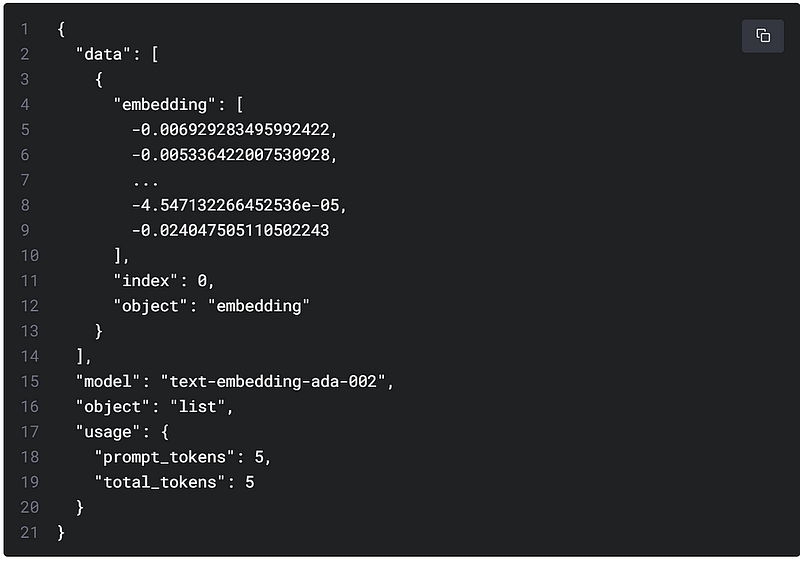
To obtain an embedding, we need to send the text string, i.e., the HTMLs, to OpenAI’s embeddings API endpoint along with a choice of embedding model ID, e.g., text-embedding-ada-002. The response will contain an embedding. However, since the knowledgebase may contain more than 2,048 tokens and the token limit for the text-embedding-ada-002 model is 2,048 tokens, we use the ‘text_splitter’ utility (from ‘langchain.text_splitter import TokenTextSplitter’) to split the knowledgebase into manageable 1,000-token chunks. If you’re wondering, the pricing for the embedding model is $0.0004 / 1K tokens. Finally, we store the embedding in Chroma, our embedding database, and persist it on a file system.
The following is an illustration of a sample embedding response from OpenAI.
text_splitter = TokenTextSplitter(chunk_size=1000, chunk_overlap=0)
kb_doc = text_splitter.split_documents(kb_data)
embeddings = OpenAIEmbeddings() kb_db = Chroma.from_documents(kb_doc, embeddings, collection_name=collection_name, persist_directory=persist_directory) kb_db.persist()
Configure LangChain QA
To configure LangChain QA with Chroma, use the OpenAI GPT-3 model (model_name=’gpt-3.5-turbo’). Additionally,
- Add the intermediary step of a result from an embedded database, i.e., Chroma (set return_source_documents = True).
- Add the semantic search returns 5 results from an embedded database, i.e., Chroma (top_k_docs_for_conext = 5).
kb_qa = ChatVectorDBChain.from_llm(
    OpenAI(
        temperature=0,
        model_name = "gpt-3.5-turbo"),
    vectorstore = kb_db,
    top_k_docs_for_context = 5,
    return_source_documents = True)
Questions & Answers with the knowledgebase
Generating questions and answers from the knowledge base is a straightforward process. However, I have not figured out how to add the ‘system’ role prompt using LangChain. Therefore, I have included ‘Provide verbose answers and URL links, also’ in every prompt.
Initiate the chat history.
chat_history = []
Question #1: How does monthly bill credit work?
query = "How does monthly bill credit worK? Provide url links, also."
result = kb_qa({"question": query, "chat_history": chat_history})
Semantic search results #1
pprint(result[“source_documents”])
[Document(page_content="Trade in your device for monthly bill credits\n\nThe trade-in offer with monthly bill credits is a type of a device offer in which the promotional value is credited back to you through monthly bill credits, usually over a duration of 24 months.\n\nLearn about trade-in with monthly bill credits\n\nWhen you have an eligible trade-in with a monthly bill credits promotion, you'll receive the credits in one of two ways depending on how you purchased the new device.\n\nIf you pay upfront for the new device:\xa0\n    \n      You receive the monthly bill credits starting with the first bill. These credits go towards your monthly bill payment, which includes\xa0Fi service taxes and fees.\xa0\n      We refund the appropriate trade-in value to your original form of payment after the trade-in inspection is finished and your device\xa0passes trade-in inspection.\n      Monthly bill credits continue for 24 months, or until you leave Fi, whichever is earlier.\n\nIf you pay for the new device through device financing:\n    \n      You receive the monthly bill credits starting with the first bill. These credits go towards your monthly bill payment, which includes Fi service taxes and fees.\xa0\n      We refund the appropriate trade-in value in the form of lump sum Fi service credits after the trade-in inspection is finished and your device passes the trade-in inspection.\n      Monthly bill credits continue for 24 months, or until you leave Fi, whichever is earlier.\n\nRelated resources\n\nTrade in or upgrade your phone\n\nLearn about Monthly Bill Credits\n\nWas this helpful?\n\nHow can we improve it?", lookup_str='', metadata={'source': 'https://support.google.com/fi/answer/13318811?hl=en&ref_topic=4596407'}, lookup_index=0),
 Document(page_content='About your billing statement\n\nUnderstand your Google Fi bill\n\nYour Google Fi billing cycle\n\nView or download your billing statement', lookup_str='', metadata={'source': 'https://support.google.com/fi/topic/6216188?hl=en&ref_topic=4596410'}, lookup_index=0),
 Document(page_content='Understand your final bills after you cancel Fi\n\nFor single member plans, after you cancel your service, you may get up to 2 more bills to close out all your charges.\n\nFor group plan owners, after your last member leaves, you may receive up to 2 more bills to close out all your group\'s charges. Group plan members typically have 60 days to leave the plan, so that can delay the closing for the owner.\n\nCheck final bill\n\nAfter you cancel your service, you can still sign in to your account to check your bill and other details. If you have outstanding balances on your second bill, we\'ll refund you on your primary payment card. Depending on international usage, it can take 60—90 days for billing and refunds to complete. Service credits are non-refundable.\n\nOpen the Google Fi website or app Project Fi.\n\nSelect the\xa0Billing\xa0tab.\n\nAt the end of your last active billing cycle, under "Standard monthly charges," your first statement won\'t show a balance for your monthly data budget.\n\nFlexible plan\n\nIf you cancel your service before the end of your Flexible plan\'s billing cycle, you get a credit for any days remaining in a second bill 30 days later. This statement may include charges for international usage, which take longer to appear.\n\nUnlimited Plus plan & Simply Unlimited plan\n\nIf you cancel your service before the end of your Unlimited plan\'s billing cycle, you\'re charged the full amount of that billing cycle. This could be charged in a later cycle. A second bill sent 30 days later may include charges for international use, which take longer to appear.\n\nRelated resources\n\nCancel your Google Fi service\n\nLeave a group plan or remove members\n\nWas this helpful?\n\nHow can we improve it?', lookup_str='', metadata={'source': 'https://support.google.com/fi/answer/12831079?hl=en&ref_topic=4596410'}, lookup_index=0),
 Document(page_content='\n\nTap TTY mode.\n\nSelect from the available options.\n\nAccessibility FAQ\n\nCan I download a copy of my billing statement? Yes, you can download your billing statement.\n\nWas this helpful?\n\nHow can we improve it?', lookup_str='', metadata={'source': 'https://support.google.com/fi/answer/6215279?hl=en&ref_topic=6061932'}, lookup_index=0),
 Document(page_content="Billing issues\n\nBill is higher than usual\n\nFix a declined payment\n\nCan't pay your Google Fi bill", lookup_str='', metadata={'source': 'https://support.google.com/fi/topic/6216183?hl=en&ref_topic=4596410'}, lookup_index=0)]
Answer #1
pprint(result["answer"])('Monthly bill credit is a promotional offer in which the value of a device '
'trade-in is credited back to the customer through monthly bill credits over '
"a period of 24 months. The credits are applied towards the customer's "
'monthly bill payment, which includes Fi service taxes and fees. The trade-in '
"value is refunded to the customer's original form of payment after the "
'trade-in inspection is completed and the device passes inspection. If the '
'customer pays upfront for the new device, they receive the monthly bill '
'credits starting with the first bill. If the customer pays for the new '
'device through device financing, they also receive the monthly bill credits '
'starting with the first bill, but the trade-in value is refunded in the form '
'of lump sum Fi service credits. Monthly bill credits continue for 24 months '
'or until the customer leaves Fi, whichever is earlier. More information on '
'trade-in with monthly bill credits can be found at the following URL: '
'https://support.google.com/fi/answer/7531769?hl=en')Question #1.1: How will I receive monthly bill credits?
query = "How will I receive monthly bill credits? Provide verbose answer and url links, also."
result = kb_qa({"question": query, "chat_history": chat_history})Answer #1.1
('Monthly bill credit is a promotional offer in which the value of a device '
 'trade-in is credited back to the customer through monthly bill credits over '
 "a period of 24 months. The credits are applied towards the customer's "
 'monthly bill payment, which includes Fi service taxes and fees. The trade-in '
 "value is refunded to the customer's original form of payment after the "
 'trade-in inspection is completed and the device passes inspection. If the '
 'customer pays upfront for the new device, they receive the monthly bill '
 'credits starting with the first bill. If the customer pays for the new '
 'device through device financing, they also receive the monthly bill credits '
 'starting with the first bill, but the trade-in value is refunded in the form '
 'of lump sum Fi service credits. Monthly bill credits continue for 24 months '
 'or until the customer leaves Fi, whichever is earlier. More information on '
 'trade-in with monthly bill credits can be found at the following URL: '
 'https://support.google.com/fi/answer/7531769?hl=en')
Question #1.2: I paid upfront for the device.
query = "I paid upfront for the device. Provide verbose answer and url links, also."
result = kb_qa({"question": query, "chat_history": chat_history})
Answer #1.2
('If you paid upfront for your device when signing up for Google Fi service, '
 'you will receive monthly bill credits towards your monthly bill payment, '
 'which includes Fi service taxes and fees. The appropriate trade-in value '
 'will be refunded to your original form of payment after the trade-in '
 'inspection is finished and your device passes trade-in inspection. Monthly '
 'bill credits will continue for 24 months or until you leave Fi, whichever is '
 'earlier. For more information on trade-in with monthly bill credits, you can '
 'visit the following link: https://support.google.com/fi/answer/7531769?hl=en')
Question #2: Can you tell me how to cure the wart on my hand?
chat_history = []query = "Can you tell me how to cure the wart on my hand? Provide verbose answer and url links, also."
result = kb_qa({"question": query, "chat_history": chat_history})Semantic search results #2
pprint(result["source_documents"])[Document(page_content='How can we improve it?', lookup_str='', metadata={'source': 'https://support.google.com/fi/answer/10448622?hl=en&ref_topic=6061932'}, lookup_index=0),
Document(page_content='Voicemail\n\nCheck your voicemail\n\nSet up your voicemail', lookup_str='', metadata={'source': 'https://support.google.com/fi/topic/6216169?hl=en&ref_topic=6061932'}, lookup_index=0),
Document(page_content='\n\nTap TTY mode.\n\nSelect from the available options.\n\nAccessibility FAQ\n\nCan I download a copy of my billing statement? Yes, you can download your billing statement.\n\nWas this helpful?\n\nHow can we improve it?', lookup_str='', metadata={'source': 'https://support.google.com/fi/answer/6215279?hl=en&ref_topic=6061932'}, lookup_index=0),
Document(page_content="Google Fi accessibility features\n\nImportant:\xa0At this time,\xa0Google Fi doesn't support Real Time Text (RTT).\n\nContact support\n\nGoogle Fi questions\n\nTo reach Google Fi support on your TTY device, dial 711 and ask to connect\xa0to Google Fi support at 1-844-TALK2Fi.\n\nIf Google Fi support at 1-844-TALK2Fi is closed or\xa0you want to request a call back, complete\xa0the form to get a call from a Google Fi Support Expert.\n\nGeneral accessibility questions\n\nIf you have questions about assistive technology or other Google products, go to the contact page for the Google Disability Support team. Then, select a support option.\n\nCall relay services\n\nYou can use 711 to call Telecommunications Relay Services (TRS). The relay service helps people with hearing or speech disabilities make phone calls through an operator.\n\nNote: If you need to reach emergency services, use TTY to call 911 directly. When possible, do not rely on 711 in the event of an emergency.\n\nAndroid accessibility features for your phone\n\nAndroid accessibility features and apps let you customize your Android device to suit your needs. You can use services and tools such as a screen reader (TalkBack), switch access, and braille support. You can also customize settings such as captions, magnification gestures, large text, high-contrast text, and more.\n\nYou can enable TalkBack immediately when you set up your new Android device.\n\nLearn more about all Android accessibility features.\n\nHearing aid compatibility\n\nTurn on hearing aid compatibility\n\nOpen your device's Phone app.\n\nTap Menu .\n\nTap Settings Accessibility.\n\nCheck or uncheck the box next to \x9cHearing aids.\x9d\n\nHearing aid compatible phones\n\nGoogle Fi currently offers these hearing aid compatible handsets:\n\nDevice\n\nHearing Aid Compatibility\n\nManufacturer\n\nFCC ID\n\nPixel 7\n\nM3 & T4\n\nGoogle\n\nA4RGVU6C\n\nPixel 7 Pro\n\nM3 & T4\n\nGoogle\n\nA4RGE2AE\n\nPixel 6a\n\nM3 & T4\n\nGoogle\n\nA4RGX7AS\n\nPixel 6\n\nM3 & T3\n\nGoogle\n\nA4RGB7N6\n\nPixel 6 Pro\n\nM3 & T4\n\nGoogle\n\nA4RG8V0U\n\nPixel 5a with 5G\n\nM3 & T4\n\nGoogle\n\nA4RG1F8F\n\nPixel 5\n\nM4 & T3\n\nGoogle\n\nA4RGD1YQ\n\nPixel 4a (5G)\n\nM3 & T4\n\nGoogle\n\nA4RG025E\n\nPixel 4a\n\nM3 & T4\n\nGoogle\n\nA4RG025J\n\nPixel 4\n\nM3 & T4\n\nGoogle\n\nA4RG020I\n\nPixel 4 XL\n\nM3 & T4\n\nGoogle\n\nA4RG020J\n\nPixel 3a\n\nM3 & T3\n\nGoogle\n\nA4RG020G\n\nPixel 3a XL\n\nM3 & T3\n\nGoogle\n\nA4RG020C\n\nPixel 3\n\nM3 & T3\n\nGoogle\n\nA4RG013A\n\nPixel 3 XL\n\nM3 & T3\n\nGoogle\n\nA4RG013C\n\nMoto G7\n\nM4 & T4\n\nMotorola\n\nIHDT56XP1\n\nMoto G 5G\n\nM3 & T3\n\nMotorola\n\nIHDT56AA3\n\nMoto G Play\n\nM3 & T3\n\nMotorola\n\nIHDT56ZD4\n\nMoto G Power (2020)\n\nM3 & T3\n\nMotorola\n\nIHDT56YL1\n\nMoto G Power (2021)\n\nM3 & T3\n\nMotorola\n\nIHDT56ZH1\n\nMoto G Power (2022)\n\nM3 & T3\n\nMotorola\n\nIHDT56ZP5\n\nMoto G Stylus\n\nM3 & T3\n\nMotorola\n\nIHDT56YN1\n\nMoto G Stylus 5G\n\nM3 & T3\n\nMotorola\n\nIHDT56AA4\n\nMotorola One 5G Ace\n\nM3 & T3", lookup_str='', metadata={'source': 'https://support.google.com/fi/answer/6215279?hl=en&ref_topic=6061932'}, lookup_index=0),
Document(page_content="Google Fi tips & tricks\n\nHere are some tips & tricks to make the most of Google Fi.\n\nExpand your coverage & manage data\n\nKeep your phone connected to Wi-Fi\n\nTo make the most of Google Fi, we recommend connecting to Wi-Fi whenever it's available and always keeping your Wi-Fi turned on. By connecting to Wi-Fi, you:\n\nExpand your coverage in places where the cellular network isn't as strong.\n\nLimit or manage the amount of mobile data that you use.\n\nLikely have faster access for streaming, downloads, games, and apps.\n\nStay under the data speed limit for your plan. Learn more about data speeds.\n\nMake calls over Wi-Fi\n\nWi-Fi calling expands your coverage in places where the cellular network isn't as strong.\n\nJust make sure you're connected to Wi-Fi, and your call is\xa0placed over the strongest connection.\n\nLearn more about how to make calls over Wi-Fi.\n\nShare your data using a Wi-Fi hotspot\n\nSet up a Wi-Fi hotspot\n\nWith Google Fi and your Fi\xa0phone, you can turn your phone into a portable Wi-Fi hotspot and share its Internet connection with up to 10 other devices at the same time.\xa0For example, if you want to use your laptop at the airport, you can turn your phone into a Wi-Fi hotspot to connect your laptop to the Internet.\n\nWith the Flexible plan, data for a Wi-Fi hotspot or tethering all comes out of your data budget. It's $10 per GB just like data on your phone.\n\nWith the Simply Unlimited plan, Wi-Fi hotspot or tethering isn't available.\n\nOn the Unlimited Plus plan, data used for a Wi-Fi hotspot or tethering is included in the plan cost.\n\nLearn more about Fi plan options.\n\nLearn how to set up a Wi-Fi hotspot.\n\nGet to know your Fi\xa0phone\n\nTry these recommended apps\n\nYou'll have the best Google Fi experience if you use the following apps:\n\nPhone app\n\nBy using the Phone app that comes on your phone, you're\xa0able to take advantage of Google Fi's features like Wi-Fi calling.\n\nMessages by Google\n\nYou can send and receive text (SMS) and multimedia (MMS) messages with\xa0the Messages app.\n\nWe recommend you use\xa0Messages by Google on your Fi phone.\n\nLearn more about how to use Messages by Google.\n\nGoogle Fi app\n\nThe Google Fi app comes installed on the\xa0phone you bought through Google Fi, and you need the app to use Google Fi.\n\nUse your Google Fi app to track your data usage and manage your account, right from your phone. You'll also get important notifications about your account.\n\nMake sure to keep the Google Fi app updated on your phone for the best experience.\n\nIf you've used\xa0other apps for calls and texts, try to switch\xa0back to the Phone app and\xa0Messages by Google\xa0for the best Google Fi experience.\n\nLearn what your Fi\xa0phone can do\n\nFi phones can do all kinds of cool things you might not know about yet:\n\nConnect to Wi-Fi wherever you are\n\nBeam cool stuff to friends\n\nSend texts even faster by swiping to type\n\nUse tap-and-pay to buy things without taking your credit card out\n\nRemotely lock and\xa0erase your phone if you leave it somewhere\n\nTake 360° pictures\n\nWas this helpful?\n\nHow can we improve it?", lookup_str='', metadata={'source': 'https://support.google.com/fi/answer/6062495?hl=en&ref_topic=4596517'}, lookup_index=0)]Answer #2
pprint(result["answer"])("I'm sorry, but the given context does not provide any information related to "
'curing warts on hands.')As you can see, any topic not included in the search will result in an “I’m sorry, but the given context does not provide information on …..” response.
I hope you have enjoyed this simple tutorial. If you have any questions or comments, please provide them here.