avatarMoments Online

Free AI web copilot to create summaries, insights and extended knowledge, download it at here

1514

Abstract

ns:</p><ol><li>Go to <a href="https://barcode.tec-it.com/en">barcode.tech-it.com</a>.</li></ol><p id="ed39">2. Choose Code-128 as the barcode type, enter data like your name, and hit <i>Show Barcode </i>or <i>Refresh</i>. <i>(you can also enter your secret love notes)</i></p><p id="af09">3. Download your name as a barcode image.</p><figure id="253c"><img src="https://cdn-images-1.readmedium.com/v2/resize:fit:800/1*tnaWuGoZ_D4QuFVDef_hAQ.png"><figcaption>Screenshot by the author</figcaption></figure><p id="46a2"><b><i>You have successfully encoded your name into a barcode image.</i></b></p><p id="c311"><b>How to change the barcode image format</b></p><ol><li>Click on the settings icon.</li></ol><figure id="2cc1"><img src="https://cdn-images-1.readmedium.com/v2/resize:fit:800/1*TfKwgkqjc86kQM6ofwhneQ.png"><figcaption>Screenshot by the author</figcaption></figure><p id="c982">2. Choose image format (GIF, JPG, PNG, SVG)</p><figure id="6d99"><img src="https://cdn-images-1.readmedium.com/v2/resize:fit:800/1*ITe-HniotpbMR5dkkkFXvw.png"><figcaption>Screenshot by the author</figcaption></figure><p id="a866">Now let’s get your barcode image into text format. <i>(this will help your forbidden lover understand your secret love notes)</i></p><p id="2941"><b>How to decrypt your barcode image to text</b></p><p id="a753">Things needed:</p><ol><li>Barcode image</li><li>A barcode decoder</li></ol><p id="e041">Instructions:</p><ol><li>Search <a href="https://zxing.org/w/decode.jspx">ZXing decoder o

Options

nline</a>.</li><li>Enter the image URL or upload the image file and hit Submit Query.</li></ol><figure id="de6d"><img src="https://cdn-images-1.readmedium.com/v2/resize:fit:800/1*fh4ihzbiv5vCHVmTi4sTiA.png"><figcaption>Screenshot by the author</figcaption></figure><figure id="4b16"><img src="https://cdn-images-1.readmedium.com/v2/resize:fit:800/1*YSkWytkrjmYBFIyhBAWugg.png"><figcaption>Screenshot by the author</figcaption></figure><p id="942c"><b><i>You have successfully decrypted your barcode image into text.</i></b></p><p id="7cdf"><i>(your forbidden lover can now understand your secret love notes)</i></p><figure id="ca98"><img src="https://cdn-images-1.readmedium.com/v2/resize:fit:800/1*BNEt0-aSqkZMj1P9hrNFdw.png"><figcaption>Screenshot by the author</figcaption></figure><p id="22a8"><i>I hope you enjoyed this piece.</i></p><h1 id="2e5a">Also, Read Post by me:</h1><div id="07e7" class="link-block"> <a href="https://readmedium.com/write-your-first-simple-c-program-1346cbfc8a2d"> <div> <div> <h2>Write Your First Simple C++ Program</h2> <div><h3>The program receives integer values, sums, and displays the result</h3></div> <div><p>medium.com</p></div> </div> <div> <div style="background-image: url(https://miro.readmedium.com/v2/resize:fit:320/1*eHQrndZWh9dF2VkBafw3zw.png)"></div> </div> </div> </a> </div></article></body>

How to Encode Your Name Using Barcode

name-to-barcode-cryptography
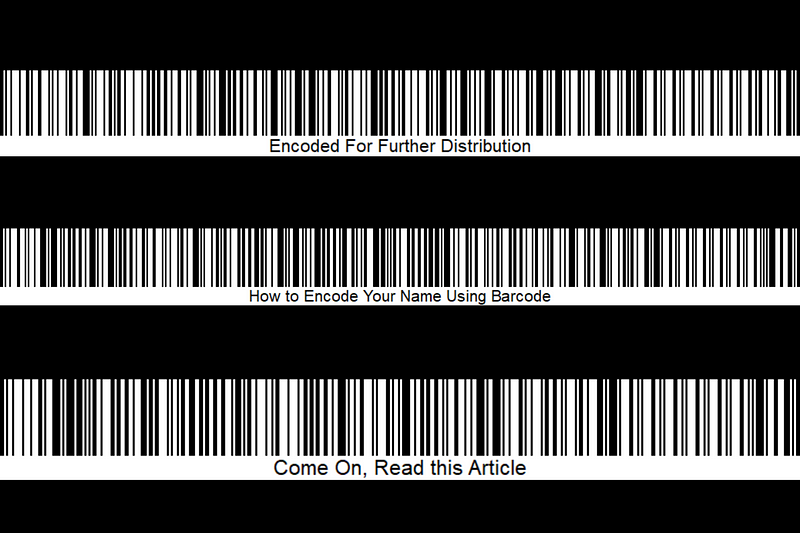
Designed by the author on Canva

Have you ever wondered what your name would look like in barcode format? Well, I will show you how to turn your name into a barcode image, readable with a barcode scanner.

This technique I call name-to-barcode- cryptography (this is term does not exist, in case you didn’t get the joke) which means hiding a person’s name in barcode format. Google has a barcode image that translates to “Google” in a text when scanned. (see image below)

Screenshot by the author

Now let’s get your name into a barcode image. (FYI you can also use this technique to send secret love notes to your forbidden lover as it’s useless to the naked eye)

How to make a barcode image of your name

Things needed:

  1. Your name.
  2. A barcode generator.

Instructions:

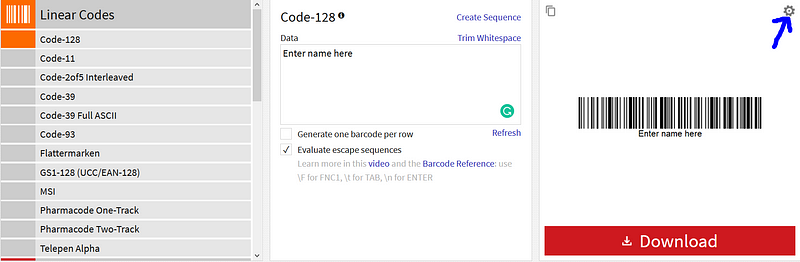
  1. Go to barcode.tech-it.com.

2. Choose Code-128 as the barcode type, enter data like your name, and hit Show Barcode or Refresh. (you can also enter your secret love notes)

3. Download your name as a barcode image.
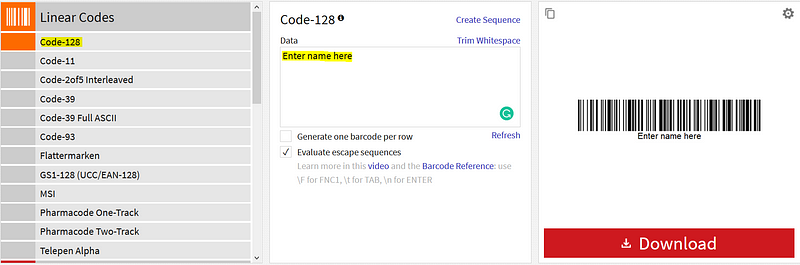
Screenshot by the author

You have successfully encoded your name into a barcode image.

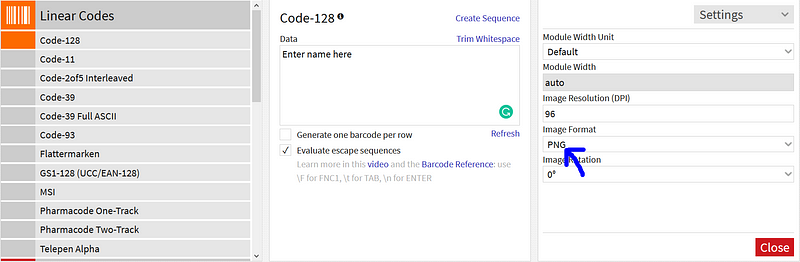
How to change the barcode image format

  1. Click on the settings icon.
Screenshot by the author

2. Choose image format (GIF, JPG, PNG, SVG)
Screenshot by the author

Now let’s get your barcode image into text format. (this will help your forbidden lover understand your secret love notes)

How to decrypt your barcode image to text

Things needed:

  1. Barcode image
  2. A barcode decoder

Instructions:

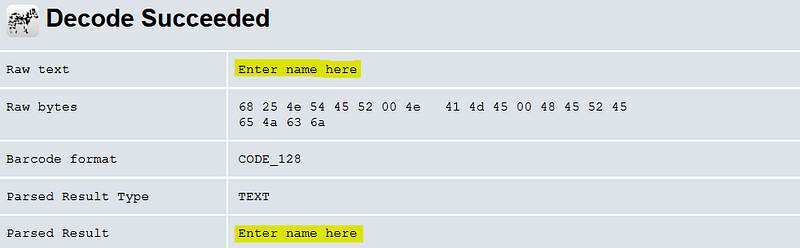
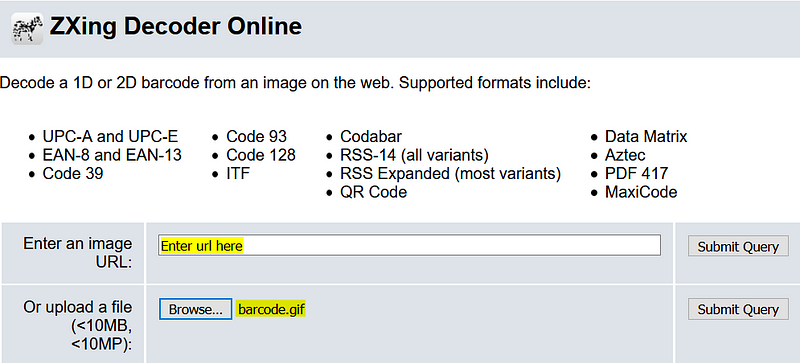
  1. Search ZXing decoder online.
  2. Enter the image URL or upload the image file and hit Submit Query.
Screenshot by the author

You have successfully decrypted your barcode image into text.

(your forbidden lover can now understand your secret love notes)

Screenshot by the author

I hope you enjoyed this piece.

Also, Read Post by me:

How To
Barcode
Fun
Cryptography
Steganography
Recommended from ReadMedium