

How to empower your Java Maven Project with Git Hooks for automated Code Formatting and Semantic Versioning
Have you ever stumbled upon a messy codebase that was missing some basic clean code principles? (Short clean code insights here) I already had the pleasure to see a codebase whose style was mixed up with different IntelliJ formatting styles. Furthermore, commit messages were messed up as well which made understanding changes from the past more difficult. I am always trying to keep a linear git history even though this is not always possible. In my opinion, conventional commits are a good fit to keep a git commit history that is understandable and on top, you can automate changelog creation and semantic versioning for example by specifying breaking changes through your commit message.
To overcome this I was searching for a simple solution that checks code formatting and the commit message. (Serverside hooks were not an option for those projects but Github Actions is a good fit if suitable) That is why I ended up with git hooks.
Essentially we are hooking into the commit lifecycle, where we have several useful hooks. For our use case, the pre-commit and commit-msg hooks are of particular interest.
So if you want to follow along, make sure you have:
- Java 17
- Maven
- Node
In your pom.xml file in the root directory, you have to set up the plugins. This one is responsible for copying your hooks into the default git hooks folder and has the maven install as a goal (This is where maven builds a dependency tree based on our pom.xml and fetches all needed components, otherwise we could not build our project). We specified a custom hook for the commit-msg and the pre-commit. You could also change the whole default hooks directory in that configuration. I will show you later where the hooks folder resides and what the code looks like.
<plugin>
    <groupId>com.rudikershaw.gitbuildhook</groupId>
    <artifactId>git-build-hook-maven-plugin</artifactId>
    <version>3.1.0</version>
    <configuration>
        <installHooks>
            <commit-msg>hooks/commit-msg</commit-msg>
            <pre-commit>hooks/pre-commit</pre-commit>
        </installHooks>
    </configuration>
    <executions>
        <execution>
            <goals>
                <goal>install</goal>
            </goals>
        </execution>
    </executions>
</plugin>
For more options see: https://github.com/rudikershaw/git-build-hook
This plugin is responsible for the formatting of your code. I have used prettier but you could also use google-java-format, eclipse jdt or palantir-java-format. You have several options for your formatting, see spotless maven. You could also let your builds fail if the formatting is not correct.
<plugin>
    <groupId>com.diffplug.spotless</groupId>
    <artifactId>spotless-maven-plugin</artifactId>
    <version>2.25.0</version>
    <configuration>
        <formats>
            <!-- prettier with java-plugin -->
            <format>
                <includes>
                    <include>src/*/java/**/*.java</include>
                </includes>

                <prettier>
                    <devDependencies>
                        <prettier>2.0.5</prettier>
                        <prettier-plugin-java>0.8.0</prettier-plugin-java>
                    </devDependencies>
                    <config>
                        <tabWidth>4</tabWidth>
                        <parser>java</parser>
                    </config>
                </prettier>
            </format>
        </formats>
    </configuration>
    <executions>
        <execution>
            <phase>verify</phase>
            <goals>
                <goal>check</goal>
            </goals>
        </execution>
    </executions>
</plugin>
So the following picture shows our simple directory structure and where we manage our hooks. A plus is that the hooks are also versioned by git if you do it this way (If you want to use it in several projects you could create a maven library for your hooks and integrate them in the git-build-hook-maven-plugin):
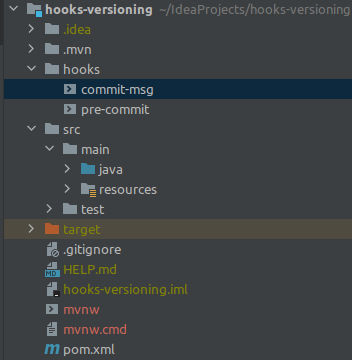
Also make sure to execute:
- chmod +x hooks/pre-commit
- chmod +x hooks/commit-msg
Because the used maven plugin git-build-hook-maven-plugin copies them into the default git hooks directory and if they have no permission to execute we cannot run our hooks.
Essentially the commit-msg hook checks if the message starts with one of the allowed words and exits with an error if it does not. The whole script was copied from here, where the author wrote a nice article on that topic, but without the automatic inclusion as the hook was manually copied into the hooks directory.
#!/usr/bin/env bash

# Create a regex for a conventional commit.
convetional_commit_regex="^(build|chore|ci|docs|feat|fix|perf|refactor|revert|style|test)(\([a-z \-]+\))?!?: .+$"

# Get the commit message (the parameter we're given is just the path to the
# temporary file which holds the message).
commit_message=$(cat "$1")

# Check the message, if we match, all good baby.
if [[ "$commit_message" =~ $convetional_commit_regex ]]; then
   echo -e "\e[32mCommit message meets Conventional Commit standards...\e[0m"
   exit 0
fi

# Uh-oh, this is not a conventional commit, show an example and link to the spec.
echo -e "\e[31mThe commit message does not meet the Conventional Commit standard\e[0m"
echo "An example of a valid message is: "
echo "  feat(login): add the 'remember me' button"
echo "More details at: https://www.conventionalcommits.org/en/v1.0.0/#summary"
exit 1
The pre-commit hook looks like this and simply applies the code style:
#!/usr/bin/env bash
mvn spotless:apply
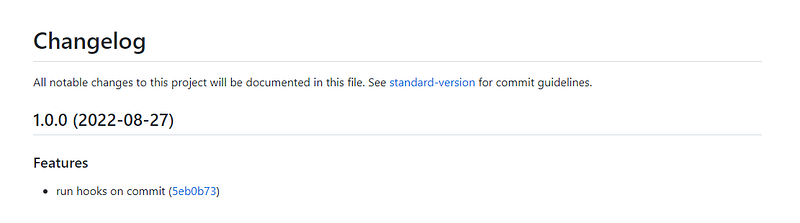
Now we are almost set up, but the part around releasing new versions and automatic version bumps is still missing. The author of the commit-msg script also released an npm package that helps with automatic versioning and new releases. Initially, you have to run
npx dwmkerr/standard-version --first-release --packageFiles pom.xml --bumpFiles pom.xmlAnd for each new release after that just omit the first-release option from the command. By running
git push --follow-tagsYou push the newly created tag to your repository along with your changelog and the updated version number.
You can see my example repository on Github.


