
How to Embed Amazon Affiliate Links in Your Medium Articles — A Step-by-Step Guide
Boost your earnings by promoting products you love!
Medium offers a unique platform for sharing insights, stories, and product recommendations. Whether you’re a seasoned affiliate marketer or just starting, embedding Amazon Affiliate links in your articles can be a lucrative way to earn commissions on the products you recommend.
However, Medium’s formatting options require a specific approach to integrate these links effectively.
This tutorial will guide you through becoming an Amazon Affiliate, finding the perfect product, and embedding links in your Medium articles in a way that’s both seamless and engaging.
Ready to monetize your content? Let’s dive in!
I. Becoming an Amazon Affiliate
Before you dive into embedding affiliate links, the first step is to become an Amazon Affiliate.
Here’s how:
- Sign Up: Go to Amazon’s Affiliate Program website and sign up. The process is straightforward, requiring you to fill in your personal details, website or mobile app details, and how you plan to drive traffic and generate income.
- Approval: Once you’ve completed the application, you’ll have to wait for Amazon’s approval. This can take a few hours to a few days.
II. Finding Products and Generating Links
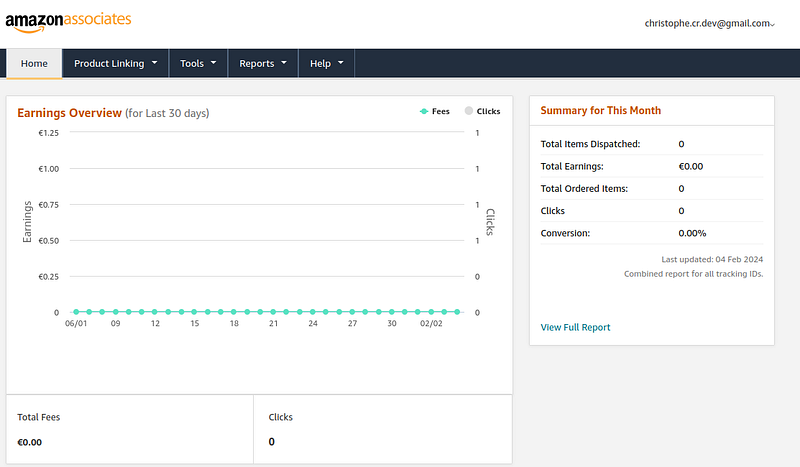
After receiving approval, it’s time to find products to promote and generate your affiliate links:
- Search for Products: Log in to your Amazon Affiliate account and use the Amazon site to search for products you want to promote. Ensure these products align with your Medium article’s content and audience interest.
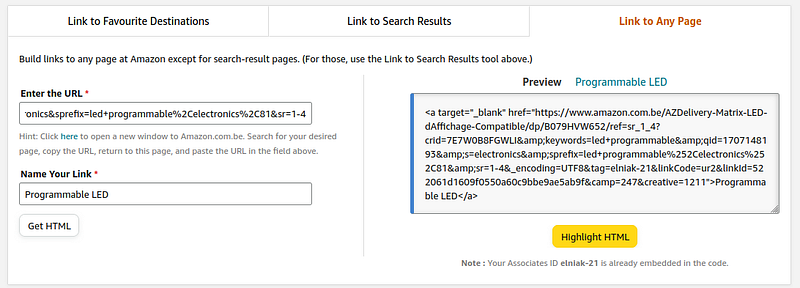
- Generate Affiliate Links: Once you’ve found a product, you can generate an affiliate link directly from the product page. Click on the “Get Link” button to get the HTML code for your affiliate link.
III. Embedding Links in Medium Articles
Medium does not support direct embedding of HTML code for affiliate links.
However, you can still incorporate affiliate links by extracting and using the “href” portion of the HTML code.
Here’s an example HTML code you might get from Amazon:
<a target="_blank"
href="https://www.amazon.com/AZDelivery-Matrix-LED-Display-Compatible/dp/B079HVW652/ref=sr_1_4?crid=7E7W0B8FGWLI&keywords=led+programmable&qid=1707148193&s=electronics&sprefix=led+programmable%2Celectronics%2C81&sr=1-4&_encoding=UTF8&tag=elniak-21&linkCode=ur2&linkId=522061d1609f0550a60c9bbe9ae5ab9f&camp=247&creative=1211">
Programmable LED
</a>
To embed this link in your Medium article, follow these steps:
- Extract the URL: Identify the URL within the
hrefattribute of the HTML tag. In this case, it’shttps://www.amazon.com/AZDelivery-Matrix-LED-Display-Compatible/dp/B079HVW652... - Insert Link in Medium: In your Medium article, highlight the text you wish to turn into a link, click the link icon in the editor, and paste the extracted URL. Medium will automatically create a clickable link.
Et voila ! Here a very cool affiliate link for programmable LED:
Best Practices for Embedding Affiliate Links
- Disclose Affiliate Links: Transparency builds trust. Always disclose that your article contains affiliate links at the beginning of your post.
- Align Products with Content: Only recommend products relevant to your content and audience. This not only increases the likelihood of clicks but also enhances your article’s value.
- Monitor and Update Links: Affiliate products can become unavailable. Periodically check your links to ensure they’re still active and relevant.
Conclusion
Embedding Amazon Affiliate links in your Medium articles can be a fantastic way to earn extra income from your writing.
By following the steps outlined in this tutorial, you can enhance your articles with valuable product recommendations, providing your readers with additional resources while monetizing your content.
Remember, the key to successful affiliate marketing on Medium lies in offering genuine recommendations that provide real value to your readers.
Happy writing, and don’t forget to clap and follow if you found this guide helpful! 👏👏👏
Follow my journey and connect with me:


