
How to Easily Convert Your Old Medium Articles into New Writing Samples
Get new work with your old work!
Look how happy she is while she’s making trillions working from home.
That could be you!
Are you applying for remote writing work through an agency? Do you need to share your work offline without using Medium? Are you creating a portfolio so you can be a freelance writer?
I have found a way!
Perhaps you already have a way to create PDFs of your Medium articles. What if I told you that I have a way that involves no copy/paste, no arguing with Microsoft Word, and no reformatting? What if I also told you it creates a near-exact copy of your article, photos included, and takes less than one minute?
It will take longer to read this article than it will take for you to save your articles as PDFs. If you would like to learn the secret technique, read on~
ㅤ
Step 1: Choose Your Masterpiece(s)
Which articles make you the proudest? Which ones show off your abilities? Which ones best represent your niche?
Open each of your choices in its own tab.
ㅤ
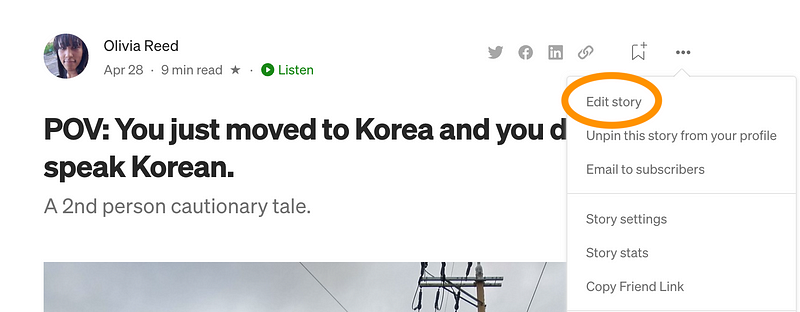
Step 2: Enter Edit Mode
Perhaps you have tried to save your articles as they are published on Medium. This is not the way! To access the secret, easy, magical technique, you must be in Edit Mode.
ㅤ
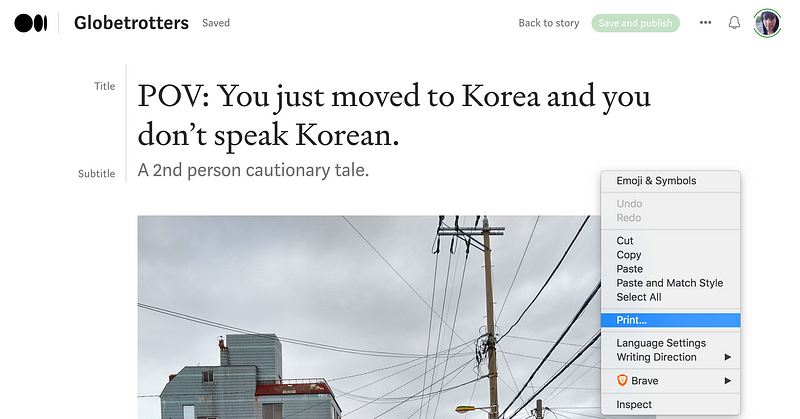
Step 3: Right-Click Anywhere and Then Click “Print”
Before you fret, don’t worry. We’re not printing anything physically.
~ t r u s tㅤt h eㅤp r o c e s s ~
ㅤ
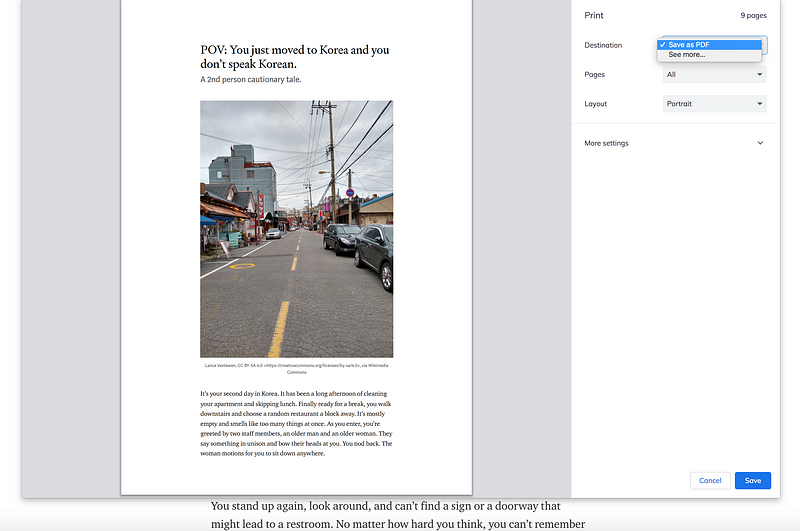
Step 4: Save the Page as a PDF
Instead of selecting a printer, most browsers will give you the option to save a page as a PDF.
Just select “Save as PDF,” click “Save,” name your file, and you’re done!
ㅤ
Step 5: Accomplish All Your Goals and Dreams
Now that you know how to save your Medium articles as PDFs, the sky is the limit. Writing gigs will fall into your lap instantly, hassle-free. No more trying to format and mess with Microsoft Word. No more copy/pasting images and captions. No more problems at all!
As long as you’re satisfied with your article in its current state, then save it. Perhaps your prospective client/employer/reader will also be satisfied.

ㅤ
Which Articles Did You Turn into PDFs, Olivia?
I’m so glad that you asked. I’ll stop writing now so you can read them.


