avatarBen Hui

Free AI web copilot to create summaries, insights and extended knowledge, download it at here

2174

Abstract

span> pd <span class="hljs-keyword">import</span> mpl_interactions.ipyplot <span class="hljs-keyword">as</span> iplt <span class="hljs-keyword">import</span> matplotlib.pyplot <span class="hljs-keyword">as</span> plt

plt.style.use(<span class="hljs-string">'fivethirtyeight'</span>)

x = np.linspace(<span class="hljs-number">0</span>, np.pi, <span class="hljs-number">100</span>) tau = np.linspace(<span class="hljs-number">0.5</span>, <span class="hljs-number">10</span>, <span class="hljs-number">100</span>)

<span class="hljs-keyword">def</span> <span class="hljs-title function_">f1</span>(<span class="hljs-params">x, tau, beta</span>): <span class="hljs-keyword">return</span> np.sin(x * tau) * x * beta

<span class="hljs-keyword">def</span> <span class="hljs-title function_">f2</span>(<span class="hljs-params">x, tau, beta</span>): <span class="hljs-keyword">return</span> np.sin(x * beta) * x * tau

fig, ax = plt.subplots(dpi=<span class="hljs-number">80</span>)

<span class="hljs-comment">#iplt.plot</span> controls = iplt.plot(x, f1, tau=tau, beta=(<span class="hljs-number">1</span>, <span class="hljs-number">10</span>, <span class="hljs-number">100</span>), label=<span class="hljs-string">"f1"</span>) iplt.plot(x, f2, controls=controls, label=<span class="hljs-string">"f2"</span>)

_ = plt.legend() iplt.title(<span class="hljs-string">"iplt.plot: tau is {tau:.2f}"</span>, controls=controls[<span class="hljs-string">'tau'</span>]) plt.show()</pre></div><figure id="fa9d"><img src="https://cdn-images-1.readmedium.com/v2/resize:fit:800/1*knyXPqA2FqAwQ3OVEc905w.png"><figcaption></figcaption></figure><p id="07e0">It will pop up 2 figures. You can drag the second one to change the curve.</p><p id="6f2e">3. Histogram</p><div id="0aca"><pre>%matplotlib ipympl <span class="hljs-keyword">import</span> ipywidgets <span class="hljs-keyword">as</span> widgets <span class="hljs-keyword">import</span> matplotlib.pyplot <span class="hljs-keyword">as</span> plt <span class="hljs-keyword">import</span> numpy <span class="hljs-keyword">as</span> np

<span class="hljs-keyword">from</span> mpl_interactions <span class="hljs-keyword">import</sp

Options

an> interactive_hist

<span class="hljs-keyword">def</span> <span class="hljs-title function_">f</span>(<span class="hljs-params">loc, scale</span>): <span class="hljs-keyword">return</span> np.random.randn(<span class="hljs-number">10000</span>) * scale + loc

fig, ax = plt.subplots(dpi=<span class="hljs-number">80</span>) controls = interactive_hist(f, loc=(<span class="hljs-number">0</span>, <span class="hljs-number">10</span>, <span class="hljs-number">100</span>), scale=(<span class="hljs-number">0.5</span>, <span class="hljs-number">5</span>)) iplt.title(<span class="hljs-string">"iplt.interactive_hist: loc is {loc:.2f} "</span>, controls=controls[<span class="hljs-string">'loc'</span>])</pre></div><figure id="7ce4"><img src="https://cdn-images-1.readmedium.com/v2/resize:fit:800/1*s0biSVnpPMKS3o4vFxFLhA.png"><figcaption></figcaption></figure><p id="cdd5">4. Heatmap</p><div id="2ea2"><pre>%matplotlib widget <span class="hljs-keyword">import</span> matplotlib.pyplot <span class="hljs-keyword">as</span> plt <span class="hljs-keyword">import</span> numpy <span class="hljs-keyword">as</span> np

<span class="hljs-keyword">from</span> mpl_interactions <span class="hljs-keyword">import</span> heatmap_slicer

x = np.linspace(<span class="hljs-number">0</span>, np.pi, <span class="hljs-number">100</span>) y = np.linspace(<span class="hljs-number">0</span>, <span class="hljs-number">10</span>, <span class="hljs-number">200</span>) X, Y = np.meshgrid(x, y) data1 = np.sin(X) + np.exp(np.cos(Y)) data2 = np.cos(X) + np.exp(np.sin(Y)) fig, axes = heatmap_slicer( x, y, (data1, data2), slices=<span class="hljs-string">"both"</span>, heatmap_names=(<span class="hljs-string">"dataset 1"</span>, <span class="hljs-string">"dataset 2"</span>), labels=(<span class="hljs-string">"Some wild X variable"</span>, <span class="hljs-string">"Y axis"</span>), interaction_type=<span class="hljs-string">"move"</span>, )</pre></div><figure id="c4be"><img src="https://cdn-images-1.readmedium.com/v2/resize:fit:800/1*-pwIFmUnOp-T7wSHmuuKkg.png"><figcaption></figcaption></figure><p id="697c">Thank you for reading.</p></article></body>

How to draw interactive visuals in Python?

Usually plotted by matplotlib is static. In this article, I am going to introduce how to produce the visuals interactively.

  1. qt backend
#!pip install mpl_interactions
%matplotlib qt  # qt backend
import matplotlib.pyplot as plt
import numpy as np
from matplotlib.widgets import Slider
import mpl_interactions.ipyplot as iplt

plt.style.use('fivethirtyeight')
fig, ax = plt.subplots(dpi=80)
plt.subplots_adjust(bottom=.25)
x = np.linspace(0, 2 * np.pi, 200)


def f(x, freq):
    return np.sin(x * freq)


axfreq = plt.axes([0.25, 0.1, 0.65, 0.03])
slider = Slider(axfreq, label='freq', valmin=.05, valmax=10)
controls = iplt.plot(x, f, freq=slider, ax=ax)

At the bottom you can drag the frequency bar to change the curve.

2. ipympl backend

%matplotlib ipympl
import numpy as np
import pandas as pd
import mpl_interactions.ipyplot as iplt
import matplotlib.pyplot as plt

plt.style.use('fivethirtyeight')

x = np.linspace(0, np.pi, 100)
tau = np.linspace(0.5, 10, 100)


def f1(x, tau, beta):
    return np.sin(x * tau) * x * beta


def f2(x, tau, beta):
    return np.sin(x * beta) * x * tau


fig, ax = plt.subplots(dpi=80)

#iplt.plot
controls = iplt.plot(x, f1, tau=tau, beta=(1, 10, 100), label="f1")
iplt.plot(x, f2, controls=controls, label="f2")


_ = plt.legend()
iplt.title("iplt.plot: tau is {tau:.2f}", controls=controls['tau'])
plt.show()
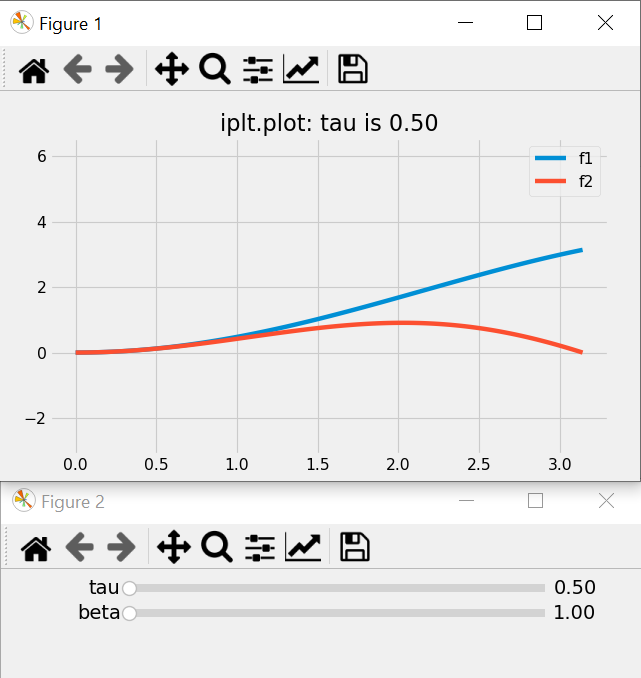
It will pop up 2 figures. You can drag the second one to change the curve.

3. Histogram

%matplotlib ipympl
import ipywidgets as widgets
import matplotlib.pyplot as plt
import numpy as np

from mpl_interactions import interactive_hist


def f(loc, scale):
    return np.random.randn(10000) * scale + loc


fig, ax = plt.subplots(dpi=80)
controls = interactive_hist(f, loc=(0, 10, 100), scale=(0.5, 5))
iplt.title("iplt.interactive_hist: loc is {loc:.2f} ", controls=controls['loc'])

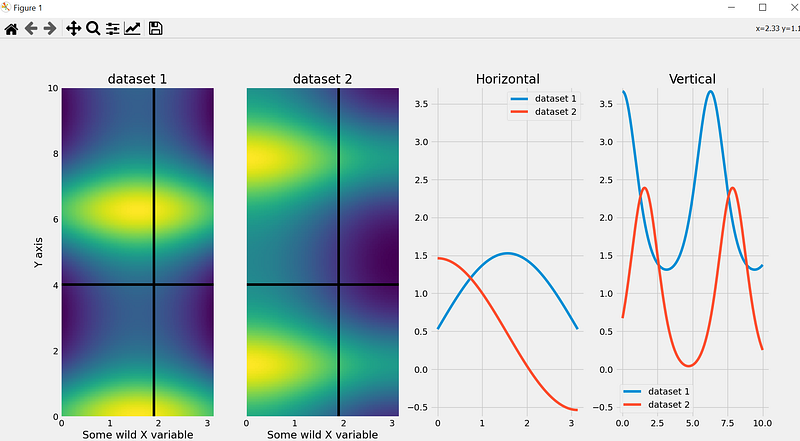
4. Heatmap

%matplotlib widget
import matplotlib.pyplot as plt
import numpy as np

from mpl_interactions import heatmap_slicer

x = np.linspace(0, np.pi, 100)
y = np.linspace(0, 10, 200)
X, Y = np.meshgrid(x, y)
data1 = np.sin(X) + np.exp(np.cos(Y))
data2 = np.cos(X) + np.exp(np.sin(Y))
fig, axes = heatmap_slicer(
    x,
    y,
    (data1, data2),
    slices="both",
    heatmap_names=("dataset 1", "dataset 2"),
    labels=("Some wild X variable", "Y axis"),
    interaction_type="move",
)
Thank you for reading.

Python
Data Science
Data Visualization
Data Analysis
Matplotlib
Recommended from ReadMedium