avatarWoojin Go

Free AI web copilot to create summaries, insights and extended knowledge, download it at here

2843

Abstract

is leads to a relatively slow typing speed, since if they don’t fully activate their 10 fingers, some of their fingers cover many keys to press, which requires lots of stress to that finger. I know, that if you were a person who only uses some of the fingers, you may feel it is a hard challenge to overcome to change the typing style. Unfortunately, if you don’t use all 10 fingers to type, no matter how hard you train, you’ll hit the limit that you may not get the high speeds to type English.</p><p id="078b">Luckily, there are various sites to practice the optimum position to type English characters with your keyboard.</p><ul><li><a href="https://www.keybr.com/">Keybr</a></li><li><a href="https://www.typing.com/student/lessons">Typing.com</a></li><li><a href="https://www.typingclub.com/">Typingclub</a></li><li><a href="https://10fastfingers.com/">10fastfingers</a></li></ul><p id="f67c">There are so many practices to master a suitable typing position. Therefore, try to maintain the right typing posture, and activate all 10 fingers to boost your typing speed.</p><h1 id="2487">2. How to find your personal best position</h1><p id="9a92">Have you ever heard about the terminology called Ergonomics? The definition of ergonomics is same as the follows:</p><blockquote id="6ef9"><p><b>Ergonomics can roughly be defined as the study of people in their working environment — <a href="https://ehs.unc.edu/workplace-safety/ergonomics/">UNC</a></b></p></blockquote><p id="7bb6">If you want to increase your typing speed effectively (after you activated all 10 fingers when you are typing), you should deeply consider the ergonomics. There are several factors you should think about:</p><ul><li><b>Desk height</b></li><li><b>Arm angle</b></li><li><b>Chair height</b></li><li><b>Keyboard position</b></li><li><b>Else. (temperature, humidity, etc.)</b></li></ul><p id="735b">Look at the following figure.</p><figure id="3fcb"><img src="https://cdn-images-1.readmedium.com/v2/resize:fit:800/1*7ApzbZrQwvIsrP0qzGlByw.png"><figcaption>Image source: <a href="https://ergonomictrends.com/creating-perfect-ergonomic-workspace-ultimate-guide/">https://ergonomictrends.com/creating-perfect-ergonomic-workspace-ultimate-guide/</a></figcaption></figure><p id="d094">The most important is the arm bent angle. Your arm should be bent about 90 to 120 degrees to put your keyboard in the right position. Besides, your knee angle and the sitting angle should also be maintained at 90 degrees. After then you can feel that there would be no further efforts to maintain typing postures except for moving fingers. Ergonomics can make you type words in the most comfortable condition, and you can eventually increase your typing speeds.</p><h1 id="18c3">3. Practice every day</h1><p id="d661">The most important thing to increase your typing speed would be <b>

Options

consistent practice.</b> Since I started typing practice about 6 months ago, I made the decision that I should practice English typing for at least 10 minutes per day. This made considerable results. After a month, I could feel that I memorized all the English characters on the keyboard. Then, my fingers started to memorize (not me, my fingers) the certain sequence to type words fast that I could type frequently used words rapidly (e.g. sometimes, because, notebook, mouse, keyboard, etc.). After then, I broke 80 wpm, 90 wpm, and recently, 100 wpm!</p><p id="2c8e">According to the wpm tier chart below, I noticed that I already surpassed the <code>Expert</code> level (since for 17 years old and over, 65 wpm is the Expert-level speed).</p><figure id="e3a3"><img src="https://cdn-images-1.readmedium.com/v2/resize:fit:800/1*DEkSnzfaZL73NzpJdzWFJg.png"><figcaption>Image source: <a href="https://www.typingpal.com/en/documentation/school-edition/pedagogical-resources/typing-speed">https://www.typingpal.com/en/documentation/school-edition/pedagogical-resources/typing-speed</a></figcaption></figure><p id="9f67">Of course, even now, I tend to devote about 10 minutes a day to typing practice. I often do typing tests, especially when I’m stressed or when I feel like I don’t want to do my job anymore. My next goal is to break 150 wpm. Since English is not my native language, it’s hard to speed up my typing by leaps and bounds, but I’m working on it a lot.</p><p id="e2a5">I highly recommend the below sites which you can try right now to examine your typing speed. Those are really good sites where you can easily check your current wpm with various types of typing tests.</p><ul><li><a href="https://10fastfingers.com/">10fastfingers</a></li></ul><figure id="a99a"><img src="https://cdn-images-1.readmedium.com/v2/resize:fit:800/1*iTllJN1osvs19J-n8ZT7Wg.png"><figcaption></figcaption></figure><ul><li><a href="https://monkeytype.com/">monkeytype</a></li></ul><figure id="22a8"><img src="https://cdn-images-1.readmedium.com/v2/resize:fit:800/1*QfOtnDs9duc8p1Haobbj-g.png"><figcaption></figcaption></figure><h1 id="7f12">Extra</h1><p id="3afe">Did you enjoy this post? I hope so, and cheer up for your typing. You can absolutely be a fast typer, so if you are not, don’t be depressed and practice every day. Since I could increase my typing speed, you can absolutely do this.</p><p id="caf7">I prefer to type English with pentagraph keyboards, and I especially, like my Magic keyboard (designed by Apple) since it is pretty, solid, and has good feels.</p><figure id="6409"><img src="https://cdn-images-1.readmedium.com/v2/resize:fit:800/1*ycgjxu6oSjNtFscU0FPQWw.png"><figcaption>My magic keyboard.</figcaption></figure><p id="a347">Thank you for reading this post.</p><p id="7d44">Sincerely,</p><p id="599c">Woojin</p></article></body>

How to Dramatically Increase Your Typing Speed

Photo by Courtney Corlew on Unsplash

Introduction

If you’re like most people, you probably don’t spend a lot of time thinking about your typing speed. But if you’re looking to improve your productivity, typing speed is a great place to start.

There are a few simple things you can do to dramatically increase your typing speed. With a little practice, you’ll be able to type faster than you ever thought possible.

For a person whose native language is not English, it was a very difficult task for me to hit English quickly. I was not used to the English keyboard, so the limit was to make a typing speed of about 20–30 wpm (words per minute). But at this point, now I can type English at around 100–120 wpm (!). How was this possible?
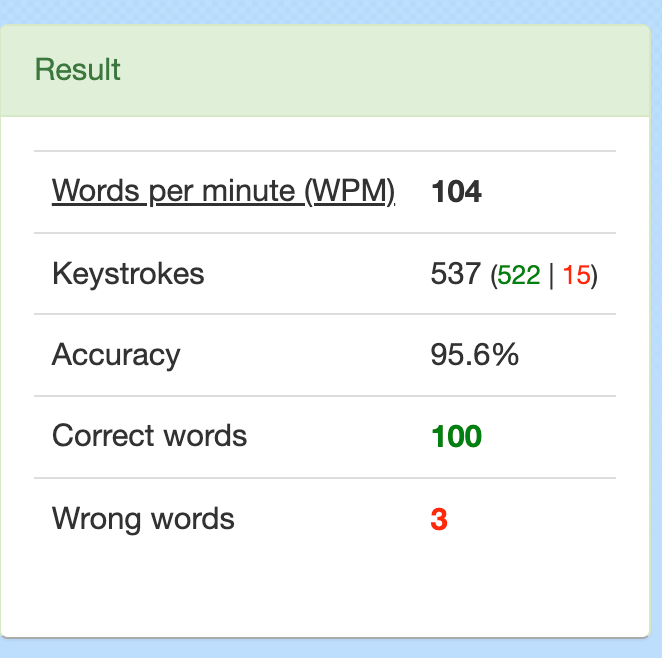
My recent results on 10fastfingers.com

Why typing speed is important

First, I have to explain why we need to type quickly. What are the advantages of typing fast? Let’s say that there are people who type at the speed of 10 wpm and someone who hits the keyboard at 100 wpm. The former person can input less than 10 words per minute, and the latter can input less than 100 words per minute. Imagine they have the same tasks where they have to write a report of 1000 words. The former takes 100 minutes to complete the report, whereas the latter can complete the report in 10 minutes (assuming, of course, that the person just typed without any interruptions). As such, a person who types slowly has a significant disadvantage in terms of speed compared to a person who types quickly. Being able to type quickly also means being more intelligent. Of course, typing fast doesn’t mean that a person is necessarily smart. However, being able to type at a high speed means that the person has a lot of brainpower to understand characters and type them out. Luckily, if you practice hard, it is possible to improve your typing skills by leaps and bounds. Let me share some tips for you to increase your typing speed dramatically.

1. The importance of proper technique

You should first check that you are using all 10 fingers when you type. Some people don’t activate the full 10 fingers when they type. However, this leads to a relatively slow typing speed, since if they don’t fully activate their 10 fingers, some of their fingers cover many keys to press, which requires lots of stress to that finger. I know, that if you were a person who only uses some of the fingers, you may feel it is a hard challenge to overcome to change the typing style. Unfortunately, if you don’t use all 10 fingers to type, no matter how hard you train, you’ll hit the limit that you may not get the high speeds to type English.

Luckily, there are various sites to practice the optimum position to type English characters with your keyboard.

There are so many practices to master a suitable typing position. Therefore, try to maintain the right typing posture, and activate all 10 fingers to boost your typing speed.

2. How to find your personal best position

Have you ever heard about the terminology called Ergonomics? The definition of ergonomics is same as the follows:

Ergonomics can roughly be defined as the study of people in their working environment — UNC

If you want to increase your typing speed effectively (after you activated all 10 fingers when you are typing), you should deeply consider the ergonomics. There are several factors you should think about:

  • Desk height
  • Arm angle
  • Chair height
  • Keyboard position
  • Else. (temperature, humidity, etc.)

Look at the following figure.
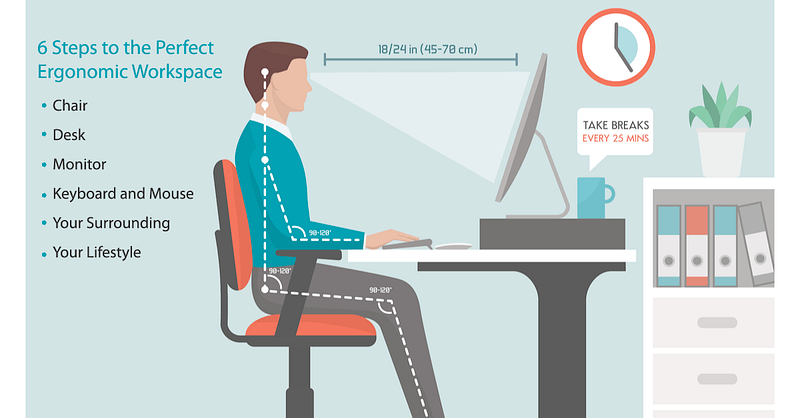
Image source: https://ergonomictrends.com/creating-perfect-ergonomic-workspace-ultimate-guide/

The most important is the arm bent angle. Your arm should be bent about 90 to 120 degrees to put your keyboard in the right position. Besides, your knee angle and the sitting angle should also be maintained at 90 degrees. After then you can feel that there would be no further efforts to maintain typing postures except for moving fingers. Ergonomics can make you type words in the most comfortable condition, and you can eventually increase your typing speeds.

3. Practice every day

The most important thing to increase your typing speed would be consistent practice. Since I started typing practice about 6 months ago, I made the decision that I should practice English typing for at least 10 minutes per day. This made considerable results. After a month, I could feel that I memorized all the English characters on the keyboard. Then, my fingers started to memorize (not me, my fingers) the certain sequence to type words fast that I could type frequently used words rapidly (e.g. sometimes, because, notebook, mouse, keyboard, etc.). After then, I broke 80 wpm, 90 wpm, and recently, 100 wpm!

According to the wpm tier chart below, I noticed that I already surpassed the Expert level (since for 17 years old and over, 65 wpm is the Expert-level speed).
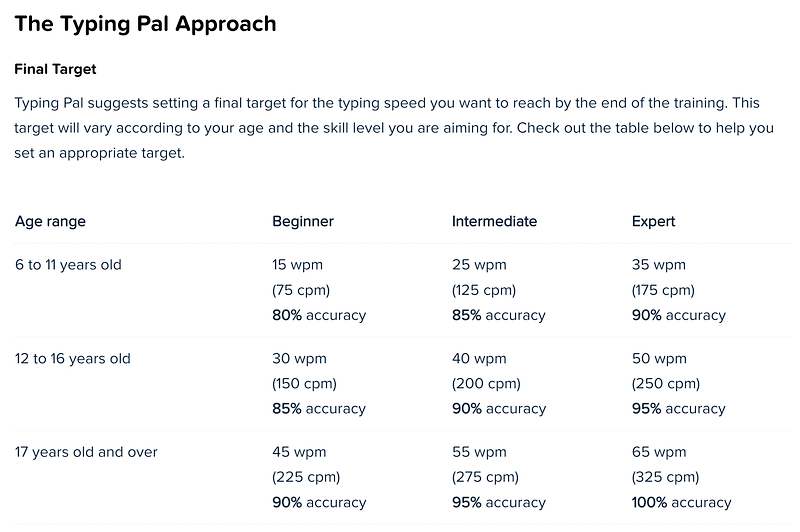
Image source: https://www.typingpal.com/en/documentation/school-edition/pedagogical-resources/typing-speed

Of course, even now, I tend to devote about 10 minutes a day to typing practice. I often do typing tests, especially when I’m stressed or when I feel like I don’t want to do my job anymore. My next goal is to break 150 wpm. Since English is not my native language, it’s hard to speed up my typing by leaps and bounds, but I’m working on it a lot.

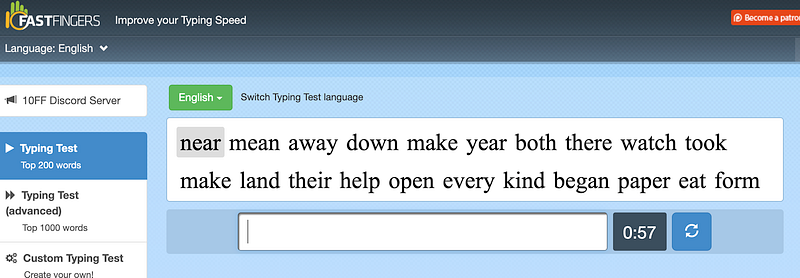
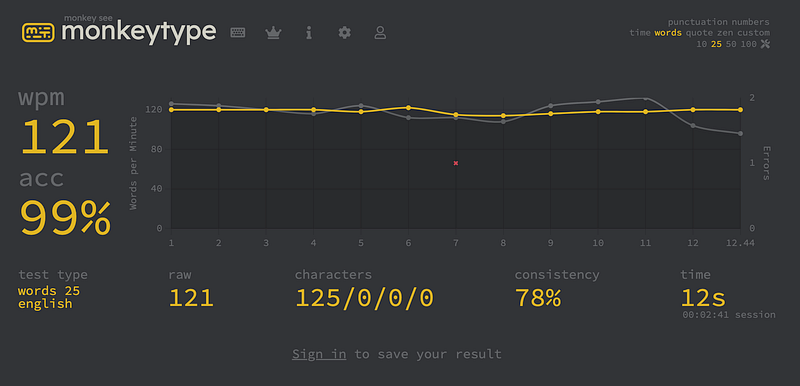
I highly recommend the below sites which you can try right now to examine your typing speed. Those are really good sites where you can easily check your current wpm with various types of typing tests.
Extra

Did you enjoy this post? I hope so, and cheer up for your typing. You can absolutely be a fast typer, so if you are not, don’t be depressed and practice every day. Since I could increase my typing speed, you can absolutely do this.

I prefer to type English with pentagraph keyboards, and I especially, like my Magic keyboard (designed by Apple) since it is pretty, solid, and has good feels.
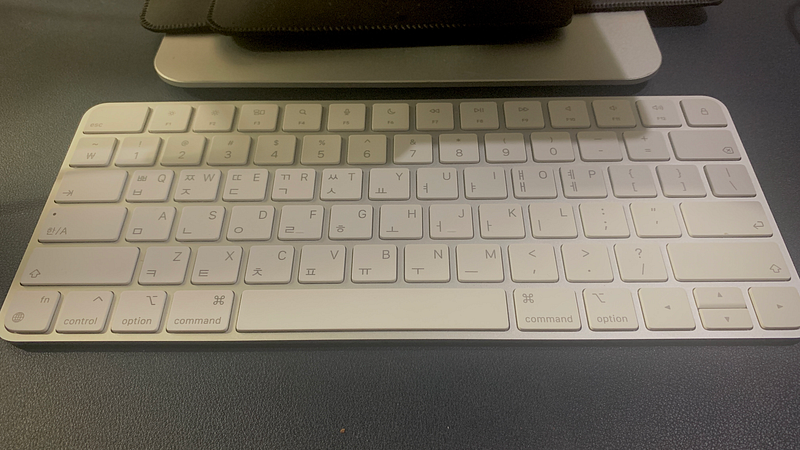
My magic keyboard.

Thank you for reading this post.

Sincerely,

Woojin

Typing
Typing Speed Increase
Keyboard
Productivity
Speed
Recommended from ReadMedium