
DIGITAL PRODUCT DEVELOPMENT
How to Develop an App for the Education Sector
A Story About How An App Was Developed For Parents And Teachers

Working in the e-Commerce industry, I’ve had the opportunity to work on many Digital products over the years. Mostly Websites with the occasional App thrown into the mix.
This article is about one such App. A step-by-step guide about my experience designing an Edtech App for the Educational sector.
Overview
My approach with the team was ‘User-Centered’ strategy, a no-brainer, executed from the outset through stakeholder engagement during the Product Development process, namely:
- Internal | The client
- External | Teachers and Parents
This approach identified user needs, such as what features each stakeholder desired. With respect to external stakeholders, the product requirements were further refined through user stories, derived from research and personas below.
I managed a 6-person team to approach and guide each stakeholder, through a process of elimination, to discover a user-defined “Requirements List”. The results collated were validated by the market from a design and functionality point of view.
Product Direction
While the client was buoyed with a strong brand, the market had become stale (online educational books). This initiated the client to create something new, a brand extension, a fresh dimension for their customers (parents and teachers) and consumers (students).
The options were twofold:
- Re-Engineer the existing eCommerce platform, or
- Develop a new complementary digital product
The Client felt that improving the UX or UI of their existing platform would never negate the fact that parents were obliged to purchase School books in Ireland, as a result, the latter option was chosen — A new digital product.
Also, option 2 offered the potential for a new revenue stream, in time. It would also enable a higher level of engagement, which in turn could add value to the customers and consumers alike.
Deeper investigation revealed three possible directions in which a new product could take:
- Exchange platform — A place where parents, teachers, and students could engage to exchange books or indeed other products
- Learning portal — A location where students could access learning material (eBooks and Books)
- Social platform — One location where parents, teachers, and students could share and communicate important information
Option #1 was eliminated due to:
- The risk associated with cannibalism of existing Website
- Unattractive or complex revenue generation
Option #2 was eliminated due to:
- Reliance on 3rd party
- The risk of completing an MVP within time-frame
- Revenue sharing
The process of elimination concluded that option three (Social Communication Platform) was the most viable with respect to project constraints and the factors listed above.
In summary, the chosen direction presented a potential return on investment via a new revenue stream.
“Product management is a difficult, burnout-inducing profession. We do it because we love the idea of it more than actually doing it. I’ve hit the point in every product job I’ve ever had where I tell myself, “this is the last product job I’ll ever have.” Still, I keep doing product work, hoping that the next job I have will be the one that fulfills my expectations.” — David Schlossberg, product director at CrowdTap
Brainstorming
Facilitated by Trello, ideas were initially captured and shared across all Stakeholders. The brand name, early logo design, colours, functionality, and layouts evolved during this phase while adhering to stakeholder requirements at each juncture.
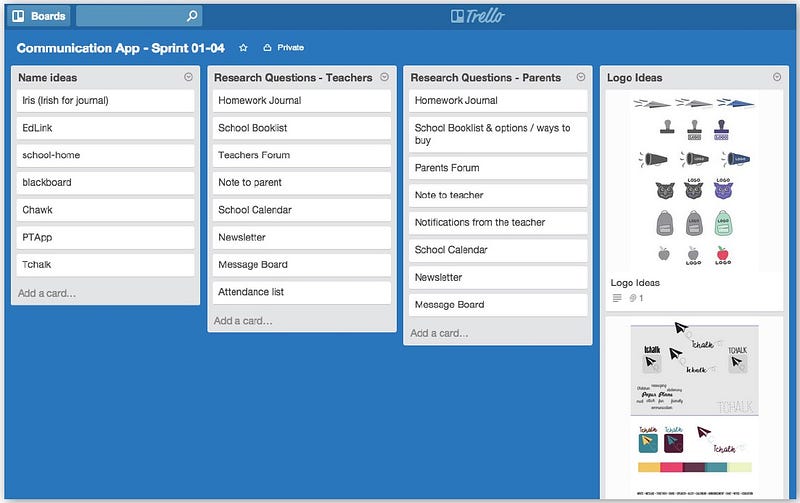
In parallel coding tasks associated with back-end hosting and front-end development framework was refined.
When a clear direction was established the next steps involved design processes and Agile Project Management (ATPM) methodologies.
Research Design
After the direction was defined, market research was mobilized.
Target Audience
A two-fold approach triangulated as follows:
a) Intrinsic Audience — The Client
Throughout the project scope and objective identification process, the Client’s involvement proved highly valuable, given their intimate knowledge of eCommerce and the target market.
As the project progressed, however, availability and engagement diminished somewhat. While regular correspondence and updates were relayed through me, the Project Manager, attendance and visibility was poor amongst the wider team.
Lesson learned
A valuable lesson became clear with respect to project timing. The previous year the Client experienced an unfortunate event, threatening their survival. During the App development project, the business was also undergoing a rebuilding phase to reassert brand awareness and trust. The fruits of this process were realized last year, whereby sales (YoY) increased by an impressive 40% in 12 months, 100% in the last 3 years.
Also, peak-demand in the online School Books market occurs at the end of July, remaining consistent throughout August, which coincided with the latter stages of this project. The net effect manifested with the lack of client availability. Nevertheless, in light of the brands’ re-emergence amongst the target audience, an optimistic future awaits Tchalk.ie.
In hindsight, managing Stakeholder expectations, ownership and seasonality planning was overlooked. This was a mistake, but we adjusted.
b) Extrinsic Audience — The Market
A successful Market research strategy not only provided a wealth of data but was validated by the level of interest from the target market. From the outset it became clear that the Value-proposition proposed by Tchalk.ie was in demand, filling a gap to meet user needs.
In contrast, however, during the user-testing phase, the inverse occurred by which the client became more engaged whereas the audience less-so, highlighting the impact of timing. The evidence suggests that August is a less than ideal time to interact with Parents and Teachers.
Market Research
Once the research design was defined, Market research commenced in order to assess the viability of the product and interact on a deeper level with potential users.
Using Google forms I was able to create a Questionnaire that allowed the team to collect data and differentiate between Teachers and Parents, with targeted questions for each group.
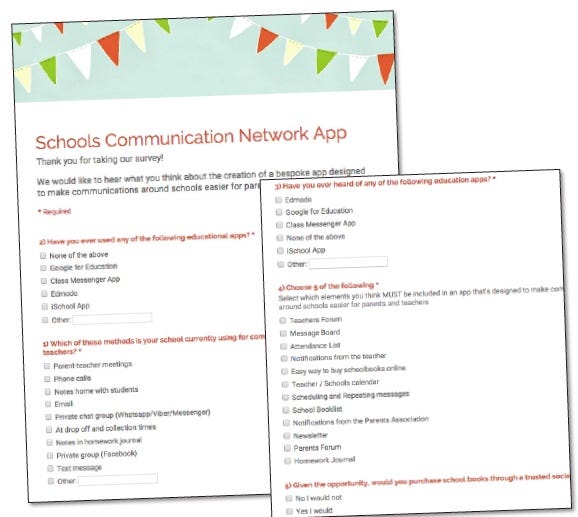
I used Twitter, Facebook, and Linkedin, along with the team’s personal networks, to push out the Questionnaire. Hashtags like @Educatetogether, @Schooldays_ie, @HerFamilydotie and @MummyPages were used to reach or at least attract the relevant audience.
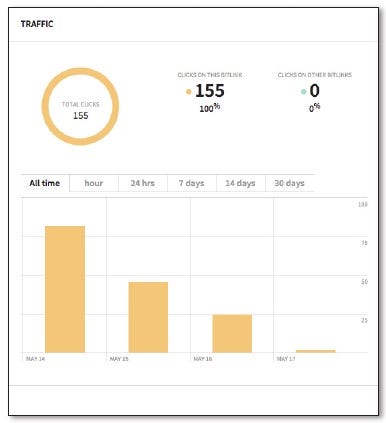
Using ‘Bitly’ I tracked the number of ‘Clickthroughs’ to assess the uptake (percentage/number of responses), which was quite good, circa 20% response. As the project progressed continuous engagement with the same audience further refined the ‘Requirements List’ noted above.
Below is an example of the Questionnaire.
Persona and User Stories
A “User Persona is a fictional representation of a group of users of your website. Once created, User Personas are a beneficial tool for designers and developers alike as they aid in gap analysis, define site functionality and unearth potential opportunities.” (Function1.com)
Here are two examples from the project:
Carol (26)
Carol Young is a 26-year-old primary school teacher in Dublin. She is reasonably tech-savvy with accounts on most of the popular social networks. Carol has a daily commute to and from work on public transport and uses this time to catch up with what’s happening on the news and social media using her smartphone.

Carol currently communicates with the parents of her class through notes sent home with the pupil, notes sent through the pupil's homework journal, and talking with parents at the school gate when they drop off or collect their child. She would find it useful to keep track of these communications in a single place, especially if it was in an app on her smartphone. She would prefer to keep these messages separate from her personal correspondence in other communications App and would like to be able to outline office hours when she can be messaged by parents.
Carol thinks that if there was a more reliable communication system within her school between parents, teachers, the parents association, and the principal, it would take a lot of hassle out of the day and bring together the school’s community.
Scenario: Carol flips open her mobile to access her Social Media accounts on the way home from a routine day at work. She notices that she has a notification on the Tchalk.ie app. Opting to check this instead she finds that she has a message from a parent who has discovered that her daughter has head-lice. She is able to quickly compose and circulate an alert to the other parents in the pupil’s class informing them of this development and recommending what steps to take.
The school’s principal is also included in this circular so that they can consider if a wider alert needs to be issued across the school.
Samuel (32)
Samuel Akintola is a devoted father of two girls Joy (5) and Idowu (7) with very little time on his hands as a result of his demanding yet highly successful international spice import and export business. Both girls attend the same school. The family lost their mother, Chioma, in a car accident two years ago and Samuel strives to maintain his success in order to ensure the girls want for nothing. Every morning he drops the girls off to school before heading off to spend at least 10 hrs on average at his business per day. He is well versed in the potential that mobile applications can deliver, using many in his day to day affairs and having emigrated from a country where the internet is primarily accessed on mobile devices.

His sister Adele collects and takes care of the children each day after school and it is her who ensures that the girls are well looked after until Samuel gets home in the evening. She also supervises the homework obligations that the girls may have, Idowu’s more-so, as she has a much greater amount of this.
Samuel likes to keep on top of any news and developments that may arise with the girl’s school. He engages with his sister constantly as to how the girls are getting on at home. He likes to keep on top of homework and activity notices presently achieved through paper notes and text circulars from both the school’s principal and secretary and the Parent’s Association. He is intent on his daughters receiving a good education and likes to be as attentive to developments as his time allows.
Scenario: Fresh off a call with a supplier in Lagos, Samuel decides to check on the latest activities that the school has planned in the coming weeks. He notices on the in-app calendar that a school outing is planned for his youngster’s class. This is the first time that they have gone on such. He quickly makes a call to inform his sister that she won’t have to collect Joy until later than usual, closer in fact to Idowu’s normal time. Having done this he quickly accesses the forums to see what, if anything, the other parents are saying about this upcoming trip
In total, 6 Personas were created to understand user stories to define the features and functions required within the App in addition to market research.
It’s important to do this exercise in order to flesh out hidden features that a digital product will need.
Research Conducted
A comprehensive binary research approach was carried out, tailored for each audience. The research design led to three strands of data:
The Client — Qualitative Research A
Unstructured engagement with the Client formulated a process of elimination through an array or brainstorming exercises (noted above). Once completed, the primary objective was clear.
The Audience / Market — Qualitative Research B
As above each team member selected a sample audience, who met the criteria of either a parent or a teacher, to conduct in-depth interviews.
The Audience / Market — Quantitative Research A1
Lastly, a random audience was selected through a combination of the email invitation and social media promotion.
I was conscious of the fact that a biased approach would potentially invalidate the research, so I managed the team to strategically design a triangulation method, outlined above, for optimum effect.
Cumulatively, the blended acquisition of results minimized risks associated with bias, thus improving validity.
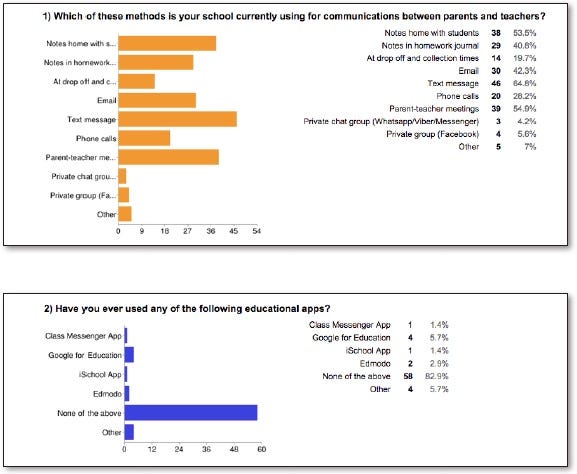
The data captured was deemed satisfactory and a true representation of the needs and expectations of all stakeholders. For transparency results were recorded and shared via Google forms.
Planning And Project Execution
Guided by user-defined requirements, derived from primary research — questionnaire and depth interviews — the project planning process was outlined:
- Brainstorming, Market Research, and Initial Design
- Development of a Product Backlog — The details were extracted from user stories, market research, and initial Design to establish key functions.
- Iteration identification and planning — Tasks identified from the backlog resulted in the evolution of sprints. From there iterations occurred on a 2-week cycle, totaling 6 sprints — 12 weeks.
- Daily agenda led stand-ups — Took place at noon each day, adhering to a defined agenda directly relating to iteration tasks. The team utilized Google-hangouts to facilitate remote meetings. Documents and progress updates were shared via Google chat and Drive.
- Cross-functional team collaboration — Stream collaboration was encouraged, facilitated and acted upon as required, to overcome challenges, meet milestones and stay on track.
- Ongoing continuous improvement and risk analysis — Were recorded during sprint retrospectives and maintained so that risks were recognized early and dealt with swiftly.
- Pivots were undertaken — Early risk identification led to a number of pivots to protect critical milestones, adhering to the project timeline.
- Stakeholder engagement and expectation management — Early and intensive engagement with the main stakeholders underpinned the direction of the project. Post-iteration updates followed throughout.
- Internal (Client) and external (Audience) User-testing — Journey testing engaged stakeholders to further refine the product.
Looking back the planning process was excellent but the execution was challenging to meet the final deliverable — Tchalk.ie.
That said, it’s highly important to plan from the outset.
Design
The design brief was to create a Web application with a Family appeal and a clear UI with simple navigational features.
Design Rationale
The design rationale took inspiration from a number of sources, such as recently emerging contemporary Apps (example), while recognizing factors with respect to the client’s’ brand:
- Existing Brand fatigue
- Brand Identity
- Brand trust association
- Brand diversity
- Brand loyalty
- Brand evolution
Such considerations were acknowledged with customer loyalty in mind, to influence retention.
For generations, the industry maintained a unique customer-consumer dissonance whereby decision-makers (Schools/Teachers), influenced by competitors (Publishers), negated customer (Parent) choice and ignored consumers (child/student).
Tchalk.ie intended to expand market boundaries, envelope all stakeholders with fresh aesthetics for multi-level appeal.
As such, the look and feel of the product introduced a fresh dimension, underpinned by its functionality.
Other market Apps were used for comparison (see below), leading to a distinct difference in contrast to the clients’ existing brand palette. The educational theme however complimented the proposed brand extension — Tchalk.ie — bringing a new generation feel to the client's brand.
To achieve the desired outcome, team designers developed wireframes followed by high-resolution layouts.
Wireframe — Parent
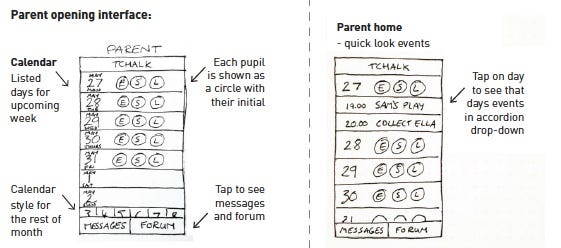
Wireframe — Parent
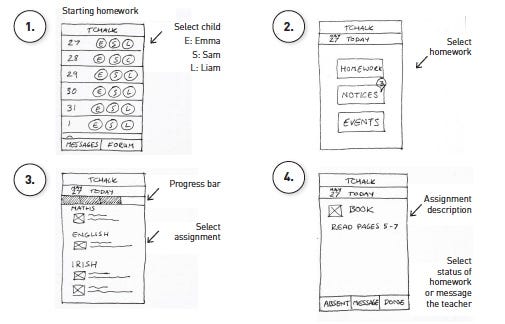
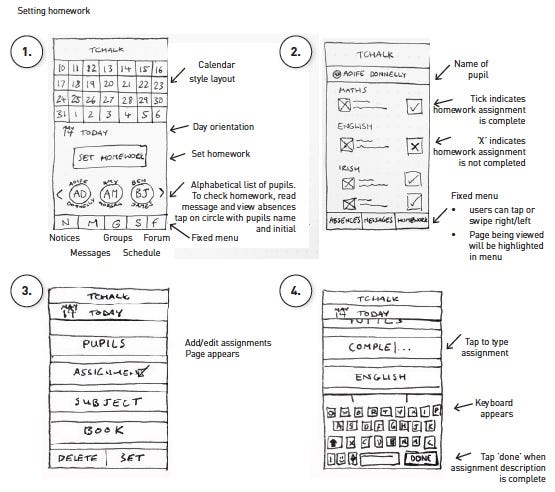
Wireframe — Teacher
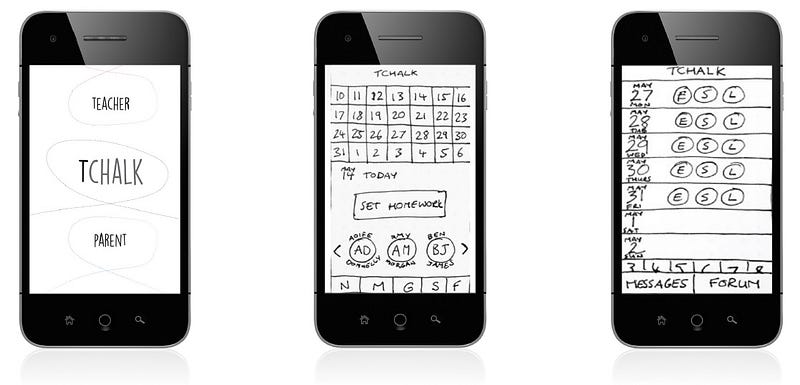
Wireframe Mock-up
Look And Feel
The look and feel of the App arrived through researching other Apps available in the market — class messengers, calendars and family Apps.
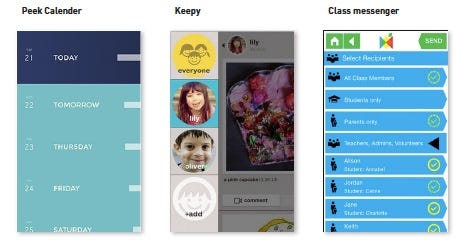
From there we shortlisted the designs by conceptualizing and documenting design solutions in InVision:
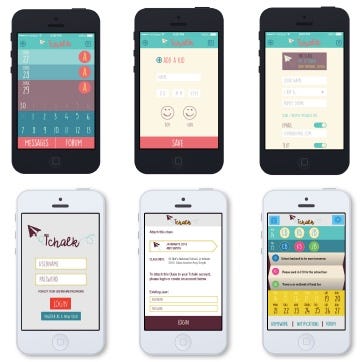
Design Features
The colors chosen considered the family audience appeal. The designer took the approach of using a playful palette with bright yellow, Aquas and greens.
The design centered around an illustration of a paper-plane flying messages back and forth.
- Logo — The logo was hand-drawn and digitized. It was inspired by education, writing, blackboards, notes, homework and sharing messages. As shown below.
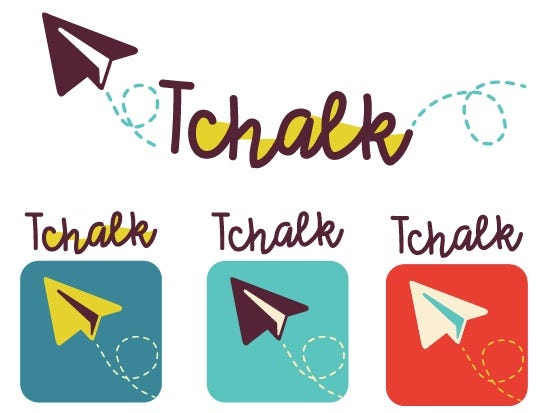
- Colour palette — Considering the family audience, we took the approach of using a playful palette with bright yellows, aquas, and greens. The design centers around an illustration of a little paper-plane flying messages back and forth.

- Proxima Nova — Modern proportions with a geometric appearance. In the last few years, Proxima Nova has become one of the most popular web fonts, in use on thousands of websites around the world.
- Foxhole — This is a new web font. We wanted to use it sparingly but to keep the script feel of the logo on choice areas. For example the child’s name, cross-heads in the FAQs. Examples of sites using Proxima Nova are Spotify, Twitter Music and Instagram use it on the desktop version.
Also, brighter colors were used for notices and reminders.
- Icons — The icons designed were unique to the App. Quirky and fun. Corners were round for a friendly and open theme.
- Buttons — Again a light, fun approach. The design used a frame to look like a speech bubble.
Application Functionality
At the time the majority of schools, teachers, and parents lacked a coherent means of distributing notices like updates, homework requirements, resources, and invitations.
The research revealed that this was achieved in an ad-hoc fashion: printed handouts, group or individual texts, emails, phone calls, meetings, social media or photocopied homework.
You get the point.
So the App had to collate all of the above. For example, Calendar considerations and sensitivities, where the onus is on the parent or guardian in two-way communication, was absent.
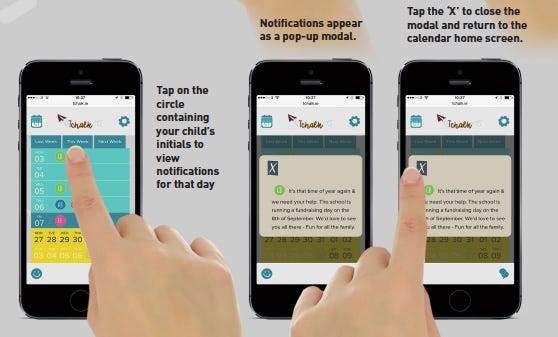
So the core functionality for the App was to address these deficits and enable teachers and parents (and pupils where appropriate) to seamlessly engage with all school communication in one location — a single source of truth.
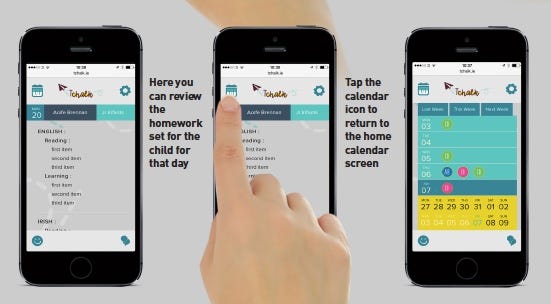
Another problem the App aimed to solve was to remove a pain point for parents/guardians who were inundated with printed handouts, sent by schools, using students as couriers.
The lost, misplaced or delayed exchange led to problems.
Also, the reduction in paper consumption improved a School's pursuit to achieve Green Flag status.
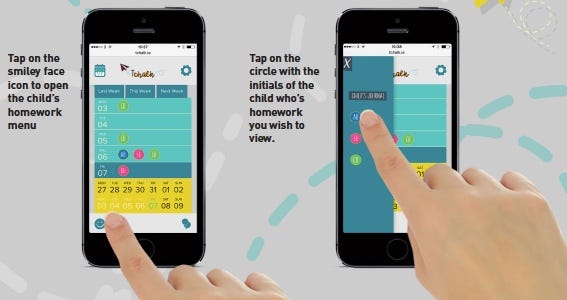
It goes without saying and is taken as understood that security will be a foundational functionality of any product that relates to children’s issues and one which relies on a user’s personal details. Encryption and gate-keeping will be fundamental to the application.
Teacher Registration
This will be the Apps' initial screen. The teacher creates their class build, adding the pupils and parent(s) by invite.
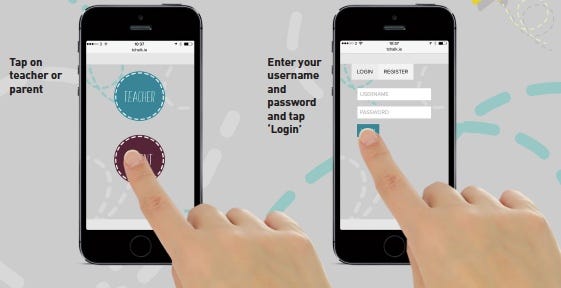
The option for admin and volunteers was included.
Invitations to participate were issued via email to reinforce the sense of a trusted, curated gate-keeping component i.e. security — where confirmation and approval are housed.
Security was an essential feature, picked up during the research.
Parent Registration (via invite)
This function completed the registration procedure whereby the parent(s) or guardian(s) validated students by name — their children.
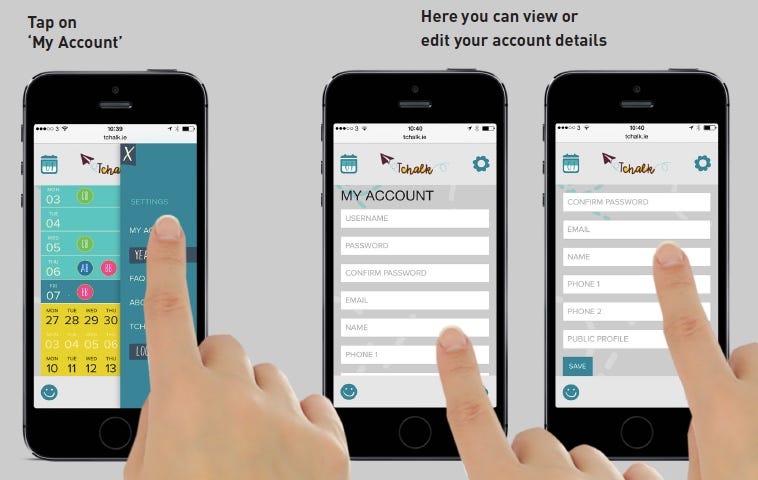
Group Creation
This function offered an alternative to existing social media groups, like Facebook or WhatsApp. Groups are created with each class code.
For instance:
- Teachers/Admin/Volunteers group
- Parents group
Calendar
Shared information is stored, shared and available on-demand in the App. This was a clear requirement throughout the research, particularly important for correspondence, homework and special events/activities.
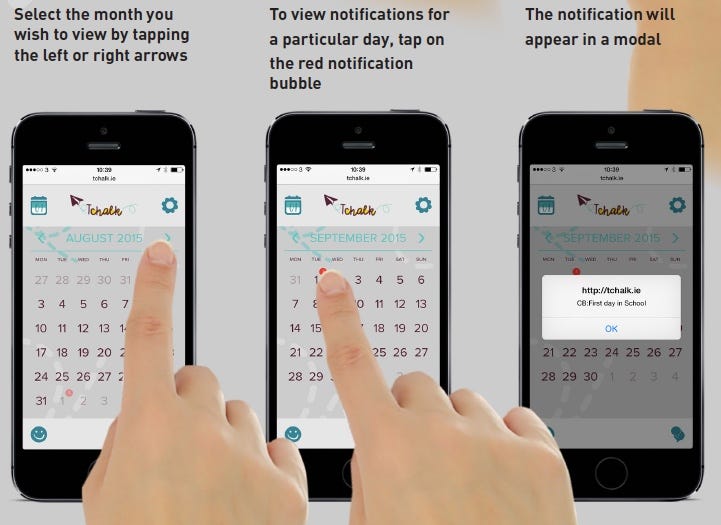
For this reason, the Interactive Calendar Module was viewed as the main engine of the App.
In the Calendar users simply click to view homework, scheduling, notes, notices, reminders, actions, general messages including the ability to access the messaging module and social forum.
The calendar provided the usual search and browse functionality common to many applications.
Message
This module offered a single source of truth for everything, eliminating the need to jump from the school website, paper handouts, Facebook and WhatsApp. Alerts included:
- Alerts
- General Messages
- Notices
- Notifications
- Reminders
- Homework
- Actions
Forum & Resources
Here all participants had the ability to exchange ideas and offer feedback outside of normal teacher-parent/guardian channels.
Members also had the ability to create and distribute essential or supplemental learning resources, organize social engagements, birthday arrangements and all of the other extra-curricular activities.
Functionality Conclusion
From a functional point of view, the App streamlined communications into a flexible one-stop-shop.
It also enabled users to comprehensively assume easy control over, and organization of, the multitude of ongoing communications, of every variety, that transpired between effected parties in the educational environment.
Everyone’s needs were met — All in one place.
Additional information
The client proved to be a complex but valuable client, for the following reasons:
№ 1 — Acquisition Approach: Upon project commencement, the team gained insight into a commercial reality of the e-commerce world, whereby an established brand sought to acquire our client. Although the deal collapsed, the lessons learned were two-fold:
- Entrepreneur — Homegrown brands do attract interest
- Confidence — The courage to say ‘No’ and walk away from a bad deal
Albeit a distraction, our exposure to such realities provided a unique experience without parallel. So I’d recommend that you select the right client fit, if not an interesting client that you can learn from.
№ 2 — Seasonal Demand
As touched on earlier, the client embarked upon a transformational journey, following the fallout of a ‘payment gateway’ failure leading to a cautious Brand re-establishment phase. Spurred on by their entrepreneurial spirit, they witnessed an explosion in sales.
I’d recommend selecting a client in the right sector with the right team to realize market opportunities. It makes it easier to get paid.
№ 3 — Availability, Timing, Trust & Agility
As a consequence, of № 1 and № 2 above, the clients’ availability was a challenge. This revealed the importance and impact of timing and agility to change, which soon became abundantly clear.
Know your client's business, intimately, or at least ask the right questions.
№ 4 — Innovation
The potential implications of Brand innovation that Tchalk.ie brought to the table could prove to be a game-changer in the school books industry in the near future.
The team was optimistic that such an addition will have a profound impact on the market, influencing consumer behavior due to the value-add element of brand-fusion and complementary functionality.
Always pick something exciting, with potential impact, even if it doesn't work out the journey is worth it.
Final Thoughts and Lessons
In retrospect, it would be fair to conclude that the project met its primary objective. that said, the initial objectives shifted somewhat to minimize risks associated with UX design milestones within the time-frame.
Lesson #1— It’s important to know your objectives from the outset.
It was agreed that the back-end proved very complex to complete in full, within 12-weeks. This constraint resulted in a pivot, focusing on the front-end in order to achieve a more valuable MVP — development ready.
Lesson #2— Don't be afraid to pivot.
A highly developed User-Interface was delivered, providing the client with an investor ready showcase product, which was considered a strength.
Back-end testing took place to ensure that integration with the front-end was feasible going forward. So from an Architecture perspective, a back-end database was in place in addition to CMS testing.
Lesson #3 — Test, test, and test again.
The biggest weakness, discussed above, was the protracted periods of client absence. The impact of this led to some frustration within the team initially, however as the weeks progressed the team became more confident, leading from the front, acknowledging the fact that clear objectives were agreed from the outset, progressing undeterred thereafter.
Lesson #4 — Get commitment from your client to participate.
Feedback from both the client and audience was very positive indeed. The team recorded a video of the clients’ representatives, Andy and Paul, participating in user-testing.
Lesson #5 — Client feedback is important.
Likewise, the team designed a Google form to record audience feedback by means of a questionnaire (above). Feedback was sought from the same participants engaged during the market research phase, the implications of which confirmed successful achievement of the project objectives.
Lesson #6 — User/audience feedback is more important.
As expected the project revealed an assortment of strengths and weaknesses. A strong team ethos coupled with a clear mission, vision and values enabled team members to successfully navigate challenges, head-on, when they arose.
In the end, the lack of budget meant that the project was warehoused for the time being.
To learn more I’d recommend reading the article below by Dr Mehmet Yildiz.
References
- Productplan.com. (2020). How to Manage Stakeholder Expectations for Your Product. [online] Available at: https://www.productplan.com [Accessed 4 Feb. 2020].
- ProductGeeks. (2020). What People Don’t Tell You About Product Management — ProductGeeks. [online] Available at: https://productgeeks.com [Accessed 4 Feb. 2020].
- Function1..com (2015). User-Centered Design: User Personas vs. User Stories. [online] Available at: https://www.function1.com/ [Accessed 4 Feb. 2020].
