
How to Design a Permission System, You Can Do this

Permission system can be simply understood as power restriction, that is, different people have different powers, and what they see and can use may be different. Corresponding to a system a user may have different data permissions and operation permissions.
There are mainly two mainstream permission models:
- ACL Model: Access Control List
- RBAC model: Role-based access control
1. ACL model: access control list
Access Control List, ACL is the earliest and most basic access control mechanism. It is an object-based control model, and ACL is also used in other models. To solve the problem of configuring users with the same authority one by one, the user group method was also adopted later.
Principle: Each object has a list, which records which subjects can do what behaviors to this object, which is very simple.
For example: when user A wants to edit an article, ACL will first check whether there is user A in the control list of the article editing function.
Another example is: Members of different levels can use different functions in the product.
Disadvantages: When the number of subjects is large, the configuration and maintenance work will be costly and error-prone.
2. RBAC, role-based access control
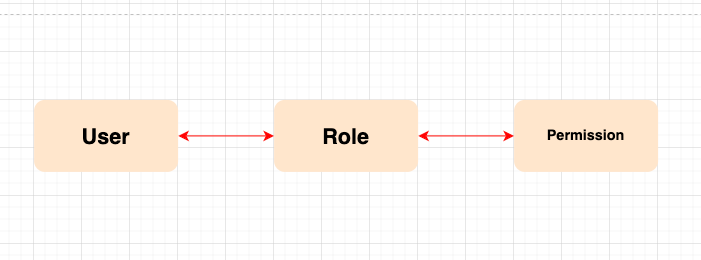
The core of Role-Based Access Control is that users are only associated with roles, and roles represent permissions, which are a collection of permissions.
Three elements of RBAC:
- User: all accounts in the system
- Role: A collection of permissions (such as administrator, developer, audit administrator, etc.)
- Permissions: Detailed permissions for menus, buttons, additions, deletions, modifications, and queries of data.
In RBAC, permissions are associated with roles, and users gain the permissions of those roles by becoming members of the appropriate roles.
Roles are created to complete various tasks, and users are assigned corresponding roles according to their responsibilities and qualifications. Users can be easily assigned from one role to another.
Roles can be given new permissions according to new requirements and system integration, and permissions can also be withdrawn from a role as needed. There is also an inheritance relationship between roles and roles to prevent overreach.
Advantages: easy role division, more flexible authorization management, minimum granularity authorization.
3. Application of RBAC permission management in the actual system
The RBAC authority model consists of three parts, namely user management, role management, and authority management.
User management is divided according to the enterprise architecture or line of business architecture. These structures themselves are relatively clear, and the scalability and readability are very good.
Role management must be designed after a deep understanding of the business logic. Generally, the real roles of each department are used as the basis and then expanded according to the business logic.
Permission management is the reinforcement of the previous two types of management. If it is too thin, it will be too fragmented, and if it is too thick, it will not be safe enough. Here we need to design it based on experience and actual conditions.
3.1 User Management
Users in user management are every employee in the enterprise. They have their organizational structure. We can directly use the enterprise department structure as clues to build a user management system.
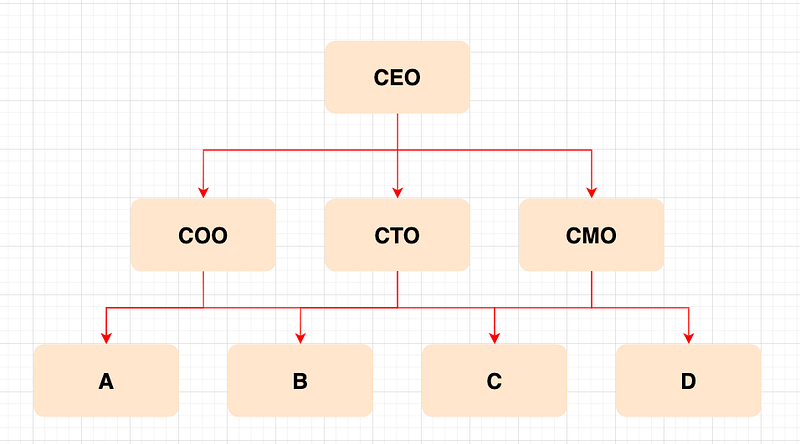
Special attention is required: the organizational structure in the actual business may be different from the enterprise department structure and business line structure, and the data-sharing mechanism needs to be considered. The general practice is to authorize a certain person or a certain role group to share the data of a certain object group at a certain organizational level.
3.2 Role Management
When designing system roles, we should have a deep understanding of the company structure and business structure, and then design the roles and the levels within the roles according to the needs.
Generally, roles are fixed relative to users, and each role has its clear permissions and restrictions. These permissions are determined at the point of system design, and will not be easily changed later.
Automatically get the base character
When an employee joins a department, the employee’s account should be automatically added to the corresponding basic role of the department and have the corresponding basic permissions. This operation is to ensure system security and reduce a lot of manual operations by administrators. Enable recruits to quickly use the system and improve work efficiency.
Temporary role and expiration time
The company’s business sometimes needs external support. They are not employees of the company, and they only support the company at a certain time. At this time, we need to set up temporary roles to deal with such temporary employees who may collaborate across multiple departments.
If the company’s security level is high, such accounts have a fixed expiration time by default, and when the expiration time is reached, they need to be reviewed again before they can be reopened. Avoid temporary accounts being forgotten in the system due to imperfect processes, causing security risks.
Virtual role
The level in the department role can authorize employees of the same level to have the same permissions, but some employees need to call permissions outside the role level due to work reasons, and different employees of the same level need different permissions.
We can set virtual roles for this kind of permission granting that exceeds the role level and is reasonable. This virtual role can integrate all the permissions required for this job, which can then be assigned to specific employees. In this way, it is not necessary to adjust the organizational structure and corresponding roles, but also to meet the permission requirements of special situations in the work.
Black and white list
Whitelist: Some users do not own the top-level role of a certain department, but they need to be given advanced permissions outside the role due to business needs. Then we can design a whitelist with limited scope and add the required users to it.
In the security process, we only need to design a security process for the white list to review special users in the white list, monitor users with special permissions, and reduce security risks.
The more common blacklist scenario is that some employees who have made mistakes, although they are working, can no longer give them any company authority. In this situation where the role association can neither be canceled nor the account can be completely deactivated, a blacklist can be set up so that such users can log in to the account and view basic information, but most of the key permissions have been restricted by the blacklist.
3.3 Permission Management
Rights management is generally restricted to three aspects. Page/menu permissions, operation permissions, data permissions.
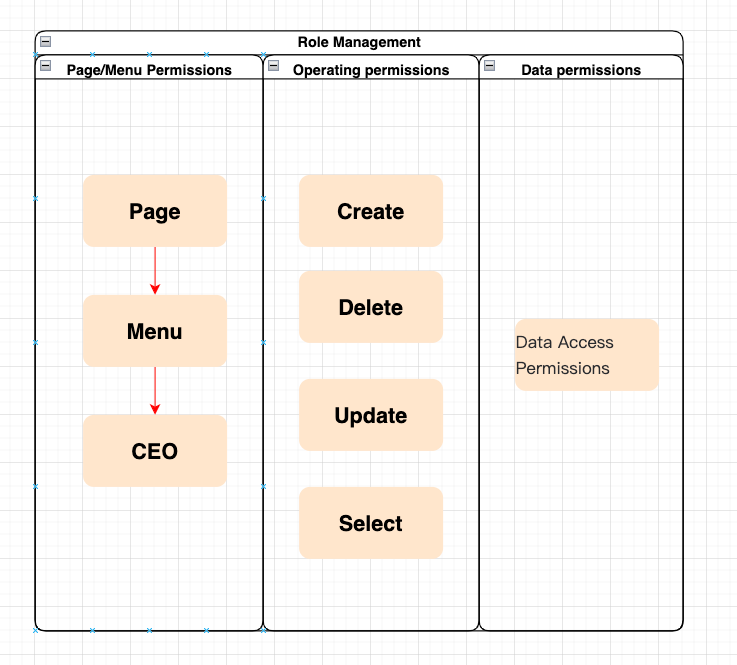
Page/Menu Permissions
For users who do not have permission to operate, directly hide the corresponding page entry or menu option. This method is simple, quick, and direct, and it is very efficient for some permissions that are not sensitive to security.
Operating permissions
Operation permissions usually refer to whether different users can add, delete, modify and query the same set of data. Read-only browsing data for some users, editable data for others.
Data permissions
For permission management with high-security requirements, it is not enough to only restrict the hidden menu and edit button from the front end, it is also necessary to restrict the data interface. If a user attempts to edit data that does not belong to his authority through illegal means, the server will identify, record, and restrict access.
How to control data permissions
Data permissions can be divided into row permissions and column permissions.
- Row access control: see how many pieces of data
- Column permission control: how many fields to see a piece of data
In a simple system, row permissions can be controlled through the organizational structure, and column permissions can be configured according to roles. However, in complex situations, the organizational structure cannot carry complex row permission control, and roles cannot carry the specialized display of columns.
The current industry practice is to provide row-column-level data rights rule configuration and assign rules to a certain role or a certain user as a similar permission point configuration.
4 User Management System Permission Design
4.1 Super Administrator
The super administrator is an account used to start the system and configure the system. This account should be hidden after configuring the system and creating an administrator. The super administrator account has all the permissions in the system and can shuttle and view the data of various departments. If it is not used properly, it will be a security risk for system management.
4.2 How to deal with mutually exclusive roles
When the roles already available to the user and the roles to be added are mutually exclusive, the administrator should be prompted when adding a new role that the new role cannot be added due to the role being mutually exclusive. If you need to add, you must revoke the previous role first, and then add a new role.
4.3 The design of the user management authority system must be simple and clear
When designing the permission system, it is necessary to clarify the thinking, keep everything simple, and not add redundant roles and permission logic that can not be added. Because with the expansion of the company’s business, the permissions and roles will also increase. If the initial design ideas are not rigorous, the permission system will become infinitely chaotic as the business expands. It is too late to sort out the permissions at this time. Therefore, the initial design must be clear, simple, and clear, and can avoid a lot of unnecessary troubles in the follow-up.
4.4 Prompt page without permission
Sometimes employee A will directly share the page he is currently working on with employee B, but employee B may not have the right to view it. At this point, we should consider adding a “no-authority prompt page” here, to avoid the rude 404 page from making employee B think that there is a system error.
Finally
Thanks for reading. I am looking forward to your following and reading more high-quality articles.


