
How to Deploy Redis on Kubernetes: with Real Job Scenario.
What is Redis?
Redis is an in-memory data store often used in Kubernetes environments as a database and caching solution. By caching data in Redis, you can reduce the load on your backend databases, improving application response times. Redis also supports pub/sub messaging, data persistence, horizontal scalability (via Redis Cluster), stateful application support, and more.
In summary, Redis plays a vital role in Kubernetes environments by providing high-performance data storage and caching for scalable, reliable, and responsive applications in containerized and orchestrated setups.
Are you ready to supercharge your application’s performance with in-memory caching? Let’s dive into deploying Redis on Kubernetes, the powerhouse combination for turbocharging your data!
Prerequisites:
1. Access to a Kubernetes cluster. 2. `kubectl` utility configured to work with your cluster.
Objectives:
- Deploy Redis on Kubernetes.
- Utilize Kubernetes features for scaling and reliability.
- Store data in Redis with confidence.
Job Scenario:
The Nautilus application development team observed some performance issues with one of the application that is deployed in Kubernetes cluster. After looking into number of factors, the team has suggested to use some in-memory caching utility for DB service. After number of discussions, they have decided to use Redis. Initially they would like to deploy Redis on kubernetes cluster for testing and later they will move it to production.
Please find below more details about the task:
- Create a redis deployment with following parameters:
- Create a config map called my-redis-config having maxmemory 2mb in redis-config.
- Name of the deployment should be redis-deployment, it should use redis:alpine image and container name should be redis-container.
- Also make sure it has only 1 replica.
- The container should request for 1 CPU.
Mount 2 volumes:
a. An Empty directory volume called data at path /redis-master-data.
b. A configmap volume called redis-config at path /redis-master.
c. The container should expose the port 6379.
Finally, redis-deployment should be in an up and running state.
SOLUTION:
Step 1: Create a Redis ConfigMap
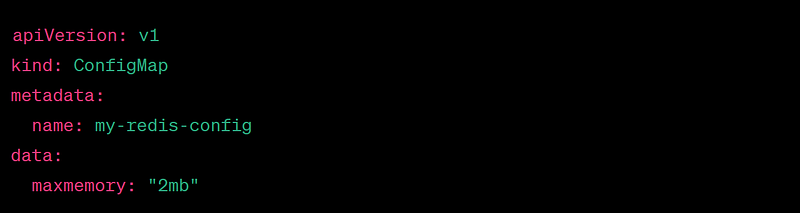
apiVersion: v1
kind: ConfigMap
metadata:
  name: my-redis-config
data:
  maxmemory: "2mb"
**Step 2: Deploy Redis**
apiVersion: apps/v1
kind: Deployment
metadata:
 name: redis-deployment
spec:
 replicas: 1
 selector:
 matchLabels:
 app: redis
 template:
 metadata:
 labels:
 app: redis
 spec:
 containers:
 - name: redis-container
 image: redis:alpine
 resources:
 requests:
 cpu: "1"
 ports:
 - containerPort: 6379
 volumeMounts:
 - name: data
 mountPath: /redis-master-data
 - name: redis-config
 mountPath: /redis-master
 volumes:
 - name: data
 emptyDir: {}
 - name: redis-config
 configMap:
 name: my-redis-config
**Step 3: Apply the Configuration**
kubectl apply -f redis-deployment.yaml
**Step 4: Verify Redis Deployment**
kubectl get pods
NAME                                READY   STATUS    RESTARTS   AGE
redis-deployment-xxxxx-yyyyy        1/1     Running   0          2m
🔒 Security Recommendations:
1. Restrict network access to your Redis service to only trusted sources. 2. Enable Redis authentication with a strong password. 3. Regularly update the Redis image to patch security vulnerabilities. 4. Implement Role-Based Access Control (RBAC) to limit access within Kubernetes.
Redis on Kubernetes is a game-changer for your application’s speed and responsiveness. Try it out and watch your data-intensive tasks become lightning fast!
#Kubernetes #Redis #DevOps #PerformanceBoost #InMemoryCaching #DeploymentGuide #ougabriel #okomugabriel
Feel free to copy and share this guide with your network to help them harness the power of Redis on Kubernetes!
References:


