
How to Deploy a Panel Visualization Dashboard to GitHub Pages
The fastest way to deploy Python data apps
By Marc Skov Madsen and Sophia Yang
Python tools make it easy to build visualization dashboards, but sharing them using a Python server in the cloud can be difficult and expensive. What if it were as easy as pushing your file out to GitHub pages, with no running server needed? Now it is! Thanks to the HoloViz team, especially Philipp Rudiger, with the new Panel 0.14 release, you can run a Panel data app entirely in your browser, no server needed!
This is now the fastest way to deploy apps in Python. The apps are very performant when loaded because there is no latency for communication between server and client.
Running your dashboard in WebAssembly (via Pyodide and PyScript) is the future of dataviz in Python.
In this article, we will show you how you can deploy a Panel app easily on Github pages and share your app with the world!
What is Panel?
Panel is the dashboarding library in the open-source HoloViz ecosystem, which includes eight libraries: Panel, hvPlot, HoloViews, GeoViews, Datashader, Lumen, Param, and Colorcet, and was developed by Philipp Rudiger, Jim Bednar, and a community of contributors. Check out our previous blog post on the three main ways to build a Panel dashboard to learn more.
How to deploy a Panel visualization dashboard to GitHub pages?
- Step 0: Set up the environment
You will need to install the latest version of Panel:
conda install panel hvplot -c pyvizCheck to make sure your Panel is at least 0.14.0:
conda list panel- Step 1: Convert a Panel app to WebAssemly
If you have a Panel application file app.py, you can convert your existing Panel application to WebAssembly with one line of code:
panel convert app.py --to pyodide-worker --out docs/appStep 1 will write your code into an HTML file and a JS file. pyodide-worker is specified to generate these two files using Pyodide running in a separate thread to increase performance. Both files will be under the docs/ folder. The underlying technology is WebAssemply, Pyodide, and PyScript. Check out the Panel WebAsembly documentation, pyscript.net, and our previous blog post on PyScript to learn more.
- Step 2: Add files to GitHub
git add docs/*git commitgit push- Step 3: Set up GitHub Pages
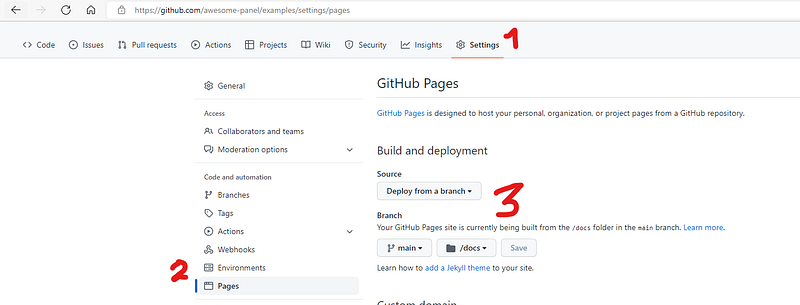
After you add the created files to GitHub, you can configure GitHub Pages in GitHub Settings — Pages — Build a deployment, from main /docs.
A hello world example
Code: https://github.com/awesome-panel/examples/blob/main/src/hello-world/app.py
GitHub pages: https://awesome-panel.github.io/examples/hello-world/app.html
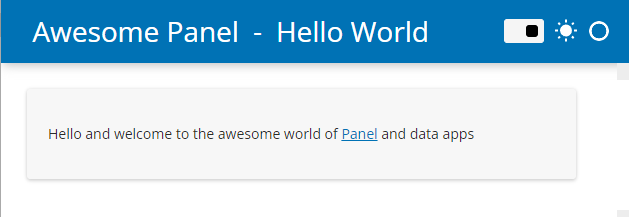
In this first hello world example, we have a simple Panel app file app.py using a Panel template and displaying a sentence.
Give it a try yourself:
- Fork this repository: https://github.com/awesome-panel/examples
- Git clone your forked repository
- Set up your Conda environment and install the latest Panel via
conda install panel hvplot -v pyviz - You can
panel convertfor example the hello-world application to WebAssembly via
panel convert src/hello-world/app.py --to pyodide-worker --out docs/hello-world- The
panel convertcommand above created two files in the docs/hello-world folder: app.html and app.js. Add both of these two files to GitHub (following step 2 above) and set up GitHub pages with the main branch and /docs folder (see step 3 above). After a few minutes, you will see this app showing up on the Github page (you will get a new Github page link from your own forked repo).
Optional steps:
- To serve a Panel app locally, you can serve for example the hello-world application on your Panel server via
panel serve src/hello-world/app.py -autoload. It will be available at http://localhost:5006/app. - In the panel convert step, If you want to avoid repeating the big download over and over again, you can even convert to a progressive web app that can be installed on your laptop! It is as simple as adding the — pwa and — title flags.
- To serve a WebAssembly app locally:
python3 -m http.serverThe app is now available at http://localhost:8000/docs/hello-world/app.html
An interactive dataframe dashboard example
Code: https://github.com/sophiamyang/hvplot_interactive
GitHub pages:
https://sophiamyang.github.io/hvplot_interactive/hvplot_interactive.html
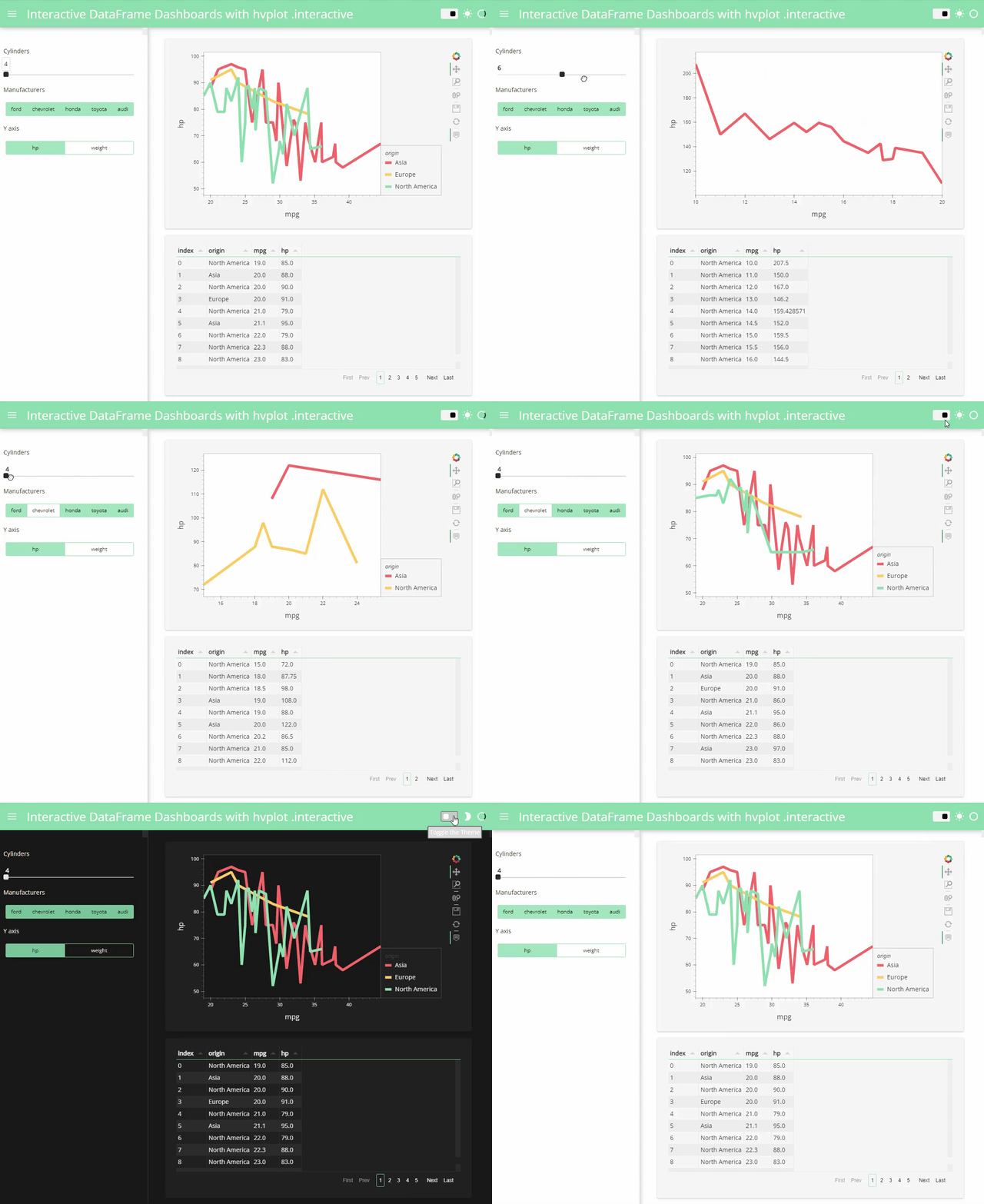
Previously, we posted a detailed blog post and a video tutorial on the easiest way to create an interactive dashboard in Python. With similar steps, we can convert this app to WebAssembly and deploy it on Github pages.
Note that a Panel app file can either be a .py file or a .ipynb notebook file. In this example, our Panel app file is hvplot_interactive.ipynb.
To deploy this app to Github pages:
- We use
panel convertto convert this app to WebAssembly
panel convert hvplot_interactive.ipynb --to pyodide-worker --out docs- We then add created files to Github following step 2 at the beginning of this article.
- Finally, we follow step 3 to set up GitHub pages.
Then we can find our app on Github pages.
A streaming dashboard example
Code: https://github.com/awesome-panel/examples/blob/main/src/streaming-indicators/app.py
Github page: https://awesome-panel.github.io/examples/streaming-indicators/app.html

With the same steps, we can even deploy a real-time streaming dashboard on GitHub pages!
Where can you learn more?
- Check out the new Panel 0.14.0 release notes
- Check out the official documentation: holoviz.org, panel.holoviz.org, and hvplot.holoviz.org.
- Check out https://awesome-panel.org/ for inspiration.
Hope you find this article helpful! If you have questions or want to connect to other HoloViz users check out https://discourse.holoviz.org/.
Acknowledgment:
Thank you Jim Bednar and Phillipp Rudiger for your guidance and feedback!
References:
- https://blog.holoviz.org/panel_0.14.html
- https://panel.holoviz.org/user_guide/Running_in_Webassembly.html#formats
- 3 ways to build a Panel visualization dashboard
- https://holoviz.org/
- https://panel.holoviz.org/
- https://holoviews.org
- https://hvplot.holoviz.org/
- https://anaconda.cloud/dashboardlandscape
- https://anaconda.cloud/easiest-interactive-dashboard
. . .
By Marc Skov Madsen and Sophia Yang on October 6, 2022.
Sophia Yang is a Senior Data Scientist at Anaconda. Connect with me on LinkedIn, Twitter, and YouTube, and join the DS/ML Book Club ❤️


