
How to Deploy a Next.js App with Apollo GraphQL to Heroku

Intro
Deployments are one of those things that trip up a lot of people. When I was attending bootcamp, I vividly remember a good portion of the class struggling to get their apps deployed. Coding was the fun and enjoyable part.. but deployments... 😅
In this article, I will show you how to easily deploy a Next.js app with Apollo GraphQL to Heroku. Key thing to note here, is that there is no difference in how you would deploy any other Next.js app. If you inspect the starter code provided below, you will notice that we are serving Apollo GraphQL on a route served by Next.js. With that said, let’s get started!
Prerequisites
Please verify you have the following installed and configured.
- Node.js 10.x installed (Next.js requirement)
- Git CLI installed and configured
- Heroku account
- Heroku CLI installed and logged in
Starter Code
I have provided the starter code if you wish to follow along.
You can clone the repo by running the following command in your terminal.
git clone https://github.com/kluu1/deploy-next-graphql-app.gitInspecting package.json
Navigate into the project directory and open the project in your favorite text editor. If you are using VSCode and have the ‘code’ command in your PATH, you can run the following commands below in your terminal.
cd deploy-next-graphql-app
code .
Now with your text editor open, let’s take a look at the package.json file.
The important scripts to note here are “start” and “build”.
- build — Heroku will run this in the build process
- start — Heroku will run this to start the app on a specific port
If you wish to customize the Heroku build process, I highly recommend going through the Heroku Node.js Support documentation. For example, you can add preinstall and postinstall scripts, which runs before or after builds on Heroku.
Push the Code to Heroku
In your terminal, make sure you have the Heroku CLI installed and logged in. Run the following command to create a new application on Heroku.
heroku create deploy-next-graphql-appThen run the command below to add a remote repository .
heroku git:remote -a deploy-next-graphql-appNow we can push our code to Heroku and it will start the build process.
git push heroku master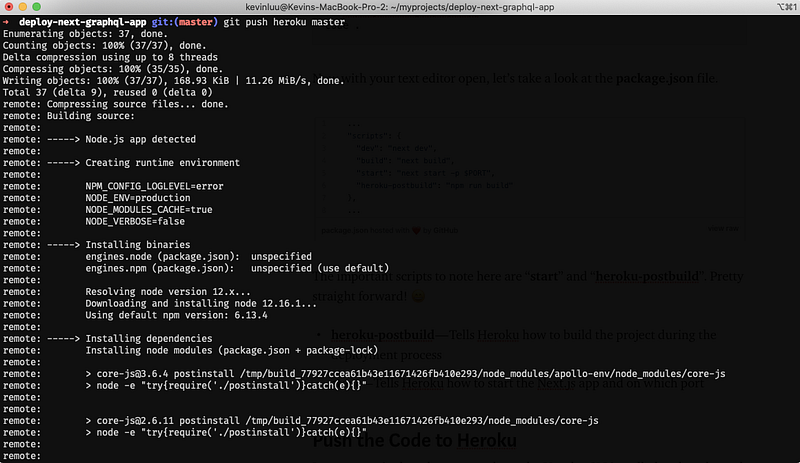
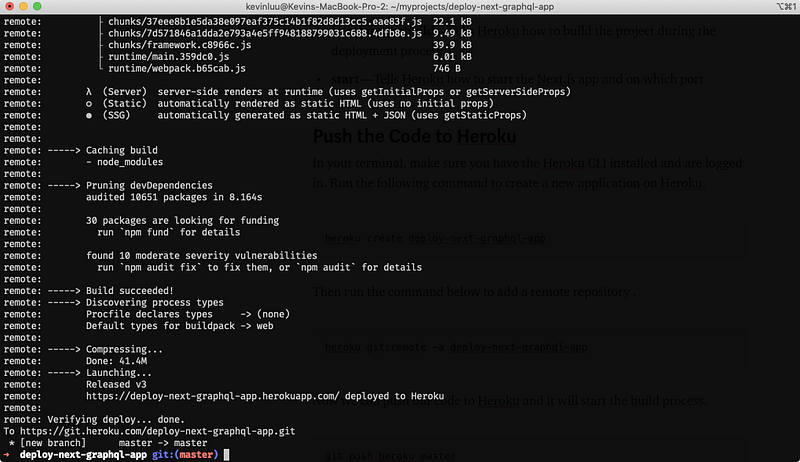
Once the build process is complete, the app will be automagically deployed by Heroku. I hope you enjoyed the magic show! Your app is now deployed and is live!
Conclusion
Heroku is one of the easiest platforms to work with. With just a few modifications to your Next.js project, you can have your app deployed on Heroku in minutes. The documentation and support from the community is top notch. I personally use Heroku for all my personally projects and will continue to do so. I hope you found this article helpful and you are able to use it to deploy your Next.js projects! On to the next! 😆
I write these articles for fun during my spare time. If you have enjoyed this article, please leave your likes and comments below! You can follow me on Medium and Twitter. Thanks for the support!


