avatarVivek Naskar

Free AI web copilot to create summaries, insights and extended knowledge, download it at here

2848

Abstract

ps://thedeveloperstory.com/">my blogging website</a> to see if that is working as expected. It has the capability to access the internet and read some pages and give a brief summary.</p><figure id="85f4"><img src="https://cdn-images-1.readmedium.com/v2/resize:fit:800/0*9MFY1H7Obs8TZllS.png"><figcaption>Analysed my blog — <a href="https://thedeveloperstory.com/">thedeveloperstory.com</a></figcaption></figure><p id="0deb">The analysis was brief, but this was not what I was looking for. I would park it for later and first asked the GPT Builder to name the GPT as “Fix My Website” and also asked to add a suitable image to the GPT.</p><p id="ab76">I would repeat it until I get the suitable display picture.</p><figure id="ed8e"><img src="https://cdn-images-1.readmedium.com/v2/resize:fit:800/0*4eHug4CO6cBYHrPI.png"><figcaption>Adding the name and profile picture to the GPT</figcaption></figure><p id="4690">After the name and display picture are set. I add the roles for the GPT with the instructions in such a way it would analyse the website and also suggest the plugins that would enhance your website and suggest the monetization rules. You can always try out the changes in the <b>Preview</b> screen.</p><p id="0b32">Once everything is finalized, you need to publish your GPT. There are 3 options: <b><i>Only me</i></b>, <b><i>Anyone with a link,</i></b> and <b><i>Public</i></b>.</p><figure id="c29d"><img src="https://cdn-images-1.readmedium.com/v2/resize:fit:800/0*7dU7B5i9EvUCXwW7.png"><figcaption>3 options to publish your custom GPTs</figcaption></figure><p id="f3f8"><i>I published my GPT to Public and you can also access it from <a href="https://chat.openai.com/g/g-OoAeIJ8is-fix-my-website"><b>here</b></a>.</i></p><p id="b93b">The GPT, “<b>Fix My Website</b>”, looks something like below.</p><figure id="cc7c"><img src="https://cdn-images-1.readmedium.com/v2/resize:fit:800/0*uMO-R5ouoI4bwaJq.png"><figcaption>Published the Custom GPT</figcaption></figure><h1 id="83ed">Testing the GPT</h1><p id="d243">Once your GPT is published, you can, of course, test it with any public URL and I did with mine just like above.</p><figure id="5375"><img src="https://cdn-images-1.readmedium.com/v2/resize:fit:800/1*XoLNKQtSYSfRRanMXPlsqg.png"><figcaption></figcaption></figure><figure id="8c17"><img src="https://cdn-images-1.readmedium.com/v2/resize:fit:800/1*GLtYsMZzRUaeiLUx1Z_FBg.png"><figcaption>Analysis details (Left) | Recommendations (Right)</figcaption></figure><p id="4a4a">Once the website is analysed, you get the results of the analysis as well as the plugins or tools to improve your website as part of the recommendation.</p><h1 id="3b63">My Thoughts</h1><p id="136e">OpenAI plans to enable monetization of the GPTs that you create and publish in the yet-to-be-launched GPT store. This would be similar to the App store tha

Options

t we have in the iOS and Play Store for Android.</p><p id="3a26">This is still using the capability of <a href="https://openai.com/research/gpt-4">GPT-4</a>, and I am sure with every iteration of GPTs whenever they launch, the GPTs would also become widely popular.</p><p id="70bb">I am just waiting what Sam Altman and his team at OpenAI along with other competitors have in store, as AI will definitely shape our future in ways we cannot possibly imagine.</p><p id="1e8f"><i>If you enjoyed reading this, you might also find the below articles worth your time.</i></p><div id="51c4" class="link-block"> <a href="https://levelup.gitconnected.com/google-releases-gemini-with-bard-and-it-promises-to-be-better-than-chatgpt-4af377357114"> <div> <div> <h2>Google Releases Gemini With Bard And It Promises To Be Better Than ChatGPT</h2> <div><h3>Can Google beat OpenAI to claim the AI throne?</h3></div> <div><p>levelup.gitconnected.com</p></div> </div> <div> <div style="background-image: url(https://miro.readmedium.com/v2/resize:fit:320/1*sSDQg8RoZamqrFJVQN-ZFA.png)"></div> </div> </div> </a> </div><div id="6893" class="link-block"> <a href="https://levelup.gitconnected.com/i-compared-the-best-2-free-ai-image-generators-the-results-are-incredible-1fac78fb3b82"> <div> <div> <h2>I Compared The Best 2 “Free” AI Image Generators & The Results Are Incredible</h2> <div><h3>The best free alternatives to Midjourney.</h3></div> <div><p>levelup.gitconnected.com</p></div> </div> <div> <div style="background-image: url(https://miro.readmedium.com/v2/resize:fit:320/1*M6Y5w7ynTYlWZXKVqOh0_w.jpeg)"></div> </div> </div> </a> </div><p id="483e"><i>If you enjoy reading stories that help you learn, live, and work better, consider <a href="https://viveknaskar.medium.com/subscribe">becoming a subscriber</a>. I am also on X, <a href="https://twitter.com/vivek_naskar">do connect with me there</a>.</i></p><figure id="75b9"><img src="https://cdn-images-1.readmedium.com/v2/resize:fit:800/0*_ovpV7wfH2w65ePV.png"><figcaption></figcaption></figure><p id="7838"><b>This story is published on <a href="https://generativeai.pub/">Generative AI</a>. Connect with us on <a href="https://www.linkedin.com/company/generative-ai-publication">LinkedIn</a> to get the latest AI stories and insights right in your feed. Let’s shape the future of AI together!</b></p><figure id="b2d2"><img src="https://cdn-images-1.readmedium.com/v2/resize:fit:800/0*zgRskjvRYwh62OCM.png"><figcaption></figcaption></figure></article></body>

How To Create Your Own GPT Using The GPT Builder

A step-by-step guide to create your own GPT.
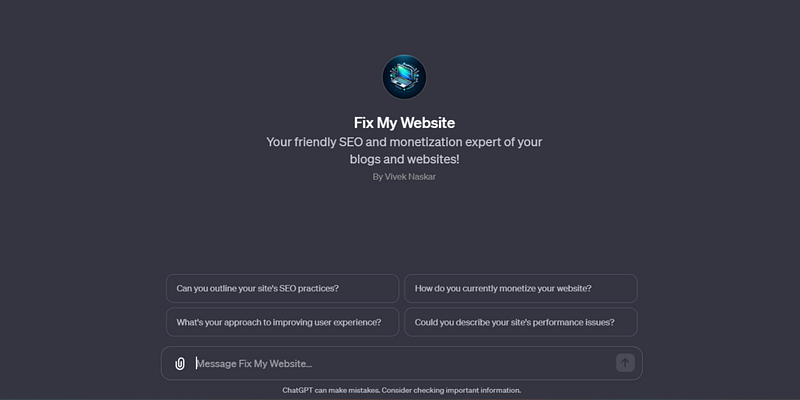
Custom GPT — Fix My Website created by the Author

Sam Altman, the CEO of OpenAI, had announced that now everyone can create their own Generative pre-trained transformers or GPTs on the Open AI Dev Day Keynote that held on 6th of November 2023. He demonstrated on stage by giving some instructions, and it was created within minutes.

Well, I have created a couple of custom GPTs, and they are tailor-made to do the tasks that I wanted it to do. It is quite easy, and you can too create with some simple instructions, and it will create for you.

The only prerequisite is that you must have a paid subscription to ChatGPT, which means that you need ChatGPT Plus subscription.

Let’s see how to do that.

Step-by-step Guide

Click on the GPT discovery website link to see a list of already published GPTs and where you can find the option to create your own GPT.
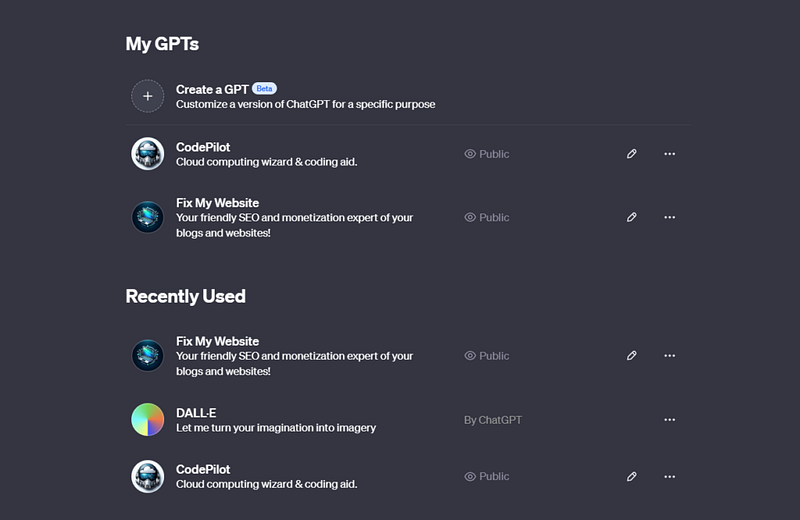
GPT discovery website link to see all the GPTs

Once the site loads, you need to select the Create a GPT link at the top of the page. This will open the GPT Builder page with the options of Create and Configure and a Preview page.
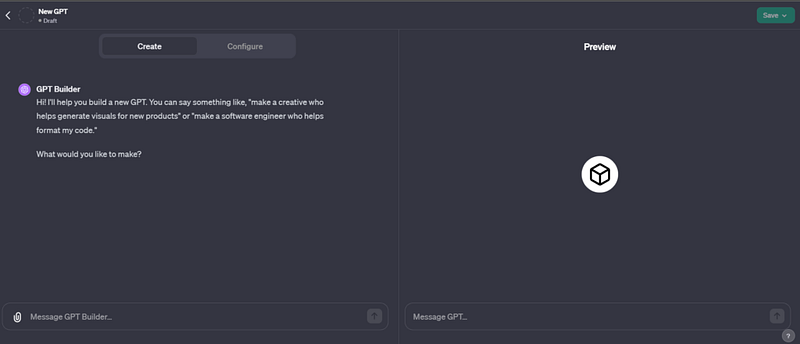
GPT Builder page to create and customize your GPT

Once the editor opens, you can add any custom instructions. I wanted a custom GPT to analyse any website that would check the performance, SEO features and accessibility.

I entered the below instruction:

I want to create a GPT that would analyse my website or any website from the internet and would give the detailed analysis of the site performance, accessibility and SEO functionality.
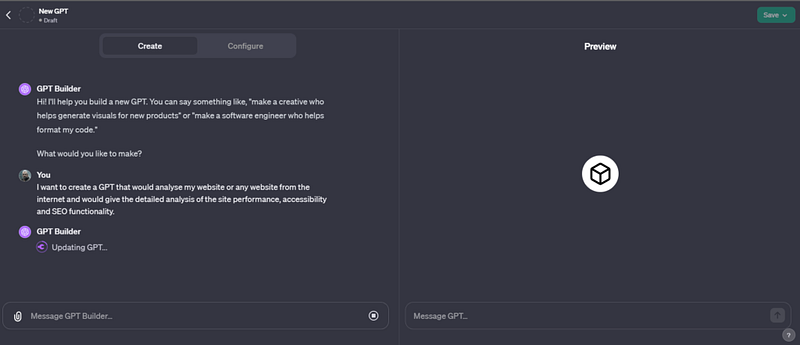
On adding the instruction, the GPT builder starts its work

Once that is done, I tried to analyse my blogging website to see if that is working as expected. It has the capability to access the internet and read some pages and give a brief summary.
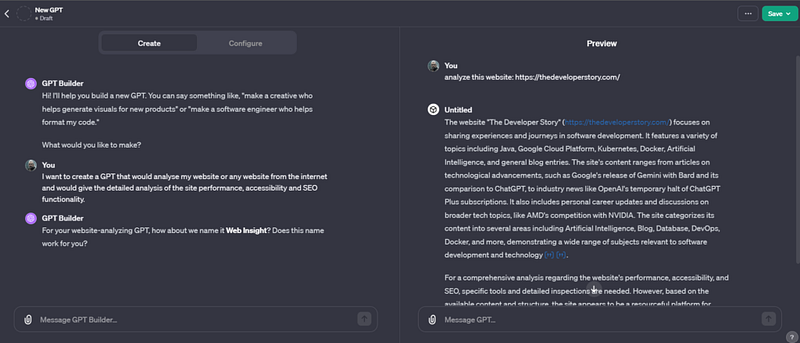
Analysed my blog — thedeveloperstory.com

The analysis was brief, but this was not what I was looking for. I would park it for later and first asked the GPT Builder to name the GPT as “Fix My Website” and also asked to add a suitable image to the GPT.

I would repeat it until I get the suitable display picture.
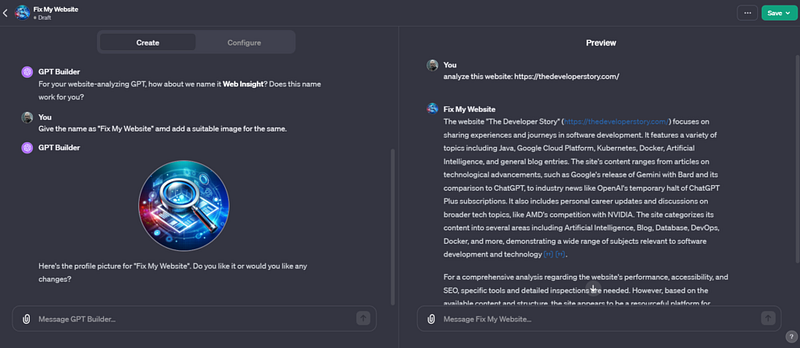
Adding the name and profile picture to the GPT

After the name and display picture are set. I add the roles for the GPT with the instructions in such a way it would analyse the website and also suggest the plugins that would enhance your website and suggest the monetization rules. You can always try out the changes in the Preview screen.

Once everything is finalized, you need to publish your GPT. There are 3 options: Only me, Anyone with a link, and Public.
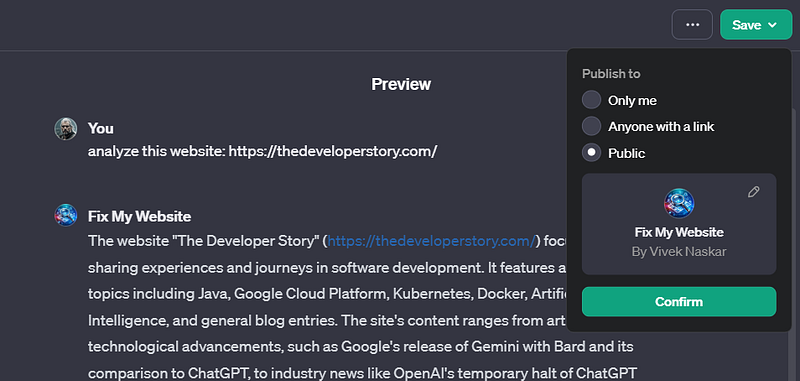
3 options to publish your custom GPTs

I published my GPT to Public and you can also access it from here.

The GPT, “Fix My Website”, looks something like below.
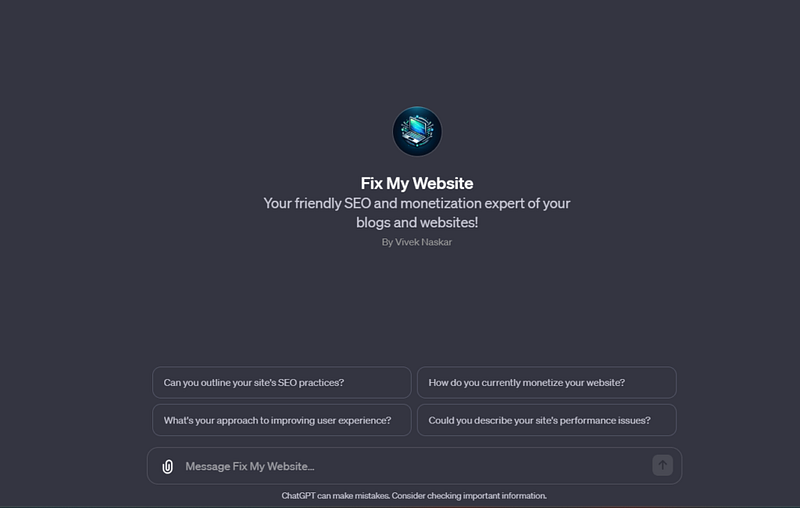
Published the Custom GPT

Testing the GPT

Once your GPT is published, you can, of course, test it with any public URL and I did with mine just like above.
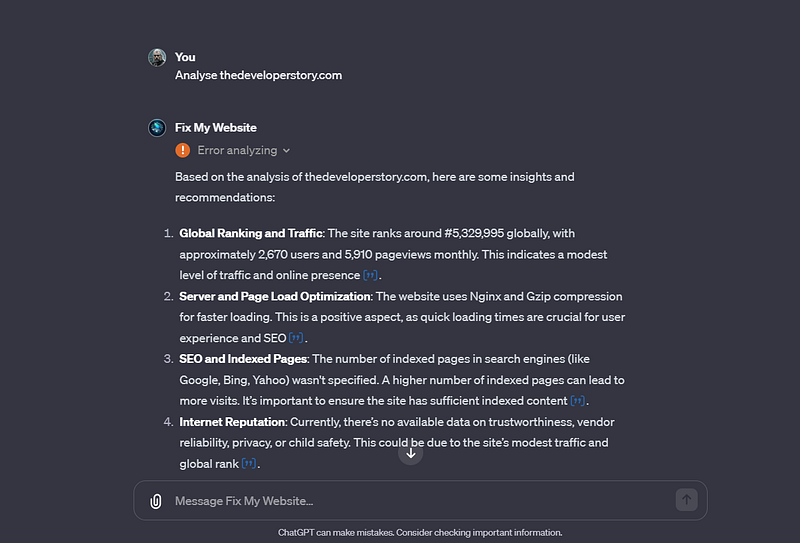
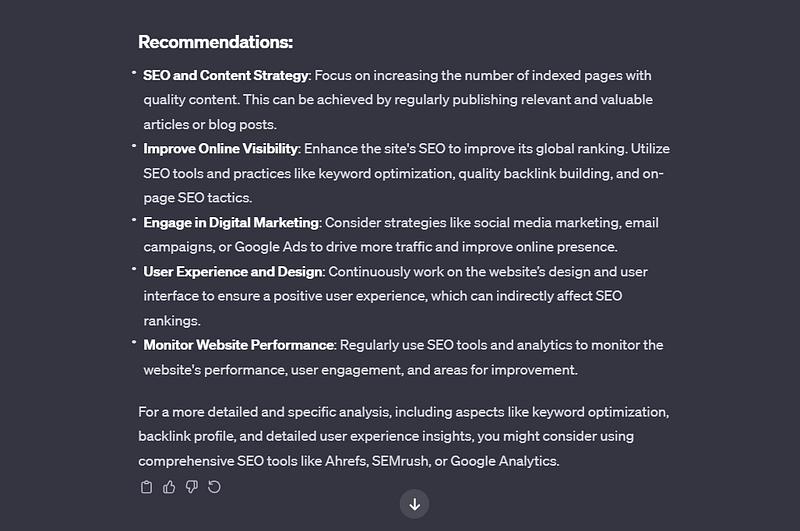
Analysis details (Left) | Recommendations (Right)

Once the website is analysed, you get the results of the analysis as well as the plugins or tools to improve your website as part of the recommendation.

My Thoughts

OpenAI plans to enable monetization of the GPTs that you create and publish in the yet-to-be-launched GPT store. This would be similar to the App store that we have in the iOS and Play Store for Android.

This is still using the capability of GPT-4, and I am sure with every iteration of GPTs whenever they launch, the GPTs would also become widely popular.

I am just waiting what Sam Altman and his team at OpenAI along with other competitors have in store, as AI will definitely shape our future in ways we cannot possibly imagine.

If you enjoyed reading this, you might also find the below articles worth your time.

If you enjoy reading stories that help you learn, live, and work better, consider becoming a subscriber. I am also on X, do connect with me there.

This story is published on Generative AI. Connect with us on LinkedIn to get the latest AI stories and insights right in your feed. Let’s shape the future of AI together!

Artificial Intelligence
AI
ChatGPT
Technology
Tech
Recommended from ReadMedium