avatarInformula

Free AI web copilot to create summaries, insights and extended knowledge, download it at here

2010

Abstract

an>, <span class="hljs-attr">progress</span>=<span class="hljs-literal">False</span>, <span class="hljs-attr">auto_adjust</span>=<span class="hljs-literal">True</span>)</pre></div><p id="2514">Step 3: Define X1, X2 and X3 for X-days moving average and calculate them using rolling mean (We are using open quote here).</p><div id="4a53"><pre>x1 = 50 x2 = 200 x3 = 500

y = <span class="hljs-string">"-day moving average"</span>

string1 = str(x1) + str(y) string2 = str(x2) + str(y) string3 = str(x3) + str(y)

<span class="hljs-built_in">df</span>[<span class="hljs-string">'MA1'</span>] = <span class="hljs-built_in">df</span>[<span class="hljs-string">'Open'</span>].rolling(window=x1).mean() <span class="hljs-built_in">df</span>[<span class="hljs-string">'MA2'</span>] = <span class="hljs-built_in">df</span>[<span class="hljs-string">'Open'</span>].rolling(window=x2).mean() <span class="hljs-built_in">df</span>[<span class="hljs-string">'MA3'</span>] = <span class="hljs-built_in">df</span>[<span class="hljs-string">'Open'</span>].rolling(window=x3).mean()</pre></div><p id="6c85">Step 4: Plot the information.</p><div id="386d"><pre>fig = <span class="hljs-keyword">go</span>.Figure(data=[<span class="hljs-keyword">go</span>.Scatter(x=df.index, y=df[<span class="hljs-string">'Close'</span>], name = <span class="hljs-string">'Stock Price'</span>, line = dict(color = <span class="hljs-string">'blue'</span>, width =<span class="hljs-number">4</span>)), <span class="hljs-keyword">go</span>.Scatter(x=df.index, y=df.MA1, line=dict(color=<span class="hljs-string">'green'</span>, width=<span class="hljs-number">3</span>), name = string1 ), <span class="hljs-keyword">go</span>.Scatter(x=df.index, y=df.MA2, line=dict(color=<span class="hljs-string">'orange'</span>, width=<span class="hljs-number">3</span>), name = string2), <span class="hljs-keyword">go</span>.Scatter(x=df.index, y=df.MA3, line=dict(color=<span class="hljs-string">'red'</span>, width=<s

Options

pan class="hljs-number">3</span>), name = string3) ]) fig.show()</pre></div><figure id="c250"><img src="https://cdn-images-1.readmedium.com/v2/resize:fit:800/1*Rz8EKfuJNhkC1PRYPUY3LA.png"><figcaption></figcaption></figure><p id="bfb6">Based on the data from 2011, we can see that it might be a good timing to long COST when the price is below or close to 500-Days MA if there is no much headwinds in terms of company strategy and competitive advantage.</p><p id="39b4">More related articles:</p><p id="3c6b"><b>Data Viz</b></p><div id="7c00"><pre>How <span class="hljs-built_in">to</span> Build stock comparison <span class="hljs-built_in">line</span> chart <span class="hljs-keyword">with</span> dynamic <span class="hljs-built_in">date</span> range?

How <span class="hljs-built_in">to</span> Build <span class="hljs-keyword">a</span> Word Collocation Network Graph via Python</pre></div><p id="3a73"><b>Stock Market</b></p><div id="3f42"><pre>How <span class="hljs-keyword">to</span> <span class="hljs-keyword">Import</span> Stock Information <span class="hljs-keyword">for</span> <span class="hljs-keyword">All</span> Tickers <span class="hljs-keyword">in</span> the US <span class="hljs-keyword">and</span> TW Market <span class="hljs-keyword">into</span> SQLite via Python Colab?

How <span class="hljs-keyword">to</span> Calculate PE ratio <span class="hljs-keyword">for</span> ETFs via Python <span class="hljs-keyword">in</span> Colab - QQQ

How <span class="hljs-keyword">to</span> Understand the <span class="hljs-keyword">level</span> <span class="hljs-keyword">of</span> <span class="hljs-keyword">cost</span> (moving average) <span class="hljs-keyword">for</span> <span class="hljs-keyword">each</span> holding <span class="hljs-keyword">of</span> ETF-QQQ?</pre></div><p id="be0f">Thank you! If you want to support Informula, you can buy us a coffee here :)</p><p id="ca55"><a href="https://www.buymeacoffee.com/Informula">𝗕𝘂𝘆 𝗺𝗲 𝗮 𝗰𝗼𝗳𝗳𝗲𝗲</a></p></article></body>

How to Create X-days Moving Average Chart in stock market via Python (Plotly & Pandas)

Previously on How to Build stock comparison line chart with dynamic date range via Python (Plotly & Pandas)? we demonstrated how to leverage Plotly and Pandas to do the comparison among stocks based on the dynamic starting date. In this article, we will show you how to build moving average charts based on given days and tickers so that we are able to know the average cost across the market during that period.

Step 0: Install required packages.

!pip install plotly
!pip install pandas
!pip install yfinance

Step 1: Import required packages.

import pandas as pd
import yfinance as yf
import plotly.express as px
import plotly.graph_objects as go

Step 2: Define timeframe and ticker and pull stock price details.

df = yf.download('COST',
                     start='2011-01-01',
                     end='2023-08-18',
                     progress=False,
                     auto_adjust=True)

Step 3: Define X1, X2 and X3 for X-days moving average and calculate them using rolling mean (We are using open quote here).

x1 = 50
x2 = 200
x3 = 500

y =  "-day moving average"

string1 = str(x1) + str(y)
string2 = str(x2) + str(y)
string3 = str(x3) + str(y)

df['MA1'] = df['Open'].rolling(window=x1).mean()
df['MA2'] = df['Open'].rolling(window=x2).mean()
df['MA3'] = df['Open'].rolling(window=x3).mean()

Step 4: Plot the information.

fig = go.Figure(data=[go.Scatter(x=df.index, y=df['Close'], name = 'Stock Price', line = dict(color = 'blue', width =4)),
go.Scatter(x=df.index, y=df.MA1, line=dict(color='green', width=3), name =  string1 ),
go.Scatter(x=df.index, y=df.MA2, line=dict(color='orange', width=3), name = string2),
go.Scatter(x=df.index, y=df.MA3, line=dict(color='red', width=3), name = string3)
                      ])
fig.show()
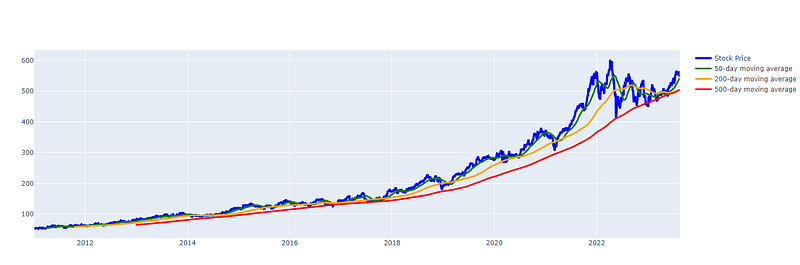
Based on the data from 2011, we can see that it might be a good timing to long COST when the price is below or close to 500-Days MA if there is no much headwinds in terms of company strategy and competitive advantage.

More related articles:

Data Viz

How to Build stock comparison line chart with dynamic date range?

How to Build a Word Collocation Network Graph via Python

Stock Market

How to Import Stock Information for All Tickers in the US and TW Market into SQLite via Python Colab?

How to Calculate PE ratio for ETFs via Python in Colab - QQQ

How to Understand the level of cost (moving average) for each holding of ETF-QQQ?

Thank you! If you want to support Informula, you can buy us a coffee here :)

𝗕𝘂𝘆 𝗺𝗲 𝗮 𝗰𝗼𝗳𝗳𝗲𝗲

Python
Stock Market
Data
Data Visualization
Business Intelligence
Recommended from ReadMedium