
How to Create Threads Seamlessly on Twitter
A (non-sponsored) review of the Typefully App
If you’ve been puzzled by Twitter threads for a long time, I’ve just discovered a thread-making app for Twitter that might make it easier for you! It’s relatively new so there are a few things to be desired, but already has some solid functionality that I’m excited to use on a more regular basis!
Get the scoop from the gal who has over 127 threads and at one point programmed her own in-house app (named Lucy’s Microwave) to automate some of the boring parts of creating threads!
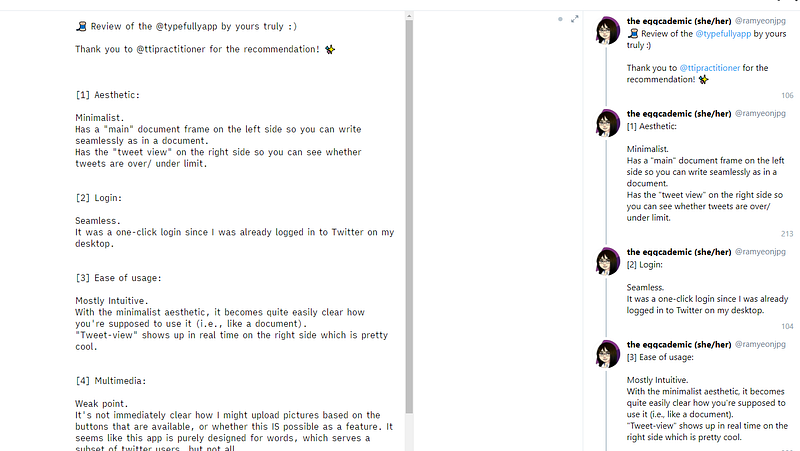
- Minimalist aesthetic: It’s split into two sides, with a left side that appears as a seamless document and a right side that shows you what the thread looks like in thread view. The familiarity of the document side might work best for writers like you (and I) who get frustrated by the ticking word count timer when creating Twitter threads on the platform itself.
- Seamless login: One-click via Twitter authentication. Took about 5-seconds.
- Easy to use: The platform is mostly intuitive, with the user interface clearly showing you where to start writing because of how closely it mirrors standard document/ writing apps.
- Multimedia is the weak point: It’s not immediately apparent nor apparent after some more extensive search (5-minutes, shh, I’m an impatient consumer) whether this app supports multimedia uploads like gifs, photos, videos. The text-based editor is optimized to serve a subset of Twitter users, but not all.
- Diverse potential uses: Medium publication daily digests? Lists? Reviews? Rants? The thread format supports a lot of potential options.
The Twitter thread version of this review pictured in the cover photo is available here:
Lucy (The Eggcademic) [she/her] is not only avidly writing about social media marketing because it’s something intriguing to her, but she also avidly uses social media which makes this advice lively and applicable to real users. (Translation: someone who might die in her sleep one day and continue to wake up and haunt Twitter via her ghostly tweets). If you have questions about social media, drop them below! I’m eager to compile more guides for problems others are facing!


