avatarHales

Free AI web copilot to create summaries, insights and extended knowledge, download it at here

2832

Abstract

that the antivirus solution should flag.</p><p id="a8ec">That’s fine and lovely, but sometimes you need a PDF with a virus instead. Here’s how to create a testing pdf with a virus for software testing.</p><p id="e97e">We don’t care about receiving a payload, so</p><h2 id="2881">Step 0 — Make sure your host computer has an active anti-malware</h2><p id="92fe">We’ll be working inside of a VM, but it’s worth double-checking that your machine has some sort of active anti-malware on it.</p><h2 id="073c">Step 1 — Create a Kali Linux VM</h2><p id="0f2c">Kali Linux is an operating system for penetration testers. It comes pre-installed with all sorts of open-source penetration testing tools.</p><p id="cafe">Your exact installation steps will differ, so head to Kali.org and download a <a href="https://www.kali.org/get-kali/#kali-virtual-machines">virtual machine image</a>.</p><p id="fec0">Spin up your favorite virtual machine software, point it at the Kali image, and boom, bang, you’re a hacker.</p><p id="dd7d">(Kali images have the default credentials of <b>kali/kali</b>)</p><h2 id="bf6f">Step 2 — Open the Social Engineering Toolkit</h2><figure id="5ecc"><img src="https://cdn-images-1.readmedium.com/v2/resize:fit:800/1*lG8cIs6mRDcPmA-cWE7yhQ.png"><figcaption>Find and open the Kali program ‘social engineering toolkit’. Screenshot by author.</figcaption></figure><p id="9ef4">Open the Kali social engineering toolkit that comes pre-loaded on Kali Linux systems, by opening the applications menu (Kali Icon) -> “08 — Exploitation Tools” -> “social engineering toolkit (root)”.</p><p id="ac3e">If you’re a command line pro, then open the social engineering toolkit by opening a terminal and running <code>sudo setoolkit</code>.</p><p id="f880">Regardless of how you open the program, a terminal window will appear with the tool ready to use.</p><h2 id="136e">Step 3 — Make the PDF</h2><figure id="e8b8"><img src="https://cdn-images-1.readmedium.com/v2/resize:fit:800/1*S8KDhGnX9py7zxcNezWadw.png"><figcaption>The splash page for the Social-Engineer Toolkit (or SET). Screenshot by author.</figcaption></figure><p id="16e7">Once the Social Engineering Toolkit has loaded and you see the splash screen. You should see the first menu with options.</p><figure id="7d61"><img src="https://cdn-images-1.readmedium.com/v2/resize:fit:800/1*3LT_s4lHH7hDPWPEwqn19Q.png"><figcaption>Select ‘1’ when you see this menu. Screenshot by author.</figcaption></figure><ol><li>Type 1 to select “Social Engineering Attacks”, then press Enter.</li><li>Type 3 to select “Infectious Media Generator”, then press Enter.</li><li>Type 1 to select “File-Format Exploits”, then press Enter.</li><li>Enter your WAN IP address. Use <a href="http://wanip.info/">WanIP.info</a> to find your WAN IP address.</li><li>Type 13 to select “Adobe PDF Embed

Options

ded EXE Social Engineering”, then press Enter.</li><li>We’ll use their blank PDF for this attack, so type “2” and press Enter.</li><li>Type 2 to select “Windows Meterpreter Reverse_TCP”, and press Enter.</li><li>Type your IP Address again, and press enter for the port.</li></ol><p id="7851">If we were trying to fully test the ability to penetrate a system, we would then start the listener. But since we’re just interested in a PDF with some valid virus, we don’t need to start the listener.</p><figure id="a085"><img src="https://cdn-images-1.readmedium.com/v2/resize:fit:800/0*v5gu7hbCZzCrFhRD"><figcaption>Photo by <a href="https://unsplash.com/@headwayio?utm_source=medium&amp;utm_medium=referral">Headway</a> on <a href="https://unsplash.com?utm_source=medium&amp;utm_medium=referral">Unsplash</a></figcaption></figure><h2 id="3ffa">Step 4 — Find the File</h2><p id="2f0e">Finding the file can be the trickiest part of using some of Kali’s tools.</p><p id="7150">To find your newly created PDF for virus testing:</p><ol><li>Open a new terminal</li><li>Type <code>sudo -s</code>to enter elevated permissions</li><li><code>cd /root/.set/autorun</code></li><li><code>ls</code></li><li>You should see you .pdf file here. Copy the file to your desktop, and it’s ready to be uploaded to your virus scanner for testing.</li></ol><p id="b8b8"><b>New to Medium? Become a member to read more.</b></p><div id="7a4f" class="link-block"> <a href="https://haleyrymel.medium.com/membership"> <div> <div> <h2>Join Medium with my referral link - Hales</h2> <div><h3>Get More Out of Medium by Becoming a Member (And Support Your Favorite Writers) Get full access to Medium.com by…</h3></div> <div><p>haleyrymel.medium.com</p></div> </div> <div> <div style="background-image: url(https://miro.readmedium.com/v2/resize:fit:320/0*j6ERRjs5ounY9HIZ)"></div> </div> </div> </a> </div><p id="e8d4">Interested in software testing? Follow the <a href="https://medium.com/software-testing-pipeline">Software Testing Pipeline</a>.</p><div id="5c82" class="link-block"> <a href="https://medium.com/software-testing-pipeline"> <div> <div> <h2>Software Testing Pipeline</h2> <div><h3>Tech has a pipeline problem. We’re here to reduce the hurdles for people who want to start a career in tech. Learn…</h3></div> <div><p>medium.com</p></div> </div> <div> <div style="background-image: url(https://miro.readmedium.com/v2/resize:fit:320/1*uxhRMXavAVBb-KkRadLOuA.jpeg)"></div> </div> </div> </a> </div></article></body>

How to Create Safe PDFs with Viruses for Software Testing

Need to test the integration of your virus scanner? Use these safe PDFs for testing a virus scanner.
Photo by Alex Chumak on Unsplash

PDFs are a common file format, and can be used to spread viruses. When testing software, you may need to perform an integration test to verify the virus scanner.

For the health and safety of your devices and the network that you’re on, DO NOT download files infected with live viruses to test with. (But what if I’m an expert? You’re reading this article, so yah ain’t. Don’t do it.)

In this article, I will show you how to create safe PDFs with viruses and where to download PDFs for virus testing.

WARNING: The methods described in this article are for educational purposes related to white hat testing and should not be used on live systems. Use of these methods may result in damage to your computer or network. I’m not your mama, and I’m not liable for you doing something dumb.

Where to Find Safe EICAR PDFs for Virus Scan Testing

EICAR files are files that have been made to test virus scanners. They are safe to open and will not harm your computer, but are flagged by properly working virus scanners. While they are not harmful, some personal antivirus programs make it difficult to remove the file.

Where to Download EICAR Test Files

How to Create Safe PDFs for Virus Scan Testing

EICAR files contain a string that the antivirus solution should flag.

That’s fine and lovely, but sometimes you need a PDF with a virus instead. Here’s how to create a testing pdf with a virus for software testing.

We don’t care about receiving a payload, so

Step 0 — Make sure your host computer has an active anti-malware

We’ll be working inside of a VM, but it’s worth double-checking that your machine has some sort of active anti-malware on it.

Step 1 — Create a Kali Linux VM

Kali Linux is an operating system for penetration testers. It comes pre-installed with all sorts of open-source penetration testing tools.

Your exact installation steps will differ, so head to Kali.org and download a virtual machine image.

Spin up your favorite virtual machine software, point it at the Kali image, and boom, bang, you’re a hacker.

(Kali images have the default credentials of kali/kali)

Step 2 — Open the Social Engineering Toolkit
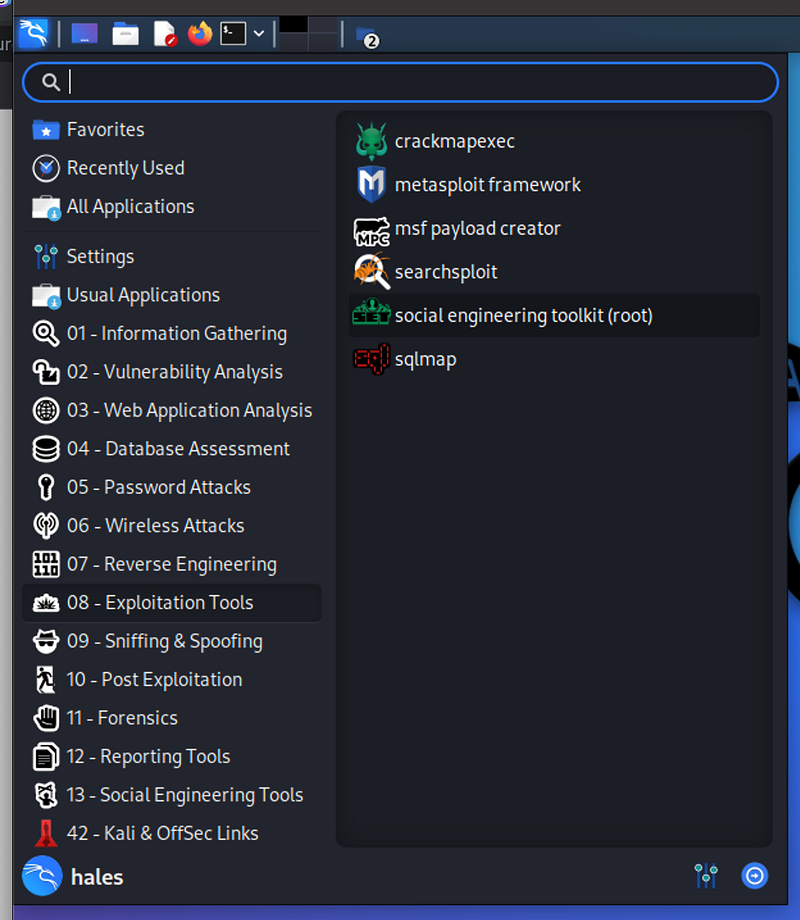
Find and open the Kali program ‘social engineering toolkit’. Screenshot by author.

Open the Kali social engineering toolkit that comes pre-loaded on Kali Linux systems, by opening the applications menu (Kali Icon) -> “08 — Exploitation Tools” -> “social engineering toolkit (root)”.

If you’re a command line pro, then open the social engineering toolkit by opening a terminal and running sudo setoolkit.

Regardless of how you open the program, a terminal window will appear with the tool ready to use.

Step 3 — Make the PDF
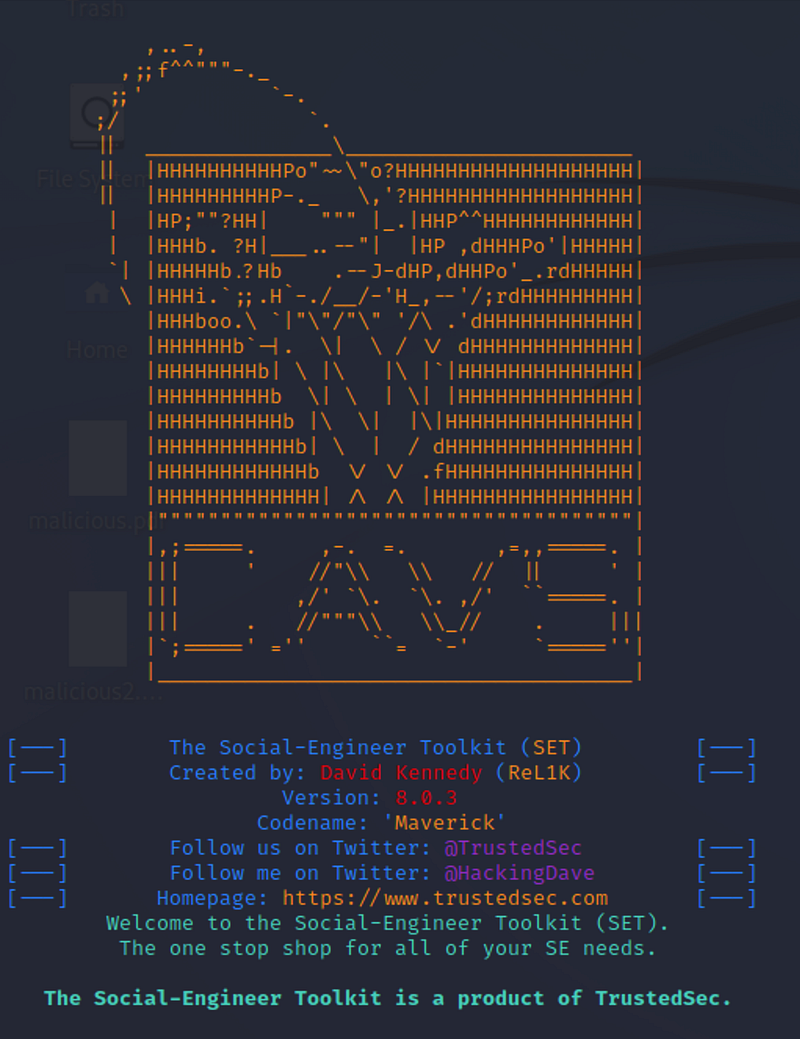
The splash page for the Social-Engineer Toolkit (or SET). Screenshot by author.

Once the Social Engineering Toolkit has loaded and you see the splash screen. You should see the first menu with options.
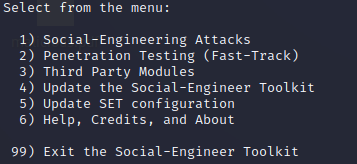
Select ‘1’ when you see this menu. Screenshot by author.
  1. Type 1 to select “Social Engineering Attacks”, then press Enter.
  2. Type 3 to select “Infectious Media Generator”, then press Enter.
  3. Type 1 to select “File-Format Exploits”, then press Enter.
  4. Enter your WAN IP address. Use WanIP.info to find your WAN IP address.
  5. Type 13 to select “Adobe PDF Embedded EXE Social Engineering”, then press Enter.
  6. We’ll use their blank PDF for this attack, so type “2” and press Enter.
  7. Type 2 to select “Windows Meterpreter Reverse_TCP”, and press Enter.
  8. Type your IP Address again, and press enter for the port.

If we were trying to fully test the ability to penetrate a system, we would then start the listener. But since we’re just interested in a PDF with some valid virus, we don’t need to start the listener.

Photo by Headway on Unsplash

Step 4 — Find the File

Finding the file can be the trickiest part of using some of Kali’s tools.

To find your newly created PDF for virus testing:

  1. Open a new terminal
  2. Type sudo -sto enter elevated permissions
  3. cd /root/.set/autorun
  4. ls
  5. You should see you .pdf file here. Copy the file to your desktop, and it’s ready to be uploaded to your virus scanner for testing.

New to Medium? Become a member to read more.

Interested in software testing? Follow the Software Testing Pipeline.

Technology
Penetration Testing
Software Development
Software Engineering
Software Testing
Recommended from ReadMedium