
How to Create Multiple Substack Newsletters (Under One Account)
Multiple publications under your Substack profile

Newsletters are all the rage in 2024.
Platforms like Substack*, Beehiiv*, and ConvertKit* are booming like never before.
This success story of the email format is not only helping grow those platforms, it’s also inspiring thousands of writers to create a newsletter each day.
But for some, one newsletter isn’t enough. They want multiple outlets for their creativity.
This can have a number of reasons:
- Different topics: People write about a range of topics which wouldn’t fit under one newsletter
- Length: People may have different formats and length in mind for their newsletters, which would make more sense in separate publications
- Fun: Some people just love creating different things and see where they take them
This is all good and fun.
So, today, let’s talk about how to create multiple newsletters under one account on one of the most popular newsletter platforms 2024, Substack.
Substack profile
Over the years, Substack has become much more than a simple newsletter and blogging platform. It offers chats, mentions, cross-posting, Substack Notes, threads, podcasts, videos, and more.
This is great on the one hand, on the other it has made this platform a little more complex and complicated as it used to be.
If you have never worked with Substack, the first thing to do, is create a Substack profile.
This can be done in many places on the Substack website under the “Sign up” button.
You can do it here, for example: https://substack.com/home
Click the orange “Sign up” button and go through the next steps to create your Substack profile.

This means you’re signed up as a reader. You don’t have a publication just yet to write our own newsletter.
You can now subscribe to all the newsletters you want with this Substack profile.
You’ll find your profile hompage at: www.substack.com/@yourname
Substack publication
To start writing, you need a Substack publication, your own newsletter.
You can do that on the Substack homepage: https://substack.com
Just click on “Start writing”.
Note: This only works if you’re not signed in yet.
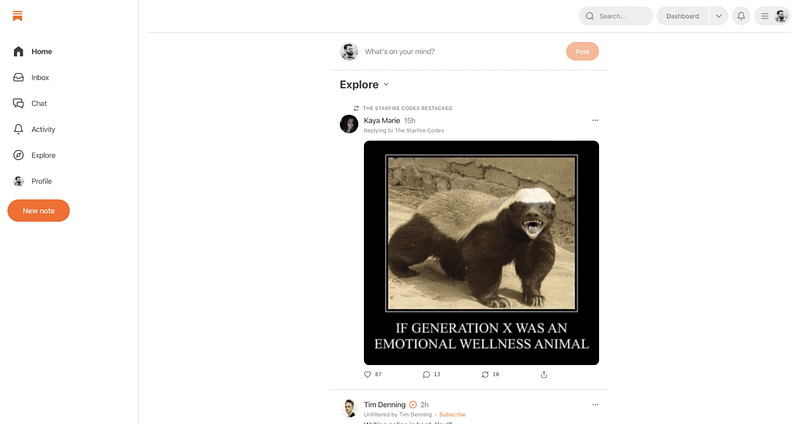
If you’re already signed in, you’ll be redirected to your Substack profile front page which is now the Substack Notes page, see the image below:
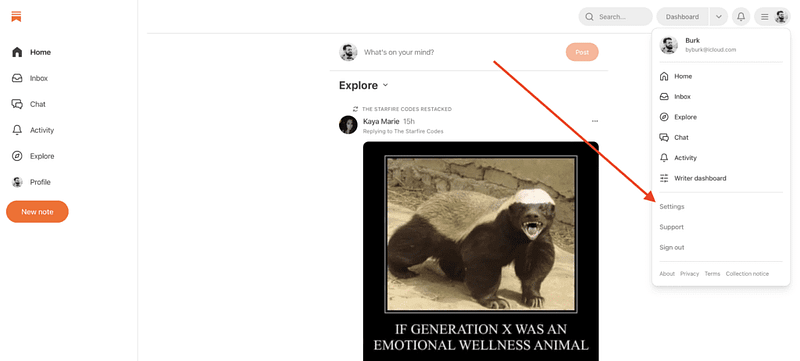
If you want to create a publication when signed in, go to the menu top right (with your logo and three lines) and in the menu click on “Settings”.
Or use this link: https://substack.com/settings
On the settings page, scroll down to the section “Publications” and then “Create publications”.
Then you select a name, subdomain, style your publication, and more.
Multiple Substack publications
If you want more than one publication, just repeat the aforementioned steps.
- Go to the settings page again
- Scroll to Publications
- Click “Create publication”
You can now name and style another publication.
Those publications will all appear in the list on the settings page. And they’re completely separate newsletters/publications, which means subscribers are not copied over or synced. Each publication has its own subscribers list, posts, emails, chat, and threads, as well as podcast and video options.
All separate.
An account with multiple publications looks like this:

As you can see I have 4 different publications in my Substack profile, each with their own name, logo, style, subscriber count, post and email archive, and more.
Multiple newsletters under one publication
Now you’ve learned how to handle multiple newsletters under one account, with completely separate subscribers and design.
But what if you want multiple newsletters under one publication?
Or better said, multiple segments or section in one newsletter, for example with different topics, but with the same list of subscribers.
That’s also possible on Substack.
It’s called “Sections” and you can create (and remove) them in the settings of your publication.
But since this is a big topic on its own, I covered that in another article. You can read that here ↓
The bottom line
Creating multiple newsletters makes sense for many creators. As we all have multiple interests and hobbies, you can come to a point where one audience doesn’t seem right for all the different topics you want to write about.
In that case, creating a second Substack publication is the right way to go.
Remember that you don’t need to create multiple Substack accounts for this work. You only create multiple publications under your Substack profile.
Happy writing!
🚨 Before you go: I run a free Medium newsletter called Medium Masterminds with tips and tricks. You don’t want to miss it! Sign up here. And if you want non-Medium related tips, join my free newsletter SoloCreator, for essays visit “Essays by Burk”, or just have some fun with me on Fun Facts.
*this is an affiliate or SparkLoop* partner link. I’ll get a commission if you decide to sign up.


