
How to Create First Pipeline Project In Jenkins using Python
Here we are going to understand step by step pipeline project
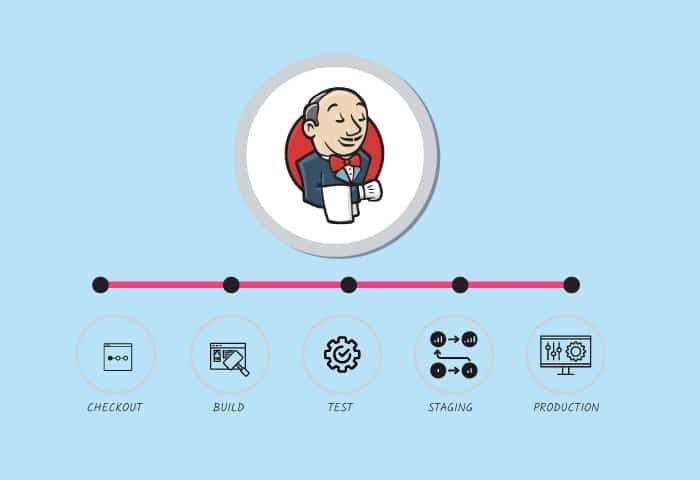
What is a Pipeline?
- In Jenkins, a pipeline is a set of automated processes defined as code and used to orchestrate software application building, testing, and deployment.
- It provides a way to define and manage the entire software delivery lifecycle in a single, continuous workflow.
A Jenkins pipeline allows you to express your build and deployment process as code, which can be versioned alongside your source code. This approach brings several benefits:
- Versioned Infrastructure: The pipeline code is versioned and stored alongside your source code, allowing for better collaboration and traceability. Changes to the pipeline can be reviewed and tracked just like changes to your source code.
- Reproducibility: By defining the build and deployment process as code, you ensure that every build and deployment follows the exact same steps, reducing the chance of errors due to manual configurations.
- Flexibility: Jenkins pipelines can handle a wide range of scenarios, from simple build tasks to complex multi-stage deployments. You can customize the pipeline to suit your specific needs.
- Visualization and Monitoring: Jenkins pipelines provide visualization of the entire workflow, showing which stages have been completed and which are currently running. This helps in monitoring the progress of your software delivery.
- Parallel and Sequential Execution: Pipelines can run stages in parallel or sequentially, depending on the requirements of your project. This allows for faster builds and testing.
- Integration: Jenkins pipelines can integrate with various tools and services, such as version control
Jenkins pipelines can be defined in two main ways:
- Declarative Pipeline: This approach uses a simplified and structured syntax to define the pipeline stages, steps, and configurations. It’s well-suited for simple to moderately complex pipelines and focuses on making the pipeline code easy to read and maintain.
- Scripted Pipeline: This approach offers more flexibility and customization by allowing you to write pipeline code using Groovy scripting. It’s suitable for more complex scenarios where you need fine-grained control over the pipeline’s behaviour.
Both declarative and scripted pipelines provide ways to define stages, steps, environment variables, agent configurations, error handling, and more.
Let us get our hands dirty:
- Dashboard → New item → “Demopipeline” → Pipeline Project → Ok
2. Add description

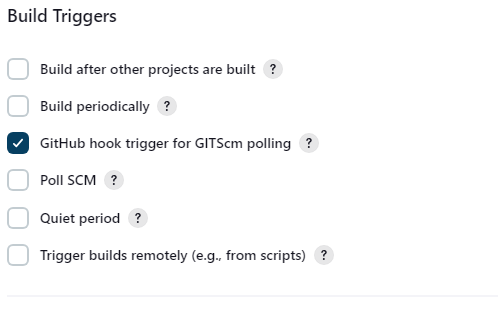
3. Choose the build trigger
4. Create a sample pipeline
pipeline {
    agent any

    stages {
        stage('Source') {
            steps {
                echo 'Hello, Mynotesoracledba Jenkins pipeline demo'
                git branch: 'Master', credentialsId: '66b19a99-ffb9-4f4e-a250-055dc13f982f', url: 'https://github.com/Mynotesoracledba/SampleJenkinsproject.git'
                sh 'cat web_scrapper.py
            }
        }
    }
}
5. Let us execute the build now manually it was successful
6. We can another stage version to get the Python version details
 stage('Version') {
            steps {
                echo 'Check the Python version'
                sh 'python3 --version'
            }
        }
7. We can execute manually the build now, it shows a successful response of the Python version as expected.
8. To execute the Python file we have to install the required libraries from the requirement file so we are going to add another stage as a build
 stage('Build') {
            steps {
                echo 'Build Demo'
                sh 'pip install -r requirement.txt'
            }
        }
9. If we executed manually whether this stage is working or not, it shows successfully installed pre-libraries in our machine
10. In the next step we are going to execute the Python script so we have added the stage called ‘Test’ and executed the build now it will display the Python results.
 stage('Test') {
            steps {
                echo 'Test Demo'
                sh 'python3 web_scrapper.py'
            }
        }
11. Let us make this code a bit complicated, which means this particular pipeline got failed or the status of this job has to send a notification to the respective team so that we have added the post status of the job. This code actually would send an email with the jobname, build name and URL of the link but we could not see the logs which causes the actual failure.
 post {
         always {
             echo 'This will always run'
         }
         success {
             echo 'This will run only if successful'
         }
         failure {
             mail bcc: '', body: "<b>Example</b><br>Project: ${env.JOB_NAME} <br>Build Number: ${env.BUILD_NUMBER} <br> URL de build: ${env.BUILD_URL}", cc: '', charset: 'UTF-8', from: '', mimeType: 'text/html', replyTo: '', subject: "ERROR CI: Project name -> ${env.JOB_NAME}", to: "[email protected]";
         }
         unstable {
             echo 'This will run only if the run was marked as unstable'
         }
     }
To Get the logs:
Now we have slightly modified the code to get the actual logs which provide the logs in case the job got failure.
pipeline {
    agent any

    environment {
        BUILD_LOGS = ''
    }

    stages {
        stage('Source') {
            steps {
                echo 'Hello, Mynotesoracledba Jenkins pipeline demo'
                git branch: 'Master', credentialsId: '66b19a99-ffb9-4f4e-a250-055dc13f982f', url: 'https://github.com/Mynotesoracledba/SampleJenkinsproject.git'
                sh 'cat web_scrapper.py'
            }
        }
        stage('Version') {
            steps {
                echo 'Check the Python version'
                sh 'python3 --version'
            }
        }
        stage('Build') {
            steps {
                echo 'Build Demo'
                sh 'pip install -r requirement.txt'
            }
        }
        stage('Test') {
            steps {
                echo 'Test Demo'
                script {
                    // Run the test script and capture its output and exit status
                    def testLogs = sh(script: 'python3 web_scrapper.py 2>&1', returnStdout: true, returnStatus: true)

                    // Check if the exit status indicates a failure
                    if (testLogs != 0) {
                        error "Test failed" // Mark the step as failed
                    }

                    // Capture the test logs for use in the post section
                    env.TEST_LOGS = sh(script: 'echo $testLogs', returnStdout: true).trim()
                }
            }
        }
        stage('Capture Build Logs') {
            steps {
                script {
                    BUILD_LOGS = sh(script: "tail -n 1000 ${JENKINS_HOME}/jobs/${JOB_NAME}/builds/${BUILD_NUMBER}/log", returnStdout: true).trim()
                }
            }
        }

    }
   post {
        always {
            echo 'This will always run'
        }
        success {
            echo 'This will run only if successful'
        }
        failure {
            catchError(buildResult: 'FAILURE') {
                script {
                    def buildLogs = BUILD_LOGS
                    def errorLogs = env.TEST_LOGS ?: "No test logs captured"
                    mail bcc: '',
                        body: """<b>Example</b><br>
                                Project: ${env.JOB_NAME}<br>
                                Build Number: ${env.BUILD_NUMBER}<br>
                                URL de build: ${env.BUILD_URL}<br>
                                <hr>
                                Build Logs:<br>
                                <pre>${buildLogs}</pre>
                                <hr>
                                Test Logs:<br>
                                <pre>${errorLogs}</pre>""",
                        cc: '',
                        charset: 'UTF-8',
                        from: '',
                        mimeType: 'text/html',
                        replyTo: '',
                        subject: "ERROR CI: Project name -> ${env.JOB_NAME}",
                        to: "[email protected]"
                }
            }
        }
        unstable {
            echo 'This will run only if the run was marked as unstable'
        }
    }

}
Now I want to get the notification even though the job was a successful build so that I have to just modify the code like below
pipeline {
    agent any

    environment {
        BUILD_LOGS = ''
    }

    stages {
        stage('Source') {
            steps {
                echo 'Hello, Mynotesoracledba Jenkins pipeline demo'
                git branch: 'Master', credentialsId: '66b19a99-ffb9-4f4e-a250-055dc13f982f', url: 'https://github.com/Mynotesoracledba/SampleJenkinsproject.git'
                sh 'cat web_scrapper.py'
            }
        }
        stage('Version') {
            steps {
                echo 'Check the Python version'
                sh 'python3 --version'
            }
        }
        stage('Build') {
            steps {
                echo 'Build Demo'
                sh 'pip install -r requirement.txt'
            }
        }
        stage('Test') {
            steps {
                echo 'Test Demo'
                script {
                    // Run the test script and capture its output and exit status
                    def testLogs = sh(script: 'python3 web_scrapper.py 2>&1', returnStdout: true, returnStatus: true)

                    // Check if the exit status indicates a failure
                    if (testLogs != 0) {
                        error "Test failed" // Mark the step as failed
                    }

                    // Capture the test logs for use in the post section
                    env.TEST_LOGS = sh(script: 'echo $testLogs', returnStdout: true).trim()
                }
            }
        }
        stage('Capture Build Logs') {
            steps {
                script {
                    BUILD_LOGS = sh(script: "tail -n 1000 ${JENKINS_HOME}/jobs/${JOB_NAME}/builds/${BUILD_NUMBER}/log", returnStdout: true).trim()
                }
            }
        }

    }
   post {
        always {
            echo 'This will always run'
        }
        success {
            echo 'This will run only if successful'
            script {
                def buildLogs = BUILD_LOGS
                def errorLogs = env.TEST_LOGS ?: "No test logs captured"
                mail bcc: '',
                    body: """<b>Example</b><br>
                            Project: ${env.JOB_NAME}<br>
                            Build Number: ${env.BUILD_NUMBER}<br>
                            URL de build: ${env.BUILD_URL}<br>
                            <hr>
                            Build Logs:<br>
                            <pre>${buildLogs}</pre>
                            <hr>
                            Test Logs:<br>
                            <pre>${errorLogs}</pre>""",
                    cc: '',
                    charset: 'UTF-8',
                    from: '',
                    mimeType: 'text/html',
                    replyTo: '',
                    subject: "SUCCESS CI: Project name -> ${env.JOB_NAME}",
                    to: "[email protected]"
            }
        }
        failure {
            catchError(buildResult: 'FAILURE') {
                script {
                    def buildLogs = BUILD_LOGS
                    def errorLogs = env.TEST_LOGS ?: "No test logs captured"
                    mail bcc: '',
                        body: """<b>Example</b><br>
                                Project: ${env.JOB_NAME}<br>
                                Build Number: ${env.BUILD_NUMBER}<br>
                                URL de build: ${env.BUILD_URL}<br>
                                <hr>
                                Build Logs:<br>
                                <pre>${buildLogs}</pre>
                                <hr>
                                Test Logs:<br>
                                <pre>${errorLogs}</pre>""",
                        cc: '',
                        charset: 'UTF-8',
                        from: '',
                        mimeType: 'text/html',
                        replyTo: '',
                        subject: "ERROR CI: Project name -> ${env.JOB_NAME}",
                        to: "[email protected]"
                }
            }
        }
        unstable {
            echo 'This will run only if the run was marked as unstable'
        }
    }

}
To Get the python results in email:
pipeline {
    agent any

    environment {
        BUILD_LOGS = ''  // Initialize the variable here
    }
    stages {
        stage('Source') {
            steps {
                echo 'Hello, Mynotesoracledba Jenkins pipeline demo'
                git branch: 'Master', credentialsId: '66b19a99-ffb9-4f4e-a250-055dc13f982f', url: 'https://github.com/Mynotesoracledba/SampleJenkinsproject.git'
                sh 'cat web_scrapper.py'
            }
        }
        stage('Version') {
            steps {
                echo 'Check the Python version'
                sh 'python3 --version'
            }
        }
        stage('Build') {
           steps {
                echo 'Build Demo'
                sh 'pip install -r requirement.txt'
            }
        }

        //  stage('Test') {
        //     steps {
        //         echo 'Test Demo'
        //         script {

        //              echo 'Build Demo'
        //              sh 'python3 web_scrapper.py'
        //             // Capture the test logs for use in the post section
        //             env.TEST_LOGS = sh(script: 'echo $testLogs', returnStdout: true).trim()

        //         }
        //     }
        // }
//         stage('Test') {
//     steps {
//         echo 'Test Demo'
//         script {
//             // Run the test script and capture its output and exit status
//             def testLogs = sh(script: 'python3 web_scrapper.py 2>&1', returnStdout: true, returnStatus: true)

//             // Check if the exit status indicates a failure
//             if (testLogs != 0) {
//                 error "Test failed" // Mark the step as failed
//             }

//             // Capture the test logs for use in the post section
//             env.TEST_LOGS = testLogs.trim()
//         }
//     }
// }

stage('Test') {
    steps {
        echo 'Test Demo'
        script {
            // Run the test script and capture its output and exit status
            def testLogs = sh(script: 'python3 web_scrapper.py', returnStdout: true, returnStatus: true)

            // Check if the exit status indicates a failure
            if (testLogs != 0) {
                error "Test failed" // Mark the step as failed
            }

            // Capture the test logs for use in the post section
            env.TEST_LOGS = sh(script: 'python3 web_scrapper.py', returnStdout: true).trim()
        }
    }
}


           stage('Capture Build Logs') {
            steps {
                script {
                    //  BUILD_LOGS = sh(script: "tail -n 1000 ${JENKINS_HOME}/jobs/${JOB_NAME}/builds/${BUILD_NUMBER}/log", returnStdout: true).trim()
                    //  BUILD_LOGS = sh(script: "tail -n 1000 ${WORKSPACE}/log", returnStdout: true).trim()
                    // BUILD_LOGS = sh(script: "tail -n 1000 ${WORKSPACE}/log", returnStdout: true).trim()
                    BUILD_LOGS = sh(script: "tail -n 1000 ${JENKINS_HOME}/jobs/${JOB_NAME}/builds/${BUILD_NUMBER}/log", returnStdout: true).trim()
                     echo "Captured Build Logs: ${BUILD_LOGS}"
                }
            }
        }


    }
   post {
        always {
            echo 'This will always run'
        }
    //     success {
    // echo 'This will run only if successful'
    // script {
    //             def buildLogs = env.BUILD_LOGS ?: "No build logs captured"
    //             def errorLogs = env.TEST_LOGS ?: "No test logs captured"
    //             mail (
    //                 // ... email configuration ...
    //                 body: """<b>Example</b><br>
    //                         Project: ${env.JOB_NAME}<br>
    //                         Build Number: ${env.BUILD_NUMBER}<br>
    //                         URL de build: ${env.BUILD_URL}<br>
    //                         <hr>
    //                         Build Logs:<br>
    //                         <pre>${BUILD_LOGS}</pre>
    //                         <hr>
    //                         Test Logs:<br>
    //                         <pre>${TEST_LOGS}</pre>""",
    //                 // ... other mail configuration ...
    //                  cc: '',
    //         charset: 'UTF-8',
    //         from: '',
    //         mimeType: 'text/html',
    //         replyTo: '',
    //         subject: "SUCCESS CI: Project name -> ${env.JOB_NAME}",
    //         to: "[email protected]"
    //             )

    // }


//   failure {
//     catchError(buildResult: 'FAILURE') {
//         script {
//             def buildLogs = env.BUILD_LOGS ?: "No build logs captured"
//             def errorLogs = env.TEST_LOGS ?: "No test logs captured"
//             mail (
//                 // ... email configuration ...
//                 body: """<b>Example</b><br>
//                         Project: ${env.JOB_NAME}<br>
//                         Build Number: ${env.BUILD_NUMBER}<br>
//                         URL de build: ${env.BUILD_URL}<br>
//                         <hr>
//                         Build Logs:<br>
//                         <pre>${BUILD_LOGS}</pre>
//                         <hr>
//                         Test Logs:<br>
//                         <pre>${TEST_LOGS}</pre>""",
//                 // ... other mail configuration ...
//                 cc: '',
//                 charset: 'UTF-8',
//                 from: '',
//                 mimeType: 'text/html',
//                 replyTo: '',
//                 subject: "FAILURE CI: Project name -> ${env.JOB_NAME}", // Corrected subject for failure
//                 to: "[email protected]"
//             )
//         }
//     }
// }

         success {
            echo 'This will run only if successful'
            script {
                def buildLogs = env.BUILD_LOGS ?: "No build logs captured"
                def errorLogs = env.TEST_LOGS ?: "No test logs captured"
                sendEmail("SUCCESS CI", buildLogs, errorLogs)
            }
        }
        failure {
            catchError(buildResult: 'FAILURE') {
                script {
                    def buildLogs = env.BUILD_LOGS ?: "No build logs captured"
                    def errorLogs = env.TEST_LOGS ?: "No test logs captured"
                    sendEmail("FAILURE CI", buildLogs, errorLogs)
                }
            }
        }
        unstable {
            echo 'This will run only if the run was marked as unstable'
        }
    }

}

// def sendEmail(subjectPrefix, testLogs, buildLogs) {
//     def errorLogs = testLogs ?: "No test logs captured"
//     mail (
//      body: """<b>Example</b><br>
//                 Project: ${env.JOB_NAME}<br>
//                 Build Number: ${env.BUILD_NUMBER}<br>
//                 URL de build: ${env.BUILD_URL}<br>
//                 <hr>
//                 Build Logs:<br>
//                 <pre>${buildLogs}</pre>
//                 <hr>
//                 Test Logs:<br>
//                 <pre>${errorLogs}</pre>""",
//         cc: '',
//         charset: 'UTF-8',
//         from: '',
//         mimeType: 'text/html',
//         replyTo: '',
//         subject: "\${subjectPrefix}: Project name -> \${env.JOB_NAME}",
//         to: "[email protected]"
//         )
// }

def sendEmail(subjectPrefix, testLogs, buildLogs) {
    def errorLogs = testLogs ?: "No test logs captured"
    mail (
        body: """<b>Example</b><br>
                Project: ${env.JOB_NAME}<br>
                Build Number: ${env.BUILD_NUMBER}<br>
                URL de build: ${env.BUILD_URL}<br>
                <hr>
                Build Logs:<br>
                <pre>${buildLogs}</pre>
                <hr>
                Test Logs:<br>
                <pre>${errorLogs}</pre>""",
        cc: '',
        charset: 'UTF-8',
        from: '',
        mimeType: 'text/html',
        replyTo: '',
        subject: subjectPrefix + ": Project name -> " + env.JOB_NAME,
        to: "[email protected]"
    )
}
Here we have to focus few things
- SMTP Email configuration
- Python installation on the Jenkins machine
- The GitHub repo webhook has to be configured.
- Finally, add this script to the repo in the JenkinsFile.
- The Git hub repo for this refers to this sampleJenkinsProject.


