
How To Create An Async Modal With React
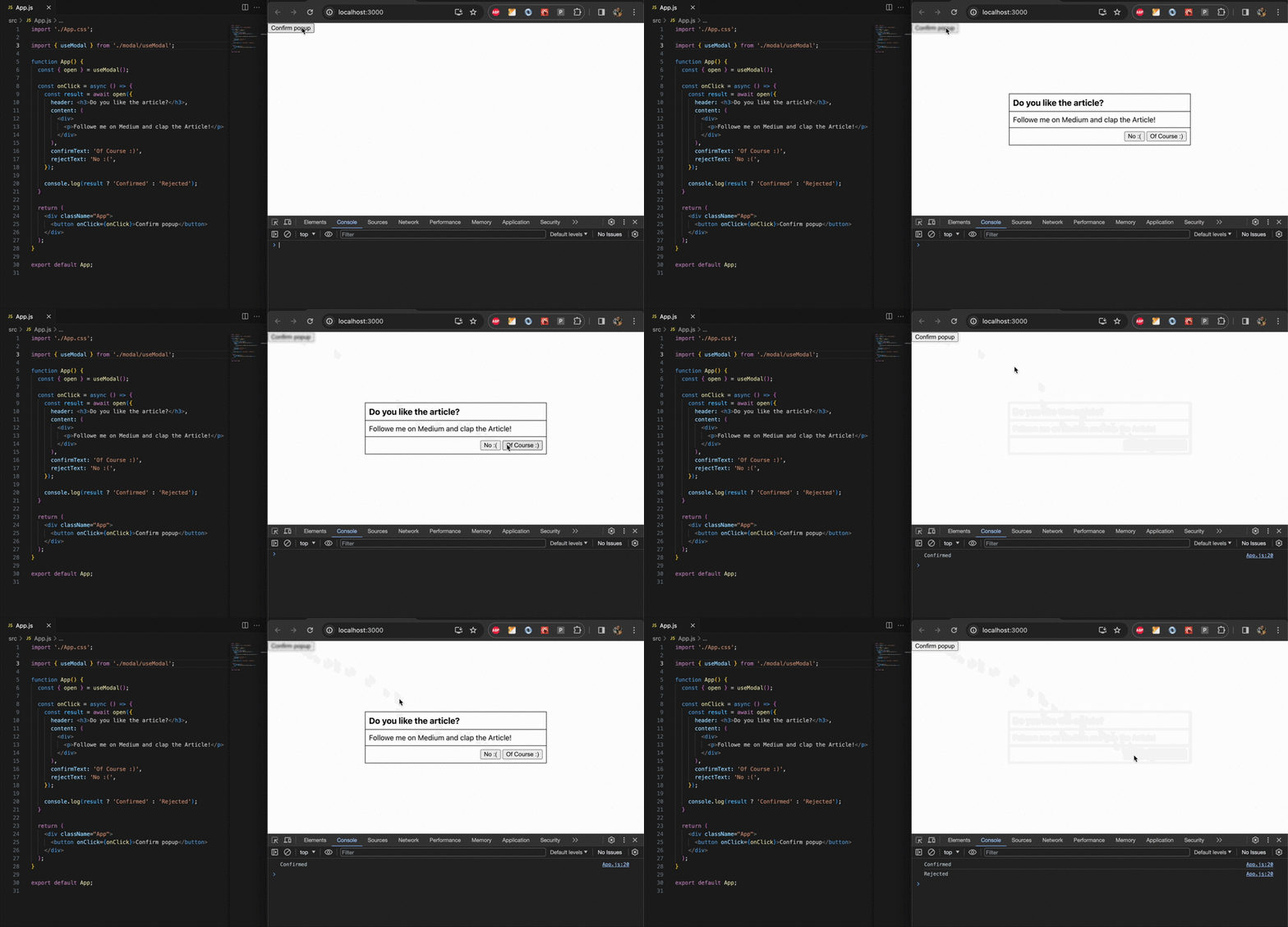
Have you ever wondered how to open a pop-up asynchronously from the code and wait for the user’s actions? Today we are going to create such a component!
Requirements
Let’s think about what we want to accomplish. Our modal has to:
- Be opened from anywhere in the code.
- Return a promise, that resolves with
truewhen the user confirms andfalsewhen the user rejects. - Be configurable.
Components
To bring our desires into life a couple of components needs to be implemented:
- Modal. The modal should allow rendering of an arbitrary header, content, and confirmation/rejection texts.
- Context. The context will be responsible for displaying the modal on the screen.
- Hook. The hook will encapsulate interaction with the context and return a function to open the modal. The function itself will return a promise that resolves when the user confirms or rejects the modal.
The Modal
Let’s start by creating a new folder under src called modal . Inside the modal let’s create two files: Modal.js and Modal.css . Keep in mind that if you are not using the latest version of React, then it should be Modal.jsx.
Modal.js:
import './Modal.css';

export const Modal = ({
    header,
    content,
    confirmText,
    rejectText,
    onAction
}) => {
    const handleReject = () => onAction(false);
    const handleConfirm = () => onAction(true);

    return (
        <div className='modal-wrapper'>
             <div className='modal'>
                <div className='modal-header'>
                    {header}
                </div>

                <div className='modal-content'>
                    {content}
                </div>

                <div className='modal-actions'>
                    <button onClick={handleReject}>{rejectText}</button>

                    <button onClick={handleConfirm}>{confirmText}</button>
                </div>
            </div>
        </div>
    );
}
The component accepts several props:
- header — anything, that will be rendered in the header of the modal.
- content — anything, that will be rendered in the content of the modal.
- confirmText — a string, that will be rendered in the confirm button.
- rejectText — a string, that will be rendered in the reject button.
- onAction — a function, that will be called with either
trueorfalsedepending on whether we confirm or reject.
and a little bit of css to make it look like a modal:
.modal-wrapper {
    position: fixed;
    top: 0;
    left: 0;
    height: 100vh;
    width: 100vw;
    display: flex;
    align-items: center;
    justify-content: center;
    backdrop-filter: blur(2px);
}

.modal {
    width: 400px;
    display: flex;
    flex-direction: column;
    border: 1px solid #000;
}

.modal-header, .modal-content {
    border-bottom: 1px solid #000;
    padding: 8px;
}

.modal-actions {
    padding: 8px;
    display: flex;
    justify-content: flex-end;
}

.modal-actions button {
    margin-left: 4px;
}
The Context
The first requirement was to be able to open a dialog from anywhere in the code. That can be achieved in many ways, but the simplest one, in my opinion, is using React Context. Context allows a component to receive information from a distant parent without passing it as props. Let’s create a new file called context.js.
import { createContext, useState } from "react"
import { createPortal } from "react-dom";

import { Modal } from './Modal';

export const ModalContext = createContext();

export const ModalProvider = ({ children }) => {
    const [isOpen, setIsOpen] = useState(false);
    const [modal, setModal] = useState({});

    const render = (modal, handleAction) => {
        setModal({
            ...modal,
            action: (result) => {
                setIsOpen(false);

                handleAction(result);
            },
        });

        setIsOpen(true);
    }

    return (
        <ModalContext.Provider value={{ render }}>
            {children}

            {isOpen && createPortal(
                <Modal
                    header={modal?.header}
                    content={modal?.content}
                    confirmText={modal?.confirmText}
                    rejectText={modal?.rejectText}
                    onAction={modal?.action}
                />,
                document.body
            )}
        </ModalContext.Provider>
    );
}
The main action happens in ModalProvider. The provider has two state variables:
- isOpen — is responsible for showing/hiding the modal.
- modal — stores configuration of the modal.
The provider exposes only one function. The render function, that accepts two parameters:
- modal — contains configuration properties like
header,content,confirmTextandrejectText. - handleAction — a callback, that will be executed when the dialog is resolved.
When the modal is open it will be rendered inside a portal.
The Hook
Now we need a convenient way of opening the dialog. We will do that in the useModal hook:
import { useContext } from 'react';

import { ModalContext } from './context';

export const useModal = () => {
    const modalContext = useContext(ModalContext);

    const open = async (modal) => {
        const reactionPromise = new Promise((resolve) => {
            modalContext.render(modal, resolve);
        });

        return reactionPromise;
    };

    return {
        open,
    }
}
The hook gets access to the context by calling useContext(ModalContext) and returns an object with only one function. Every time the function is called a new promise is created and returned to the caller. The resolve function is passed to the context as the handleAction callback.
Result
Time to put everything together. Let’s try using the hook in App.js:
import './App.css';

import { useModal } from './modal/useModal';

function App() {
  const { open } = useModal();

  const onClick = async () => {
    const result = await open({
      header: <h3>Do you like the article?</h3>,
      content: (
        <div>
          <p>Followe me on Medium and clap the Article!</p>
        </div>
      ),
      confirmText: 'Of Course :)',
      rejectText: 'No :(',
    });

    console.log(result ? 'Confirmed' : 'Rejected');
  }

  return (
    <div className="App">
      <button onClick={onClick}>Confirm popup</button>
    </div>
  );
}

export default App;
When the confirm popup button is clicked a new modal will be opened. The best part about it is that the modal is opened from onClick and execution of the function is paused until the dialog is resolved.
Conclusion
We’ve created an async modal that can be opened from anywhere in the code! The source code is available on GitHub.
If you’ve enjoyed the article say hi on LinkedIn and consider buying me a coffee! ☕️


