How to Create Advanced GPTs in ChatGPT: Your Ultimate Guide to Building a Personal Fitness Coach AI
Step-by-Step Walkthrough: From Basic Setup to Advanced Customization of Your AI Fitness Companion GPT
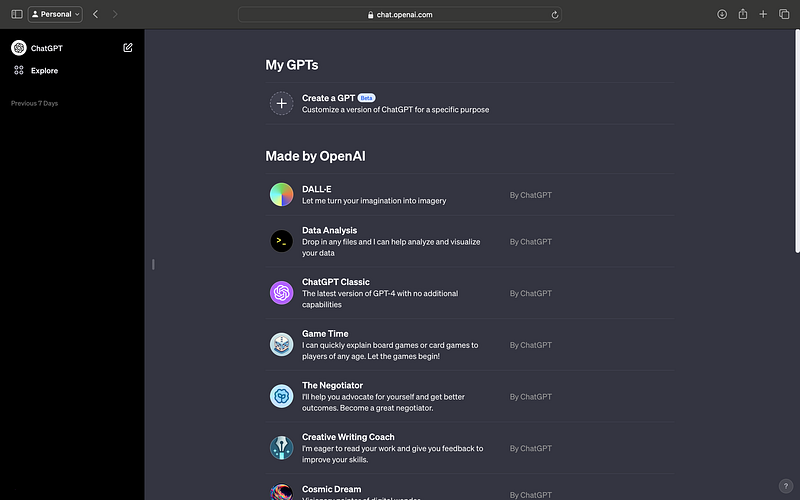
In today’s digital landscape, OpenAI’s ChatGPT emerges as a pivotal tool in the realm of AI-driven interactions. The platform’s latest advancement, “My GPTs,” revolutionizes user engagement by enabling the creation of custom GPT models. This functionality paves the way for a diverse range of applications, from personalized AI assistants to specialized content generators. This guide is dedicated to navigating the intricacies of the “My GPTs” feature, providing insights into the development of custom GPT models within the ChatGPT framework. Whether you’re aiming to build a domain-specific chatbot, an AI-driven content creator, or a tailored digital assistant, this guide equips you with the necessary know-how to harness the full potential of ChatGPT’s customizable models.
1. Understanding My GPTs
Generative Pre-trained Transformers (GPTs) are AI models that excel in generating and understanding text. “My GPTs” enables you to customize these models for specific functions or knowledge areas.
2. Starting with My GPTs
The journey to creating a custom GPT begins with accessing the “My GPTs” feature. This innovative tool is located within the ChatGPT platform, designed by OpenAI to offer a user-friendly interface for personalizing AI models.
Accessing the Feature
To access “My GPTs,” you’ll first need to log into your ChatGPT account. Once logged in, look for the “Explore” tab on the platform’s dashboard. Here, you’ll find the gateway to the “My GPTs” feature. It’s important to note that availability may vary based on your subscription level or the specific offerings of OpenAI at the time.
Account Requirements
If you’re unable to see the “My GPTs” option, there are a couple of things to check:
- Subscription Level: Ensure you have the appropriate subscription level. Advanced features like “My GPTs” might require a higher-tier subscription or special access granted by OpenAI.
- Beta Features: Sometimes, new features are rolled out as beta versions to a select group of users. Check your account settings to see if you have access to beta features or if there’s an option to opt-in.
Navigating the Interface
The interface of “My GPTs” is designed to be intuitive and user-friendly. Upon entering the feature, you’ll encounter several options:
- Dashboard: Here, you can view any GPTs you have already created or started. It’s a hub for managing your existing projects.
- Create a GPT: This is your starting point for creating a new custom GPT. Clicking this option will lead you to a choice between guided and manual creation processes.
Guided vs. Manual Creation
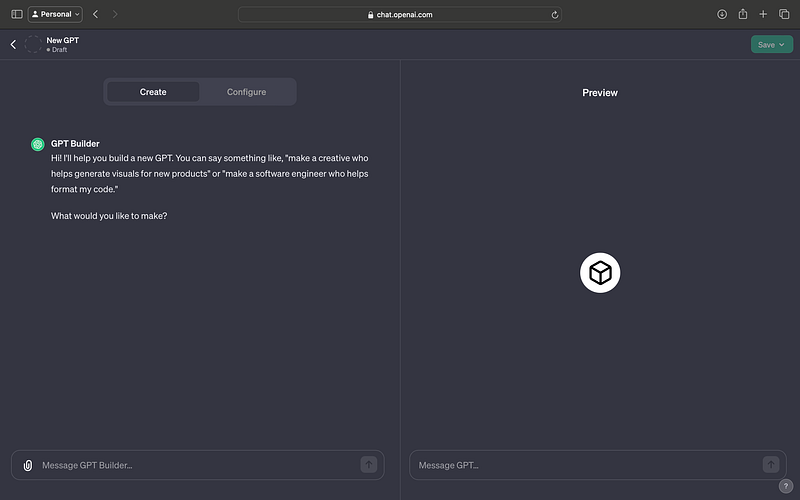
- Guided Process (Create option): Ideal for beginners or those who prefer a more structured approach. This process will walk you through each step of creating a custom GPT, providing helpful tips and explanations along the way.
- Manual Configuration (Configure option): For more advanced users or those with specific requirements, the manual configuration option allows for greater control over the customization process. You can directly adjust settings, input specific data, and fine-tune the GPT to your exact specifications.
Preparing for Creation
Before diving into creating your custom GPT, it’s beneficial to have a clear idea of what you want to achieve. Consider the following:
- Purpose: Define what you want your custom GPT to do. Whether it’s offering fitness advice, providing customer support, or teaching a language, having a clear purpose will guide the customization process.
- Content and Data: Think about the type of content and data your GPT will need to be effective. Gathering relevant information beforehand can streamline the creation process.
3. Creating Your Custom GPT
Steps to Create a GPT
Creating a custom GPT is a journey that combines technical configuration with creative thinking. Here, we’ll guide you through each step, using the example of our project: the “Personal Fitness Coach.”
Initiate Creation
First, navigate to the ‘Create a GPT’ option within the ‘My GPTs’ interface. This initiates the process of crafting your own GPT model. You’ll be presented with two distinct paths: a guided setup and a manual configuration.
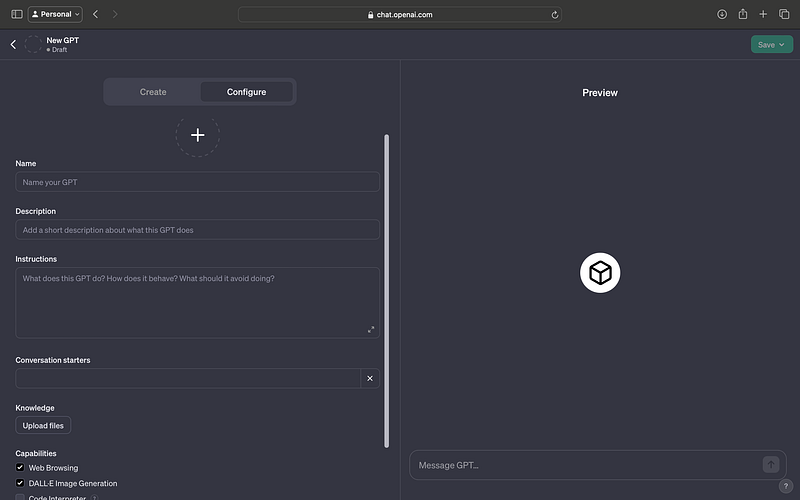
Selecting Your Path
- Guided Setup (‘Create’ Tab): This option is perfect for those who are new to AI or prefer a structured approach. It walks you through the creation process with helpful prompts and explanations.
- Manual Configuration (‘Configure’ Tab): Choose this if you’re comfortable with AI concepts and want more control over the customization. It allows for detailed tweaking of parameters and settings.
Our Project: Personal Fitness Coach
For our example, let’s craft a GPT that serves as a fitness coach. This AI assistant will be designed to offer personalized fitness advice, suggest workout routines, and provide motivational support to users of varying fitness levels.
Naming Your GPT
Choose a name that reflects the purpose of your GPT. For our fitness coach, we might choose something like “FitBot” or “Your AI Trainer.” A good name makes your GPT more approachable and memorable.
Defining the Role and Scope
Clarify the role of your GPT. Will it answer general fitness queries, provide workout plans, or offer nutritional advice? For our fitness coach, we’ll focus on general fitness guidance, workout suggestions tailored to individual needs, and motivational support.
Inputting Relevant Data
To make your GPT effective, input relevant and up-to-date information. For a fitness coach, this could include:
- Recent fitness and health research
- Variety of workout routines for different fitness levels
- Nutritional guidelines and healthy eating tips
Remember, the quality of information you provide significantly impacts the effectiveness of your GPT.
Customizing Responses
Decide on the tone and style of your GPT’s responses. For a fitness coach, a motivational, encouraging, and informative tone might be ideal. This can be achieved by adjusting language style settings and providing examples of desired responses during the setup process.
Testing and Iterating
Once you’ve inputted the data and set the tone, test your GPT with various queries to see how it responds. Use this phase to refine and tweak settings for better accuracy and relevance.
4. Advanced Customization Techniques
Once the basic configuration of your custom GPT is complete, you can dive into more advanced customization techniques. These enhancements can significantly improve the functionality and user experience of your “Personal Fitness Coach.”
Crafting Engaging Prompts
Creating engaging prompts is key to guiding users in their interactions with your GPT. Well-crafted prompts encourage meaningful exchanges and ensure users get the most out of the fitness coach.
- Contextual Openers: Develop prompts that initiate conversations based on various fitness topics, like “What’s your goal for today’s workout?” or “Need tips for a healthy meal?”
- Scenario-Based Queries: Include prompts for common fitness scenarios, such as overcoming plateaus, dealing with motivation slumps, or modifying workouts when injured.
- Feedback Requests: Encourage users to provide feedback on their workouts or diet plans, enabling the GPT to offer more personalized advice in future interactions.
Integrating External Actions with Zapier
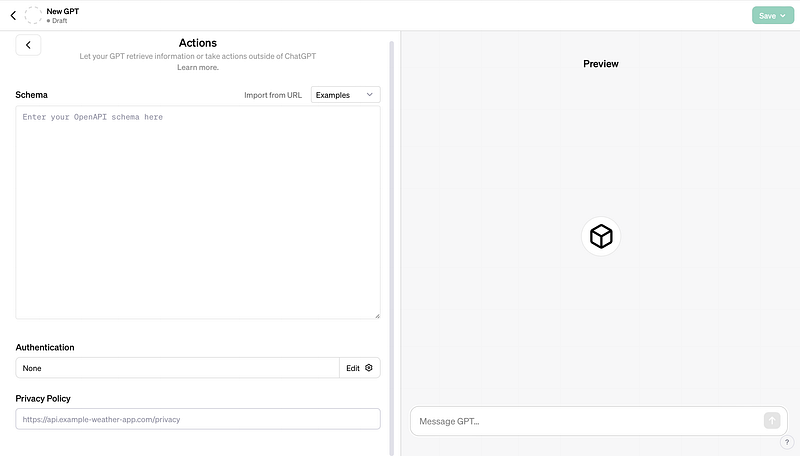
Zapier, an online automation tool, can be used to connect your GPT with various apps and services, enhancing its functionality.
- Fitness App Integration: Use Zapier to connect your GPT with fitness tracking apps. This allows the GPT to access workout data and provide tailored advice based on the user’s activity.
- Calendar Synchronization: Automate workout scheduling by connecting the GPT with calendar apps. Users can receive reminders for workouts or meal prep times directly from the GPT.
Implementing User Feedback Mechanisms
Incorporate systems for users to give feedback on the advice and information provided by the GPT. This feedback is crucial for continuous improvement and personalization.
- Direct Inquiries: After providing advice, the GPT can ask users how helpful they found the information.
- Rating Systems: Implement a simple rating system where users can rate the advice on a scale, providing quick and easy feedback.
Personalization Based on User Interaction
Deepen the personalization of your GPT by allowing it to learn from user interactions and adjust its advice accordingly.
- User Preferences: Enable the GPT to remember user preferences and past interactions, using this information to tailor future advice.
- Goal Tracking: Allow the GPT to track user progress towards fitness goals, providing adjustments and encouragement based on their journey.
Continual Updates and Improvement
The world of fitness is constantly evolving. Keep your GPT up-to-date with the latest fitness trends, research, and methodologies.
- Incorporating New Research: Periodically update your GPT’s knowledge base with new fitness studies and findings.
- Evolving Exercise Regimens: Add new workouts and routines as fitness trends change, ensuring your GPT remains a relevant and effective coach.
5. Deployment Options
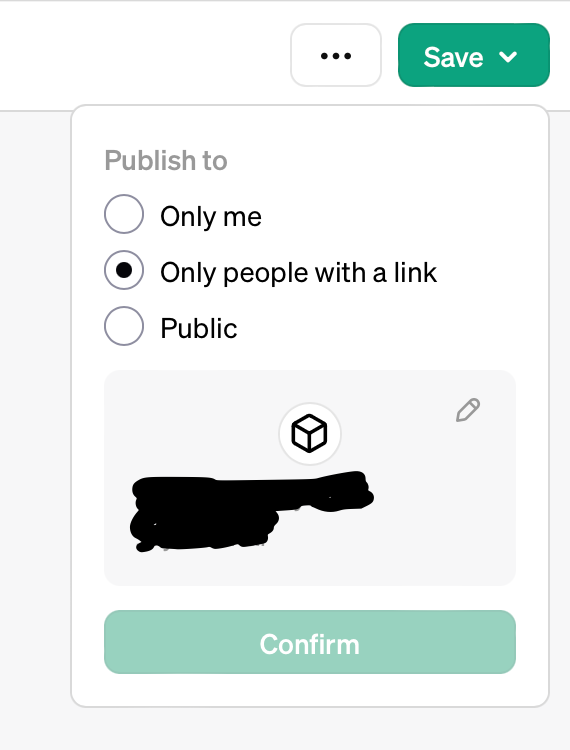
Once you are confident in your GPT’s performance, it’s time to deploy it.
Choosing the Right Platform
- Private vs. Public Deployment: Decide if the GPT will be for personal use, shared with a select group, or made available to the public.
- Integration with Other Platforms: Consider integrating the GPT with fitness websites, apps, or social media platforms to increase accessibility and user engagement.
Promotion and User Onboarding
After deployment, focus on promoting your GPT and guiding new users on how to interact with it effectively.
- Social Media Campaigns: Utilize social media platforms to introduce your “Personal Fitness Coach” to potential users.
- Collaborations with Fitness Influencers: Partner with fitness influencers to demonstrate the GPT’s capabilities and reach a broader audience.
User Onboarding
- Guided Tutorials: Provide tutorials or guides on how to use the GPT effectively, highlighting its features and capabilities.
- User Support: Set up a support system to assist users with any queries or issues they may encounter while using the GPT.
Final Thoughts
Creating a custom GPT is an empowering journey, allowing you to harness AI in ways that resonate with your specific needs.


