avatarAntonio Blago

Free AI web copilot to create summaries, insights and extended knowledge, download it at here

2472

Abstract

rm validator</h2><p id="7c55">We need to setup a class variable and put it this in run.py.</p><figure id="0ef3"><img src="https://cdn-images-1.readmedium.com/v2/resize:fit:800/1*3IJkLJHKA2SLm5rNmEriwA.png"><figcaption></figcaption></figure><p id="17b6">For that we also need to import wtf forms and wtforms.validator.</p><figure id="413e"><img src="https://cdn-images-1.readmedium.com/v2/resize:fit:800/1*27jZSsKx5eblLXMDjasiew.png"><figcaption></figcaption></figure><h2 id="9ecd">Autocomplete feature</h2><p id="5e95">We create an autocomplete callback function, also put this in our run.py. We get our stock infos table and put the ticker, name and sector in a list. We then create a sorted json response.</p><figure id="a7f3"><img src="https://cdn-images-1.readmedium.com/v2/resize:fit:800/1*TsAw--LLSNI0MaIa4pbljQ.png"><figcaption></figcaption></figure><p id="3aa2">You can test the response in your browser:</p><figure id="8e4e"><img src="https://cdn-images-1.readmedium.com/v2/resize:fit:800/1*2gGXAPryspAlSN0PrT7Fog.png"><figcaption></figcaption></figure><h2 id="063f">Integrate it in stocks.html</h2><p id="1922">(1) Update the route in “/stocks/<ticker>”. The code lines are highlighted.</ticker></p><div id="3910"><pre><span class="hljs-attribute">form</span> <span class="hljs-operator">=</span> SearchForm(request.form)</pre></div><figure id="2800"><img src="https://cdn-images-1.readmedium.com/v2/resize:fit:800/1*fad9KxvsP7YgKSThJ_SevQ.png"><figcaption></figcaption></figure><p id="73a3">(2) Modify the stocks.html. Code lines are hightlighted. Replace the form and put the javascript for the autocomplete function and the url replacement there.</p><figure id="e851"><img src="https://cdn-images-1.readmedium.com/v2/resize:fit:800/1*lecMyvpgppCZdFUuvSn09A.png"><figcaption></figcaption></figure><p id="a509">The first javascript is an ajax function which is searching for a smililar string in your serachbar, which is at least 3 characters long.</p><p id="6cb1">The second javascript function observes the form when submitting the button and extrtacting the value from it (see below). Then we have to split it at our separator “|” , take the first string and clean it from whitespace.</p><div id="2ae9"><pre><span class="hljs-string">"AADI | AADI BIOSCIENCE INC | Health Care"</span></pre></div><p id="f0a6">That should work!</p><figure id="0358"><img src="https://cdn-images-1.readmedium.com/v2/resize:fit:800/1*60XYVrdpc-wiFOnx9gqO_w.gif"><figcaption>Gif cr

Options

eated by author</figcaption></figure><p id="26cc">Just modify this example to your needs and upload it on <a href="https://www.pythonanywhere.com/?affiliate_id=007ce8a4">pythonanywhere.com</a>. Here is the repo: <a href="https://github.com/AntonioBlago/Webpage_Tutorial_4">https://github.com/AntonioBlago/Webpage_Tutorial_4</a>. Check out the branch “part4” for this version. Here I am showing you how to upload it on pythonanywhere:</p><div id="ebdf" class="link-block"> <a href="https://python.plainenglish.io/flask-tutorial-how-to-deploy-and-publish-an-app-on-pythonanywhere-225314160914"> <div> <div> <h2>Flask Tutorial: How to Deploy & Publish an App on pythonanywhere</h2> <div><h3>A step-by-step guide on how to deploy and publish an app on pythonanywhere</h3></div> <div><p>python.plainenglish.io</p></div> </div> <div> <div style="background-image: url(https://miro.readmedium.com/v2/resize:fit:320/1*RbKhE-hbErrfUeVL7a1nfw.png)"></div> </div> </div> </a> </div><p id="40f1">Thanks for reading my story. I hope you liked it. Please feel free to clap, share, and comment on it. Follow me on more content about cryptos, stocks, data analysis, and web development.</p><ul><li>Read my other article about creating a financial dashboard in Flask, see below!</li><li>Check out my webpage and get in touch with me on Linkedin: <a href="http://antonioblago.com">antonioblago.com</a></li><li>Make a free account on my stock and crypto tracking tool: <a href="http://www.tenxassets.com/">www.tenxassets.com</a></li><li>If you like to develop web apps, I recommend you <a href="https://www.pythonanywhere.com/?affiliate_id=007ce8a4">pythonanywhere.com</a> as a hosting service.</li></ul><h1 id="7e3a">Disclaimer:</h1><ul><li>*these are affiliate links</li></ul><p id="5e99"><i>More content at <a href="https://plainenglish.io/"><b>PlainEnglish.io</b></a>. Sign up for our <a href="http://newsletter.plainenglish.io/"><b>free weekly newsletter</b></a>. Follow us on <a href="https://twitter.com/inPlainEngHQ"><b>Twitter</b></a></i>, <a href="https://www.linkedin.com/company/inplainenglish/"><b><i>LinkedIn</i></b></a><i>, <a href="https://www.youtube.com/channel/UCtipWUghju290NWcn8jhyAw"><b>YouTube</b></a>, and <a href="https://discord.gg/GtDtUAvyhW"><b>Discord</b></a>.</i></p></article></body>

How to Create a Stock and Finance App With Python

Part 4: Fixing bugs and adding a search bar for the stocks.

TL;DR We make some bugfixes and add a search bar for the stocks. You should definitely check out pythonanywhere.com* ($ 5 USD/month) for hosting this app.
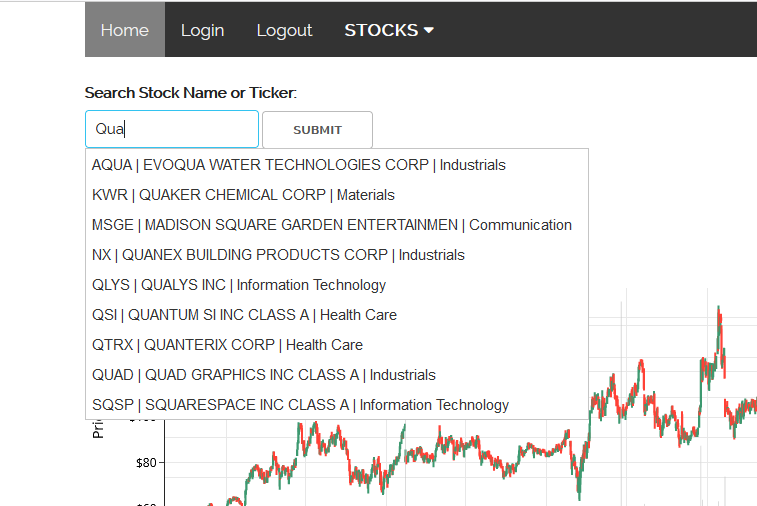
Screenshot by author

Layout Bugfixes

(1) When we first start our application and we did not login yet, the form for choosing a period to compare is still there. This should not be there. So when we call the main page or index page, this should be empty.
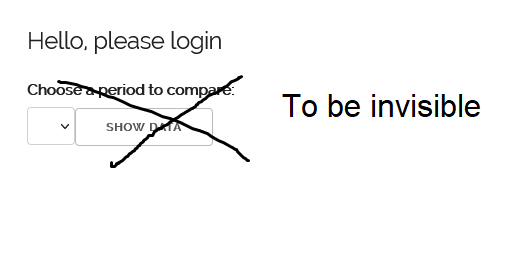
Screenshot by author

How can we change that? Fortunately, Jinja has a nice way to solve this problem. You can add to the html template “ifs and else”, see below.
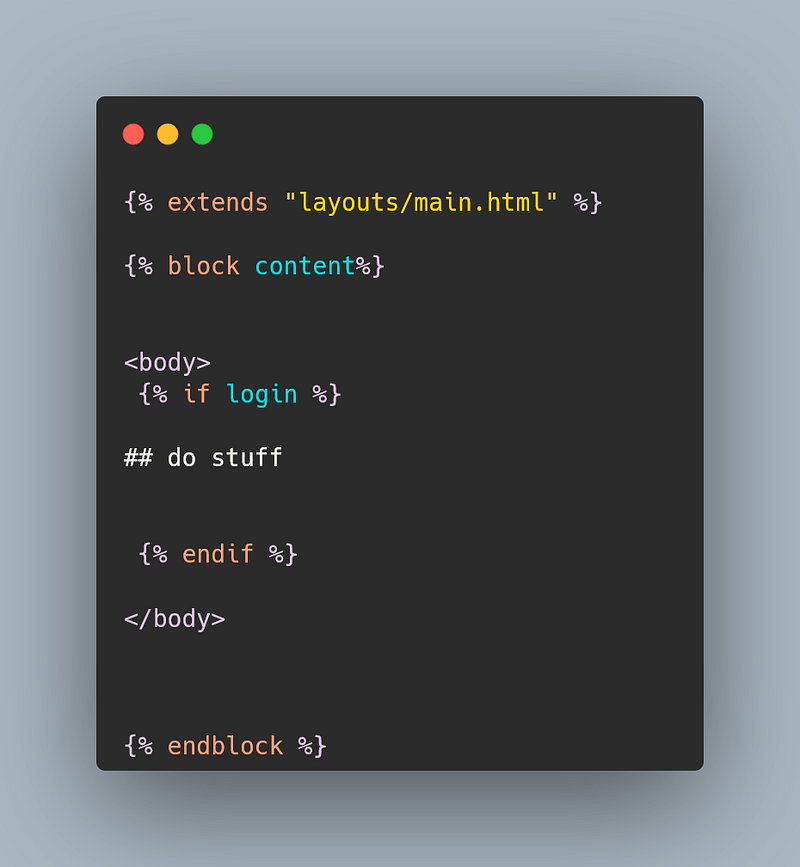
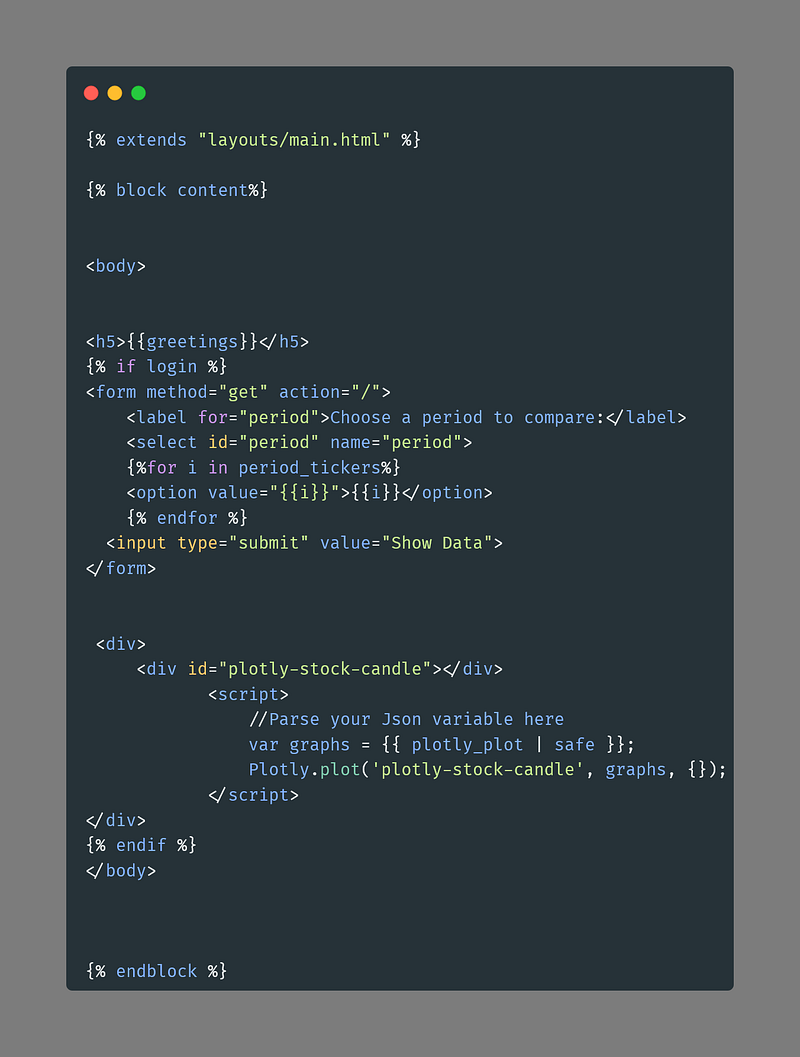
So, we add this to our home.py
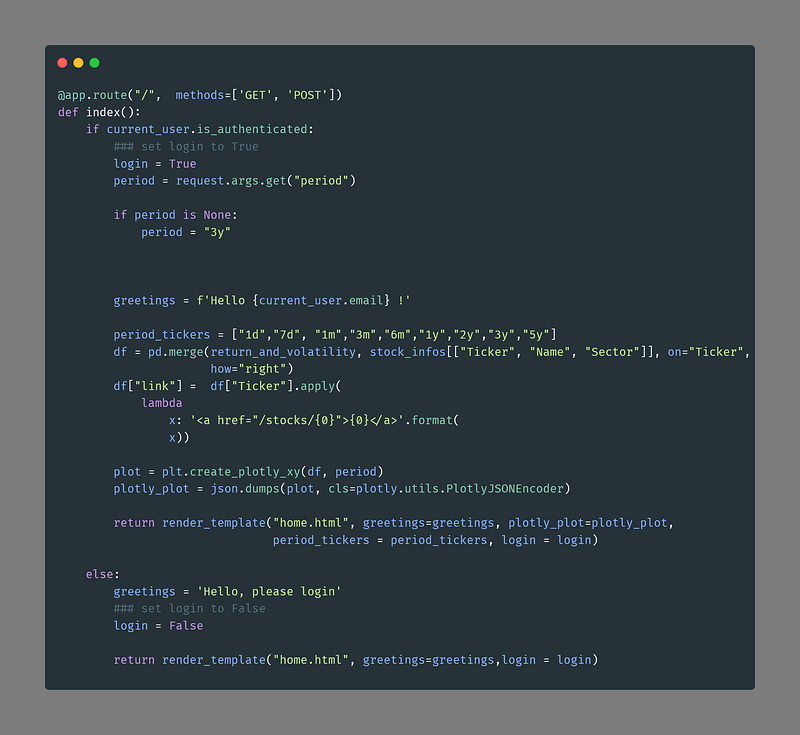
So our variable, we have to set in out app.route(“/”) in run.py.
We run run.py again, do not forget to reload your browser, that your browser reloads the html and css correctly. In Windows it is ctrl+ F5.
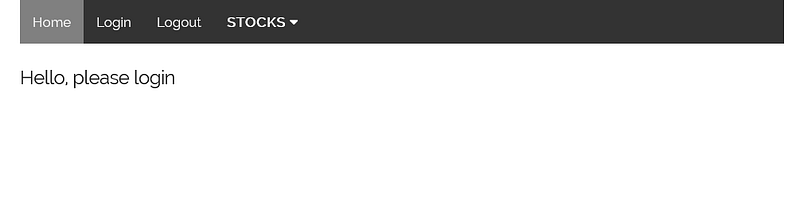
That looks good!

Adding a searchbar for the stocks

The goal is to replace the dropdown on our stocks page with a search bar, see below. The search should autocomplete, when we searching a ticker or ticker name.

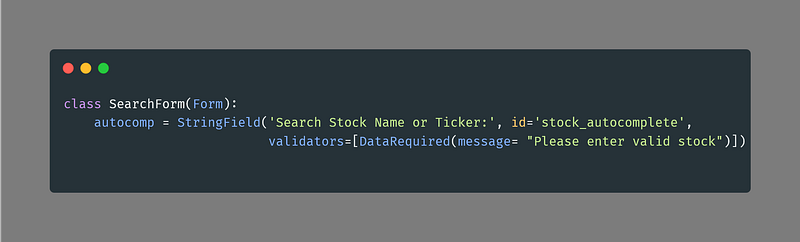
Create a form validator

We need to setup a class variable and put it this in run.py.
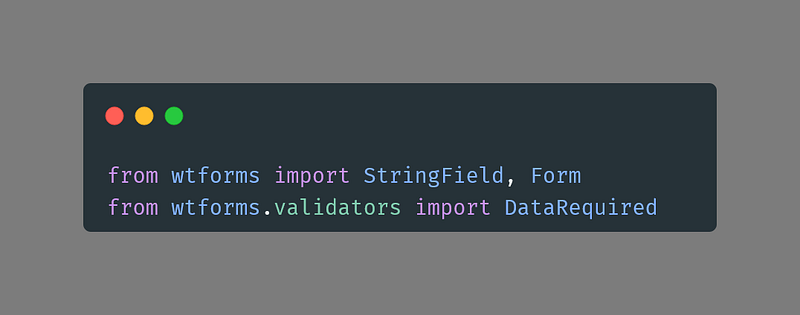
For that we also need to import wtf forms and wtforms.validator.
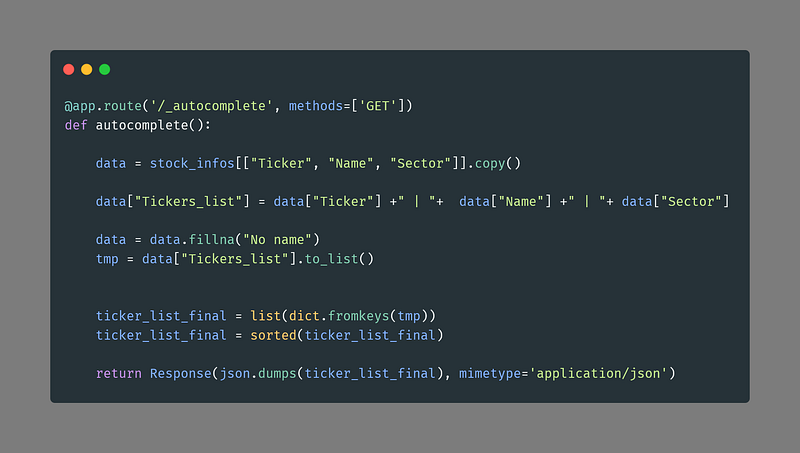
Autocomplete feature

We create an autocomplete callback function, also put this in our run.py. We get our stock infos table and put the ticker, name and sector in a list. We then create a sorted json response.
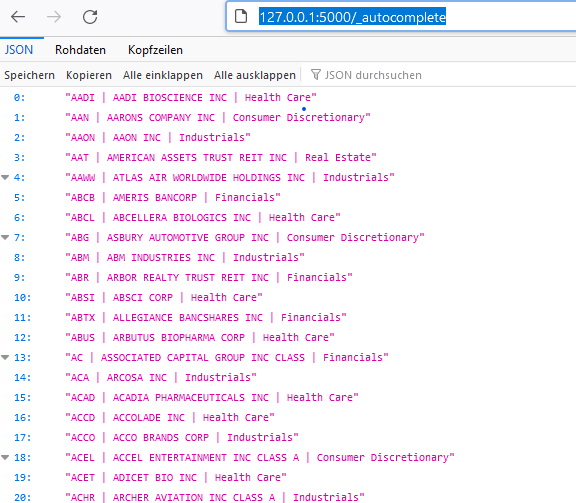
You can test the response in your browser:
Integrate it in stocks.html

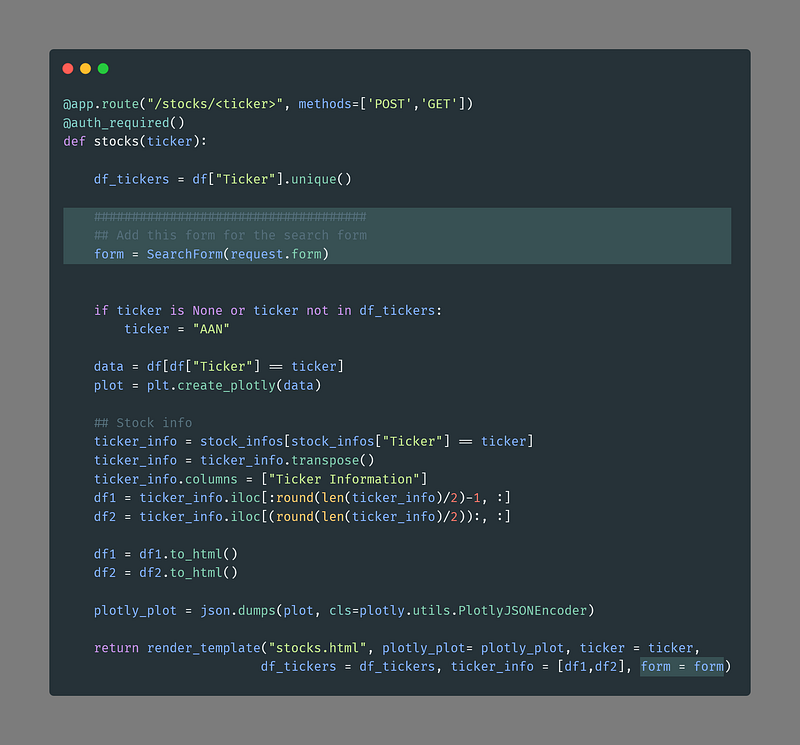
(1) Update the route in “/stocks/”. The code lines are highlighted.

form = SearchForm(request.form)

(2) Modify the stocks.html. Code lines are hightlighted. Replace the form and put the javascript for the autocomplete function and the url replacement there.
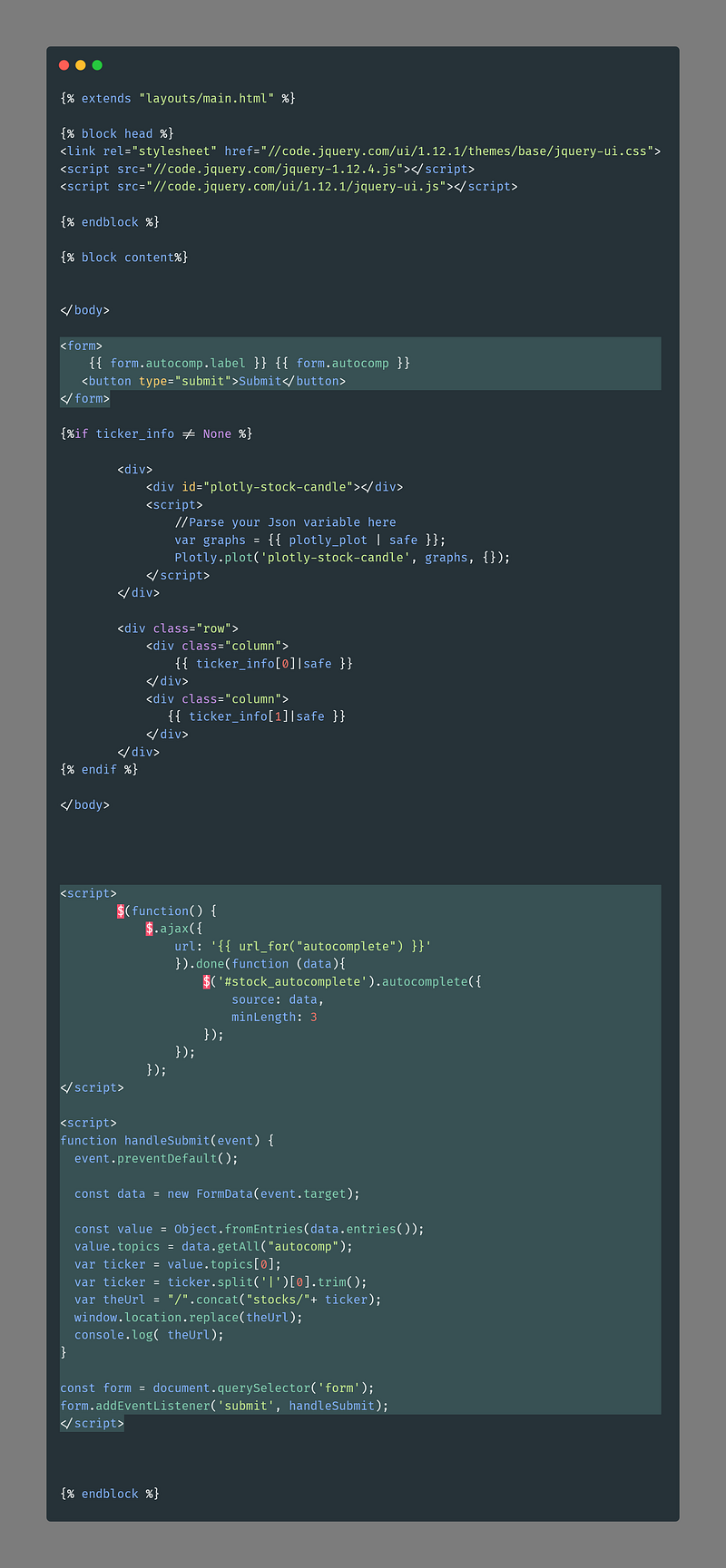
The first javascript is an ajax function which is searching for a smililar string in your serachbar, which is at least 3 characters long.

The second javascript function observes the form when submitting the button and extrtacting the value from it (see below). Then we have to split it at our separator “|” , take the first string and clean it from whitespace.

"AADI | AADI BIOSCIENCE INC | Health Care"

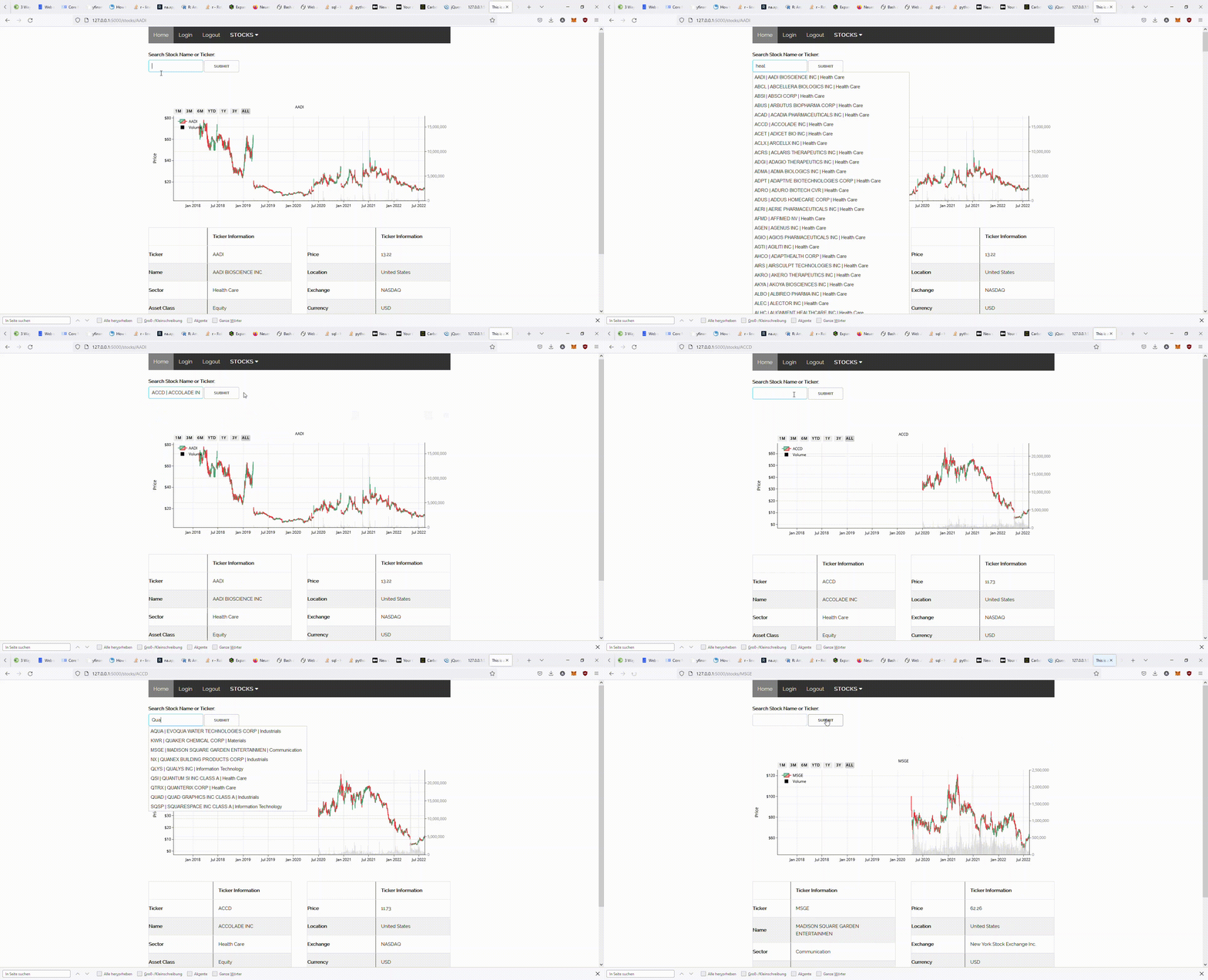
That should work!

Gif created by author

Just modify this example to your needs and upload it on pythonanywhere.com*. Here is the repo: https://github.com/AntonioBlago/Webpage_Tutorial_4. Check out the branch “part4” for this version. Here I am showing you how to upload it on pythonanywhere:

Thanks for reading my story. I hope you liked it. Please feel free to clap, share, and comment on it. Follow me on more content about cryptos, stocks, data analysis, and web development.

  • Read my other article about creating a financial dashboard in Flask, see below!
  • Check out my webpage and get in touch with me on Linkedin: antonioblago.com
  • Make a free account on my stock and crypto tracking tool: www.tenxassets.com
  • If you like to develop web apps, I recommend you pythonanywhere.com* as a hosting service.

Disclaimer:

  • *these are affiliate links

More content at PlainEnglish.io. Sign up for our free weekly newsletter. Follow us on Twitter, LinkedIn, YouTube, and Discord.

Python Web Developer
JavaScript
Finance
Web Development
Flask
Recommended from ReadMedium