
How to create a memory leak in Angular
explore the most common cause of memory leaks in Angular apps — learn how to fix them and to avoid them in the future


AngularInDepth is moving away from Medium. More recent articles are hosted on the new platform inDepth.dev. Thanks for being part of indepth movement!
Performance is crucial to the success of a web application. As a developer, it’s essential to know how memory leaks are created and how to deal with them.
This knowledge is especially important once your application reaches a certain size. If you aren’t careful about memory leaks, then you may end up in a “memory-leak taskforce”. (Yes, I have also been part of one 😉).
Memory leaks can have multiple sources. However, we believe that in Angular, there’s a pattern to the most common cause of memory leaks. And, there’s also a way to avoid them.
What is memory management
In JavaScript memory is managed automatically. This memory life cycle usually consists of three steps:
- Allocate the needed memory
- Read and write the allocated memory
- Release the memory as soon as it’s not needed anymore.
“This automaticity is a potential source of confusion: it can give developers the false impression that they don’t need to worry about memory management.” (mozilla.org)
If you don’t worry about memory management at all, there’s a chance you might run into a memory leak once your application reaches a certain size.
In essence, memory leaks can be defined as memory that is not required anymore but not released. In other words, some objects are not garbage collected.
How does garbage collection work? 🚛
A garbage collection removes garbage. Its job is to clean up memory that is not needed anymore. To determine which memory is required, the garbage collector uses a “mark and sweep” algorithm. As the name suggests, this algorithm consists of two phases, a mark phase and a sweep phase.
Mark phase
Objects and their references are presented as a tree. The root of this tree is the root node (in JavaScript, the window object). Each object contains a mark flag. In the mark phase, first, the mark bit of all objects is set to false.
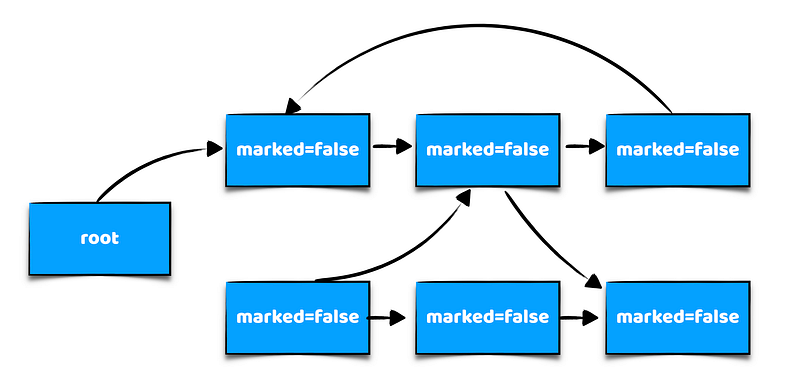
Second, the tree of objects is traversed, and all the mark bits of objects which are accessible from the root node via traversal are set to true. All non-reachable objects remain marked=false.
An object is non-reachable if there’s no way to reach it from the root.
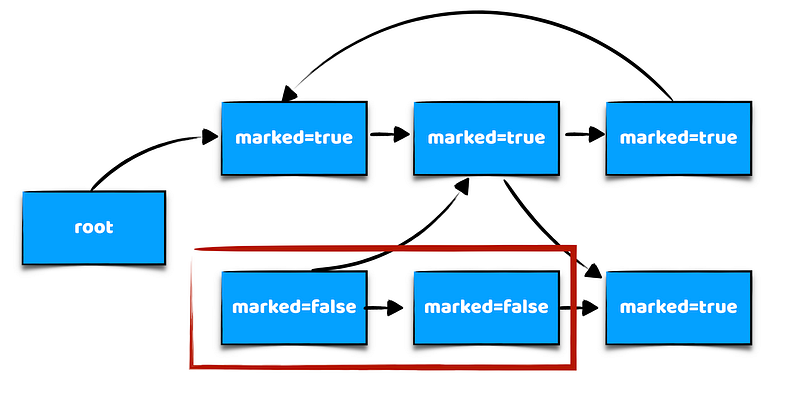
All mark bits of non-reachable objects are set to false.
That’s all that happens in the mark phase. No memory has been released yet, but the preliminary work is now in place for the sweep phase.
Sweep phase
Here’s where the memory is released. In this phase, all unreachable objects (objects that are still marked as false) are garbage collected.
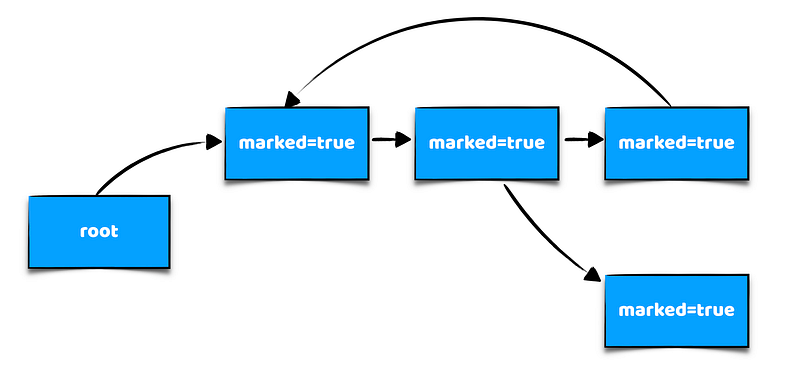
This algorithm is performed periodically (each time garbage collection runs). Freeable memory is then managed.
Maybe you are wondering if everything that is marked as false is collected, how can we create a memory leak?
If an object is not needed anymore by our application, but still referenced and accessible from the root node, it will not be garbage collected, since the mark bit of an object is set to true.
The algorithm can not determine if a certain piece of memory is used in our application or not. It’s up to the developer to make this clear.

Memory leaks in Angular
Memory leaks most often arise over time when components are rerendered multiple times, e.g through routing or by using the *ngIf directive. For example, when a power user works a whole day on our application without refreshing the browser.
To mimic this scenario, we created a setup with two components, an AppComponent and a SubComponent.
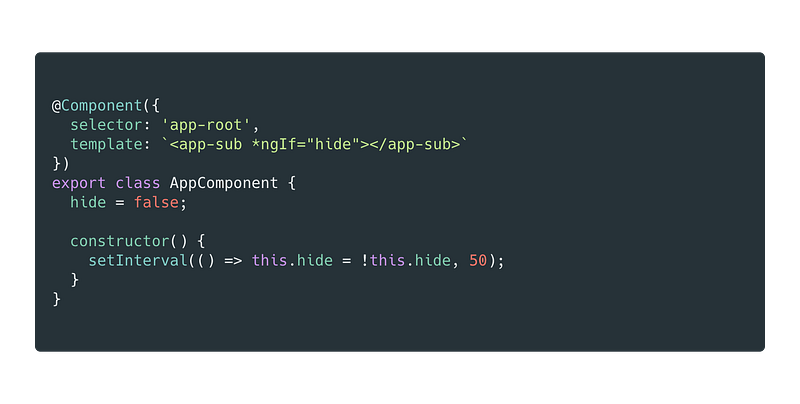
The AppComponent uses the app-sub component in its template. The unique thing about this component is that it uses the setInterval to toggle the hide flag every 50ms. This causes the app-sub component to get rerendered every 50ms, i.e. new instances of the SubComponent class are created. This code mimics the user that works a whole day on the same app without refreshing.
We implemented different scenarios in SubComponents and observed memory changes over time. Note that the AppComponent always stays the same. For each scenario, we will decide if we created a memory leak or not by looking at the memory consumption of the browser process.
If the memory consumption increases over time, we have a memory leak. If it remains more or less constant, there might be no leak or at least not a very obvious one.
Scenario 1: Huge for each loop
The first scenario is a loop that iterates 100'000 times and pushes a random value into an Array. Remember that this component is rerendered every 50ms. Have a look at the code and try to find out whether we created a memory leak or not.
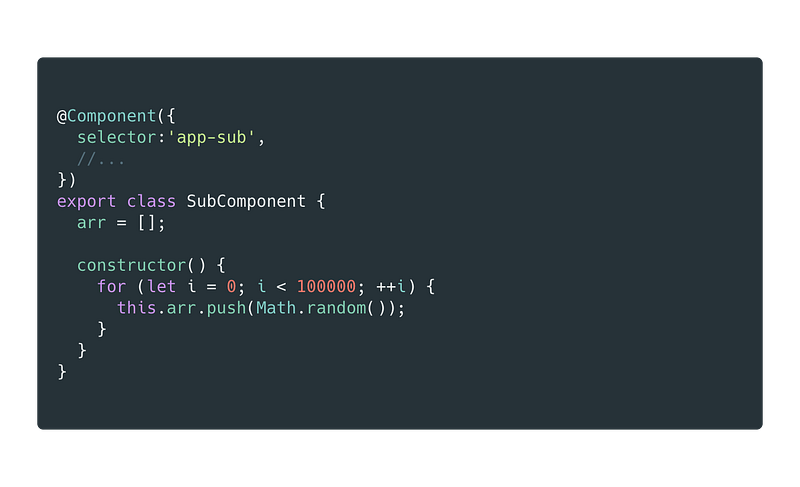
Well, even though you should not write such code in production, this code is not causing a memory leak, the memory remains within a constant range of 15MB. So, no leak. Don’t worry; we will explain later why 😉
Scenario 2: Subscribe to a BehaviourSubject
In this scenario, we subscribe to a BehaviourSubject and assign the value to a const. Does this code contain a memory leak? Again, remember the component is rerendered every 50ms.
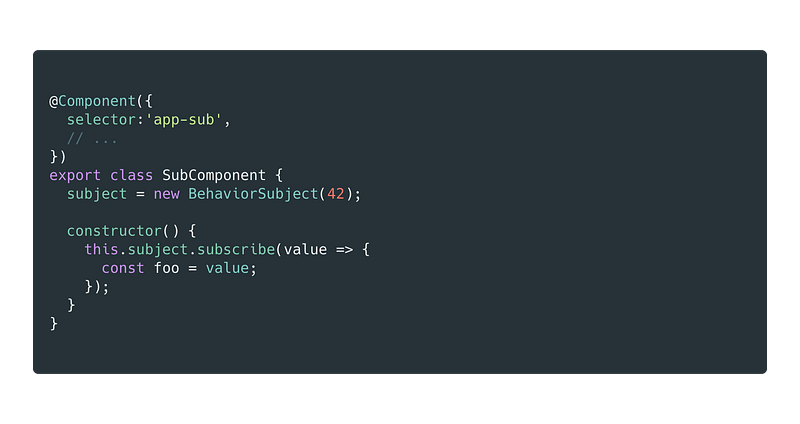
The answer is still the same. No memory leak here.
Scenario 3: Assign values inside subscribe to a field
Same code as before, the only difference that we assign the value to a field. And now, what do you think, still no memory leak?
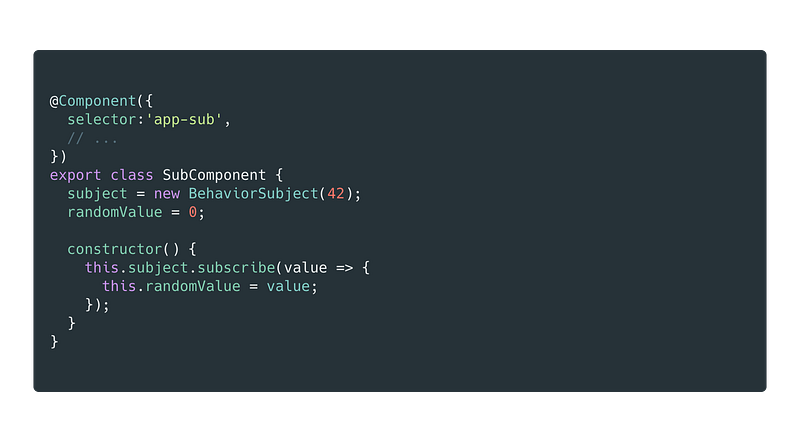
Yes, you are right, again, no memory leak here.
For example 1 we had no subscription. In scenarios 2 and 3, we subscribed to a stream of an observable that was initialized in our component. It seems like we are safe in scenarios where we subscribe to component streams.
But what if we add a DummyService.
Scenarios with a service
In the following scenarios, we are going to do revisit the scenarios above, but this time we will subscribe to a stream exposed by a DummyService.
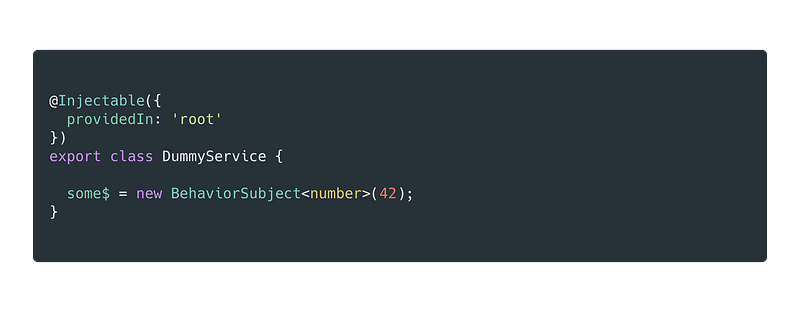
The DummyService is simple. Just a typical service that exposes a stream(some$) in the form of a public class field.
Scenario 4: Subscribe to exposed stream and assign local const
Let’s use the same situations from above, but this time we subscribe to the some$ of the DummyService instead of a component field.
Do we have a memory leak here? Again remember that this component is used inside our AppComponent and rendered multiple times.
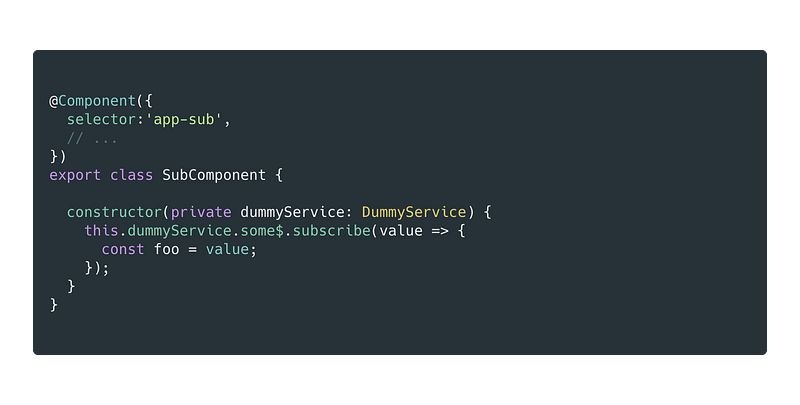
Well, at this point, we finally created a memory leak, but only a small one.😉 With a “small one,” we mean that the memory does increase slowly over time (barely noticeable, but a glance at the heap snapshot will reveal many Subscriber instances that are not removed).
Scenario 5: Subscribe to dummy service and assign to field member
Again, we subscribe to the dummyServbice. This time though, we assign the received value to a class field instead of a local const.
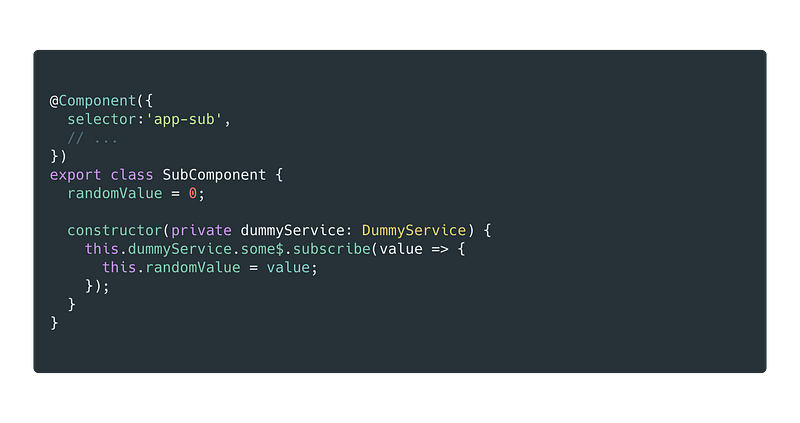
At this point, we finally created a significant memory leak. The memory consumption quickly increases above 1GB after a minute. Let’s see why.
When do we create a memory leak
Maybe you noticed that we didn’t create a memory leak in the first three scenarios. Well, the first three scenarios have something in common; all the references are local to the component.
When subscribing to an observable, the observable keeps a list of its subscribers, in this list, there is our callback, and the callback might reference our component.
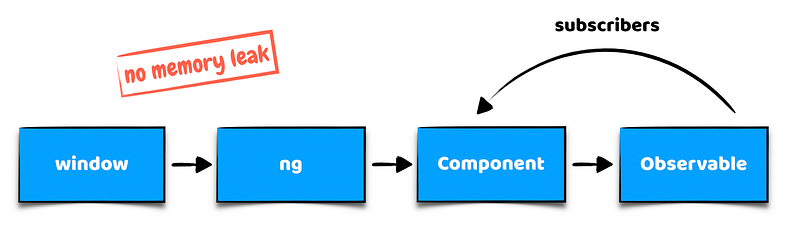
When our component is destroyed, i.e. not referenced anymore by angular and thus not reachable from the root node, the observable and its list of subscribers is not reachable from the root node anymore, and the whole component object is garbage collected.
As long as we subscribe to observables that are only referenced within the component, we do not have an issue. It changes, however, once a service comes into play.
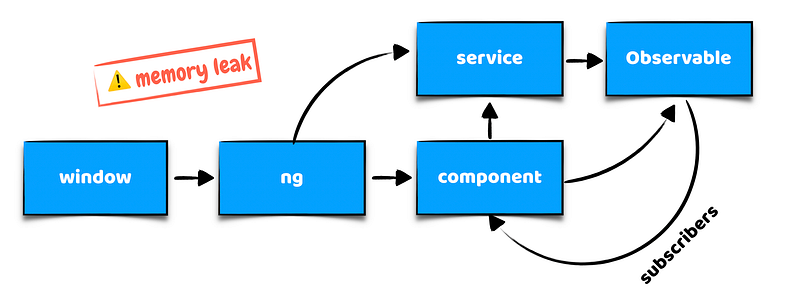
As soon as we subscribe to an Observable exposed by a service or a different class, we create a memory leak. This happens because the observable, its list of subscribers, our callback and hence our component are still accessible from the root node, although our component is not referenced by Angular directly. Therefore the component is not garbage collected.
To be clear, you can still use this approach, but you need to handle it the right way!
Handle the subscription
To avoid memory leaks, it’s essential to unsubscribe from an Observable correctly when the subscription is not needed anymore, e.g. when our component is destroyed. There are different ways to unsubscribe Observables.
In our experience, from consulting large enterprise projects, we think its best to use a destroy$ Subject in combination with the takeUntil operator.
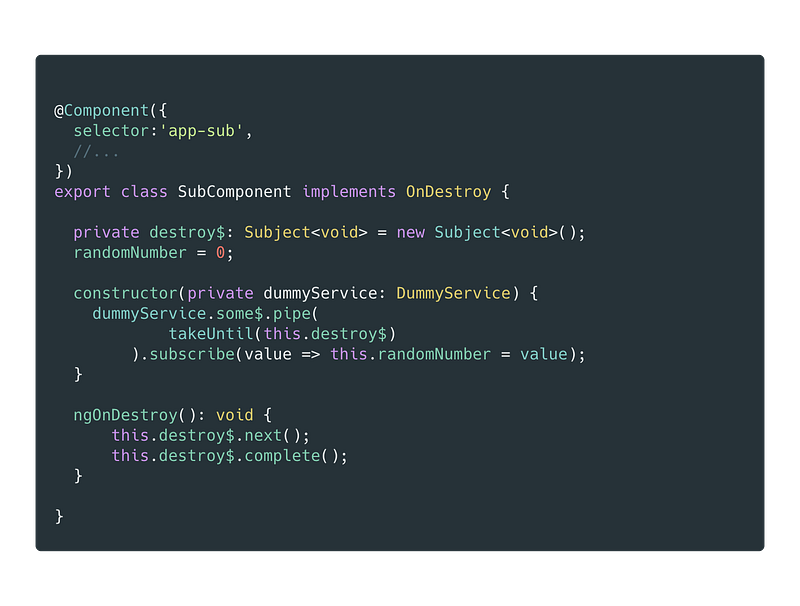
We implement the ngOnDestroy lifecycle hook on our component. Every time the component gets destroyed we call next and complete on our destroy$.
Calling
completeis important because it cleans up the subscription from ourdestroy$.
We then use the takeUntil operator and pass our destroy$ stream to it. This guarantees that the subscription is cleaned (unsubscribed) once our component gets destroyed.
How do I remember to unsubscribe
It’s easy to forget to add a destroy$ to your component and call next and complete in the ngOnDestroy lifecycle hook. Even though I taught project teams to do so, I forgot it many times in components myself.
Fortunately, there’s an awesome lint-rule written by Esteban Gehring which ensures that we correctly unsubscribe. You can simply install it with the following command
npm install @angular-extensions/lint-rules --save-devand add it to your tslint.json
{
  "extends": [
    "tslint:recommended",
    "@angular-extensions/lint-rules"
  ]
}
I highly recommend you to use this lint rule in your project. It can save you from hours of debugging sources of unwanted memory leaks.
Credits
This blog post is a write up of the amazing work from Esteban Gehring. Esteban is a software engineer from Switzerland and one of the smartest guys I know. I had the chance to work with him in a huge enterprise project. (it’s where we encountered many memory leaks).
Once after work, we chatted about memory leaks and we thought it’s a good idea to do a write up of our researches. If you are interested in the source code and presentation slides, check out the following sources.
Slides: https://slides.com/estebangehring/angular-app-memory-leak
Conclusion
It’s very easy to create a potential memory leak in Angular without noticing. Even tiny changes in non-obvious places like services can have a significant impact.
The best way to avoid memory leaks is by correct subscription management. Unfortunately, the clean up of subscriptions requires the developer to be very careful and can easily be overseen.
It’s best to use the @angular-extensions/lint-rules to ensure that the subscription gets correctly cleaned up.
Do you want to take your Angular, RxJS, TypeScript, and JavaScript skills to the next level? Don’t miss the chance to check out my Youtube channel.


Welcome to the world of Angular excellence — angularexperts.ch
Do you find the information in this article useful? — We are providing tailored expert support for developing of your Angular applications. Explore our wide range offers on angularexperts.ch
Also, check out some of our open-source libraries and articles:


