
How to Create a GUI app in Java
Overview
In java, swings are used for building a GUI application. It has different features and is popularly used for building GUI applications in java. In this article, we will be covering all about the swing library in Java.
Java Swing
Swing is developed in pure java. The swing components can have the same look and feel on all the platforms and offer a pluggable look and feel. The swing components are light-weighted.
Example:
A java program to display a creative and display a frame
import javax.swing.*;
class F1 extends JFrame{
F1() {
setSize(200,200);
setTitle(“GUI DEMO”);
setLocation(100,200);
setDefaultCloseOperation(JFrame.EXIT_ON_CLOSE);
setVisible(true);
}
public static void main(String args[]){
F1 f= new F1();
}
}
Output:
javac F1.java
java F1
Container hierarchy
Top-level container:
- Place for other swing components to paint themselves
- Eg. JFrame, JDialog, JApplet
Intermediate container:
- Simplify positioning of atomic components
- Eg, JPanel, JSplitPane, JTabbedPane
Atomic components:
- Self-sufficient components that present information to and get input from the user
- Eg, JButton, JLabel, JComboBox, JTextField, JTable
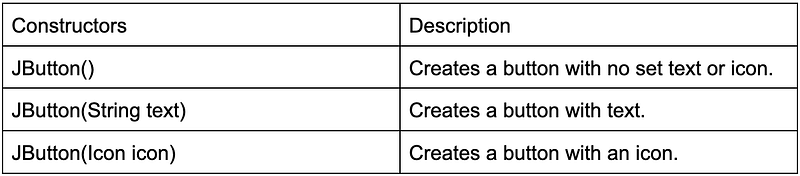
JButton
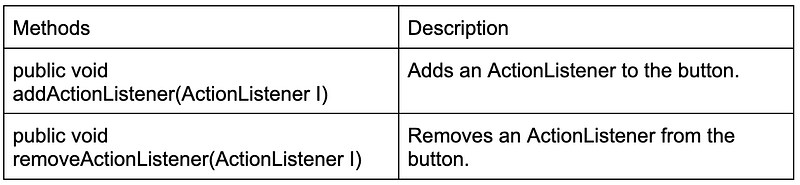
- JButton is an implementation of a “push” button
- Buttons can be configured and to some degree controlled by actions
JOptionPane
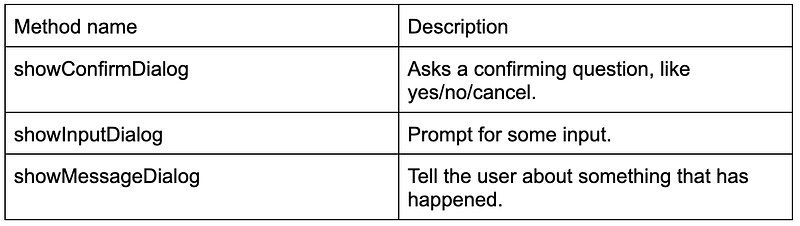
- JOptionPane makes it easy to pop up a standard dialog box that prompts users for a value or informs them of something.
- While the class may appear complex because of the large number of methods, almost all uses of this class are one-line calls to one of the static methods shown below:
Nested classes
Like a class can have variables and methods as members, the class can also contain another class which is called a Nested class.
The concept of inner classes was introduced in java 1.1
There are several benefits of using inner classes:
- Making your code more readable
- Allowing for utility classes to be encapsulated within the class using it
- Simplifying the process of writing a class, thereby actually encouraging developers to be more object-oriented.
A common use of inner classes is for event handlers. An event handler is the type of object that often needs access to the members of its outer class but is likely won't be refused y another class, making it a good candidate for an inner class.
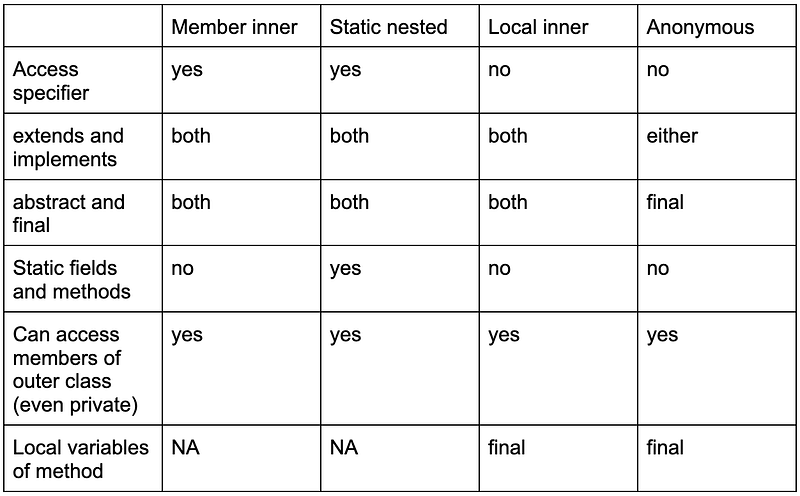
The types of inner class are as follows:
- The member inner class
- Static inner class
- The local inner class
- The anonymous class
Below is the table that explains the concept much easier:
Event handling using member inner class:
import javax.swing.*;
import java.awt.*;
import java.awt.event.*;
class M1 extends JFrame
{
Container c;
JButton b1, b2;
class L1 implements ActionListener
{
public void actionPerformed(ActionEvent ae){
if(ae.getSource()==b1)
{
JOptionPane.showMessageDialog(c, “You have clicked button 1”);
}
if(ae.getSource()==b2)
{
JOptionPane.showMessageDialog(c,”You have clicked button 2”);
}
}
}
M1()
{
c=getContentPane();
c.setLayout(new FlowLayout());
b1=new JButton(“Click 1”);
b2= new JButton(“Click 2”);
c.add(b1);
c.add(b2);
L1 a= new L1();
b1.addActionListener(a);
b2.addActionListener(a);
}
public static void main(String args[]){
M1 f= new M1();
f.setSize(200,200);
f.setTitle(“Button Click”);
f.setDefaultCloseOperation(JFrame.EXIT_ON_CLOSE);
f.setVisible(true);
}
}
Layout managers
Java’s layout manager determines how components will be arranged when they are added to the frame. AWT package includes the following layout classes:
- FlowLayout
- BorderLayout
- GridLayout
The above are the classes that implement the LayoutManager interface which is defined in java.awt package.
FlowLayout
A flow layout arranges components in a directional flow, much like lines of text in a paragraph, until there is no more room, then onto the next line.
By default, the components are centered. The programmer can specify the alignment using one of the following arguments with the constructor:
- FlowLayout.LEFT
- FlowLayout.CENTER
- FlowLayout.RIGHT
BorderLayout
A border layout lays out a container, arranging and resizing its components to fit in five regions: north, south, east, west, and center.
Each region may contain no more than one component and is defined by a corresponding constant: NORTH, SOUTH, EAAST, WEST, and CENTER.
The programmer can specify the region using the following in the add method:
- add(“North”, b1);
- add(“South”,b2);
- add(“East”,b3);
- add(“West”,b4);
- add(“Center”,b5);
OR
- add(BorderLayout.NORTH,b1);
- add(BorderLayout.SOUTH,b2);
- add(BorderLayout.EAST,b3);
- add(BorderLayout.WEST,b4);
- add(BorderLayout.CENTER,b5);
Note1: JVM raises IllegalArgumentException if the region name is not as shown.
Note2: Compilation fails if the constant name is not in upper case as shown.
Note3: Above can be combined also.
JLabel
JLabel is a display area for a short text string or an image, or both. A label does not react to input events.
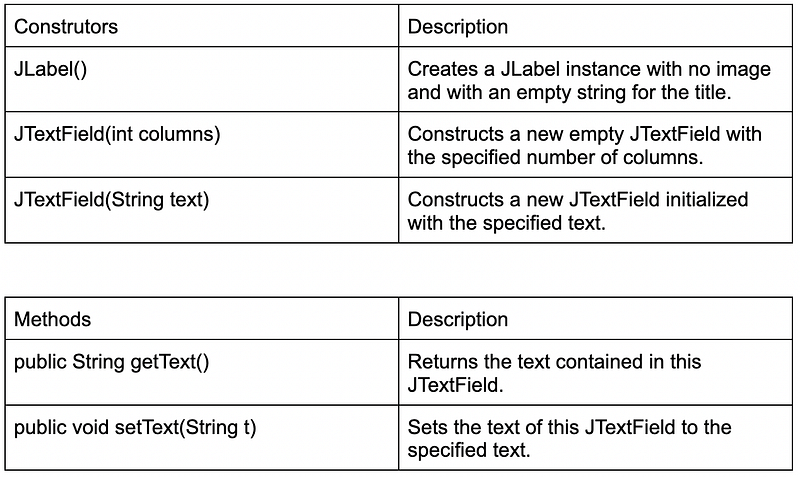
Program:
import java.awt.*;
import javax.swing.*;
import java.awt.event.*;
class S2 extends JFrame{
Container c;
JTextField txt1;
JButton btn1;
JLabel lbl1, lbl2;
S2(){
c=getContentPane();
c.setLayout(new FlowLayout());
lbl1= new JLabel(“Enter a number”);
txt1= new JTextField(10);
btn1= new JButton(“Answer”);
lbl2= new JLabel();
c.add(lbl1);
c.add(txt1);
c.add(btn1);
c.add(lbl2);
btn1.addActionListener(new L2());
}
public static void main(String args[]){
S2 frm= new S2();
frm.setDefaultCloseOperation(JFrame.EXIT_ON_CLOSE);
frm.setSize(250,150);
frm.setTitle(“Square Finder”);
frm.setVisible(true);
}
class L2 implements ActionListener{
public void actionPerformed(ActionEvent ae){
try{
int a= Integer.ParseInt(txt1.getText());
float s= a*a;
lbl2.setText(“Square=”+s);
}
catch(NumberFormatException e){
JOptionPane.showMessageDialog(c,”Please enter integer”);
txt1.setText(“ “);
txt1.requestFocus();
}
}
}
}
Handling Key Board Events
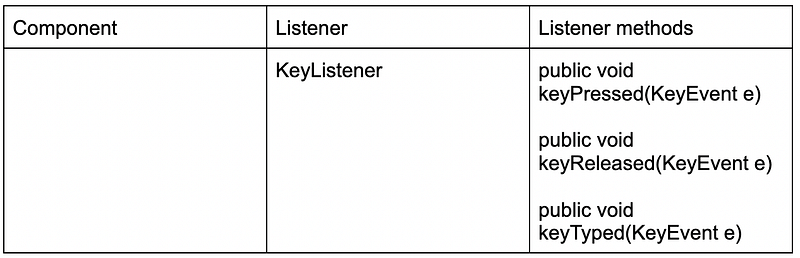
Program:
import java.awt.*;
import javax.swing.*;
import java.awt.event.*;
class S7 extends JFrame{
Container c;
JTextField txt1;
JButton btn1;
JLabel lbl1,lbl2;
S7(){
c=getContentPane();
c.setLayout(new FlowLayout());
lbl1= new JLabel(“Enter a number”);
txt1= new JTextField(10);
btn1= new JButton(“Answer”);
lbl2= new JLabel();
c.add(lbl1);
c.add(txt1);
c.add(btn1);
c.add(lbl2);
btn1.addActionListener(new L2());
btn1.addKeyListener(new L3());
}
public static void main(String args[]){
S7 frm= new S7();
frm.setDefaultCloseOperation(JFrame.EXIT_ON_CLOSE);
frm.setSize(250,150);
frm.setTitle(“Square Finder”);
frm.setVisible(true);
}
class L3 implements KeyListener
{
public void keyPressed(KeyEvent ke)
{
if(ke.getKeyCode()==KeyEvent.VK_ENTER);
try{
int a= Integer.parseInt(txt1.getText());
float s= a*a;
lbl2.setText(‘Square=’+s’);
}
catch(NumberFormatException e){
JOptionPane.showMessageDialog(c,”Please enter integer”);
txt1.setText(“”);
txt1.requestFocus();
lbl2.setText(“”);
}
}
}
public void keyReleased(KeyEvent ke){}
public void keyTyped(KeyEvent ke){}
}
class L2 implements ActionListener{
public void actionPerformed(ActionEvent ae){
try{
int a= Integer.parseInt(txt1.getText());
float s=a*a;
lbl2.setText(“Square=”+s);
}
catch(NumberFormatExcepption e){
JOptionPane.showMessageDialog(c,”Please enter integer”);
txt1.setText(“”);
txt1.requestFocus();
lbl2.setText(“”);
}
}
}
}
Handling Windows Events
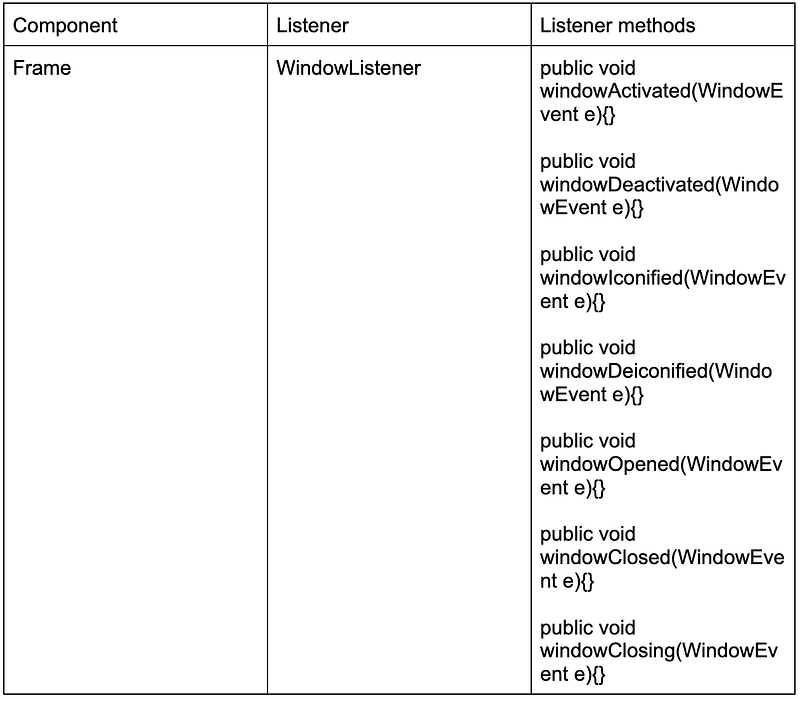
Program:
import java.awt.*;
import javax.swing.*;
import java.awt.event.*;
class S8 extends JFrame{
Container c;
JTextField txt1;
JButton btn1;
JLabel lbl1,lbl2;
S8(){
c=getContentPane();
c.setLayout(new FlowLayout());
lbl1= new JLabel(“Enter a number”);
txt1= new JTextField(10);
btn1= new JButton(“Answer”);
lbl2= new JLabel();
c.add(lbl1);
c.add(txt1);
c.add(btn1);
c.add(lbl2);
btn1.addActionListener(new L2());
btn1.addKeyLisener(new L3());
this.addWindowListener(new L4());
}
public static void main(String args[]){
S8 frm= new S8();
frm.setDefaultCloseOperation(JFrame.DO_NOTHING_ON_CLOSE);
frm.setSize(250,150);
frm.setTitle(“Square Finder”);
frm.setVisible(true);
}
class L4 implements WindowListener{
public void windowActivated(WindowEvent e){}
public void windowDeactivated(WindowEvent e){}
public void windowOpened(WindowEvent e){
JOptionPane.showMessageDialog(c,”Welcome to Square Calculator”);
}
public void windowClosed(WindowEvent e){}
public void windowClosing(WindowEvent e){
int output= JOptionPane.showConfirmDialog(c,”Do you want to exit”);
if(output==JOptionPane.YES_OPTION){
System.exit(1);
}
}
public void windowIconified(WindowEvent e){}
public void windowDeiconified(WindowEvent e){}
}
class L2 implements ActionListener{
public void actionPerformed(ActionEvent ae){
try{
int a=Integer.parseInt(txt1.getText());
float s=a*a;
lbl2.setText(“Square=”+s);
}
catch(NumberFormatException e){
JOptionPane.showMessageDialog(c,”Please enter integer”);
txt1.setText(“”);
txt1.requestFocus();
lbl2.setText(“”);
}
}
}
class L3 implements KeyListener{
public void keyPressed(KeyEvent ke){
if(ke.getKeyCode()==KeyEvent.VK_ENTER){
try{
int a= Integer.parseInt(txt1.getText());
float s=a*a;
lbl2.setText(“Square=”+s);
}
catch(NumberFormatException e){
JOptionPane.showMessageDialog(c,”Please enter integer”);
txt1.setText(“”);
txt1.requestFocus();
lbl2.setText(“”);
}
}
}
public void keyReleased(KeyEvent ke){}
public void keyTyped(KeyEvent ke){}
}
}
Conclusion
Swing is developed in pure java and is widely used since it has the same look and feel on all the platforms and offers a pluggable look and feel. I hope you liked this article, do let me know if there is any feedback. :) ❤️


