avatarSarah Nderi

Summary

The article provides a guide on creating a callback URL using Ngrok for developers, particularly those working with Africa's Talking USSD API.

Abstract

The author describes their experience with the need to create a callback URL while working with the Africa's Talking USSD API. Initially unsure how to proceed, the author discovered Ngrok during a session with Africa's Talking, which simplifies the process of exposing a local server to the internet. The article outlines the steps to set up an Ngrok account, download the application, and run it to generate a unique URL that can be used as a callback URL. The author emphasizes the ease of use for both Windows and macOS users, shares their specific command for initiating an Ngrok session on port 3000, and provides a screenshot of their Ngrok dashboard with an expired URL as an example. The article also notes the limitations of the free version of Ngrok, such as URL expiration after 2 hours and the need to keep the terminal open to maintain the connection. Additionally, the author suggests updating the callback URL in the Africa's Talking API channel and utilizing the details tab for debugging.

Opinions

  • The author initially found the concept of a callback URL daunting but eventually found Ngrok to be a user-friendly solution.
  • Ngrok is presented as an accessible tool for developers, with the article providing specific instructions for Windows and macOS users.
  • The author seems to appreciate the convenience of Ngrok, especially for testing and debugging purposes with the Africa's Talking API.
  • There is an acknowledgment of the limitations of the free version of Ngrok, which may inconvenience users who require a persistent URL or wish to avoid keeping a terminal open.
  • The article implies that the Africa's Talking API's error messages could be more specific to aid in troubleshooting.

How to Create a Callback URL using Ngrok

Learning by Building

Photo by ThisisEngineering RAEng on Unsplash

A while back I came across the need to create a callback URL while consuming Africa’s Talking USSD API. This was my first time coming across it and I didn’t know how to go about it.

I thought that I’d need to host the project first so I ignored it for a while.

Until I attended one of their sessions and they mentioned ngrok.

Create an Ngrok Account

You’ll be led to this page after signup or login.
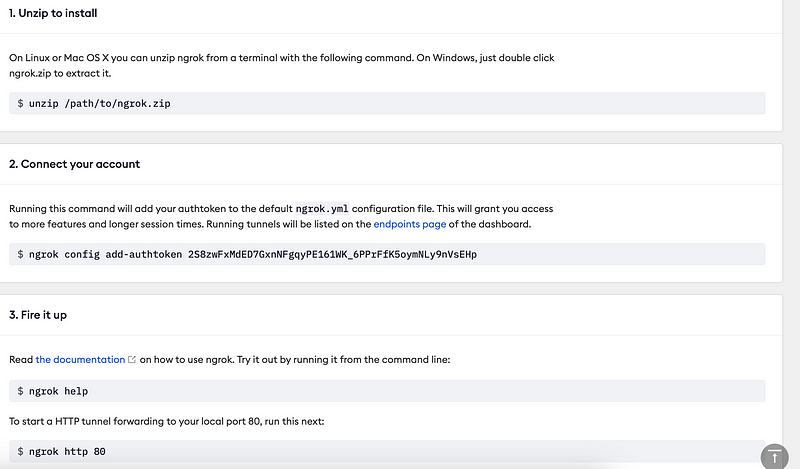
image courtesy of the author

If you’re a windows user, follow the instructions. For macOS users you don’t need to follow the instructions because the download isn't a zip file as per their documentation but a Unix Executable file.

Just download and fire it up.

Fire up Ngrok

After opening the downloaded unix file, open a new window on the terminal and run the following command:

./ngrok http <specify the port you want to use>

I used port 3000 so my command was:

./ngrok http 3000

It opens an ngrok session where you can copy your URL. Below is my expired URL.
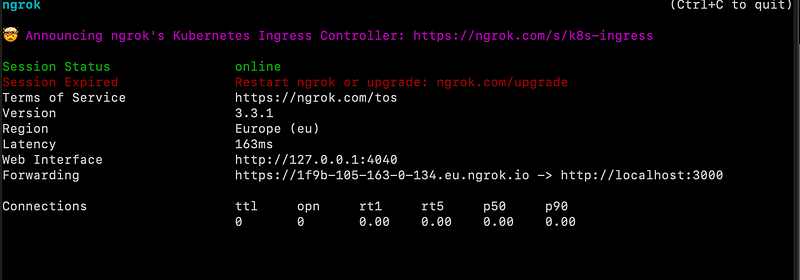
My call back URL is: https://1f9b-105-163-0-134.eu.ngrok.io

If you’re using Africa’s Talking API, create a channel and update the callback URL, save and start debugging. The details tab will let you know where your code is failing, though their error messages are pretty generic.
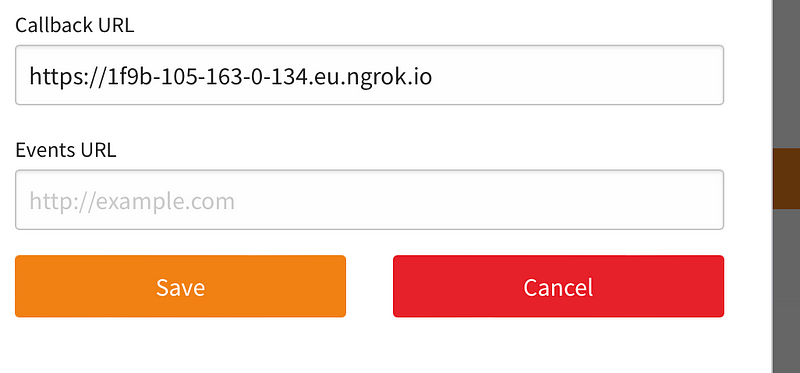
image courtesy of the author

The disadvantage of using the free version of ngrok is that the URL expires after 2 hours thus you have to keep changing and updating it. Additionally, being on a free version means you have to keep that terminal open, else you lose the connection to ngrok.

You may also like:

Ngrok
Callback
Website Development
Software Engineering
Recommended from ReadMedium