
How to copy a large file from SFTP server to AWS S3 using lambda?

Recently, I had to help a friend automate the process of moving a large file from an sftp location to s3 for further processing. It was a large(ish) XML file, which needed to be downloaded and its data was meant to be stored in a different data store and then archived for future reference.
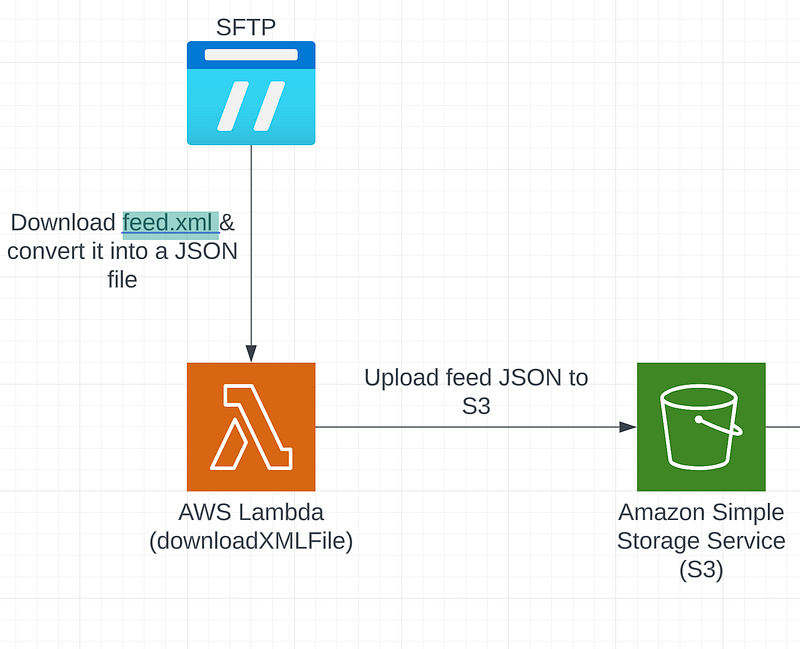
The over all process of doing so is quite simple, but it can be a little tricky when it comes to handling a large file on Lambda. In this post, I will go through the process I followed and things you should lookout for when you are building a service like this.
I used the Serverless framework for writing and deploying my lambda function. My function definition in serverless.ts file looks like this -
functions: {
    downloadXMLFile: {
      handler: "handler.downloadXMLFile",
      timeout: 900,
      memorySize: 5120,
      ephemeralStorageSize: 1024,
      events: [
        {
          http: {
            method: 'get',
            path: 'downloadXMLFile',
          },
        }
      ]
    }
  }
The function downloadXMLFile uses ssh2-sftp-client (https://www.npmjs.com/package/ssh2-sftp-client) package to make a connection with the sftp server and download the file. I also made use of /tmp folder in a lambda function to temporarily store the file before converting it into a JSON object and then uploading them both to an s3 bucket.
import { parseString } from 'xml2js';
import { S3 } from "aws-sdk";
import ClientFtp from 'ssh2-sftp-client';
import fs from "fs";

const s3 = new S3({
  accessKeyId: process.env.AWS_ACCESS_KEY,
  secretAccessKey: process.env.AWS_SECRET_ACCESS_KEY
});

export const downloadXMLFile: Handler = async (_event: APIGatewayEvent) => {
  try {

    const d = new Date();
    const today = `${d.getDate()}-${d.getMonth()+1}-${d.getFullYear()}`
    const sftp = new ClientFtp();

    return sftp
      .connect({
        host: process.env.SFTP_HOST,
        username: process.env.SFTP_USER,
        privateKey: sftpSSHKey,
      })
      .then(async () => {
        await sftp.fastGet("/upload/feed.xml", "/tmp/feed.xml");
        const xmlData = fs.readFileSync("/tmp/feed.xml", "utf-8");
        const jsonData = await parseXml(xmlData);

        await uploadtoS3({
          Bucket: process.env.FEED_BUCKET,
          Body: JSON.stringify(jsonData),
          ContentType: "application/json",
          Key: `${today}/feed.json`,
        });

        await uploadtoS3({
          Bucket: process.env.FEED_BUCKET,
          Body: xmlData.toString(),
          ContentType: "application/xml",
          Key: `${today}/feed.xml`,
        });

        return formatJSONResponse({
          message: "File downloaded and transformed successfully!",
        });
      })
      .catch((err) => {
        console.log("Catch Error: ", err);
        throw new Error(err);
      });

  } catch (error) {
    console.log(error);
    return internalServerError(error);
  }

}

export async function parseXml (xmlString: string) : Promise<any> {
  return await new Promise((resolve, reject) => parseString(xmlString, (err, jsonData) => {
    if (err) {
      reject(err);
    }
    resolve(jsonData);
  }));
}

export async function uploadtoS3(s3Data: S3.PutObjectRequest) {
  console.info("---- UPLODAING TO S3", s3Data.Bucket, s3Data.Key);

  try {
    return await s3.upload(s3Data).promise();
  } catch (error) {
    console.log(error);
    return error;
  }
}
Here, I am first creating a connecting with the said sftp server and then using its fastGet function to download the file from a particular path on that server. Once, I have the copy, I temporarily store it on Lambda’s tmp folder. Note, that there is a restriction on the size of file you can store here (up to 10GB — https://aws.amazon.com/blogs/aws/aws-lambda-now-supports-up-to-10-gb-ephemeral-storage/)
Once, I have the file in memory, I make use of the xml2js package (https://www.npmjs.com/package/xml2js) to convert XML data into JSON.
It works very well locally, but when you are deploying it on AWS, you have to tune it a little bit. The file that I was downloading was just under 0.5 GB, but I still had to increase the memory size of function to 5120 mb. Both, memorySize & ephemeralStorageSize can be configured in serverless.ts file (see above code snippet) or manually in the lambda function like this -
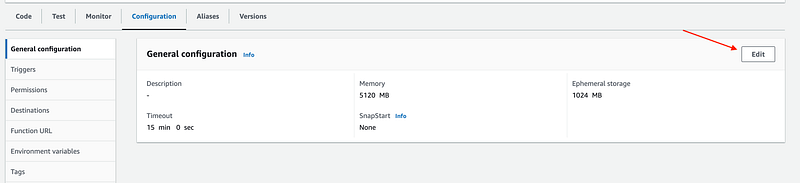
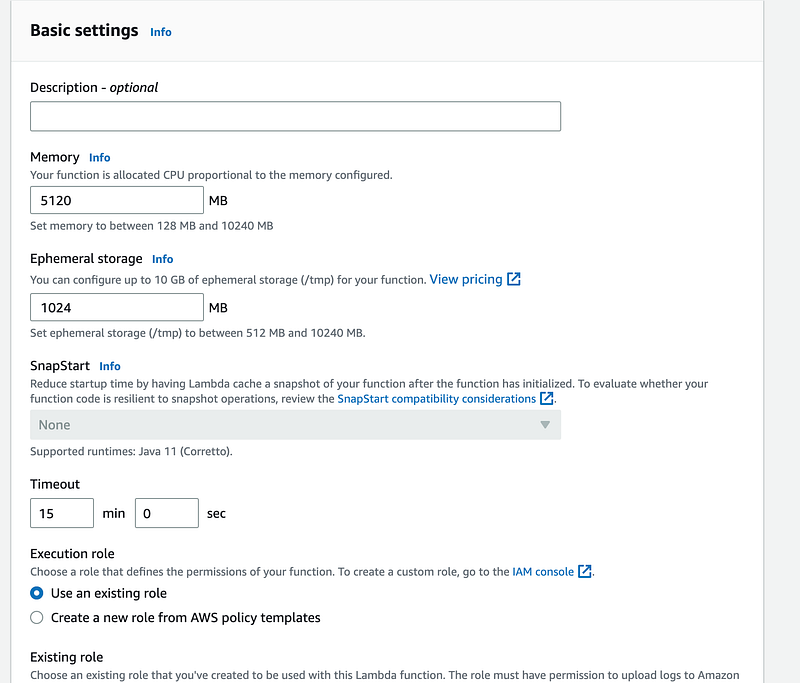
As I said at the start, its quite simple, you just need to figure out the right setting for your memory. Remember, it will cost you more to run a lambda on larger memory size and storages (https://aws.amazon.com/lambda/pricing/).
Thanks for reading and if you like my content and want to support me, then please follow me and help all of us on this platform grow and produce useful content by becoming a member.
More content at PlainEnglish.io.
Sign up for our free weekly newsletter. Follow us on Twitter, LinkedIn, YouTube, and Discord.
Build awareness and adoption for your tech startup with Circuit.


