
How To Convert Your .py File to an .exe File
On Windows with a simple GUI!

If you working with people that use Windows (or you use Windows yourself) and want to provide an executable of your project I will explain how you can convert your .py file to a Windows executable!
The program that will be used is auto-py-to-exe. It's a Gui module working like pyinstaller but in a graphical user interface mode. That means you don’t need to open your terminal and type the convert commands yourself.
Installing auto-py-to-exe
You can install the program within the pip install in a terminal
pip install auto-py-to-exe
Sometimes while you install this (typically while using Windows) you will see

To fix this issue just redo the install command with the --user option
pip install auto-py-to-exe --userOnce you install this module you can run it directly by typing auto-py-to-exe on command prompt, it will pop up a window like below.
If you cannot start the program, please have a look at the output. If you (like me) did not add the Python39/Scripts folder to your PATH you cannot execute the program in the console. There will be a warning within the installation-output

If this happens for you, you can open an explorer, switch to the folder and start the .exe manually.
Create the executable
If you start auto-py-to-exe a web browser should start and you will see
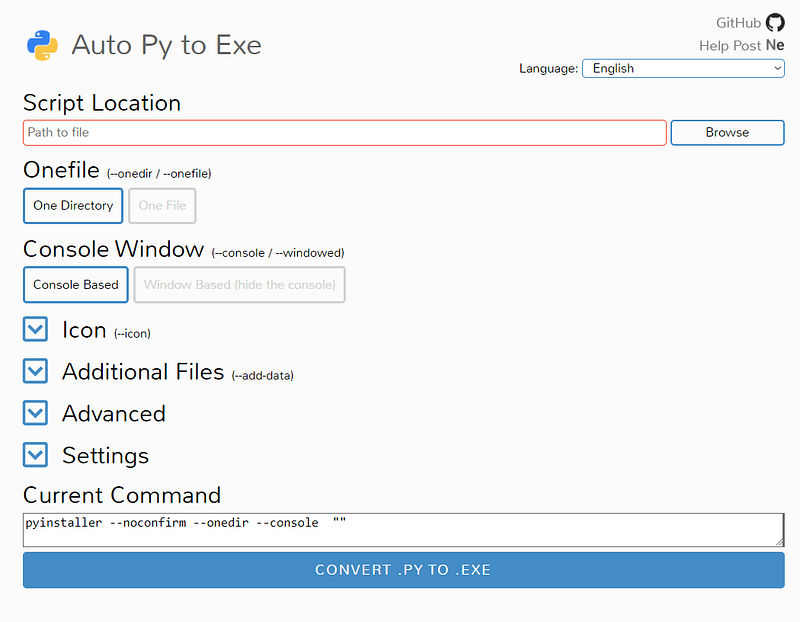
Now, you have to click on the browse button which will open a file chooser, and then you can select your Python file. Once you are done selecting the file it will look like the following image.
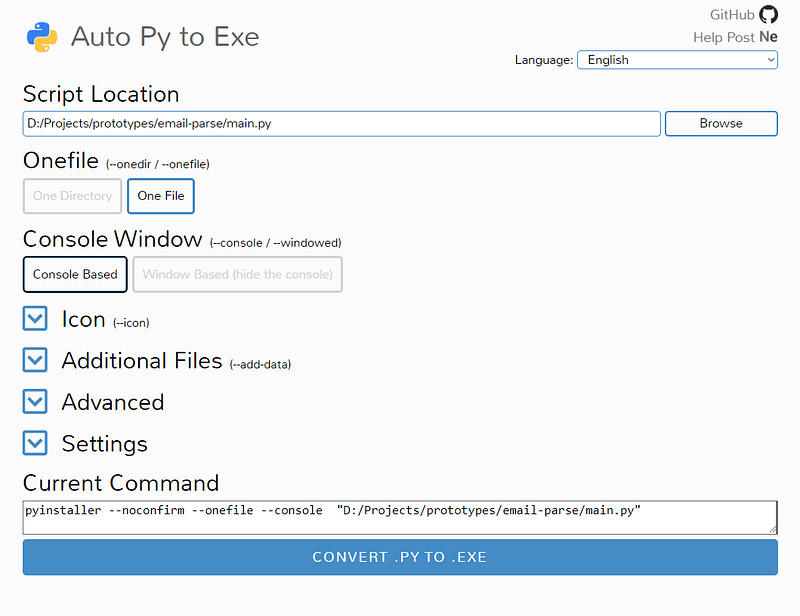
Before you can start converting you need to do some setups.
One File / One Directory
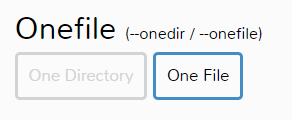
First, you need to change your file conversion which is set to One directory which means it will make all Python applications and packages that are used by your Python program and place them in one directory. This clearly means without that directories you can’t run your main.exe.
While this comes in handy when you working with some media files it won’t work quite well with a simple script. Right now your program doesn’t (hopefully) use any media files so you need to change it to One File option.
Icon
Additionally, you can change the icon of the exe file if you do not prefer the default Python icon. You can set your own icon by clicking Icon and browsing for the .ico extension file.

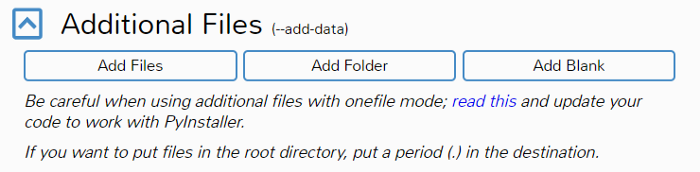
Additional files option comes in handy when your program or script had uses external files or folders.
Take a simple example you working on a Graphical user interface ( GUI ) program and you had made an assets folder where you store assets/images use by your program. And while converting the pyinstaller can’t recognize that asset's location so you had manually set the additional folders or files location using the Additional files option.
Output location
You can set the output location of your converted exe by pressing Settings

So we are ready to convert our .py file to .exe file click on the blue convert button on the bottom. It will start the process of conversion and will generate output like the following
Running auto-py-to-exe v2.13.0
Running auto-py-to-exe v2.13.0
Building directory: C:\Users\PAULKN~1\AppData\Local\Temp\tmpdsu7dksq
Building directory: C:\Users\PAULKN~1\AppData\Local\Temp\tmpdsu7dksq
Provided command: pyinstaller --noconfirm --onefile --console  "D:/Projects/prototypes/email-parse/main.py"
Provided command: pyinstaller --noconfirm --onefile --console  "D:/Projects/prototypes/email-parse/main.py"
...
MORE OUTPUT HERE
...1056240 INFO: Emedding manifest in EXE
1056240 INFO: Emedding manifest in EXE
1056256 INFO: Updating manifest in C:\Users\PAULKN~1\AppData\Local\Temp\tmpdsu7dksq\application\main.exe
1056256 INFO: Updating manifest in C:\Users\PAULKN~1\AppData\Local\Temp\tmpdsu7dksq\application\main.exe
1056341 INFO: Updating resource type 24 name 1 language 0
1056341 INFO: Updating resource type 24 name 1 language 0
1056358 INFO: Appending PKG archive to EXE
1056358 INFO: Appending PKG archive to EXE
1058034 INFO: Building EXE from EXE-05.toc completed successfully.
1058034 INFO: Building EXE from EXE-05.toc completed successfully.Moving project to: D:\UserData\Downloads
Moving project to: D:\UserData\Downloads
Complete.Afterward, the file will be created within your selected output folder

Closing Notes
I hope you find this article helpful and are now able to convert your .py files into Windows executables. I would love to hear your thoughts. If you have any questions please jot them down below 👇👇👇
Want to Connect With the Author?Here's my GitHub handle and LinkedId profile.