
How to Convert Image to Base64 with Javascript
canvas or FileReader can be used to convert images data to base64 string

In previous article, we learn how to upload image to GitHub via GitHub open APIs, and know that the image content must be encoded to base64. In this article, we will learn how to convert image data to base64.
We will discuss three scenes that we might frequently encounter :
- convert image to base64 by image url;
- convert image selected from local to base64;
- convert clipboard’s image data to base64;
1. Convert image data to base64 by image url
We need to download the image firstly, when the image is loaded, we can use the canvas element to draw the image and its toDataURL can be used to convert image to base64. The following function converts images to base64:
// imgUrl: the image origin url
// callback: when the image is converted to base64, will call this function
// we can wrap this function to Promise-based
//  function convertImageToBase64Async(imagUrl) {
//     return new Promise(resovle => convertImageToBase64(imgUrl, resolve))
//  }

function convertImageToBase64(imgUrl, callback) {
  const image = new Image();
  image.crossOrigin='anonymous';
  image.onload = () => {
    const canvas = document.createElement('canvas');
    const ctx = canvas.getContext('2d');
    canvas.height = image.naturalHeight;
    canvas.width = image.naturalWidth;
    ctx.drawImage(image, 0, 0);
    const dataUrl = canvas.toDataURL();
    callback && callback(dataUrl)
  }
  image.src = imgUrl;
}
The function involves following steps:
- Create an
Imageobject - Add
crossOriginproperty toanonymous, it is useful when the image is not same origin - Add
onloadevent handler to image - In the
onloadevent, createcanvaselement to draw the image, and then use thetoDataURLto convert the image to base64 string; - Set the image object url as the image url;
We can now use this function to convert image url to base64:
convertImageToBase64('https://miro.readmedium.com/fit/c/64/64/1*3wTm70KPAVCovuotmFReJA.png', console.log)The output is:

2. Convert image selected from local to base64;
When we want to upload file from local, we might use the input element or using the showOpenFilePicker to select files, you can learn more from this article:
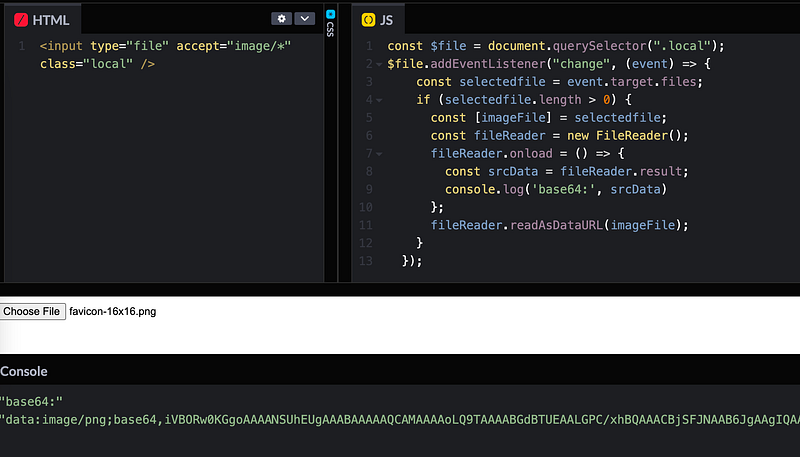
We will use the input element to demo selecting image from local for this way has a better browser compatibility:
// html
<input type="file" accept="image/*" class="local" />

// javascript
const $file = document.querySelector(".local");
$file.addEventListener("change", (event) => {
    const selectedfile = event.target.files;
    if (selectedfile.length > 0) {
      const [imageFile] = selectedfile;
      const fileReader = new FileReader();
      fileReader.onload = () => {
        const srcData = fileReader.result;
        console.log('base64:', srcData)
      };
      fileReader.readAsDataURL(imageFile);
    }
  });
It involves the following steps:
- Create
inputelement with its type is file - Handle the input element
changeevent - Get selected files with the files property of input
- Use
FileReaderto convert the image data to base64
When we select image from local, we can get the base64 string:
3.Convert clipboard’s image data to base64
Paste images from clipboard is useful at work, for example we can share text with original style by cutting is as image. The data read from clipboard is blob type, so we can continue the file FileReader to convert the data to base64. The following code shows how to do:
async function parseClipboardImageData() {
  const items = await navigator.clipboard.read()
  for (let item of items) {
    for (let type of item.types) {
      if (type.startsWith("image/")) {
        return item
          .getType(type)
          .then(blob => {
            return new Promise((resolve) => {
              const fileReader = new FileReader();
              fileReader.onload = () => {
                const srcData = fileReader.result;
                resolve(srcData);
              };
              fileReader.readAsDataURL(blob);
            })
          })
      }
    }
  }
}
We consume the data from clipboard by navigator.clipboard.read function, if it is image , we can use FileReader to convert the data to base64 string.

Finally
In this article, we learn how to convert image to base64, there are two ways can be used to generate base64 string:
- Then canvas element
toDataURLmethod - The
readAsDataURLmethod ofFileReader
We learn how to use these ways to convert image url/data to base64 string by three scenes. All of the code can be found in Codepen.io:
There are some image related articles may help you:
Level Up Coding
Thanks for being a part of our community! Before you go:
- 👏 Clap for the story and follow the author 👉
- 📰 View more content in the Level Up Coding publication
- 🔔 Follow us: Twitter | LinkedIn | Newsletter
🚀👉 Join the Level Up talent collective and find an amazing job


