avatarChristina Piccoli

Free AI web copilot to create summaries, insights and extended knowledge, download it at here

1757

Abstract

. I don’t have any yet, so I just hit “Next”.</p><p id="df9d">5. You’re all set!</p><figure id="04e8"><img src="https://cdn-images-1.readmedium.com/v2/resize:fit:800/1*lsli4xiY8jMw4Tfwes0b8A.png"><figcaption>Screenshot taken by the author.</figcaption></figure><p id="111d">You have your integration between the two platforms set up, and now you have to create a way to connect your product with ConvertKit.</p><h1 id="7c2b">Part 2: Create a new rule in ConvertKit</h1><p id="a3a9">I just published my product in Gumroad, but now I need a way for Gumroad to send emails to ConvertKit from anyone who grabs my book.</p><figure id="8a20"><img src="https://cdn-images-1.readmedium.com/v2/resize:fit:800/1*P7wnKY2hVHw9sfw56Dtwgw.png"><figcaption>Screenshot taken by the author.</figcaption></figure><ol><li>Go to “Automate”, then “Rules”.</li></ol><figure id="9f9f"><img src="https://cdn-images-1.readmedium.com/v2/resize:fit:800/1*4adX9kRwNHGYpfeOvLVXTg.png"><figcaption>Screenshot taken by the author.</figcaption></figure><p id="0a63">2. Under the Trigger section, you’ll select:</p><ul><li>Purchases a product</li><li>→ Provider: Gumroad</li><li>→ The name of your product</li></ul><figure id="415f"><img src="https://cdn-images-1.readmedium.com/v2/resize:fit:800/1*xSMYoxnxkUpdpD06dUynPA.png"><figcaption>Screenshot taken by the author.</figcaption></figure><p id="162f">3. Under the Action section, you’ll choose what you want to happen to the person purchasing your product.</p><p id="3a20">Eventually, I may want to set up a sequence. But for now, I’m going to subscribe them to my <a href="https://intellectualists.com/newsletter">daily newsletter</a>.</p><figure id="8068"><img src="https://cdn-images-1.readmedium.com/v2/resize:fit:800/1*EJbG1zw2PPqWz

Options

Ma92TWA5Q.png"><figcaption>Screenshot taken by the author.</figcaption></figure><p id="ae7b">Save the rule, and that’s it!</p><p id="baf5">From there, when someone purchases my <a href="https://christinapiccoli.gumroad.com/l/the-4-step-affiliate-marketing-system">4-Step Affiliate Marketing System</a> book through Gumroad, they should be added to my email list on ConvertKit and sent a Welcome Email.</p><h1 id="3718">Final Thoughts</h1><p id="f609">I originally set my book up on Gumroad, then didn’t know how to get the email addresses from there to my ConvertKit list. I asked on Twitter/X, and the suggestions were to use Zapier or other tools I don’t know how to use.</p><p id="6cc4"><b><i>I knew there had to be an easier way!</i></b></p><p id="8663">After a little digging, it turns out it’s right there in ConvertKit as an integration, and it’s extremely easy to set up.</p><p id="309b">I hope this helps you. If you have any questions, let me know in the comments.</p><h1 id="5834">About the Author</h1><p id="81cf">Hey! I’m Christina, an introverted book nerd on the outside, and a raging metalhead on the inside. 🤘 I’m a married mom to two teenagers (and 3 cats and a dog). I love Vegas 🎰, the band Chevelle 🎸, and murder mysteries 📖.</p><p id="e228"><a href="https://intellectualists.com/newsletter"><i>I also love creating short, daily lists of resources and ideas to help you boost your online income.</i></a> 👈 Click that astonishingly long link to sign up for free.</p><h1 id="491a">Affiliate Disclaimer</h1><p id="d254">This article contains an affiliate link to ConvertKit, my favorite email sender for content creators. If you want to check them out, I’ll get a commission if you sign up for a paid subscription.</p></article></body>

How to Connect ConvertKit to Gumroad (In 2 Easy Parts)

I’ll walk you through it step by step.
Image created by the author.

In order to connect ConvertKit with Gumroad, you’ll need a paid ConvertKit account. This allows you to set up rules and automations.

Otherwise, it’s super easy. Let me show you exactly what to do.

Part 1: Connect your ConvertKit account to your Gumroad account

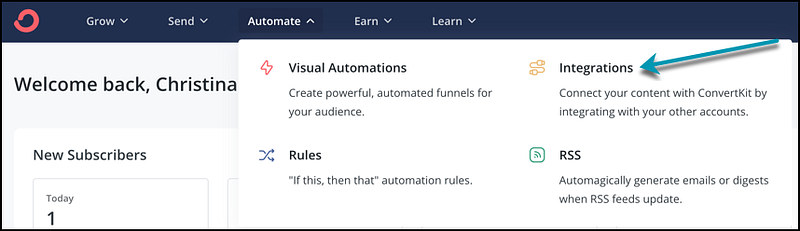
  1. Log into your ConvertKit account, and then click on:
  • Automate
  • Integrations
Screenshot taken by the author.

2. Click on the “Gumroad” button.

Screenshot taken by the author.

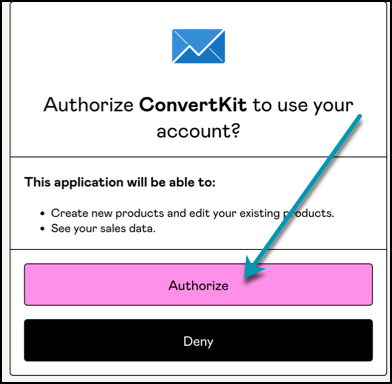
3. Allow ConvertKit to use your Gumroad account.
Screenshot taken by the author.

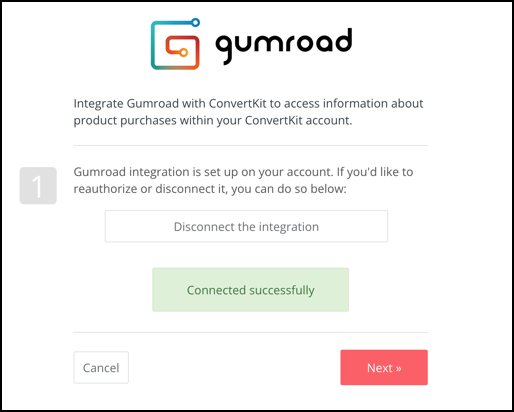
4. Now you have your integration set up.
Screenshot taken by the author.

After this, it’ll ask you to import any previous buyers from Gumroad. I don’t have any yet, so I just hit “Next”.

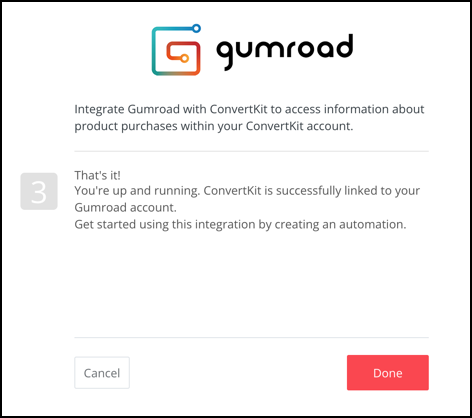
5. You’re all set!
Screenshot taken by the author.

You have your integration between the two platforms set up, and now you have to create a way to connect your product with ConvertKit.

Part 2: Create a new rule in ConvertKit

I just published my product in Gumroad, but now I need a way for Gumroad to send emails to ConvertKit from anyone who grabs my book.
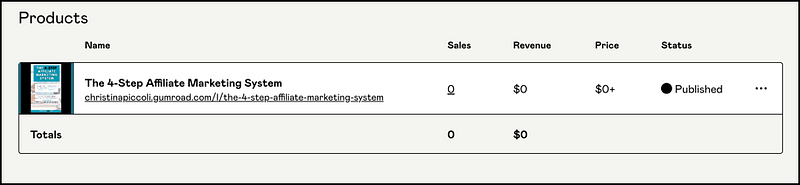
Screenshot taken by the author.
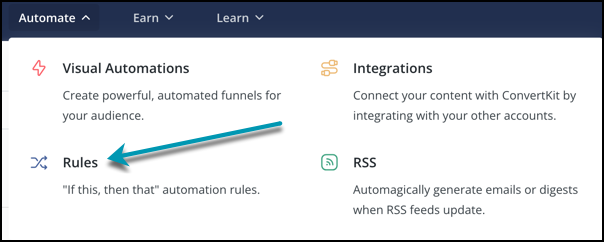
  1. Go to “Automate”, then “Rules”.
Screenshot taken by the author.

2. Under the Trigger section, you’ll select:

  • Purchases a product
  • → Provider: Gumroad
  • → The name of your product
Screenshot taken by the author.

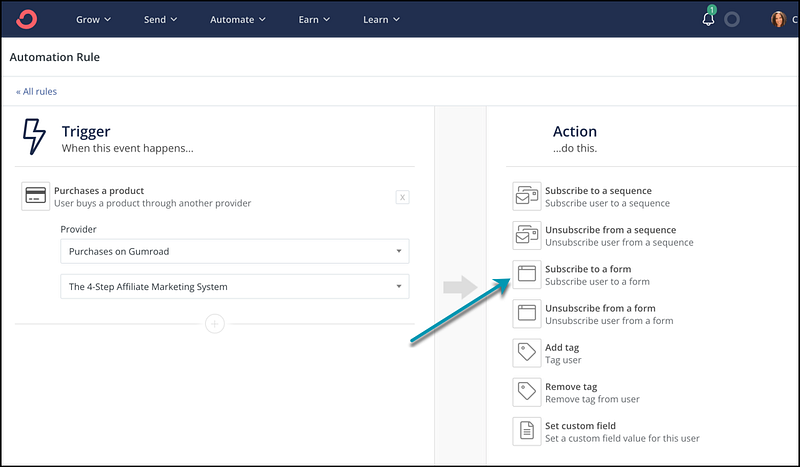
3. Under the Action section, you’ll choose what you want to happen to the person purchasing your product.

Eventually, I may want to set up a sequence. But for now, I’m going to subscribe them to my daily newsletter.
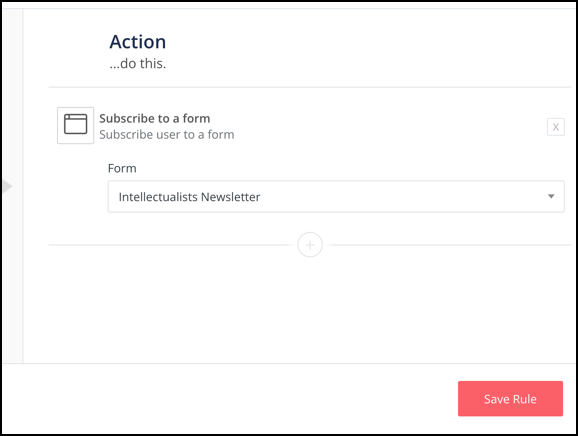
Screenshot taken by the author.

Save the rule, and that’s it!

From there, when someone purchases my 4-Step Affiliate Marketing System book through Gumroad, they should be added to my email list on ConvertKit and sent a Welcome Email.

Final Thoughts

I originally set my book up on Gumroad, then didn’t know how to get the email addresses from there to my ConvertKit list. I asked on Twitter/X, and the suggestions were to use Zapier or other tools I don’t know how to use.

I knew there had to be an easier way!

After a little digging, it turns out it’s right there in ConvertKit as an integration, and it’s extremely easy to set up.

I hope this helps you. If you have any questions, let me know in the comments.

About the Author

Hey! I’m Christina, an introverted book nerd on the outside, and a raging metalhead on the inside. 🤘 I’m a married mom to two teenagers (and 3 cats and a dog). I love Vegas 🎰, the band Chevelle 🎸, and murder mysteries 📖.

I also love creating short, daily lists of resources and ideas to help you boost your online income. 👈 Click that astonishingly long link to sign up for free.

Affiliate Disclaimer

This article contains an affiliate link to ConvertKit, my favorite email sender for content creators. If you want to check them out, I’ll get a commission if you sign up for a paid subscription.

Convertkit
Gumroad
How To Guides
Email Marketing
Newsletter
Recommended from ReadMedium